The world of real estate photography hinges on making an immediate, powerful connection. Your images bear the crucial responsibility of captivating potential buyers, igniting a desire for a property long before they step through the door. The ultimate aim is to present photographs that are not just visually appealing, but are inherently bright, sharp, clean, and exude an inviting ambiance. To achieve this coveted aesthetic, many photographers have historically turned to Lightroom presets, viewing them as an indispensable tool for streamlining their workflow and achieving rapid, consistent results. This comprehensive guide delves into the intricate landscape of real estate photo editing, exploring the inherent challenges faced by property photographers and dissecting the capabilities and limitations of presets. We will also venture into the cutting edge of AI editing, examining how it offers a more intelligent and personalized approach to achieving professional-grade real estate imagery.
The Unique Challenges of Real Estate Photography
Why is editing property photos a significantly more demanding endeavor than, for instance, retouching portraits or documenting events? The answer lies in the inherent difficulties presented by architectural spaces and the desire to showcase them in their absolute best light.
The Dynamic Range Dilemma
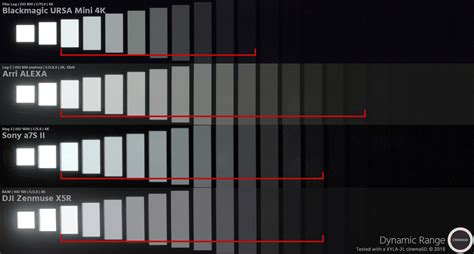
The most formidable adversary in real estate photography is the stark contrast between light and shadow, often referred to as high dynamic range. Imagine standing in a living room: the interior might be bathed in shadow, while the windows reveal a brilliantly sunny day outside. Your camera, with its limited capacity, struggles to capture both extremes simultaneously. You are faced with a difficult choice: expose for the interior, risking the windows being rendered as pure, blown-out white, or expose for the windows, plunging the room into deep, detail-obscuring darkness. A truly professional real estate photograph, however, must masterfully present both the interior's nuances and a clear, unblemished view through the windows. This necessitates capturing and meticulously blending these disparate exposures.
The Battle Against Color Casts
Light is rarely a neutral white. Sunlight streaming through a window often carries a distinct blue hue, while interior lamps can cast a warm yellow or orange glow. Furthermore, the vibrant green of an exterior lawn, which your brain effortlessly filters out when you are physically present, is registered by your camera. A significant portion of a property photographer's artistry lies in neutralizing these color casts, ensuring that white walls appear truly white, gray countertops look genuinely gray, and rich wood floors retain their natural warmth and depth. Achieving accurate color representation is paramount to conveying the true feel of a space.
Architectural Distortion and Lens Quirks
When a camera is tilted upwards to capture the full height of a building, the vertical lines of the structure can appear to converge and fall backward. This is a common distortion in architectural photography. Similarly, the wide-angle lenses that are essential for making rooms appear more spacious can introduce their own set of visual anomalies. These lenses can stretch objects at the edges of the frame and cause straight lines to appear curved. A polished, professional real estate image demands that vertical lines are perfectly straight and that any lens-induced distortion is meticulously corrected.
The Imperative of Speed and Consistency
The real estate market operates at a relentless pace. Agents are often eager to list a property on a Monday and expect high-quality photographs by Tuesday. This leaves photographers with precious little time for extensive post-processing. The demand is for a workflow that is not only fast and reliable but also consistently produces a cohesive set of images. Each photograph within a property's gallery must feel as though it belongs, contributing to a unified and compelling narrative.
The Role and Limitations of Lightroom Presets
For many years, Lightroom presets have been the industry standard for photographers seeking to accelerate their editing process and maintain a degree of consistency. A Lightroom preset is essentially a saved collection of slider settings within Lightroom's Develop module. When applied, it precisely adjusts these sliders to pre-determined positions, offering a quick way to impart a specific look to an image.
The Advantages of Presets
There are undeniable reasons behind the widespread popularity of presets:
- A Strong Starting Point: Even if a preset doesn't perfectly achieve the final desired look, it can often bring an image 70% of the way there, providing a solid foundation for subsequent adjustments.
- A Valuable Learning Tool: For photographers new to Lightroom, deconstructing a preset by examining the adjustments made to each slider can be an exceptionally effective method for understanding the software's capabilities and learning best practices.
The Inherent Weaknesses of Presets
However, the very qualities that make presets fast also expose their significant limitations:
- The "One-Size-Fits-All" Fallacy: A preset designed to enhance a dark kitchen will likely wreak havoc on a brightly lit, sun-drenched bedroom, potentially overexposing it. Presets lack the intelligence to "read" the unique characteristics of each individual photograph.
- Inability to Handle Dynamic Range: A preset cannot intelligently merge multiple exposures to overcome high dynamic range issues. It cannot selectively brighten shadows while preserving delicate highlights.
- Failure to Correct Distortion: Presets are incapable of automatically straightening converging verticals or applying the appropriate lens correction profiles to counteract distortion.
- Inadequate Color Cast Neutralization: While a preset might include a "cool" white balance setting, applying it to a photo that is already excessively blue (such as a north-facing room) can result in an unnaturally frigid appearance. A preset cannot detect and neutralize existing color casts.
- The "Overcooked" Aesthetic: Because presets apply settings indiscriminately, photographers often find themselves pushing sliders to extreme values in an attempt to salvage an image that has been negatively impacted by the preset. This can lead to spending as much time correcting the preset's overzealous application as it would have taken to edit the photo from scratch. The typical workflow becomes: apply preset, adjust exposure, fix white balance, correct distortion, and so on.
The Evolution to AI-Powered Editing
After years of wrestling with the limitations of presets and enduring late-night editing sessions, a new paradigm in image processing has emerged: Artificial Intelligence (AI) editing. Unlike static presets, AI editing tools possess the remarkable ability to analyze each photograph individually, understanding its unique content and characteristics.
Imagen: A Comprehensive AI Solution
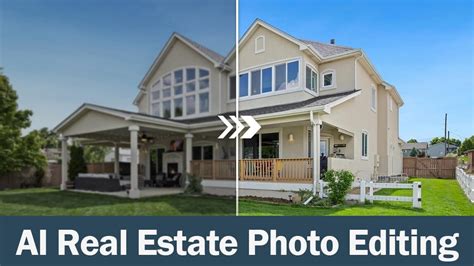
Platforms like Imagen represent a significant leap forward. Imagen is not a preset; it is a sophisticated desktop application that seamlessly integrates with Adobe Lightroom Classic, Lightroom, Photoshop, and Bridge. When a photograph is sent to Imagen for processing, its advanced AI algorithms meticulously analyze the image's content. Whether it's a dimly lit interior, a brightly lit exterior, or a room with a noticeable color cast, the AI processes each photo individually, making intelligent decisions about the necessary adjustments.
Your Style, Automated: The Power of Personal AI Profiles
The true genius of Imagen lies in its Personal AI Profile feature. This allows you to "teach" the AI your unique editing style. By pointing Imagen to your Lightroom Classic catalogs containing a substantial library of your previously edited photos (ideally 3,000 or more), the AI analyzes your past editing decisions. When you then submit a new, unedited shoot to this personalized profile, Imagen replicates your distinct aesthetic with remarkable accuracy. This is not a generic filter; it is an intelligent replication of your own artistic vision. Furthermore, this profile is dynamic and evolves with you. As you review Imagen's edits and make minor manual adjustments, you can feed these refinements back into your profile, continuously fine-tuning its performance.
For those who may not have a vast library of edited images or are still developing their signature style, Imagen offers alternative solutions. You can create a Lite Personal AI Profile using a single favorite preset as a starting point. Alternatively, "Talent AI Profiles" are available, which are pre-built by world-class professional photographers. These profiles allow you to leverage an established, high-quality editing style, intelligently adapted by AI to your specific photographs.
Specialized Tools for Real Estate Niches
Modern AI platforms such as Imagen go beyond general editing capabilities by offering tools specifically tailored for the demands of real estate photography:
- HDR Merge: This AI-driven tool is a game-changer for handling high dynamic range scenes. It intelligently merges multiple bracketed exposures into a single, perfectly balanced image, eliminating the need for time-consuming manual blending in Photoshop. This process, which previously could take up to ten minutes per image, is now accomplished in a fraction of the time.
- Perspective Correction: Say goodbye to manually straightening converging verticals in every single photo. Imagen's AI can automatically correct these architectural distortions, ensuring that buildings appear true to form.
- Window Pull: This specialized tool is designed to enhance the view through windows, ensuring that exterior details remain visible and well-exposed without compromising the interior lighting.
- Sky Replacement: For exterior shots, a compelling sky can significantly enhance the overall appeal. Imagen's AI-powered sky replacement tool allows for the seamless integration of more attractive skies.
This AI Video Animation Transforms Any Room (Real Estate Video Tutorial)
A Seamless Workflow Integration
Imagen is designed to be more than just an editing tool; it functions as a complete workflow solution. The process is remarkably straightforward:
- Install and Connect: Begin by installing the Imagen desktop application, a one-time setup process.
- Create a Project: Open the Imagen app and initiate a new project.
- Upload and Process: Select the photos you wish to edit and click "Edit." Imagen securely uploads your images to its cloud for processing, a rapid, background operation.
- Download Edits: Within minutes, Imagen will notify you that your edits are ready.
- Review in Lightroom: Open Lightroom Classic, and your processed photos will be waiting. Bracketed shots will have been merged into new DNG files, vertical lines will be straightened, and colors will be perfectly balanced.
- Final Touches and Export: Conduct a final review, perhaps applying minor spot removals, and then export the entire gallery for your client.
Beyond editing, Imagen offers additional workflow enhancements such as AI Culling, which quickly analyzes entire shoots to group duplicates, identify blurry shots, and flag images with closed eyes. Cloud storage options also ensure your projects are automatically backed up.
Alternative Editing Approaches for Real Estate Photography
While AI editing represents the forefront of efficiency and quality, it's valuable to acknowledge other methods professionals employ:
Manual Blending (Flambient)
This high-end technique involves capturing two distinct exposures for each scene: one utilizing ambient (natural) light and another with an on-camera or off-camera flash. These two images are then meticulously blended together in Photoshop by the photographer.
- Analysis: This method can yield exceptional, magazine-quality results. However, it is exceptionally time-consuming and demands advanced Photoshop proficiency. The term "Flambient" itself is a portmanteau of "Flash" and "Ambient," highlighting the core of this technique. While Imagen's HDR Merge offers an AI-driven alternative, it is important to note that it does not perform the exact manual blending process of Flambient. Instead, it achieves a similar, often more natural-looking, outcome through its intelligent algorithms.
Outsourced Editing Services
A common workflow involves photographers uploading their RAW files to an external service, where a team of human editors, often located overseas, handles the post-processing.
- Analysis: This approach effectively offloads the editing workload from the photographer. However, it introduces dependencies on the service's schedule, and consistency can vary significantly between different editors. This can lead to a lack of stylistic uniformity across a property's gallery.
Online Preset Marketplaces
Numerous online platforms allow photographers to purchase and sell .xmp preset files.
- Analysis: This is fundamentally the same approach as using traditional Lightroom presets. The quality and efficacy of presets purchased from these marketplaces can vary dramatically, and they suffer from the same inherent limitations as any static preset.
Comparing the Methods: A Practical Overview
To truly understand the advantages of each approach, a comparative analysis is beneficial.
| Method | Avg. Time per Job (50 images) | Avg. Cost per Job (50 images) | Consistency | Quality | Skill Requirement |
|---|---|---|---|---|---|
| Manual Blending (Flambient) | 4-8 hours | Low (Photoshop skills) | High | Very High | Advanced |
| Outsourced Editing | 24-72 hours (turnaround) | $100 - $300 | Moderate | Moderate | Low (selection) |
| Traditional Presets | 2-4 hours (with tweaks) | $20 - $200 (preset purchase) | Moderate | Moderate | Moderate |
| AI Editing (e.g., Imagen) | 30-60 minutes | $10 - $50 | Very High | Very High | Low (review) |
Note: Costs for Imagen are estimates and can vary based on usage and specific features selected.
The data presented in this comparison underscores the significant strengths of AI-powered editing. Imagen, for instance, offers the consistency and quality associated with high-end manual editing but delivers it at a speed and cost that other methods simply cannot match.
Embracing the Future: AI as an Enhancement, Not a Crutch
We have journeyed from the simplicity of static presets to the sophistication of fully autonomous AI editing. While real estate Lightroom presets serve as a valuable starting point, teaching foundational Lightroom skills and illustrating editing possibilities, they are ultimately a stepping stone. Professional photographers will invariably outgrow their limitations. Manual blending and outsourcing remain viable options, but they come with clear trade-offs, often demanding a significant investment of time for manual perfection.
The modern, scalable solution for real estate photography is undoubtedly AI. Utilizing tools like Imagen is not a shortcut or an act of "cheating"; rather, it is an empowerment. It is about reclaiming control over your workflow and focusing on the creative aspects of photography. By defining your Personal AI Profile, you ensure that your edited images are 100% a reflection of your unique style. AI editing is about automating the repetitive, non-creative tasks, allowing you to dedicate your most valuable assetâyour timeâto where it matters most: capturing exceptional images and growing your business. Your most valuable asset as a professional photographer is not your equipment; it is your time. Presets, in their static form, are a tool that ultimately costs you time.
Frequently Asked Questions About Real Estate Photo Editing
1. What are the best Lightroom settings for real estate photography?There are no universally "best" settings, as each photo is unique. However, the Lens Corrections panel (to fix distortion) and the Transform panel (to straighten vertical lines) are critical for almost every real estate image.
2. Can I use Imagen for free?Yes, Imagen offers a generous 1,000 free AI edits to all new users, allowing you to experience the power of AI editing firsthand.
3. How is an Imagen AI Profile fundamentally different from a preset?A preset is a fixed list of instructions (e.g., "Increase Exposure by +1.0, Increase Shadows by +50"). It applies these exact same settings to every photo, regardless of its content. An AI Profile, on the other hand, is an intelligent model. It analyzes a photo and determines the optimal settings for that specific image (e.g., Photo 1 might need Exposure +0.8 and Shadows +30, while Photo 2 requires Exposure +1.3 and Shadows +60).
4. What if I don't have 3,000 photos to create a Personal AI Profile?You have excellent alternatives. You can immediately begin using a Talent AI Profile to achieve a proven, professional style. Alternatively, you can create a Lite Personal AI Profile by uploading one of your favorite existing presets as a starting point for the AI.
5. Does Imagen work with Lightroom (cloud) or only Lightroom Classic?Imagen's desktop application seamlessly integrates with Lightroom Classic (LrC), Lightroom (Lr), Photoshop (Ps), and Adobe Bridge (Br).
6. Is Imagen a plugin or a standalone application?Imagen is a standalone desktop application that you install on your Mac or Windows computer. It operates in conjunction with Lightroom and communicates directly with your Lightroom Classic catalogs.
7. What is HDR bracketing, and why is it important for real estate photography?Bracketing involves taking multiple photos of the same scene at varying exposure levels (e.g., one underexposed, one normally exposed, one overexposed). This technique is crucial for capturing the high dynamic range inherent in real estate interiors, ensuring detail in both the shadows and highlights.
8. Can Imagen fix my blurry photos?AI editing cannot correct photos that are fundamentally out of focus. However, Imagen's AI Culling tool can efficiently scan your entire shoot and identify all blurry, out-of-focus images, saving you significant manual review time.
9. What happens to my RAW files after Imagen processes them?Your original RAW files remain untouched. Imagen operates non-destructively. The edits are downloaded back into your Lightroom Classic catalog as slider adjustments, functioning as if you had made them manually. If Imagen performs an HDR merge, it creates a new DNG file within your catalog, preserving your original RAW files alongside it.
10. Do I still need Lightroom if I use Imagen?Absolutely. Imagen is not a replacement for Lightroom but rather an intelligent assistant. Lightroom remains your central hub for organizing, storing, managing, and exporting your entire photo library.
11. What is the cost of Imagen for real estate editing?Imagen employs a pay-per-edit model, making it highly affordable. Standard AI Profile editing typically costs just a few cents per photo. Advanced Real Estate AI tools, such as HDR Merge or Perspective Correction, incur a small additional charge per photo.
12. Can Imagen differentiate between interior and exterior shots?Yes. This is a key benefit of a Personal AI Profile. When you train your profile, you provide it with all your edited images, encompassing interiors, exteriors, kitchens, bathrooms, and more. The AI learns to apply appropriate adjustments based on the specific scene and lighting conditions it encounters.
13. What is "Flambient" editing, and can Imagen replicate it?"Flambient" is a manual editing technique that involves blending a flash-exposed image with an ambient-light-exposed image in Photoshop. Imagen does not perform this specific manual blending process. However, Imagen's HDR Merge tool provides an AI-driven alternative that achieves a similar, and often more natural-looking, result by intelligently combining multiple exposures.