The quest for the perfect tablet to wield Clip Studio Paint (CSP) is a journey marked by personal preference, budget considerations, and a deep dive into the nuances of digital art tools. While the software itself is renowned for its professional-grade capabilities in drawing, painting, comics, and animation, the hardware it interfaces with plays a crucial role in translating artistic vision into digital reality. This article will explore the landscape of tablets suitable for CSP, examining various options from screenless graphic tablets to integrated display tablets, and considering the unique needs of both beginners and seasoned professionals.
The Spectrum of Digital Drawing Surfaces: Screenless vs. Display Tablets
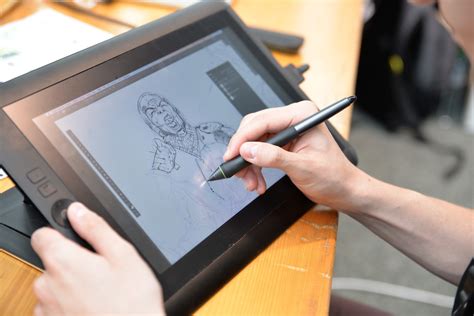
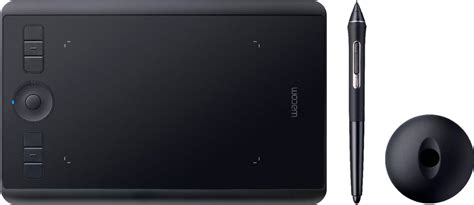
At its core, the choice between a tablet with a screen and one without significantly shapes the user experience. Screenless graphic tablets, often exemplified by Wacom's Intuos line, present a drawing surface that is separate from the display. This setup requires artists to develop a degree of hand-eye coordination, as their pen movements on the tablet are mirrored on the computer monitor.
Advantages of Screenless Tablets
One of the primary advantages of a screenless tablet is the absence of perspective skew. Because the drawing surface is flat and not tilted like a monitor, artists don't have to contend with the distortion that can occur when drawing at an angle. Furthermore, screenless tablets offer the flexibility to choose and upgrade your primary monitor independently. This modularity can be a cost-effective advantage over time, allowing users to invest in a display that best suits their visual needs. From a durability standpoint, a tablet without a screen is generally considered hardier, with fewer components susceptible to damage.
The Natural Feel of Display Tablets
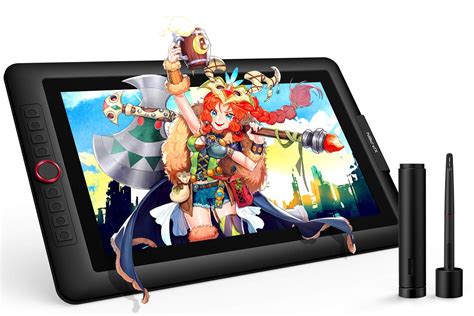
Conversely, display tablets, such as Wacom's Cintiq series or XP-Pen's Artist Pro line, offer a more intuitive and natural drawing experience. The pen directly interacts with the image on the screen, mimicking the sensation of drawing on paper. This direct feedback loop can be particularly beneficial for those transitioning from traditional art mediums.
However, display tablets come with their own set of considerations. Ergonomics are paramount; artists will need to arrange their workspace to accommodate the tilted screen, often requiring a stand to prevent hunching over. This is crucial for maintaining good posture and avoiding physical strain, as prolonged periods of drawing in an awkward position can lead to joint issues. The advice to "sit upright" and not "huddle like a shrimp" is not merely a suggestion but a vital health recommendation for digital artists.
Digital Artist Desk Makeover | Functional And Cozy 💛
The "Paper-Like" Illusion: A Cautionary Note
Many manufacturers promote screen protectors that aim to replicate the feel of drawing on paper. However, a word of caution is warranted here. These textured surfaces, while initially appealing, can significantly accelerate the wear and tear on pen nibs. For the longevity of both the tablet and the stylus, it is generally advisable to become accustomed to a smoother drawing surface. The argument that "this kind of screen protector absolutely eats your nibs, and is not worth it" highlights a practical concern that can lead to ongoing costs and frustration.
Key Players in the Tablet Arena for Clip Studio Paint
The market for digital art tablets is dominated by a few major brands, each with its own strengths and weaknesses, particularly when paired with a robust program like Clip Studio Paint.
Wacom: The Industry Standard with Evolving Quality
Wacom is often referred to as the "OG" of the digital art world, a company that has set the benchmark for quality and innovation for decades. Their tablets, particularly the Cintiq line, are widely recognized for their superior stylus responsiveness and overall performance. As one reviewer noted, "Wacom- they are the OG of the digital art world, and the price reflects it."
However, Wacom's reputation is not without its evolving narrative. While older Wacom tablets were renowned for their exceptional durability and customer service, some users have observed a decline in the longevity of newer models. "My older Wacom tablets may very literally outlive me, their newer ones are much more prone to wearing down, especially the drawing surface and pen nibs." Despite this, Wacom still maintains a strong lead in stylus technology, offering a drawing experience that is difficult to match in terms of precision and natural feel.
The Wacom Intuos line, both Pro and standard, remains a popular choice for budget-conscious artists. These screenless tablets offer excellent performance for their price point. For those who prioritize portability and quick sketching, the Wacom Intuos Pro line offers Bluetooth support, freeing users from cords. However, this feature can sometimes be "very fussy, and can be a bit of a fight to keep working," requiring patience and troubleshooting.
A fun fact for Wacom enthusiasts: the company itself pronounces its name as "Wah-com," not "Way-com."
Huion: A Strong Contender with Budget Appeal
Huion has emerged as a significant competitor to Wacom, offering tablets that often come close in performance but at a more accessible price point. For newcomers to digital art, Huion tablets are often recommended due to their near-Wacom-level handling. "Huion's tablets actually handle almost as good as Wacom's, and I would recommend them for a newcomer to digital art."
Despite their competitive performance, Huion tablets have historically faced criticism for their driver software, which some users find "painful to use." Additionally, their build quality, while improving, has not always matched the perceived standards of Wacom. A personal anecdote illustrates this: "my wife (also a career artist) has used a Huion as her daily driver for a few years now, and has had 0 problems with it. I, being a clumsy man, destroyed my Huion's charging port within a year. So, they are best used held on a flat surface, being mindful of their delicate ports." This suggests that while Huion offers a good drawing experience, users may need to be more mindful of the physical handling and care of their devices.
XP-Pen: Impressive Display Tablets at Competitive Prices
XP-Pen has made a strong impression in the market, particularly with its range of display tablets. For artists seeking a screen experience without the premium price tag of a Wacom Cintiq, XP-Pen offers compelling options. One user's experience with the XP-Pen Artist Pro 15.6 highlights its robust build quality and user-friendly features. "They're much sturdier than the Huion offerings, and have a power port that is much more protected than even the Wacom offerings. They also don't put out much heat… and have plenty of buttons."
A significant advantage of XP-Pen, as noted, is its aggressive pricing. A large screen tablet from XP-Pen can cost around $300, which is comparable to the price of a smaller, screenless Wacom Intuos Pro model. This makes integrated display technology far more attainable for a wider range of artists.
However, a crucial caveat with XP-Pen, and indeed many other brands, lies in the pen's pressure curve. The pressure sensitivity and tilt response might be comparable on paper to Wacom or Huion, but the "vastly different pressure curve" requires an adjustment period. "If you train on either of the other big two brands, then you'll need to take a moment to re-orient yourself with the XP-Pen to get the best out of it."
Another important consideration for display tablets, including the XP-Pen, is the potential for screen burn-in. "If you're using high contrasts at full brightness, there can be some issues with burn-in." Users who frequently employ high-contrast wallpapers or static images for extended periods may notice a ghost image appearing on their screen, particularly when opening CSP. Despite these potential drawbacks, the overall experience can be immensely satisfying, offering a high-value proposition for digital artists.
Beyond the Tablet: Essential Practices for Digital Art
Selecting the right tablet is only one part of the equation for a productive and healthy digital art workflow. Several other factors significantly contribute to an artist's success and well-being.
The Power of Keyboard Shortcuts
For those aiming for speed and efficiency in digital art, mastering keyboard shortcuts is indispensable. Clip Studio Paint is highly customizable, allowing artists to assign any command to any key. This personalization can dramatically streamline repetitive actions, from selecting brushes to undoing mistakes. Investing time in learning and configuring shortcuts can lead to a significant boost in productivity.
Staying Healthy: The Importance of Movement
The repetitive nature of digital art can place unique stresses on the body. As a seasoned artist advises, "GET UP EVERY FEW HOURS AND STRETCH. If you're going to do digital art, you're about to put a lot more stress on your joints than traditional, in fun and new ways. Please, stretch your hands and take little walks. You'll make better art that way!" Regular breaks for stretching and light physical activity are crucial for preventing strain and maintaining long-term artistic capability.
Clip Studio Paint Integration with Devices
Clip Studio Paint is not only compatible with a wide range of graphics tablets but also offers specific integrations with certain consumer devices, enhancing accessibility and creative opportunities.
For instance, Samsung Galaxy devices have a notable integration. Users can often receive extended free access to Clip Studio Paint for Galaxy, allowing them to "start getting creative right away!" This partnership provides a valuable entry point for users of these devices, offering "6 months free access to the new Clip Studio Paint for Galaxy." The app is praised for its ease of creating "beautiful and clean-looking linework" and its full support for the Galaxy S Pen's pressure sensitivity, which enables "smooth and expressive works of art." Furthermore, the platform boasts a vast library of over 50,000 downloadable assets, including pens and brushes, available on Clip Studio Assets, allowing for extensive customization and creative exploration.
The Wacom One LCD tablet is another example of a device designed to offer a more accessible entry into digital drawing. It aims to provide an "incredible natural drawing at a reasonable price," enhancing both creativity and enjoyment. The versatility of a digital pen is highlighted, allowing it to transform into "a multitude of brushes, pencils, erasers, and even stationary and other art supplies." Integration with devices like Galaxy smartphones can further enhance the creative process by enabling users to "connect with your Galaxy device to add a bit more originality to your photos and videos."
Ultimately, the "best tablet for Clip Studio Paint" is a deeply personal choice. It depends on a careful evaluation of individual needs, artistic style, budget, and ergonomic considerations. Whether opting for the proven reliability of Wacom, the value of Huion, the integrated display prowess of XP-Pen, or the convenience of mobile integrations, the key is to find a tool that empowers your creativity and supports a healthy, sustainable artistic practice.