DaVinci Resolve has long been recognized as a powerhouse in the post-production industry, offering an unparalleled, integrated suite of tools for editing, color correction, visual effects, motion graphics, and audio post-production. The release of DaVinci Resolve 19 Studio builds upon this formidable foundation, introducing a wealth of new features and enhancements designed to streamline workflows, boost creative possibilities, and empower professionals working on everything from independent films to major Hollywood blockbusters. This article will explore the cutting-edge capabilities of DaVinci Resolve 19 Studio, detailing its advanced features and how they can transform the post-production process.
The Integrated Post-Production Ecosystem
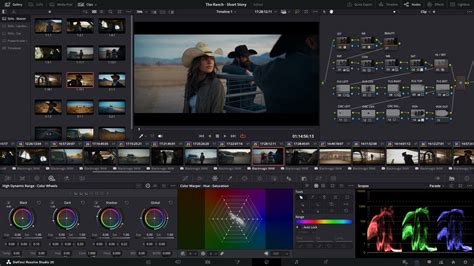
At its core, DaVinci Resolve is unique in its ability to combine all post-production disciplines within a single application. This "all-in-one" philosophy is a significant advantage, allowing users to work with camera original quality images throughout the entire process without the need to learn multiple applications or switch software for different tasks. It truly is like having your own post-production studio in a single app. This seamless integration is facilitated by DaVinci Resolve's "pages," each dedicated to a specific workflow:
- Media & Deliver Pages: For organizing, managing, and exporting your projects.
- Cut Page: Optimized for fast, deadline-driven editing.
- Edit Page: A comprehensive non-linear editor for intricate timeline construction.
- Fusion Page: For creating sophisticated visual effects and motion graphics.
- Color Page: Hollywood’s most advanced color grading and correction tool.
- Fairlight Page: A professional digital audio workstation for immersive sound design and mixing.
This unified environment not only enhances efficiency but also ensures consistency across all stages of post-production.
DaVinci Resolve 19 Studio: What's New and Enhanced
DaVinci Resolve 19 Studio introduces over 100 new features, with a significant emphasis on Artificial Intelligence (AI) and advanced creative tools. These additions are designed to accelerate complex tasks, enhance image quality, and provide greater creative control.
AI-Powered Workflow Enhancements
The DaVinci AI Neural Engine is at the forefront of many of the new features in Resolve 19 Studio. Leveraging state-of-the-art deep neural networks and machine learning, this engine powers a range of intelligent tools that simplify complex, repetitive, and time-consuming problems.
- AI IntelliScript: This groundbreaking feature allows users to create entire timelines based on a text script. By inputting dialogue or scene descriptions, Resolve can generate a foundational edit, significantly accelerating the initial assembly process.
- AI Animated Subtitles: Go beyond static text with subtitles that dynamically animate as words are spoken. This adds a layer of visual interest and engagement to content, particularly for social media or explainer videos.
- AI Multicam SmartSwitch: Revolutionizing multicam editing, this tool intelligently analyzes audio and video to identify speakers and automatically assemble a timeline with the most appropriate camera angles. This drastically reduces the manual effort involved in synchronizing and cutting between multiple camera feeds.
- AI Audio Assistant: This intelligent tool analyzes your audio and automatically creates a professional mix. It can intelligently balance levels, reduce noise, and apply processing, offering a powerful starting point for sound engineers or a quick solution for those on tight deadlines.
- IntelliTrack AI Tracking: In Fusion, IntelliTrack is the new default tracking method within the Fusion Tracker. Based on the DaVinci Neural Engine, it offers significantly improved accuracy over traditional point trackers, ensuring more stable and precise motion tracking for VFX and compositing.
- Facial Recognition: The AI Neural Engine can now recognize faces within your footage, allowing for intelligent bin population based on the people present in a shot. This streamlines media organization and makes it easier to locate specific individuals or performances.
- Object Detection & Removal: Advanced AI capabilities enable precise object detection, which, when combined with tools like the Patch Replacer, allows for the seamless removal of entire objects from a scene. This is invaluable for cleanup shots or correcting unwanted elements.
- Smart Reframing: For adapting content to different aspect ratios (e.g., from 16:9 to 9:16 for social media), Smart Reframing intelligently analyzes the action and reframes the shot to keep the subject in focus.
- Speed Warp Retiming: Utilizing advanced optical flow, Speed Warp allows for incredibly smooth and crystal-clear speed changes, even with extreme retiming. This is crucial for creating dramatic slow-motion effects or speeding up action sequences.
- Super Scale: This AI-powered upscaling technology allows users to create high-quality 4K and 8K images from HD sources. It intelligently analyzes and reconstructs detail, providing superior results compared to traditional upscaling methods.
- Auto Color and Color Matching: The AI Neural Engine assists in achieving consistent color across shots by automatically analyzing and matching color grades. This is a significant time-saver, especially for projects with extensive footage.
- AI UltraNR Noise Reduction: Exclusive to the Studio version, this advanced temporal and AI spatial noise reduction is incredibly powerful, offering sophisticated noise removal without sacrificing image detail.
Advanced Editing and Cut Page Features
The Cut and Edit pages have seen substantial updates aimed at improving efficiency and creative control.
- Dedicated Keyframe Editor: For more precise control over animations and parameter changes, a dedicated keyframe editor is now available on the Cut and Edit pages.
- Voiceover Palettes: Streamlining the process of adding narration, dedicated voiceover palettes are integrated into the editing workflows.
- Fixed Playhead on Timeline: Borrowing a feature from other editing software, the playhead can now be rigidly positioned in the center of the timeline view on the Edit page, mirroring its availability on the Cut page. This option is accessible via the Timeline View Options menu.
- Precise Trim Editor in Preview Window: The frame-by-frame precise trim editor, previously exclusive to the Cut page, is now available on the Edit page. This allows for meticulous adjustments between connected clips, with a preview window for accurate visual confirmation. Double-clicking between clips or selecting "Trim Editor" from the Trim menu activates it.
- Transcribe Mode Editing: This new mode integrates advanced transcription capabilities. Features include detecting and naming different speakers, trimming clips by removing words and pauses, searching and replacing text, and a timecode column within the transcription window.
- Change Audio Channels in Inspector: Adjusting audio channel options for clips is now more accessible, allowing changes directly within the Inspector's File tab, even for multiple clips simultaneously. This provides a visualization of the track and the ability to audition channels separately. Currently, this functionality is limited to clips still in the Media Pool.
- Broadcast Replay Tools: The Cut page now features new broadcast replay tools designed for live multi-camera broadcast editing, playout, and replay with integrated speed control. This is invaluable for live sports and news production.
- Multi Source: This feature provides the fastest way to view multiple camera feeds and begin editing to the timeline while cameras are still recording, ideal for live production environments.
Fusion Page Innovations
The Fusion page continues to be a robust environment for visual effects and motion graphics, with new tools and performance enhancements.
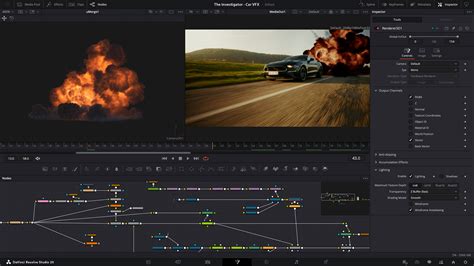
- Advanced Multi-Layer Compositing: Explore more sophisticated multi-layer compositing workflows.
- Chroma Warp in Color Warper: The Color Warper tool now includes Chroma Warp, offering new possibilities for color manipulation.
- Multipoly Rotoscoping Tool: This new tool in Fusion allows for the creation and separate control of multiple masks within a single node. This significantly simplifies complex rotoscoping tasks, and all masks are displayed in a single, organized list.
- Expanded USD Tools: Support for Universal Scene Description (USD) has been expanded, providing VFX artists with more powerful tools for working with 3D assets and scenes.
- uVolume VDB File Support: Fusion Studio 19 adds support for uVolume VDB files, further enhancing 3D compositing capabilities.
- New Multi-Merge Tool: This addition to Fusion provides enhanced control over merging multiple elements within a composite.
- Magic Mask Performance: Blackmagic Design states that the Magic Mask tool in Fusion 19 offers up to three times better performance, making object isolation and tracking significantly faster.
Color Page Advancements
The Color page, renowned for its Hollywood-grade color correction tools, receives several significant updates.
- ColorSlice: A new tool available in the Color tab, positioned between Curves and Color Warper. ColorSlice utilizes six (or seven, including skin tone) color vectors (Red, Green, Blue, Yellow, Cyan, Magenta, and Skin) to adjust hue, saturation, and brightness within specific color ranges. It emulates "Subtractive Saturation," offering a different approach to color manipulation compared to the "Additive Saturation" found in Primaries and HDR palettes.
- Film Look Creator: This new Resolve FX effect allows users to craft custom cinematic looks. It offers controls for color space transforms, photometric exposure, subtractive saturation, bleach bypass, vignette, halation, noise (grain), and film gate emulation. While it doesn't come with pre-made film stock presets like some third-party plugins, its extensive options allow for the creation of virtually any desired film look.
- RGB Mixer Channel Normalization: The RGB Mixer tool now includes enhanced features for channel normalization, including a "Preserve Luminance" option. This allows for adjustments to individual color channels without affecting overall brightness, simplifying complex color balancing tasks.
- Node Stacking: In Project Settings, users can now configure Node Stacks (from 1 to 4) and name them. This feature allows for the separate display of specific node parts (e.g., Primaries, Secondaries) at the Clip level in the Color tab, facilitating more transparent workflows on complex node trees, especially when combined with the group function.
- Cleanup Multiple Clips Node Graphs: The "Cleanup Node Graph" option, previously a per-clip operation, can now be applied to multiple clips simultaneously, saving significant time when organizing complex node structures.
- Color Managed Fusion Preview Window: Ensuring consistency between the Fusion preview and the main timeline, this update improves preview compatibility when using color management settings, particularly with DaVinci WG/Intermediate as the Timeline Color Space.
- Magic Mask and Depth Map Updates: Significant updates to the Magic Mask and Depth Map tools enhance their precision and utility for compositing and isolation tasks.
- Face Refinement Box Improvements: Enhancements to the face refinement box and profile handling provide additional controls for skin refinements, smoother sub-pixel animation, and finer control over directional blur.
Fairlight Page: Immersive Audio Post-Production
The Fairlight page offers a complete digital audio workstation experience, with new features focusing on intelligent audio processing and immersive sound.
- Automatic Loudness Correction (Ducking): A highly anticipated feature, automatic ducking allows for the intelligent adjustment of soundtrack volume relative to dialogue. Available in both Fairlight and Edit, this tool simplifies the process of ensuring dialogue clarity. Users can designate a "Duck Source" (dialogue) and a target track to be affected, with controls for duck level, lookahead, and rise time.
- Dialog Separator & Music Remixer: These AI-powered tools intelligently isolate and manipulate components of an audio track. Dialog Separator can isolate speech, background sounds, echo, and ambient elements. Music Remixer allows for the manipulation of stems within a music track. Note that Dialog Separator currently supports mono tracks only.
- IntelliTrack AI for Audio Panning: IntelliTrack AI can now be used to track motion and automatically pan audio elements within the Fairlight environment, adding a dynamic spatial dimension to mixes.
- Fairlight Audio Core Enhancements: The Fairlight Audio Core supports up to 2,000 tracks with real-time effects, EQ, and dynamics processing.
- Immersive Audio Support: DaVinci Resolve Studio 19 Studio offers comprehensive support for high-resolution 3D audio, including spatial formats like Ambisonics up to 5th order and object-based formats such as Dolby Atmos and MPEG-H. This allows for the creation of truly immersive soundscapes.
- Fairlight Hardware Consoles: Designed in collaboration with sound engineers, Fairlight hardware consoles (Desktop, Studio) act as a natural extension of the software, providing intuitive, task-based controls for streamlined mixing workflows.
DaVinci Resolve's Fairlight Page for COMPLETE NOOBS!
Resolve FX and Studio-Exclusive Features
DaVinci Resolve Studio 19 boasts an extensive collection of GPU and CPU accelerated Resolve FX, with numerous additions and improvements.
- Over 100 Resolve FX: The Studio version includes a vast library of effects such as blurs, light effects, noise reduction, image restoration, lens flare, and stylization tools.
- New Plugins: Version 19 adds plugins like Background Defocus for portrait shots and the Film Look Creator, which alters color shading, vibrance, hue, and luminance to easily apply cinematic looks and even add film grain.
- Lens Correction: A dedicated lens correction feature allows users to analyze clips and correct for spherical lens distortion and other optical aberrations.
- HDR Scopes: The HDR scopes in DaVinci Resolve Studio are capable of measuring and providing detailed information about ST.2084 and HLG images, crucial for HDR mastering.
- Stereoscopic 3D Tools: The Studio version includes a complete set of tools for editing and grading stereoscopic 3D projects.
- GPU Accelerated Dolby Vision: Support for Dolby Vision includes a GPU-accelerated version of the Dolby Vision CMU (Content Mapping Unit) and free Dolby Vision grading controls.
- IMF and DCP Creation: Create SMPTE ST.2067 compliant Interoperable Master Format (IMF) files for tapeless delivery. Native support for unencrypted DCP files allows for testing and validation of digital cinema packages.
- Patch Replacer: This plugin allows users to clone and paint out unwanted elements or spots within a scene.
- Object Removal: A dedicated plugin for removing entire objects from a scene, powered by AI.
- Temporal and AI Spatial Noise Reduction: Advanced noise reduction algorithms are a hallmark of the Studio version, offering unparalleled image cleanup.
- De-interlacing: High-quality de-interlacing is available for restoring interlaced footage.
- Scripting and API Support: DaVinci Resolve Studio supports Python and LUA scripting, along with developer APIs, enabling workflow integrations and custom encoding options. Workflow integration plugins for connecting to asset management and automation systems are also supported.
Collaboration and Multi-User Workflows
DaVinci Resolve is designed to facilitate collaboration, and version 19 enhances these capabilities, especially for larger teams.
- Blackmagic Cloud Updates: New features in Blackmagic Cloud make it easier for large companies with multiple users to collaborate on the same project simultaneously.
- Real-time Local and Remote Collaboration: Project libraries are built for real-time collaboration, allowing editors, colorists, VFX artists, and sound engineers to work together concurrently on the same project without the need for importing/exporting files or project translation.
System Requirements and Hardware Integration
To harness the full power of DaVinci Resolve 19 Studio, certain system specifications are recommended.
- Operating System: MacOS 13 Ventura or later, Windows 10 Creators Update or later, or Windows 11 for ARM (Qualcomm Snapdragon X Elite series processor).
- System Memory: 8 GB of system memory is the minimum, with 16 GB recommended for smoother performance, especially for complex projects.
- Blackmagic Design Desktop Video Software: Required for monitoring with Blackmagic Design video hardware.
DaVinci Resolve also integrates seamlessly with a range of specialized hardware designed to accelerate workflows:
- DaVinci Resolve Keyboards: The DaVinci Speed Editor and DaVinci Resolve Editor Keyboard are designed for faster editing, with dedicated function keys and a search dial. The Editor Keyboard features color-coded QWERTY keys for quick access to editing commands.
- DaVinci Resolve Color Panels: From the portable Micro Panel to the comprehensive Advanced Panel, these tools offer tactile control for precise color grading, allowing multiple parameters to be adjusted simultaneously.
- Fairlight Hardware Consoles: These consoles provide an intuitive extension of the Fairlight software, streamlining audio mixing for professional sound engineers.
Conclusion
DaVinci Resolve 19 Studio represents a significant leap forward in post-production software. Its integration of cutting-edge AI tools, advanced creative features across all pages, and enhanced collaboration capabilities make it an indispensable solution for modern filmmaking and broadcast. Whether you are a seasoned professional or an aspiring editor, the power and efficiency offered by DaVinci Resolve 19 Studio are poised to redefine what's possible in post-production. The continuous development by Blackmagic Design ensures that Resolve remains at the forefront of the industry, providing users with the tools they need to bring their creative visions to life with unparalleled quality and speed.