For professionals and aspiring colorists alike, the ability to manipulate color with precision and speed is paramount. DaVinci Resolve, a leading software solution for editing, visual effects, motion graphics, color correction, and audio post-production, offers a suite of control panels designed to enhance this creative process. Among these, the DaVinci Resolve Mini Panel stands out as a versatile and powerful tool, bridging the gap between entry-level accessibility and the comprehensive control of its larger counterpart. This article delves into the information and capabilities of the DaVinci Resolve Mini Panel, exploring how it empowers users to achieve cinematic image quality.
The Advantage of Hands-On Control
Traditional mouse and keyboard workflows can often be cumbersome when it comes to intricate color grading. The DaVinci Resolve color control panels, including the Mini Panel, are engineered to provide fluid, hands-on control over multiple parameters simultaneously. This direct manipulation allows for a more intuitive and creative workflow, enabling users to explore a wider range of artistic options and significantly increasing operational speed. Designed in collaboration with the world's leading colorists, these panels feature a logical layout that places the most critical controls within natural hand positions, facilitating rapid and efficient work.
A Tiered Approach to Color Control
Blackmagic Design offers three distinct panels to cater to varying user needs and project scopes: the DaVinci Resolve Micro Color Panel, the DaVinci Resolve Mini Panel, and the DaVinci Resolve Advanced Panel.
The DaVinci Resolve Micro Color Panel is an incredibly compact option, ideal for those just beginning their color grading journey or for on-set grading with a laptop. Despite its small footprint, it boasts dozens of professional color controls and fits neatly alongside a keyboard.
The DaVinci Resolve Mini Panel, the focus of this article, is positioned as an ideal solution for freelance artists and smaller post-production houses. It offers a fully-featured, portable panel that can be set up at home or transported between various job locations.
For high-end professional color suites working on feature films, television, and major commercial projects, the DaVinci Resolve Advanced Panel provides the ultimate level of control, offering every feature necessary to craft cinematic images.
Unpacking the DaVinci Resolve Mini Panel's Capabilities
The DaVinci Resolve Mini Panel is a robust control surface that significantly streamlines the color grading process. It offers a substantial upgrade in functionality over the Micro panel without replicating all the features of the Advanced panel. Its design allows it to be placed on a desk, mounted in a rack, or even bolted to a surface, offering flexibility in various working environments.
Precision Trackballs and Primary Adjustments
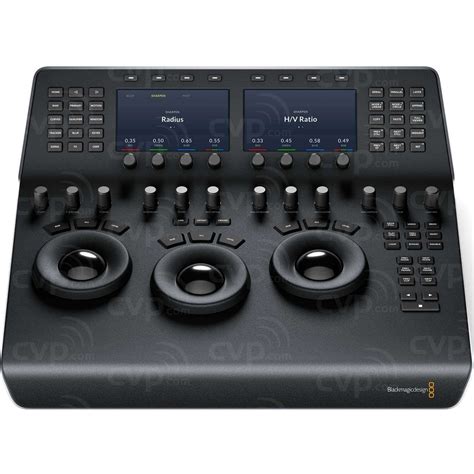
At the core of the Mini Panel's tactile control are three professional, high-resolution, weighted trackballs. These trackballs are instrumental in adjusting the colors within an image based on lift, gamma, and gain tonal ranges. Unlike a mouse, multiple trackballs can be manipulated simultaneously, allowing for the creation of complex and unique color effects. The smooth gliding rings surrounding each trackball enable precise adjustment of master levels and the establishment of dynamic contrast.
Above each trackball, dedicated keys provide the ability to reset color adjustments, level adjustments, or both, offering immediate correction capabilities.
The Mini Panel, like its smaller sibling, features 12 primary color correction control knobs. These knobs provide quick access to essential adjustments such as image contrast, saturation, hue, temperature, tint, midtone detail, color boost, shadows, and highlights.
- Lift, Gamma, and Gain Knobs: Often referred to as shadows, midtones, and highlights respectively, these dedicated knobs allow for precise control over the luminance (brightness) of specific tonal ranges within an image. This granular control is crucial for balancing an image and achieving a desired look.
- Contrast Control: This knob allows users to alter the tonal difference between the light and dark areas of an image.
- Pivot Control: This function adjusts the "balance" of contrast, effectively offsetting the tonal ranges of contrast.
- Midtone Detail: Adjusting this parameter influences the contrast of regions with high edge detail, thereby affecting the perceived sharpness and definition of an image. This can be used to subtly enhance or reduce the perception of detail.
- Color Boost Control: This intelligent feature selectively boosts saturation in areas of an image that have low saturation, while leaving already well-saturated areas untouched. This results in a more natural and subtle enhancement of color.
- Shadow and Highlight Knobs: These controls are invaluable for either lightening and darkening shadow details or for recovering blown-out highlights in high dynamic range (HDR) media by lowering their respective values.
- Saturation Control: This knob allows for the adjustment of overall image saturation. Higher values intensify colors, while lower values diminish them, offering the ability to create grayscale images by reducing saturation to zero.
- Hue Control: The hue knob enables the rotation of all hues within an image or a selected area around the color wheel. The default setting of 50 preserves the original, unaffected distribution of hues.
- Luminance Mix Control: This control adjusts the balance between color adjustments and luminance-only adjustments, providing further control over the color-to-brightness relationship.
Navigating Primary and Log Wheel Modes
Three keys located at the top of the DaVinci Resolve Mini Panel (and Micro Panel) offer essential mode switching. These keys allow users to toggle between primary and log wheel modes, activate offset, temperature, and tint controls, and turn on the full-screen viewer output. Primary adjustment controls offer a comprehensive set of tools that target specific tonal and hue ranges, affecting the luminance and chrominance of the entire image. These controls represent the most common adjustments required for producing dynamic imagery, making them a favored choice for photographers, graphic designers, and colorists operating under tight deadlines.
Advanced Features: Power Windows and Qualifiers
The DaVinci Resolve Mini Panel, along with the Advanced Panel, grants access to powerful tools for targeted corrections, including the creation of Power Windows. These are shape-based objects used to isolate specific parts of an image for selective grading. Users can generate various window shapes such as squares, circles, polygons, or gradients directly from the panel.
The qualifier tool is another significant feature, allowing users to isolate portions of an image based on specific ranges of hue, saturation, or luminance. By pressing the qualifier button and selecting a mode, users can make precise key selections for targeted adjustments.
Furthermore, the tracking controls enable the analysis of moving objects within a scene to follow them through the shot. For instance, a Bezier Power Window could be drawn around a moving car and then tracked automatically.
The Role of LCD Screens and Soft Knobs
A key differentiator of the Mini Panel is its inclusion of two color LCD screens. These screens display menus, controls, and parameter settings for the currently selected tool, providing immediate visual feedback. When a palette is selected via the dedicated feature buttons, the screens dynamically display its unique interface and settings. Arrow keys allow for navigation between different modes or pages within a palette.
Above these displays, soft keys offer further functionality, such as isolating color channels, choosing presets, or performing other feature selections specific to the active palette. Below the displays, soft knobs provide precise parameter adjustments. This integrated system minimizes the need to constantly switch back to the mouse and keyboard, allowing users to generate preset Power Window shapes and track them without ever touching their mouse.
Efficient Workflow and Navigation
The DaVinci Resolve Mini Panel is designed to keep hands on the controls, minimizing interruptions. Dedicated feature buttons provide quick access to the color page palettes, eliminating the need to navigate through menus with a mouse. Primary bars, controllable via the Mini Panel's displays, allow for more subtle adjustments to individual color channels and luminance than trackballs alone.
Custom curves can be created for highly precise adjustments to image luminance and chrominance. Buttons above the displays allow for the isolation of color channels, and the soft knobs can then be used to adjust channel luminance in 20% increments.
The area to the right of the trackballs on the Mini Panel is equipped with navigation keys. These keys facilitate swift movement between clips on the timeline, stepping through clip frames, and jumping between nodes in the node editor. These navigation keys can save considerable time by allowing common tasks, like switching nodes, to be performed directly on the panel.
Transport controls, including play forward, reverse, and stop, provide full command over the project timeline or connected deck.
Illumination for Low-Light Environments
Color grading sessions are often performed in low-light conditions to ensure the most accurate perception of colors on the grading monitor. The keys and soft knobs on the DaVinci Resolve Mini Panel illuminate when selected, making it easy to identify active controls in dim environments. The keys are also backlit, further aiding in locating and pressing each button.
Connectivity and Power
The DaVinci Resolve Mini Panel features both a USB Type-C and an Ethernet interface, offering versatile connectivity options. It is compatible with Mac, Windows, and select Linux systems. Power can be supplied via an AC power source, a 4-pin XLR connector, or Power over Ethernet (PoE). The PoE capability is particularly noteworthy, allowing the panel to be powered directly through the network connection, eliminating the need for a separate power cable and simplifying setup. For the panel to function with DaVinci Resolve, the computer must be running DaVinci Resolve version 14.3 or DaVinci Resolve Studio 14.3 or later.
Powering Creative Decisions: The Mini Panel in Practice
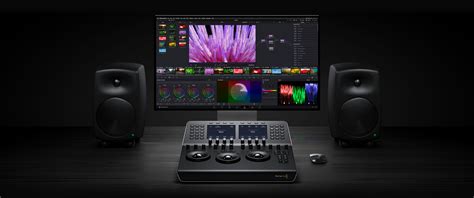
The DaVinci Resolve Mini Panel is an excellent choice for editors and colorists who frequently switch between editing and color grading tasks. It is also ideal for freelance colorists who need a portable yet powerful solution to move between different facilities. Many users report that the Mini Panel provides so much control over DaVinci Resolve that they rarely need to revert to their keyboard and mouse while working. The numerous shortcut buttons on the panel, such as those for copying/pasting grades or navigating to the next clip or frame, contribute to a substantially faster workflow. The less time spent moving between the panel and the keyboard, the more efficient the grading session becomes.
The build quality of the Mini Panel is frequently praised, described as being "built like a tank" and capable of withstanding serious wear and tear, making it suitable for transport to set or between studios. Its sleek and impressive design also contributes to its appeal.
The trackballs are often cited as having the most significant impact on the color grading process. They offer a degree of color control that allows for more specific and accurate results without unnecessarily pushing colors too far. For example, when performing a push/pull technique to cool shadows and warm highlights, the trackballs provide the finesse to achieve the desired effect with greater precision than a mouse might allow.
RAW SECTION ON THE MINI PANEL
Comparison with Other Panels and Market Position
The DaVinci Resolve Mini Panel can be seen as Blackmagic Design's answer to the market for more affordable, yet professional, control surfaces. It competes directly with offerings from companies like Tangent, whose Ripple, Wave, and Element systems have been popular choices for many colorists. While the Tangent Ripple is recognized as a very affordable grading surface, its plastic construction and lack of dedicated buttons position it differently from the Mini Panel. The Mini Panel aims to offer a more premium feel and more integrated functionality, potentially making Tangent's Wave and Element panels more vulnerable in the market.
However, a key advantage of Tangent panels is their compatibility with software beyond DaVinci Resolve, such as Adobe Premiere Pro CC. As Premiere Pro's Lumetri color tools mature, more users may opt to stay within the Premiere pipeline to avoid the Resolve conform process. The question remains whether these new Blackmagic surfaces could be adapted to work with Premiere Pro, which does support color control surfaces.
Conclusion: A Powerful Tool for Modern Post-Production
The DaVinci Resolve Mini Panel represents a significant advancement in accessible, professional color grading control. It offers a compelling combination of tactile precision through its trackballs and control knobs, intuitive navigation via its LCD screens and dedicated buttons, and robust connectivity. Its design philosophy prioritizes speed, creativity, and efficiency, empowering colorists of all levels to achieve exceptional results. For freelance artists, small to mid-sized post houses, and even independent filmmakers, the Mini Panel delivers a substantial portion of the functionality found in high-end systems at a more attainable price point, solidifying its position as a vital tool in the modern post-production landscape.
The DaVinci Resolve Mini Panel includes a built-in power supply, eliminating the need for a bulky external power brick. It also features both Ethernet and PoE support, allowing for network operation and power delivery over the network, further simplifying its deployment. The panel's design and feature set make it a highly attractive option for those seeking to elevate their color grading workflow without compromising on portability or professional-grade control.