In today's content-driven world, the quality of audio can significantly impact the effectiveness and professionalism of any project. Whether you're a podcaster, vlogger, musician, or simply someone looking to create a custom ringtone, unwanted background noise can detract from your message. Fortunately, advancements in artificial intelligence have made it easier than ever to achieve studio-quality sound with just a few clicks. This article explores how to effectively remove background noise from audio and discusses the creation of ringtones, leveraging powerful AI-driven tools.
The Challenge of Ambient Noise
Recording audio in less-than-ideal environments is a common scenario for content creators. From the hum of an air conditioner and the distant traffic to keyboard clicks, echoes, or even the chatter of other people, these ambient sounds can infiltrate recordings. Traditionally, removing such noise required specialized knowledge of audio editing software, expensive equipment, and time-consuming manual adjustments. This often involved intricate tasks like EQing, noise gating, and spectral editing, which were inaccessible to many.

The goal is to isolate the desired audio - typically speech or music - and eliminate or significantly reduce any distracting elements. This process is crucial for enhancing clarity, improving listener engagement, and presenting a polished, professional output. For creators working on a budget or with limited technical expertise, the prospect of achieving high-fidelity audio seemed daunting. However, the advent of AI-powered audio tools has democratized this capability, making professional-grade noise reduction accessible to everyone.
AI-Powered Solutions for Seamless Noise Removal
Several platforms now offer AI-driven solutions that automate the complex process of background noise removal. These tools analyze the audio, identify unwanted sounds, and intelligently reconstruct the voice or music to sound as if it were recorded in a pristine environment.
Descript's Studio Sound: A One-Click Professional Polish
Descript's "Studio Sound" feature is a prime example of how AI is revolutionizing audio editing. This tool is designed to deliver a sharper, more professional voice with a single click. The process is remarkably straightforward:
- Load Your File: Import your audio or video file into Descript as a new project.
- Apply Studio Sound: Once the transcription is complete, select the audio clip on the timeline. In the properties panel, navigate to "Audio Effects" and toggle on "Studio Sound" for background noise removal.
- Experience the Transformation: Studio Sound processes the audio rapidly using AI. It removes distracting background sounds like echoes or keyboard clicks and then rebuilds each voice with enhanced clarity. Users can further adjust the intensity of the effect to achieve their desired level of crispness.
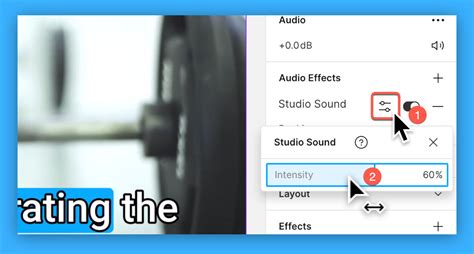
This "regenerative speech effect," as Descript terms it, means the AI not only strips away unwanted noise but also reconstructs the voice, creating the impression of a clean recording environment. This bypasses the need for expensive soundproofing or perfectly quiet recording locations, allowing creators to record anywhere. If the AI reconstruction introduces a slightly unnatural tone, the intensity can be adjusted downwards from the default 100%.
Kapwing's "Clean Audio" Feature: Simplifying Audio Enhancement
Kapwing offers a similar one-click solution with its "Clean Audio" feature. This tool is integrated into their online editor and is designed for content creators of all skill levels. By uploading a video or audio file, users can effortlessly clean up webinars, podcasts, online meetings, and more.
- Upload and Edit: Users upload their video or audio file to Kapwing's online editor.
- One-Click Noise Reduction: Within the editing timeline, the "Clean Audio" feature in the right-hand panel is activated. The AI then processes the file, significantly reducing background noise and enhancing the clarity of spoken voices.
- Further Editing: Kapwing also provides tools like "Smart Cut" to eliminate silences and pauses, and a "Split Audio" feature that separates vocals from instrumentals, making it easier to remove unwanted background music.
Kapwing emphasizes that this process is straightforward and requires no downloads or installations, working directly in the browser. While the "Clean Audio" feature is a powerful tool, it's important to note that it requires a Pro account for watermark-free exports and full functionality.
How to Remove Background in Video in Kapwing [2026 Full Guide]
VEED.io: Studio-Quality Audio with Dolby Power
VEED.io also provides a robust AI noise remover, powered by Dolby Technology. This tool automatically detects and eliminates unwanted sounds like AC hums, traffic noise, breath sounds, and static, while preserving the quality of the voice.
- Upload and Process: Users upload their audio or video file to VEED's online editor.
- Automatic Noise Removal: The AI automatically cleans the audio, delivering broadcast-quality results.
- Enhancement Tools: Beyond noise reduction, VEED offers a suite of AI tools, including "Magic Cut" for removing filler words ("um," "uh," "like") and retakes, as well as options for adding background music, fade-ins, and fade-outs.
VEED highlights its AI noise remover as a way to make every recording sound like it was done in a studio, without requiring manual audio cleanup or complex software. This approach significantly speeds up the workflow for podcasters, voiceover artists, and anyone producing spoken-word content.
Media.io Noise Reducer: Online Convenience for Audio and Video
Media.io offers an online noise reducer that works for both audio and video files. This service is designed for ease of use, allowing users to upload their recordings directly to the app.
- Smart Detection: The AI automatically identifies common background noise patterns such as hiss, hum, fan noise, and ambient sounds.
- Adjustable Strength: Users have the ability to fine-tune the noise reduction level, from subtle cleanup to more aggressive removal.
- Real-time Preview: A real-time preview function allows users to hear the cleaned audio before downloading, ensuring satisfactory results.
- Voice Enhancement: The tool is optimized for voice recordings, enhancing speech clarity while removing noise.
Media.io supports various audio file formats and offers a free trial for registered users, with file size limits for uploads. The processing happens within the browser, eliminating the need for software installation.
Creating Custom Ringtones with Clean Audio
The ability to remove background noise is also invaluable for creating personalized ringtones. Instead of settling for generic pre-installed sounds, users can extract a favorite snippet of a song or a memorable spoken phrase and ensure it sounds clear and crisp.
The Process of Ringtone Creation
- Source Audio Selection: Identify the audio clip you want to use for your ringtone. This could be a specific part of a song, a memorable movie quote, or a voice message.
- Noise Removal (If Necessary): If the source audio contains significant background noise or unwanted music, use one of the AI tools mentioned above (Descript, Kapwing, VEED, Media.io) to clean it up. For example, if you want to use a vocal snippet from a song, you might use a tool that can separate vocals from instrumentals.
- Trimming and Editing: Use an audio editor (many of the AI platforms offer basic editing capabilities, or you can use dedicated audio software like Audacity) to trim the audio to the desired length for a ringtone (typically 30-40 seconds). You may also want to add fade-in or fade-out effects for a smoother transition.
- Format Conversion: Save the final audio file in a format compatible with your mobile device, such as MP3 or M4A.
- Transfer to Device: Transfer the audio file to your smartphone via USB, cloud storage, or email.
- Set as Ringtone: On your phone's settings, navigate to the sound or ringtone options and select your newly created custom ringtone.
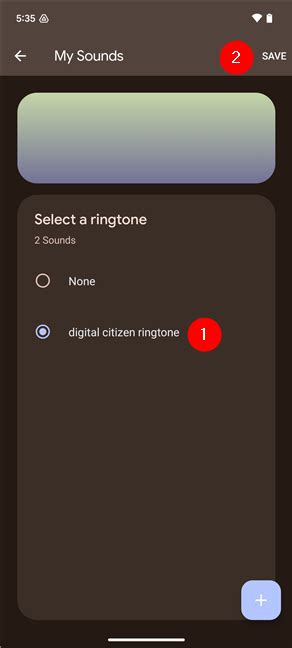
Removing Background Music from Songs for Ringtones
A common use case for ringtone creation is to isolate a specific vocal part of a song. Tools like Kapwing's "Split Vocals" feature or dedicated AI music separators can divide a song into vocal and instrumental layers. Once separated, the unwanted layer (e.g., the instrumental track if you only want the vocals) can be deleted or significantly reduced, leaving you with a clean vocal snippet perfect for a ringtone.
Beyond Noise Removal: Additional Audio Enhancements
Many of these AI-powered platforms offer more than just background noise removal. They provide a comprehensive suite of tools to elevate audio quality:
- Filler Word Removal: Tools like Descript's "Remove Filler Words" and VEED's "Magic Cut" can automatically detect and remove common filler words like "um," "uh," and "like," as well as unnecessary pauses and stutters. This results in more concise and impactful speech.
- Silence and Pause Removal: Features like Kapwing's "Smart Cut" can identify and remove silences and long pauses, streamlining content like tutorials, presentations, and vlogs.
- Volume Adjustment and Speed Control: Users can easily modify volume levels and playback speed to fine-tune their audio.
- Music and Sound Effects Library: Many platforms offer access to royalty-free music and sound effects libraries that can be layered onto audio for added depth and polish.
- Transcription Services: Automatic transcription is often integrated, allowing for text-based editing of audio and video, further simplifying the workflow.
These integrated features mean that creators can handle multiple aspects of audio and video editing within a single platform, saving time and effort.
Conclusion: Empowering Creators with Clear Audio
The accessibility of AI-driven tools for background noise removal has fundamentally changed how content is produced. From professional podcasters and YouTubers to individuals creating custom ringtones, the ability to achieve clear, polished audio is no longer a technical hurdle. Platforms like Descript, Kapwing, VEED.io, and Media.io offer intuitive, one-click solutions that empower users to eliminate distractions, enhance vocal clarity, and produce high-quality content effortlessly. By leveraging these advanced technologies, anyone can transform their audio recordings, ensuring their message resonates with listeners without the interference of unwanted background noise.