Adobe's transition from one-time software purchases to subscription-based services has fundamentally altered how users access powerful creative tools like Lightroom. This shift, while offering benefits such as ongoing product updates and cloud storage, also necessitates a clear understanding of how to manage these recurring commitments. This guide provides a detailed walkthrough on how to cancel your Adobe Lightroom subscription, specifically for those plans purchased directly through Adobe, ensuring a smooth and informed process.
Understanding Adobe's Subscription Model
The subscription model employed by Adobe is designed for continuous access and service. Your subscription begins as soon as your initial payment is processed. A crucial aspect of this model is automatic renewal. Your subscription will automatically renew each month or year, depending on your plan, without prior notice until you explicitly cancel it. This means you authorize Adobe to store your payment method(s) and automatically charge them at regular intervals until the subscription is terminated. Adobe reserves the right to change your plan's rate at each renewal term and will notify you of any such changes, providing you with the option to cancel.

Furthermore, Adobe's terms stipulate that if your primary payment method fails, they are authorized to charge any other payment method associated with your account. Should you fail to provide a valid payment method or if all provided methods fail, your subscription may be suspended. During such a suspension, you might lose access to some subscription features and functionality, although you will typically retain access to your Adobe Account and content within free user storage limits. Adobe will continue to attempt to charge your payment method(s) for the remainder of the term, and upon successful payment, your full subscription access will be restored.
For customers in the European Economic Area, initial purchases may require authentication through a password, a one-time code sent to your mobile number, or biometric recognition. This authentication process also authorizes Adobe to initiate future payments independently without requiring further explicit information for each transaction.
The Core Process of Subscription Cancellation
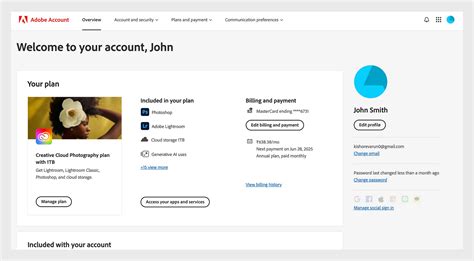
Canceling your Adobe Lightroom subscription purchased directly through Adobe is generally straightforward and can be accomplished through your Adobe account. The primary method involves navigating to your account's plan page via a web browser.
Access Your Adobe Account: Open your preferred web browser and navigate to the Adobe account management portal. You will need to sign into your account using your Adobe ID and password. If you have forgotten your credentials, Adobe provides options to recover them.
Locate Your Plan Details: Once logged in, find the section related to your subscriptions or plans. This is typically clearly labeled and easily accessible from your account dashboard. Here, you will see details of your current active subscriptions, including Lightroom.
Initiate Cancellation: Within your plan details, there should be an option to manage or cancel your subscription. Select this option. Adobe's system will then guide you through the cancellation process.
Review Cancellation Terms: Before finalizing the cancellation, Adobe will present you with information regarding the services and features you will lose upon canceling. This is an important step to ensure you understand the implications of your decision. This may include details about cloud storage, access to specific software versions, and any included generative AI features.
Confirm Cancellation and Refund Eligibility: A new window or section will typically appear, further detailing your cancellation. This is where you will be informed about any refund you may be eligible for. The terms regarding refunds are crucial. If you cancel any plan within 14 days of your initial purchase, you should receive a full refund. This 14-day window is a standard consumer protection measure. For cancellations made outside this initial period, different terms may apply, and you might not be eligible for a refund, especially if you are mid-term on an annual plan.
Once you confirm the cancellation, your subscription is officially terminated. It is advisable to save or take a screenshot of the confirmation page for your records.
Special Considerations and Alternative Cancellation Methods
While the online account management is the most common route, there are other scenarios and methods to consider.
Free Trials: If you have signed up for a free trial of Adobe Lightroom, your trial begins immediately after sign-up. If you decide to cancel before the end of the free trial period, your payment method will not be charged. Adobe determines eligibility for free trial offers.
Academic Pricing: For users who have subscribed using academic pricing, Adobe may verify your academic status at any time to confirm eligibility. If it is determined that you are no longer eligible, Adobe reserves the right to suspend your account or move you to the then-current, non-education subscription pricing. This underscores the importance of maintaining valid student or educator status if you are on an educational plan.
Generative AI Features and Credits: Many Adobe subscriptions now include generative AI features. These features often operate using generative credits, which allow you to create outputs based on your inputs. The number of credits required varies depending on the generative feature used and the type or number of outputs generated. The generative credits included in your subscription typically expire each month and are reset at the beginning of each new billing cycle for the duration of your subscription. Understanding how these credits function is part of managing your subscription, even when planning to cancel.
Contacting Customer Support: In some instances, or if you encounter difficulties with the online cancellation process, you may need to contact Adobe Customer Support. The provided information explicitly states, "You can cancel your subscription anytime via your Adobe Account page or by contacting Customer Support." For specific countries, there might be a requirement that cancellations can only be made by contacting Customer Support. Therefore, if the online portal does not yield the desired results, reaching out to their support team directly is the next logical step. Be prepared to provide your account details and subscription information to the support representative.
How to Contact Adobe Support (Easy Tutorial)
Understanding Renewal and Potential Pitfalls
The auto-renewal aspect of Adobe subscriptions is a significant point of awareness. Your subscription begins as soon as your initial payment is processed. For automatic renewing customers in the United States, after the first year, the subscription typically renews on a monthly basis until canceled. For all other customers, after the first year, subscriptions usually renew annually until canceled. This is a critical distinction that can affect cancellation timing and potential fees.
Adobe may change your plan’s rate at each renewal term and will notify you of any rate change, providing the option to cancel. This notification is a key point where users might reconsider their subscription. If your primary payment method fails, Adobe will attempt to use any other payment method in your account. If no valid payment method can be charged, the subscription may be suspended, leading to loss of access to certain features.
It is essential to be aware of the renewal date of your subscription. Canceling shortly before a renewal date can prevent an unwanted charge. If you are on an annual plan, understanding whether it renews monthly after the first year or continues as an annual renewal is crucial for managing your budget and avoiding unexpected charges.
The Evolution of Software Access: From Ownership to Access
The shift to subscription services like Adobe's represents a broader trend in the software industry. Where the use of Adobe's products once involved one-time purchases of physical software, the company now offers its products through subscription plans. This model entitles users to ongoing product updates, cloud storage, and often access to a suite of integrated applications. Dave Johnson, a technology journalist with a background in space operations and extensive experience in the tech industry, notes how the industry is transforming speculative science fiction into modern-day reality. This transformation is echoed in how software is delivered and managed - moving from a model of ownership to one of continuous access and service. As a photographer himself, Johnson's perspective highlights the practical implications of these changes for creative professionals.
The subscription model, while offering flexibility and up-to-date software, requires diligent management. Understanding the terms of service, the renewal cycle, and the cancellation procedures is paramount to avoiding unintended charges and ensuring that your software subscriptions align with your evolving needs and budget. By following the steps outlined above and being mindful of the nuances of Adobe's subscription policies, you can effectively manage and cancel your Adobe Lightroom subscription when necessary.