In today's visually driven digital landscape, sharing and utilizing images across various platforms is paramount. However, a common hurdle many users encounter, particularly those within the Apple ecosystem, is the HEIC (High Efficiency Image Container) file format. While HEIC offers significant advantages in terms of storage efficiency and image quality, its limited compatibility with non-Apple devices and software can turn a simple sharing task into a frustrating endeavor. This is where a robust and user-friendly converter becomes indispensable. Canva's online HEIC to PNG converter emerges as a powerful and accessible solution, transforming this common snag into a smooth, integrated part of your creative workflow.
Understanding the HEIC Format and Its Limitations
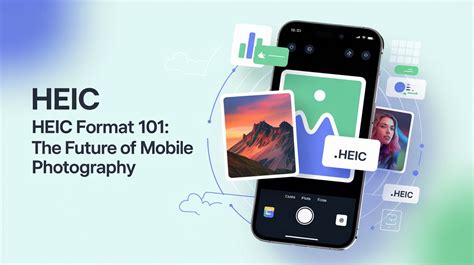
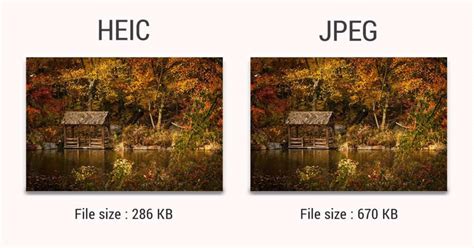
HEIC, an acronym for High Efficiency Image Container, is an image format that Apple introduced with iOS 11. It's built upon the High Efficiency Video Coding (HEVC) standard, allowing it to store images at roughly half the size of traditional JPGs without any discernible compromise in quality. This efficiency is a boon for users, enabling them to store a greater number of high-quality images on their devices while consuming less valuable storage space. Beyond mere static images, HEIC also supports advanced features like Live Photos, which capture a short video clip along with the still image.
However, the primary drawback of HEIC lies in its ecosystem-centric design. To open HEIC files natively, you typically need an Apple device such as an iPhone, iPad, or Mac. When attempting to share or use HEIC images on non-Apple devices or with software that hasn't been updated to support the format, users often encounter compatibility issues. This necessitates a conversion to a more universally recognized format.
The Need for Universal Image Compatibility
The digital world thrives on interoperability. Whether you're working on a poster for your business, curating a web portfolio, or preparing pitch-ready product mockups for a slide deck, the ability to use your images across different applications and platforms is crucial. HEIC's limited reach can hinder these creative aspirations. Converting HEIC files to a widely supported format like JPG or PNG ensures that your beautiful photos and graphics are easily shareable and usable in any digital or printed material.
Canva's HEIC to PNG Converter: A Seamless Solution
Canva, renowned for its intuitive design platform, offers a free online HEIC to PNG converter that simplifies the entire process. This tool is designed to be accessible and efficient, allowing users to transform their HEIC images into universally compatible PNG files with remarkable ease.
How to Convert HEIC to PNG with Canva
The process of converting HEIC to PNG using Canva is remarkably straightforward, designed to be intuitive even for novice users:
- Access the Converter: You can access Canva's free HEIC to PNG converter directly through any web browser, whether on your desktop or mobile device. Alternatively, for Mac users, the desktop app also provides this functionality.
- Upload Your Image: Simply select your HEIC image from your device or, for an even quicker workflow, drag and drop your HEIC file directly onto the converter page.
- Edit and Enhance (Optional): Once your HEIC image is uploaded, it will appear in Canva's editor. This is where you have the opportunity to enhance your image before conversion. Canva offers a suite of powerful yet easy-to-use photo editing tools. You can adjust brightness, contrast, add filters, crop, resize, remove backgrounds, add graphics, and utilize advanced features like Magic Switch and Magic Erase (available with Canva Pro). This step allows you to not only convert your image but also to refine it and prepare it for its intended purpose.
- Download as PNG: After making any desired edits, select 'PNG' from the drop-down list of format options when downloading your file. Canva will then process the conversion, providing you with a high-quality PNG file ready for download.
How to Use Canva HEIC to JPG Converter? | Canva Tutorials | Trainn
It's important to note that to download your converted file, you will need to sign up for a free Canva account if you don't already have one. This process is quick and unlocks access to Canva's entire design ecosystem.
Why Choose PNG?
While JPG is another common alternative for HEIC conversion, PNG (Portable Network Graphics) offers distinct advantages, especially for creative projects:
- Lossless Quality: PNG uses lossless compression, meaning it preserves all the original image data, ensuring no loss of quality, color, lines, or minute details. This is crucial for graphics, logos, icons, and any image where crispness and fidelity are paramount.
- Transparency Support: PNG files support transparent backgrounds, a feature that JPG does not. This is invaluable for web graphics, logos, and designs where you need an image to blend seamlessly with different backgrounds.
- Versatility: PNG is ideal for illustrations, vectors, graphics, charts, infographics, and any visual element that requires high resolution and sharp detail. It handles a large number of colors and is frequently used for website images.
While PNG files can sometimes be larger than JPGs, their superior quality and transparency support make them the preferred choice for many creative applications. Canva's converter allows you to switch to JPG if you need to reduce file size, or go for PNG or SVG for HD graphics, offering flexibility based on project demands.
Beyond Conversion: Canva as a Creative Hub
Canva's HEIC to PNG converter is more than just a file format utility; it's an entry point into a comprehensive design platform. Once your HEIC file is converted and uploaded into the Canva editor, you gain access to a vast library of templates, stock images, design elements, and powerful editing tools. This integration means you can:
- Design with Ease: Transform your converted HEIC images into professional-looking posters, social media posts, presentations, wallpapers, profile pictures, and much more, all within the same application.
- Collaborate Effectively: Share your design projects with collaborators by providing a simple link. This allows for collective artistic vision, enabling feedback and collaborative editing to refine your content.
- Enhance Your Visuals: Utilize Canva's extensive photo editing tools to further refine your images. Whether it's tweaking colors, adding effects, or removing unwanted elements, Canva empowers you to elevate your visuals.
- Explore Diverse File Formats: Canva's capabilities extend beyond HEIC to PNG. You can also convert JPG, PNG, HEIF, WebP, and SVG images into JPG, PNG, SVG, or PDF formats, offering a one-stop solution for your image conversion needs. Converting images into a vector format like SVG, for instance, guarantees HD quality at any size, making it ideal for web graphic use.
A Secure and Private Conversion Experience
For users concerned about the security and privacy of their uploaded files, services like heictopng.com offer a compelling alternative or supplementary option. These platforms often emphasize a commitment to user privacy, stating that they do not store uploaded files, track user activity, or collect personal data. The conversion process typically happens directly within the browser, eliminating the need for server uploads and reducing the risk of data breaches. Such services often pride themselves on being clutter-free, requiring no sign-ups, installations, or extensions, and offering a direct, no-strings-attached conversion experience. They also highlight the availability of human support and a commitment to keeping their tools free without resorting to sneaky monetization tactics.
The Future of Image Sharing
As image formats continue to evolve, the demand for seamless conversion tools will only grow. HEIC, with its efficiency, is likely to remain prevalent within certain ecosystems. However, the need for universal compatibility will persist. Platforms like Canva, which integrate powerful conversion tools with intuitive design capabilities, are setting a new standard. They move beyond simple file format changes, offering users a holistic environment to not only convert but also to create, enhance, and share their visual content with the world, making the journey from a captured moment to a polished, shareable asset as smooth and inspiring as possible.
The ability to easily change HEIC to JPG or PNG with tools like Canva ensures that your beautiful photos and important graphics are never held back by technical limitations, allowing them to reach their intended audience and fulfill their creative potential.