Capture One, a powerful image editing software, has introduced a groundbreaking AI-driven feature called "Match Look" in its version 16.5. This tool promises to revolutionize the way photographers achieve stylistic consistency across their images by enabling them to replicate the "look" of a reference image onto a set of new photos. While the concept is straightforward - apply a desired aesthetic from one image to others - the practical implementation and its effectiveness, particularly for diverse photographic genres, warrant a closer examination. This article will explore the intricacies of Match Look, its potential applications, its limitations, and the user experiences surrounding its debut.
Understanding the Core Functionality of Match Look
At its heart, Match Look is designed to analyze a user-selected reference image and then intelligently adjust Capture One's standard editing tools to make a target image (or a batch of images) visually similar to that reference. This AI-powered process aims to transfer the tonal and color characteristics of the reference into the new photographs. The tool is integrated into the "Adjust" tab of the Tools sidebar, replacing the previous "Smart Adjustments" feature.
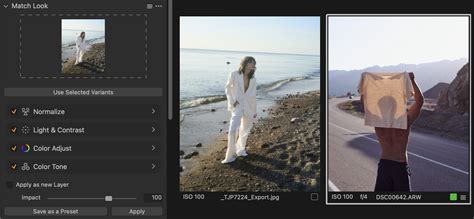
The process begins with the user designating a reference photo. This can be any image from their Capture One catalog or session, or even an external JPEG file dragged and dropped onto the designated zone. A key enhancement is the ability to utilize multiple reference images simultaneously. In this scenario, Capture One creates a weighted average of the looks from these multiple references, allowing for a more nuanced and blended outcome. The "Impact" slider, ranging from 40% to 125%, then governs the intensity of the applied look, providing a crucial level of control over how closely the target image adheres to the reference. Importantly, adjustments related to exposure and white balance within the "Normalize" group are applied at full intensity, regardless of the Impact slider's setting, though their effect can be modulated by applying the look as a new layer and adjusting its opacity.
The tool offers flexibility in how adjustments are applied. The "Apply as new Layer" option is highly recommended, as it creates a new layer with a mask covering the entire image, allowing for easy opacity adjustments to fine-tune the overall effect. Once the desired settings are configured, users can select their target photos and click "Apply" to transfer the matched look. Capture One then transparently shows which sliders were adjusted and to what values, enabling users to intervene and make manual tweaks if the automatic result isn't precisely what they envisioned.
Potential Use Cases and Applications
The introduction of Match Look has sparked considerable interest among photographers for several compelling use cases:
Achieving Visual Consistency in Projects
One of the most significant benefits of Match Look is its ability to ensure visual consistency across a series of images. This is particularly valuable for projects like photo books, where a unified aesthetic is crucial. A photographer preparing over 400 images for a photo book, ranging from old phone shots to high-end DNGs, found that Match Look could render them "printable and bright, with healthy skin tones and slightly cooler shadows" in a matter of seconds. Similarly, for documenting events like conferences, where a consistent look is desired for all images, Match Look can streamline the editing process significantly.
Capture One Match Look: Creating the Perfect Workflow
Replicating In-Camera JPEG Looks
For photographers who shoot RAW+JPEG, Match Look offers a way to bridge the gap between their RAW files and their camera's processed JPEGs. If a specific in-camera color profile or film simulation (like Fujifilm's) is preferred, the JPEG version can be used as a reference. Match Look can then attempt to replicate that specific look onto the RAW files, retaining the flexibility and image quality of RAW while achieving the desired aesthetic. This is especially useful for camera brands where Capture One might not offer direct profiles for all their color modes.
Translating Presets and Styles Across Software
For users who work with multiple editing applications, such as Lightroom and Capture One, Match Look presents a novel approach to transferring looks. By rendering an image from Lightroom with a desired preset applied and then using that rendered JPEG as a reference in Capture One, users can achieve a reasonably accurate translation of the Lightroom look into Capture One. This can then be saved as a Capture One style for future use. While not always a perfect 100% match, it's often a more effective method than some dedicated preset conversion tools. The same principle can be applied to matching looks from LUTs or other image processing software.
Emulating Film Stocks
The tool can also be employed to emulate the distinct color palettes and tonalities of classic film stocks. By using scanned film images as references, photographers can apply similar color characteristics to their digital shots. However, it's important to note that Match Look primarily focuses on color and tone; replicating film grain would still require separate editing steps. For optimal results, shooting comparable scenes on both film and digital and using the film shots as references is recommended.
User Experiences and Perceived Limitations
Despite its promising capabilities, user experiences with Match Look have been varied, highlighting both its strengths and its limitations.
The "Reference Loop" Phenomenon
One peculiar observation made by users concerns the behavior of Match Look when applied iteratively. If a set of images adjusted by Match Look is then used as the reference for the original images, the "original reference look" can be modified. This suggests that the AI's analysis and application of a "look" can subtly alter the underlying adjustments, leading to unexpected changes when images are fed back into the reference box. This "reference loop" phenomenon, where original reference images are modified by subsequent applications of the "new reference look," has been noted to affect variables like exposure, HDR, and color temperature, raising questions about the predictability and stability of the tool.
Challenges with Specific Genres
While Match Look appears to perform well with distinct styles like high-contrast black-and-white or color-toned images, its effectiveness can be less consistent with certain photographic genres, particularly landscapes and wildlife. Some users have reported mixed results, with the tool sometimes failing to accurately capture the intended look. For instance, attempts to match wildlife images have resulted in unnatural color shifts, such as a pinker rendition of reindeer or altered blues in shadows. In more extreme cases, such as matching a bird of prey to an eagle reference, the tool has been described as failing "completely," leading to an overly bright sky and a loss of original color. Similarly, attempts to match a sandpiper image resulted in an undesirable green tint, despite the original and reference photos sharing significant visual similarities.
Limitations in Replicating Complex Adjustments
It's crucial to understand that Match Look is designed to replicate adjustments made with Capture One's general tools. It cannot replicate complex edits such as layers, extensive retouching, or specific masking work. Many professional images rely heavily on these advanced techniques, making it technically impossible for Match Look to perfectly reproduce such looks by only adjusting general parameters. This limitation means that while Match Look can provide a strong starting point, manual refinement will often be necessary for highly stylized or heavily retouched images.
Facial Recognition and Animal Eyes
A point of disappointment for some photographers, particularly those working with wildlife, is the current limitation of facial recognition masking. Even when bird or animal eyes are prominently visible, the facial recognition masking feature does not appear to work effectively on them. The assumption is that Capture One's AI requires more than just the shape of an eye to identify it for masking purposes, unlike the eye-tracking capabilities found in advanced camera bodies like the Canon R5.
The Broader Context of Capture One 16.5
Match Look is not the sole innovation introduced in Capture One 16.5. The update also brought significant advancements in AI-powered masking and other features:
AI People Masking
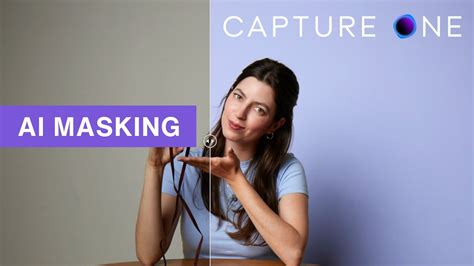
Capture One 16.5 introduced AI People Masking, a feature that allows for the rapid and precise selection of specific facial features or body parts. Options include masks for "Face Skin," "Eyes," "Eyebrows," "Mouth," and "Hair," as well as "Body Skin." These masks can be combined to create comprehensive selections, enabling targeted adjustments for skin tone correction, eye enhancement, and more. The quality of these AI-generated masks has been generally praised for their accuracy, even in moderately challenging situations. This feature is particularly useful for portrait photography and can be applied to multiple images to maintain consistency.
Other Notable Features
Beyond Match Look and AI People Masking, Capture One 16.5 includes several other enhancements:
- Background Replacement: A built-in plugin for background replacement, integrating with the external Photoroom service.
- Content Credentials: Support for a standard for digital confirmation of image edits, enhancing photo credibility and transparency.
- Tethering Improvements: Minor but practical enhancements to tethering, including audio signals for camera connection/disconnection and a ready signal for the camera.
- Cloud Settings: The ability to synchronize shortcuts, export presets, workspaces, and styles across a user's devices via Capture One's cloud.
- Camera Tool Notifications: On macOS, the Camera Tool can now notify users if a camera connection is being slowed down by the operating system, especially if the camera's memory card is not empty.
Pricing and Subscription Considerations
It's important to note that some of these advanced features, including Match Look and Background Replacement, are not available in all Capture One subscription tiers. They are typically included in the "Studio" and "All In One" subscription packages. This tiered pricing model can be a point of contention for users, particularly those with perpetual licenses who may need to purchase the full software again to access these new tools, as upgrade pricing is no longer offered. For users on older perpetual licenses, the decision to upgrade solely for Match Look might be difficult to justify unless it offers a significant workflow improvement.
Conclusion: A Powerful Tool with Evolving Potential
Capture One's Match Look is undoubtedly a powerful and innovative tool that leverages AI to streamline the process of achieving stylistic consistency in image editing. Its ability to transfer looks, replicate in-camera JPEGs, and translate presets across software offers significant potential for photographers across various genres. However, like any new technology, it has its limitations. The observed "reference loop" behavior, inconsistencies with certain photographic subjects like wildlife and landscapes, and its inability to replicate complex layered edits are important considerations.
While Match Look may not be a universal panacea for all editing challenges, its introduction marks a significant step forward in AI-assisted image processing. As the technology matures and Capture One continues to refine its AI models, we can anticipate even more sophisticated and reliable performance from this game-changing feature. For photographers seeking to expedite their workflow and maintain a cohesive visual style, Match Look, despite its current quirks, presents a compelling and valuable addition to their editing arsenal.