Portrait editing, especially retouching, shouldn't be a time sink or an afterthought. In the pursuit of delivering clean, natural-looking results efficiently, Capture One has significantly enhanced its retouching capabilities, aiming to keep photographers within a single application and eliminate the need for extensive reliance on third-party software. This evolution in their editing suite is particularly impactful for professionals who demand both speed and quality, especially during high-volume shoots or live client sessions.
The Retouch Tool Tab: A Centralized Hub for Face Refinement
The core of Capture One's one-touch portrait features resides within the Retouch Tool Tab. This dedicated area consolidates a suite of powerful tools designed to address common portrait imperfections with remarkable ease. Whether working on a group photograph or a solitary portrait, users have the flexibility to apply changes across all detected faces simultaneously or to meticulously fine-tune each individual face. This granular control ensures that every subject receives the appropriate level of attention, preserving the unique character of each person.
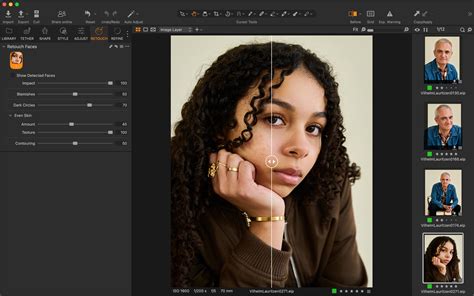
The software's ability to automatically detect faces is a cornerstone of its efficiency. Capture One can identify up to 32 faces within a single image, provided each face meets a minimum size requirement of 200 pixels on its shortest edge. This robust detection mechanism forms the foundation for applying automated adjustments, significantly reducing the manual effort typically associated with such tasks.
Addressing Common Imperfections with Precision Sliders
Capture One's retouching tools are built around intuitive sliders, allowing for precise control over various aspects of facial refinement.
Blemish Removal: Preserving Natural Texture
The Blemish slider offers a clean and natural way to address minor imperfections. From common pimples to subtle rough patches on the skin, this tool effectively cleans up distractions without resorting to overly smooth or artificial-looking results. Crucially, it is designed to retain the natural skin texture, beauty marks, and scars, ensuring that the retouching remains authentic. The Blemish option has a sliding scale that allows users to control the intensity of the effect: lower numbers focus on larger blemishes, while higher numbers address smaller imperfections.
Dark Circle Reduction: Restoring Radiance
Tired-looking eyes can detract from the natural glow of a portrait. Capture One's Dark Circle Reduction tool directly addresses this by softening shadows beneath the eyes. This feature is engineered to maintain the natural detail of the skin, preventing an unnatural or "flat" appearance. The slider provides a simple yet effective way to bring back vibrancy and alertness to the subject's gaze.
Even Skin: Balancing Tone and Texture
The Even Skin sliders are instrumental in addressing broad contrast inconsistencies across the skin. This feature helps to create a more uniform tone and texture while crucially keeping natural texture and lighting intact. This is particularly valuable for a wide range of portraiture, from high-fashion shoots to more candid school portraits.
Capture One suggests experimenting with different slider combinations for varied outcomes. A high "Amount" with low "Texture" (e.g., 80 / -70) can yield a polished, editorial look, akin to magazine covers. Conversely, a lower "Amount" with higher "Texture" (around 40 / 50) helps maintain a more natural and understated appearance, ideal for everyday portraits. The "Amount" option in the Even Skin feature reduces contrast in specific areas, and while initially subtle, it can be adjusted for more pronounced results.
Contouring: Intelligent Depth Enhancement
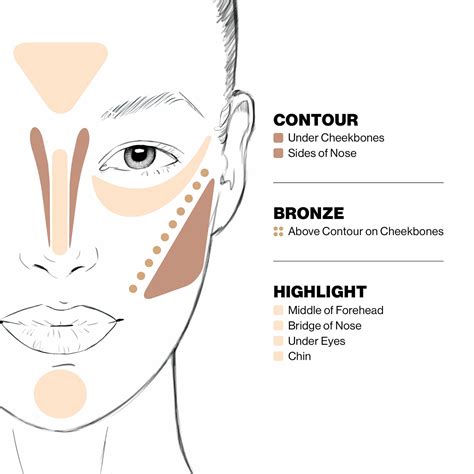
Adding dimension to portraits without the need for manual dodging and burning is a significant advantage. Capture One's Contouring tool intelligently analyzes the existing light on the face. It strategically applies depth only where it makes visual sense, skillfully avoiding highlights and ensuring a natural enhancement of facial structure. This acts as a global control for facial shaping.
Global Control and Workflow Efficiency
The Impact Slider: Unified Adjustment
The Impact slider serves as a powerful global control for all facial edits. With a single adjustment, users can fine-tune the overall intensity of all applied facial retouching. This is incredibly useful for making rapid decisions during live editing sessions or client reviews, allowing for quick adjustments to suit immediate feedback.
Copy and Apply: Batch Processing for Volume Shoots
For photographers dealing with dozens or even hundreds of portraits, the Copy and Apply function is a game-changer. This feature allows edits made to one portrait to be efficiently transferred to others. However, it's more than a simple copy-paste. When copying adjustments from portraits where multiple faces were individually edited, Capture One intelligently applies these adjustments based on the order of the faces in the source image, maintaining consistency and context.
Custom Styles and Shortcuts: Rapid-Fire Retouching
To further streamline the workflow, Capture One allows users to save global Retouch Face adjustments as custom Styles. Once created, these Styles can be automatically applied to all faces within an image. By assigning a custom Style to a keyboard shortcut, photographers can establish a rapid-fire retouching setup, enabling them to process large volumes of images with just a few keystrokes.
Tethered Shooting: Real-Time Retouching
One of the most powerful applications of Capture One's retouching features is during tethered portrait shoots. When combined with "Next Capture Adjustments," every portrait captured is instantly retouched as it comes into the software. The edits carry over from one shot to the next, ensuring that clients consistently see the most polished version of their images in real-time on set. This immediate feedback loop leads to faster client approvals, a reduction in reshoots, and significantly less time spent in post-production. The synergy between Retouch Faces, tethered shooting, and Next Capture Adjustments means clients can see final-quality results the moment the shutter clicks.
Capture One Tutorial | Tethered Capture | Advanced Workflows
The Role of AI in Retouching
While many automated tools leverage artificial intelligence, Capture One's retouching feature relies on it only partially. AI is primarily used for face detection and mask creation, which are not directly editable outside of the retouch tool itself. The actual process of removing blemishes, for instance, is a sophisticated blend of traditional image editing techniques and AI. Capture One has not specified whether this involves generative AI or machine learning specifically, but the outcome is an efficient and effective retouching process.
Future Enhancements: Preserving Natural Details
Capture One is actively developing its retouching tools, with a future feature planned to allow users to protect specific skin details, such as beauty spots, freckles, scars, or moles, during the retouching process. This acknowledges that current tools like Blemish Removal can sometimes unintentionally smooth out these desirable natural marks. This upcoming enhancement demonstrates a commitment to preserving individual characteristics while still achieving a refined look.
Beyond Retouching: Enhanced Workflow and Organization
Capture One's recent updates extend beyond retouching, improving the overall workflow and file management. The software has introduced a new Session Builder tool, enabling users to create sub-folders within Sessions for the first time in 15 years. Previously, creating sub-folders required moving files outside of Capture One, necessitating a sync to the catalog. This new workflow feature simplifies organization, making it easier to manage project files directly within the application.
Capture One's Broader Ecosystem and Philosophy
Born out of a passion for photography, Capture One aims to provide photographers with the tools to collaborate effectively, achieve the highest image quality, and bring their creative visions to life. The software is renowned for its industry-leading tethered shooting capabilities, intuitive workflow, and unparalleled image quality, supported by over 600 camera and lens profiles. Its commitment to true-to-life color processing and precise editing tools solidifies its position as a professional-grade solution.
The company has also unveiled a new brand identity, simplifying its logo and moving away from its previous circular design. This rebranding reflects a modern, streamlined approach that aligns with the efficiency and power of its software.
Capture One's mobile offerings, available on iPhone and iPad, further extend its capabilities, providing users with essential editing tools like Crop, Keystone, Noise Reduction, Exposure, White Balance, HDR, and Color Editor for on-the-go adjustments. Features like AI Crop, which ensures consistent framing across a series of images, and one-click dust removal, add further layers of efficiency and polish to the mobile editing experience.
The comprehensive "Pro for desktop" plan, which includes Capture One for desktop, mobile versions, Live Unlimited for collaboration, priority support, and all future updates, underscores Capture One's commitment to providing a complete, integrated solution for professional photographers. This all-encompassing approach aims to streamline the entire photographic process, from capture to final delivery.