The world of digital lettering and calligraphy has seen a dramatic evolution, particularly with the advent of powerful tablet devices and precise styluses. For many, the journey into digital calligraphy began with the announcement of the iPad Pro and Apple Pencil in September 2015. Previously, the precision and tactile feedback required for calligraphy felt challenging to replicate on a screen, where one's focus was diverted from the hand's movement to the digital output. However, through dedicated practice and experimentation, particularly within the robust environment of the Procreate app, achieving professional-level blackletter calligraphy on an iPad has become increasingly accessible.
Procreate, a digital art application for iOS and iPadOS, has rapidly gained significant traction in the creative digital sphere. While its extensive brush library is often geared towards digital painters and illustrators, its inherent flexibility allows for the import of custom brushes. This feature has been instrumental for calligraphers seeking specialized tools. Recognizing a scarcity of dedicated blackletter brushes, creators have taken to developing their own, offering a wealth of options for those looking to emulate traditional calligraphic styles digitally.
Understanding the Chisel and Sign Brushes
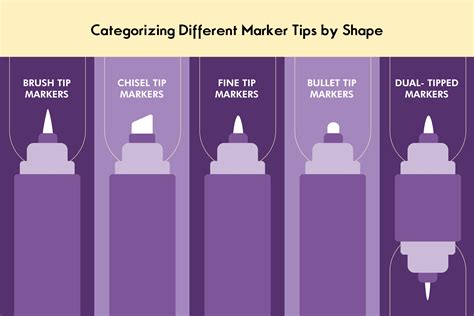
Two such valuable resources for Procreate users are the "Chisel" and "Sign" brushes. These brushes are designed to mimic the distinctive strokes of traditional markers, offering distinct advantages for lettering enthusiasts. The "Sign" brush, as its name suggests, features a blocky tip reminiscent of a sign marker, allowing for bold, impactful lettering. In contrast, the "Chisel" brush provides a more refined, angled tip, akin to a chisel tip marker, enabling the creation of strokes with varying thickness and a classic calligraphic feel.
A key characteristic of both the "Chisel" and "Sign" brushes is their lack of pressure sensitivity. This feature is particularly beneficial for users with older iPads that may not support the Apple Pencil's pressure-sensitive capabilities. Even without the nuanced control offered by pressure sensitivity, these brushes provide a reliable and consistent experience, making digital blacklettering accessible to a wider range of users.
Importing and Utilizing Custom Brushes in Procreate
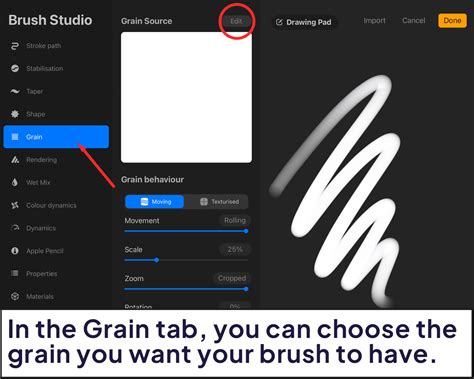
Procreate's capacity to import custom brushes is a cornerstone of its versatility for specialized art forms like calligraphy. Users can either create their own brushes or download those developed by other artists. This open approach has fostered a vibrant community of brush creators, expanding the possibilities for digital artists. When importing brushes, a minor consideration might be their orientation. Depending on your Procreate settings, brushes may import in a reversed direction. Fortunately, this is easily rectified by adjusting the grain source of the brush, allowing you to achieve the desired stroke direction and texture.
The grain source of a brush is a powerful tool for adding depth and character to your lettering. Procreate's library boasts a wide array of textures that can be applied to any brush, transforming a simple stroke into something visually rich. For instance, the "Concrete" grain is a popular choice for its gritty, authentic feel. Beyond brush-specific textures, Procreate also offers built-in brush sets like "Spraypaints," which can be employed to introduce additional layers of texture and visual interest. Experimenting with these elements can significantly elevate the aesthetic quality of your digital calligraphy.
Crafting Blackletter with Precision: Angles and Guides
For those deeply invested in the art of blackletter calligraphy, the pursuit of authentic strokes and precise forms is paramount. Traditional blackletter, also known as Gothic script, is characterized by its dramatic thick and thin strokes, sharp serifs, and angular forms. Replicating this with digital tools requires brushes that can effectively emulate these qualities.
Advanced blackletter brush sets have been developed to address this need. These sets often include multiple brushes, each designed for specific aspects of blackletter composition. For example, a comprehensive blackletter set might offer five distinct brushes, with each brush available in several angles-such as 35°, 40°, and 45°. These varying angles are crucial because they directly influence the thickness of the strokes and the overall character of the script, mirroring the way a traditional broad-edged pen would be held at different inclinations.
In addition to the primary lettering brushes, guide brushes are an invaluable component of these specialized sets. A guide brush can be used to create templates or guidelines directly on the canvas. These guides help maintain consistent letter height, stroke width, and spacing, which are critical for achieving a cohesive and aesthetically pleasing blackletter piece. By layering these guides, calligraphers can establish a structured framework for their lettering, ensuring accuracy and uniformity throughout their work.
calligraphy brush for procreate
Enhancing Blackletter with Fine Details and Flourishes
Beyond the core letterforms, the art of blackletter calligraphy is often enhanced by the addition of fine details and decorative flourishes. These embellishments can elevate a piece from simple lettering to a sophisticated work of art. To achieve these intricate details, a fine-line brush is indispensable. The "Technical Pen" brush within Procreate is frequently recommended for this purpose. Its precise, consistent line weight allows for the creation of delicate serifs, decorative loops, and other fine strokes that add complexity and elegance to the lettering.
The interplay between bold strokes created by the chisel or sign brushes and the delicate lines from a fine-point brush is what gives blackletter its distinctive dynamism. Mastering the balance between these elements is key to producing visually compelling work. Experimentation with different brush sizes, opacities, and blending modes can further refine these details, adding subtle nuances and depth.
For instance, a flourish might begin with a broad stroke from the chisel brush, then transition to a thin, elegant tail rendered with the technical pen. The contrast in weight and texture between these strokes creates visual interest and guides the viewer's eye through the composition.
Tips for Analog Calligraphers Transitioning to Digital
For calligraphers accustomed to the tactile experience of analog tools, transitioning to digital platforms like Procreate can present a learning curve. The shift in perspective, from observing one's hand directly to viewing the output on a screen, requires adjustment. However, the benefits of digital tools-such as the ability to undo mistakes instantly, experiment with different styles without wasting materials, and achieve a level of precision that can be challenging with traditional pens-are significant.
To ease this transition, it is helpful to approach digital lettering with the same principles of precision and tact that are fundamental to analog calligraphy. Understanding the nuances of brush settings, such as grain, texture, and opacity, can help replicate the feel of traditional tools. Furthermore, utilizing guide brushes and templates can provide a familiar structure, akin to using guidelines on paper.
The iterative nature of digital art also allows for extensive practice and refinement. Artists can spend hours experimenting with different brush combinations, color palettes, and compositional layouts. This trial-and-error process, while sometimes challenging, ultimately leads to a deeper understanding of the tools and techniques available within Procreate. The feedback loop is immediate, allowing for rapid learning and adaptation.
Exploring Textures and Advanced Techniques
The ability to alter the grain source of brushes in Procreate opens up a vast landscape for textural exploration. Beyond built-in options like "Concrete," artists can import custom texture images to create unique brush behaviors. This allows for the emulation of a wide range of materials, from rough paper and canvas to distressed metal and smooth stone. By applying these custom grains to the Chisel or Sign brushes, one can imbue their blackletter work with an unprecedented level of realism and artistic expression.
Furthermore, Procreate's layer system and blending modes offer advanced techniques for adding depth and visual complexity. For example, a blackletter piece could be created on one layer, then a subtle texture applied on a layer above using a blending mode like "Overlay" or "Soft Light." This allows for fine-tuning the texture's intensity without altering the underlying lettering. Additionally, using the "Color Dynamics" settings within brush properties can introduce subtle variations in hue and saturation, adding a hand-painted quality to the digital strokes.
The "Spraypaints" brush set, for instance, can be used not just for overall texture but for creating subtle atmospheric effects or distressed edges around lettering. A light application of a spatter brush can give the impression of age or a weathered aesthetic. Conversely, a more deliberate application can be used to create distressed borders or background elements that complement the main lettering.
Community and Sharing Your Creations
The digital art community thrives on sharing knowledge and creations. As you delve deeper into creating blackletter calligraphy in Procreate, you will undoubtedly discover unique tricks and techniques. Sharing these insights with others can foster a collaborative environment where everyone benefits from collective experience. Whether it's a novel way to use a specific brush setting, an efficient workflow for creating complex flourishes, or a new approach to texture application, your contributions can help fellow artists.
Conversely, if you encounter difficulties or find yourself struggling to adapt to the digital medium, reaching out to the community is highly recommended. Online forums, social media groups, and artist communities dedicated to Procreate and digital calligraphy are excellent resources for seeking advice and support. Many artists are willing to share their expertise and offer guidance. The journey of mastering digital blacklettering is often made smoother and more enjoyable through shared learning and mutual encouragement. Remember, the initial thought process when Apple announced the iPad Pro and Apple Pencil was about the accessibility of digital lettering tools, and through the efforts of creators and the flexibility of apps like Procreate, that vision is increasingly becoming a reality for a broad spectrum of artists.