The world of digital art software often presents a complex landscape for users, especially when it comes to licensing and obtaining full functionality. Clip Studio Paint, a powerful and popular application for digital illustrators, comic artists, and animators, is no exception. While the allure of free software is strong, understanding the implications of using unofficial serial number generators, often referred to as "Keygens," is crucial for both the integrity of your work and the security of your devices. This article aims to demystify the concept of Clip Studio Paint serial numbers, highlight the risks associated with Keygens, and guide you toward legitimate avenues for acquiring and utilizing this versatile software. We will also delve into the nuances between Clip Studio Paint Pro and EX, offering insights to help you choose the version that best suits your creative needs.
The Perilous Path of Clip Studio Paint Keygens
The internet is rife with offers of "Clip Studio Paint Keygen" or "Clip Studio Paint free versions," promising access to the full software without the cost. However, these offers are not only illegal but also fraught with danger. A Keygen is a program engineered by individuals with malicious intent, designed to circumvent the security measures implemented by software developers to protect their intellectual property. These programs attempt to automatically generate or "crack" license keys, thereby bypassing the need for legitimate purchase.
While many online sources might claim that using a Clip Studio Paint Pro Keygen is safe, this is a dangerous misconception. Downloading and installing pirated software, including a "free" version of Clip Studio Paint obtained through such means, constitutes a violation of copyright law. This infringement carries significant legal repercussions, and users can be held liable for their actions. The perceived immediate financial saving is often dwarfed by the potential future costs of rectifying the problems that arise from using cracked software.
The Hidden Costs of Pirated Software
The risks associated with using Keygens extend far beyond legal penalties. The digital ecosystem is interconnected, and compromising one aspect can have cascading negative effects.
Malware Infection: A staggering proportion of illegally distributed software, estimated at nearly two-thirds, is infected with viruses and other forms of malware. Pirates often embed these malicious programs into the software during the hacking process. When you download a pirated Clip Studio Paint free version, you are inadvertently inviting these threats onto your computer. These viruses can steal your personal information, damage your system, or even hold your data hostage for ransom.
Code Tampering and Instability: To make pirated software function without a valid license, hackers must modify its source code. This process is typically done quickly and carelessly, with little regard for the program's stability or long-term performance. Such modifications can lead to unpredictable behavior, frequent crashes, and data corruption, rendering the software unreliable for professional or even casual use.
Legal Ramifications and Enforcement: Governments worldwide are increasingly cracking down on software piracy. The demand for pirated software remains high, and consequently, legal penalties for copyright infringement are becoming more stringent. What might have once resulted in a manageable fine can now lead to more severe consequences, including substantial financial penalties and legal entanglements.
Absence of Updates and Support: Legitimate software developers regularly release updates to improve functionality, fix bugs, and patch security vulnerabilities. When you install a Clip Studio Paint Pro Crack or Keygen, you forfeit access to these crucial updates. This means your software will quickly become outdated, potentially leading to compatibility issues with newer operating systems or hardware, and it may start working improperly over time. Furthermore, you will have no access to official customer support should you encounter problems.
Legitimate Pathways to Clip Studio Paint
For those who wish to utilize Clip Studio Paint without succumbing to the risks of piracy, there are two primary legal and secure methods to obtain the software. These methods ensure you receive a fully functional, up-to-date version with access to all necessary support and updates.
Purchasing Clip Studio Paint Pro
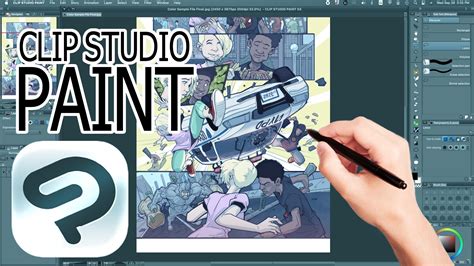
The purchase of Clip Studio Paint Pro grants you a legitimate license to use the program for creating comics, illustrations, and animations. This version is packed with a comprehensive suite of tools and functions designed to empower artists. Key features include:
- Natural, Customizable Pen and Brush Tools: Experience a drawing feel that closely mimics traditional media with a vast array of customizable brushes and pens.
- Extensive Material Library: Access over 10,000 free brushes and materials to enhance your workflow and creative output.
- 3D Model and Drawing Capabilities: Integrate 3D models into your workflow for pose reference, scene construction, and more.
- Color Space Support: Seamlessly combine RGB and CMYK color modes, essential for both digital display and print production.
- Animation Tools: Create frame-by-frame animations with intuitive tools for bringing your characters and stories to life.
Exploring Clip Studio Paint EX for Professionals
For artists and professionals whose creative demands extend beyond the capabilities of the Pro version, Clip Studio Paint EX offers an enhanced feature set. This premium version includes all the functionalities of Clip Studio Paint Pro, along with additional advanced features tailored for more complex projects. While the core drawing and illustration tools remain consistent, EX is particularly beneficial for users working on:
- Extended Animations: EX provides expanded capabilities for longer and more complex animation projects.
- Multi-Page Comic and Manga Projects: Manage and organize extensive comic or manga projects with greater ease.
- Advanced Storyboarding and Layout Tools: Facilitate the creation of intricate storyboards and page layouts.
The decision between Pro and EX often hinges on the scale and complexity of your artistic endeavors. If you are unsure whether Clip Studio Paint will meet your needs, exploring its free alternatives can be a prudent first step.
Clip Studio Paint vs Photoshop — What Actually Matters for Artists
Free Alternatives to Clip Studio Paint
While Clip Studio Paint offers a professional-grade experience, several free and open-source alternatives can serve as excellent starting points or even full-fledged solutions for artists on a budget or those exploring different creative workflows.
Krita: The Open-Source Powerhouse
Krita is a free, open-source raster graphics editor specifically designed for digital painting and drawing. While it excels in artistic creation, it's important to note that Krita is not intended for image editing in the traditional sense. Its focus is on drawing from scratch, which distinguishes it in the "Clip Studio Paint Ex vs Krita" confrontation for pure drawing capabilities. Krita boasts robust features such as:
- Non-Destructive Editing: Supports non-destructive editing of layers and masks, allowing for greater flexibility in the creative process.
- Extensive Brush Engine: Offers a highly customizable brush engine with numerous brush types and settings.
- Animation Tools: Includes built-in tools for creating frame-by-frame animations.
- Color Management: Provides advanced color management options for professional workflows.
Inkscape: Versatile Vector Graphics
Inkscape is a free, open-source vector graphics editor available to everyone. It is exceptionally versatile, making it suitable for creating both artistic and technical illustrations. This alternative to pirated Clip Studio Paint supports a wide array of document formats and provides a comprehensive toolkit, including:
- Diverse Drawing Tools: Features tools such as fill, corrector, calligraphy pen, eraser, and many others for detailed vector creation.
- Scalable Graphics: Vector graphics can be scaled infinitely without loss of quality, making them ideal for logos, icons, and large-format prints.
- Object Manipulation: Offers advanced tools for manipulating paths, shapes, and text.
- Cross-Platform Compatibility: Available on Windows, macOS, and Linux.
MyPaint: Simplicity and Focus for Digital Artists
MyPaint is another free graphic editor that is particularly convenient for digital artists who appreciate a straightforward interface and a focused drawing experience. It operates across all platforms and can be installed on modern tablets, making it a viable option for artists on the go. This Clip Studio Paint Keygen alternative offers:
- Simple and Intuitive Interface: Designed to be unobtrusive, allowing artists to concentrate on their work.
- Decent Brush Set and Customization: Provides a good selection of brushes with extensive customization options for brush behavior and appearance.
- Unlimited Canvas Size: Offers an unlimited canvas, catering to artists who require vast working spaces.
- Layer Support: Includes basic layer functionality for managing different elements of a drawing.
Enhancing Your Workflow with Brushes and Materials
Whether you are a seasoned professional or just beginning your journey with Clip Studio Paint, leveraging custom brushes and materials can significantly enhance your workflow and artistic expression. The software's powerful brush engine allows for immense customization, and a rich ecosystem of downloadable assets further expands its capabilities.
For instance, imagine creating a winter scene. The right brush can instantly add a believable layer of snow, transforming a plain landscape into a picturesque winter vista. Similarly, if you aim to capture a foggy atmosphere by a river in the morning or amidst mountains, a specialized brush can perfectly convey that ethereal mood. For nature scenes, a dedicated cloud brush can effortlessly add depth and beauty to a sky, moving beyond a simple blue expanse to a dynamic and visually appealing composition.
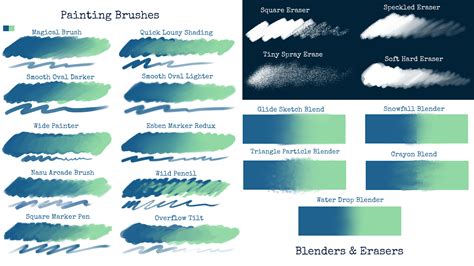
These tools are not merely decorative; they are integral to efficiently translating your artistic ideas into compelling visuals. Exploring the vast library of user-created and official assets available for Clip Studio Paint can unlock new possibilities and streamline the creation of intricate details and atmospheric effects.
The developers of Clip Studio Paint, along with numerous third-party creators, continuously contribute to an ever-expanding library of brushes, textures, 3D models, and other assets. These resources can be found on the official Clip Studio Assets store and various community forums, offering a treasure trove for artists looking to customize their toolkit.
Understanding the Underlying Technology and Licenses
The development and distribution of sophisticated software like Clip Studio Paint involve a complex ecosystem of underlying technologies and licenses. While users primarily interact with the application's interface, the software itself relies on numerous open-source libraries and components, each governed by specific licensing agreements. Understanding these licenses, such as the GNU General Public License (GPL) or the MIT License, provides insight into the principles of software freedom and the legal frameworks that enable collaborative development.
For example, the Android version of Clip Studio Paint might incorporate components like FreeType, libuuid, OpenAL Soft, or OpenBLAS, each with its own set of terms and conditions. Similarly, the Windows version may utilize Microsoft.Web.WebView2, ncurses, or OpenCL-ICD-Loader. These acknowledgments, often found in the software's "About" or "License" sections, are not just legal formalities; they represent the collaborative spirit of the software development community.
The "AS IS" disclaimer, frequently seen in these licenses, signifies that the software is provided without warranty. This is a standard practice in open-source and commercial software distribution, emphasizing that users assume responsibility for the software's use and any potential consequences. The warranties of merchantability, fitness for a particular purpose, and non-infringement are explicitly disclaimed, meaning the creators do not guarantee the software will meet specific user needs or be free from defects.
The inclusion of various libraries like Intel MKL, Vulkan, Glslang, and others highlights the advanced technical underpinnings of Clip Studio Paint, enabling features such as high-performance computing, graphics rendering, and cross-platform compatibility. Each of these components comes with its own set of usage rights and limitations, ensuring that the intellectual property of their respective developers is respected.
The extensive legal text surrounding software licenses, including disclaimers and limitations of liability, serves to protect both the developers and the users by clearly defining responsibilities and expectations. While this legally dense information might seem overwhelming, it underscores the importance of adhering to the terms of use for any software you employ in your creative workflow.
The contributions of various entities, such as The Closure Library Authors, The OpenSSL Project, The Regents of the University of California, and the Mozilla Foundation, among many others, are vital. Their open-source contributions form the backbone of many modern software applications, fostering innovation and accessibility within the digital landscape. By understanding and respecting these licenses, users contribute to the continued growth and availability of powerful creative tools like Clip Studio Paint.
The legal framework surrounding software, particularly concerning intellectual property and distribution, is complex. When you download software through unofficial channels, you are not only risking your computer's security but also engaging in activities that undermine the efforts of developers and contributors who rely on legitimate sales and licensing to continue their work. Choosing the legal path ensures you receive a stable, secure, and fully supported product, allowing you to focus on what truly matters: your art.
The mention of specific projects and their licenses, such as FreeType, libuuid, OpenAL Soft, OpenBLAS, Vulkan, Glslang, and others, showcases the intricate web of open-source collaboration that underpins modern software. These components, often developed and maintained by dedicated communities, are integrated into applications like Clip Studio Paint to provide specific functionalities, from audio processing and graphics rendering to high-performance computing. The licenses associated with these components, such as the GNU General Public License (GPL) and various MIT-style licenses, dictate how they can be used, modified, and distributed. Understanding these terms is essential for developers and, to a lesser extent, for users who wish to appreciate the open and collaborative nature of software development.
The extensive disclaimers of warranty and limitations of liability found within these licenses are standard legal practices. They serve to protect the developers and copyright holders from being held responsible for any damages or issues that may arise from the use of their software. This emphasizes the user's responsibility to ensure the software is suitable for their intended purpose and to implement appropriate security measures. The "AS IS" nature of many software distributions means that users are accepting the software in its current state, with all its potential flaws and limitations.
The inclusion of specific libraries and their associated legal text, such as those related to Intel MKL or the Android Support Libraries, further illustrates the diverse technical foundations of Clip Studio Paint. These components contribute to performance optimization, cross-platform compatibility, and the overall functionality of the application. Respecting the licensing terms of each of these components is crucial for maintaining a legal and ethical software ecosystem. Ultimately, by opting for legitimate purchase channels, users not only secure their digital environment but also support the ongoing development and innovation within the creative software industry.