Clip Studio Paint, a powerhouse application for digital artists, illustrators, comic creators, and animators, has undergone a remarkable transformation since its inception. What began as a focused tool for manga creation has blossomed into a comprehensive, multi-platform creative suite, celebrating its tenth anniversary in May 2022 with a user base exceeding 25 million. This journey, marked by continuous innovation and a deep commitment to user feedback, is a testament to the dedication of its development team and the evolving landscape of digital art.
Genesis and Early Development: Laying the Foundation
The seeds of Clip Studio Paint were sown around 2010, with development actively commencing two to three years before its official release. Initially, the development team was a lean operation, comprising only five to six individuals. This small, dedicated group poured their expertise into crafting a program that would redefine digital art creation.
A pivotal focus during this early stage was the "pen rendering." Yokotsuka, a key figure in the development, dedicated weeks to meticulously fine-tuning how the pen input translated onto the canvas. This involved countless hours of adjusting stroke endings, correction mechanisms, and the nuanced expression of pen pressure. This intense focus on the core drawing experience, even before the formal testing phase, was instrumental in ensuring the application would deliver superior drawing quality from its launch. The testing team, in turn, faced the significant challenge of conducting rigorous printing tests, including repeatedly printing dozens of pages on laser printers to meticulously assess the appearance of screentones.
The very name "CLIP" encapsulates the project's ambitious vision: "Creator," "Link," and "Platform." The concept was to create a global platform that would connect creators worldwide, fostering a community unbound by the limitations of existing media. During the initial development phases, a codename was used before a definitive product name was established.
From Manga Studio to Global Recognition: A Name Change and Expanding Horizons
The English version of the software, initially sold in North America and Europe, was known as "Manga Studio." This name reflected its primary target audience and its strong roots in the manga creation workflow. However, as the application's capabilities expanded and its appeal broadened, a strategic rebranding took place. The name was changed to Clip Studio Paint, a move that better represented its versatility beyond just manga.
This rebranding was accompanied by a significant expansion of its linguistic reach. Following the English release, Clip Studio Paint was introduced in Traditional Chinese in 2013. The following years saw further localization efforts, with French and Spanish versions arriving in 2014, Korean in 2016, and German in 2017. This multilingual approach was crucial in making the software accessible to a global audience of artists. The ability to easily replicate deformed, manga-style art became a hallmark of the application.
Core Features and Innovations: Empowering Creators
Clip Studio Paint's evolution has been driven by the introduction of innovative features designed to streamline and enhance the creative process. One such feature, highly anticipated by comic artists, was the black-and-white layer. Its addition was met with great enthusiasm from the user community, highlighting the development team's responsiveness to creator needs.
The "Manga Perspective" ruler is another feature that has garnered significant praise. Its utility extends far beyond its intended purpose, enabling artists to draw everything from straight-on faces to intricate lace, snow crystals, and complex magic circles with ease. This feature not only provides practical drawing assistance but has also been celebrated on social media for making the act of drawing more enjoyable and engaging.
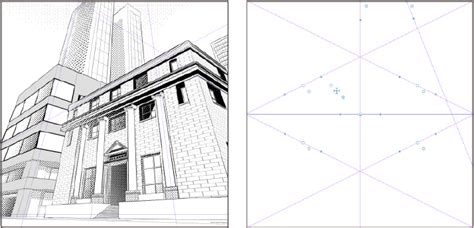
The "Symmetrical ruler" further exemplifies the application's commitment to facilitating complex artistic tasks. Whether it's creating delicate patterns, symmetrical designs, or intricate details, this tool empowers artists to achieve precise and beautiful results with greater efficiency.
Animation: A Leap into Motion Graphics
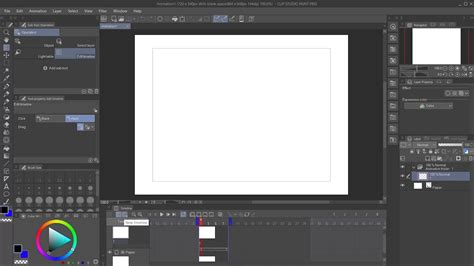
Celsys, the company behind Clip Studio Paint, has consistently aimed to support animation studios in their transition to digital workflows. This commitment culminated in the integration of a robust animation suite into Clip Studio Paint in 2015.
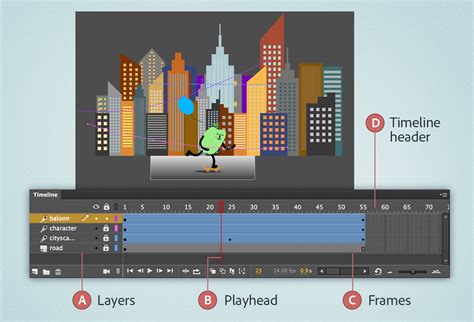
The development of the animation features presented a significant technological challenge. Inaba, a member of the development team, described the animation feature's creation as a "huge achievement," fraught with difficulties from initial planning to actual implementation. The "File object function," a complex technological undertaking, was a particular point of focus.
While the initial release of the animation tools garnered some critical feedback and difficult opinions, the development team actively engaged with the industry, incorporating extensive user feedback into subsequent updates. This iterative process led to the animation features becoming a core component of Clip Studio Paint, with the software now being utilized by numerous animation companies. The recent surge in independent animators experimenting with the software has been a welcome surprise to the development team.
Community Engagement and Creative Promotions: Beyond the Software
Clip Studio Paint's relationship with its user base extends beyond the software itself. The company has actively engaged with its community through various promotional campaigns and events. These initiatives have ranged from practical rewards like winning rice (inspired by the idea that creators should be able to eat with one hand while working) to unexpected collaborations.

The pursuit of collaborations, though often met with initial rejections due to the company's then-lesser-known status, has been a strategic effort to broaden the application's reach and showcase its versatility. Shinta, reflecting on these campaigns, noted the joy and social media engagement that often followed when handwritten letters were included with prizes, underscoring the personal connection fostered with the winners. Looking ahead, Shinta expressed a desire to explore collaborations with diverse industries such as fashion, architecture, and automobiles, demonstrating novel applications of Clip Studio Paint.
The introduction of APNG file support, making it easier for individuals to create animated stickers for platforms like LINE, further exemplifies Clip Studio Paint's responsiveness to emerging trends and user desires. The testing team found this update particularly enjoyable, creating and testing original APNGs to ensure seamless integration.
Global Reach and Accessibility: Bridging Digital Divides
The expansion of Clip Studio Paint's multilingual support, beginning with Clip Studio ASSETS, was a crucial step in making the platform truly international. Yamazaki highlighted the necessary interface renewal to ensure creators worldwide could use the software smoothly across various devices and operating systems.
Recognizing the challenges users faced in searching for materials by name, the development team introduced a search function by Content ID. This, alongside the growing international user base that now comprises over 50% of its users, spurred an increase in international events and contests.
Joana, who has hosted international online drawing parties and regular livestream events, emphasized the ongoing challenge of time differences when catering to an overseas audience. The International Comic/Manga Schools Contest, a yearly event, stands out as a particularly impressive initiative, drawing student submissions from across the globe. The task of translating these submissions while preserving their original nuance is a complex but rewarding endeavor.
Nakazawa recounted the early days of using machine translation and outsourced services for overseas user support before the official English version's release. The subsequent expansion into more languages led to an "explosion" in the overseas user base, solidifying Clip Studio Paint's status as a global creative tool. The company's commitment to supporting creators with deadlines, understanding the international nature of their work, remains a core tenet of its user support.
Mobile Revolution and AI Integration: Embracing New Technologies
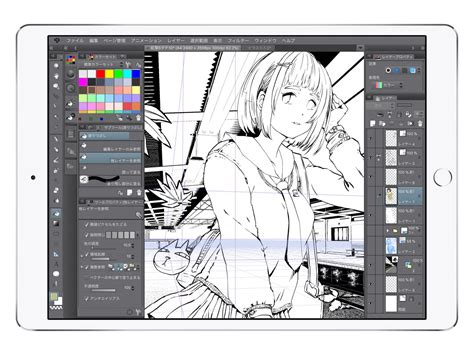
The advent of powerful mobile devices presented new opportunities and challenges for Clip Studio Paint. Inaba, a personal admirer of Apple products, had been researching the integration of Clip Studio Paint with devices like the Apple Pencil even before the official project began. Within approximately three months, a prototype was developed, and within a year, all core features of the program were operational on the iPad. This period involved extensive personal testing and refinement by Inaba, identifying bugs and improving usability.
The integration of AI technology, particularly for colorization, marked another significant leap. Yokotsuka described the development of the AI Colorization feature as a month-long process of intense trial and error. Each morning involved checking output results and adjusting parameters that seemed to hinder the machine learning process.
The expansion to the iPhone presented unique UI challenges. While the iPad version's interface could technically run on the iPhone, it was not user-friendly. The development team engaged in a "battle" to create a truly mobile-optimized UI for smaller screens.
The platform's reach continued to expand, with the iPhone version launching in December 2019, followed by Galaxy, Android, and Chromebook devices in 2020. This expansion required significant testing efforts, with the testing team procuring Galaxy devices from various countries simultaneously to ensure cross-device compatibility. The Android development team, initially small, grew to include engineers from different branches of the company to manage the extensive range of devices and languages.
Shimada highlighted the logistical shift in testing, moving from just Windows and Mac to a multitude of platforms including iPad, iPhone, Chromebook, and Android smartphones and tablets. This necessitated testers managing a significantly larger and more expensive collection of devices. The challenge was further compounded by testing across seven languages.
The Perpetual Journey of Updates and Versions: A Commitment to Evolution
Clip Studio Paint's history is punctuated by a relentless cycle of updates and major version releases, reflecting a deep-seated commitment to continuous improvement. From its initial release in 2012, the application offered free updates for its one-time purchase versions for a decade. This model fostered loyalty and allowed creators to benefit from ongoing enhancements without additional cost.
The transition to paid major version upgrades, beginning in 2023 and continuing into 2024 with Ver. 4.0 and Ver. 5.0 respectively, has been met with positive reception. These major updates introduce significant new features and refinements, driving user engagement and sales. The introduction of Ver. 4.0 on March 12 worldwide across all major platforms marked a significant milestone.
The features of Version 4.0 were made accessible to users of earlier one-time purchase versions through either a subscription service or a discounted purchase of the new version. For users of perpetual licenses (one-time purchases) of Ver. 4.0 or earlier, upgrading to Ver. 5.0 became an attractive option. Annual/Monthly Plan and Update Pass users automatically receive access to the latest versions.
Key Innovations Across Versions:
Version 4.0 and Beyond:
- Smart Shape: This feature allows users to draw clean straight lines, curves, and figures by simply long-pressing with a pen or brush, eliminating the need to switch to a separate Figure tool.
- 3D Hand Model: High-quality, customizable 3D hand models were added to the Material palette, providing artists with invaluable references for drawing hands.
- Batch Export Textures: Users can now export all textures of custom materials or 3D models at once from the Tool Settings and Advanced Tool Settings palettes.
- Height from Fog: This new option allows for more sophisticated control over 3D layers in the Tool Settings palette.
- Multi-Layer Tonal Correction: Commands in the Edit menu for Tonal Correction can now be applied to multiple layers simultaneously, streamlining post-processing.
- Recently Used Materials Folder: A dedicated folder for recently accessed materials simplifies workflow.
- Frequency Sorting: A new sorting option in the Material palette menu enhances material organization.
- Asset Icon Updates: Icons for materials downloaded from Clip Studio ASSETS have been updated to match the Clip Studio icon design and repositioned for better clarity.
- Save Location Display: The save location of selected materials is now clearly shown in the material details.
- Pop-up Palettes: Tool-related palettes can now be set to pop up automatically when tapping tool icons, improving accessibility.
- "Sub Tool" Renamed to "Tool": A nomenclature change for clarity and consistency.
- Save Recovery Data: A new preference allows for saving recovery data after every operation, enhancing data safety.
- Hide All Visible Draft Layers: A new option in the Layer menu to quickly hide all draft layers.
- VRM File Import: Support for importing VRM files in a photorealistic rendering format was added for Windows, macOS, iPad, and iPhone.
- Import from Clipboard: Functionality to load images copied to the clipboard directly into the Sub View palette was introduced for Android and other platforms.
- Default Layout Changes: Version 4.2 layout options were added to the Window menu, allowing users to revert to earlier default layouts.
- Perspective Ruler Grid Interval Stability: Perspective ruler grid intervals now remain consistent when moving files between different environments.
- Embed ICC Profile: PDF export settings now include an option to embed color profiles and select CMYK color from Expression color.
Version 5.0 and Future Directions:
Version 5.0 represents the next evolutionary step, incorporating all features added since Ver. 4.0, along with numerous new enhancements. This includes faster painting with large brushes, improved blending quality in Ink settings, and continuous saving of data for restoration. The commitment to multilingual support across all platforms continues, ensuring global accessibility.
The pricing and upgrade structure for these newer versions reflects Celsys's adaptive business model. Perpetual license users have options to upgrade at discounted rates or opt for subscription-based "Update Passes" to access the latest features and ongoing updates. For companies and educational institutions, volume licenses offer managed solutions for remote work and learning environments.
The introduction of Clip Studio Paint Ver. 4.0 and the anticipation for Ver. 5.0 underscore Celsys's dedication to providing a dynamic and evolving platform. With over 45 million users worldwide, Clip Studio Paint continues to empower creators across a vast spectrum of artistic endeavors, from intricate illustrations and compelling comics to dynamic webtoons and captivating animations. The journey from a small team developing a specialized tool to a global creative ecosystem is a testament to the power of innovation, user-centric design, and a forward-looking vision.