The digital art landscape is brimming with powerful tools, and two names that frequently surface in discussions among artists are Clip Studio Paint and Procreate. While both serve the fundamental function of enabling digital art creation, they cater to distinct user needs and artistic workflows. Understanding their differences is crucial for artists seeking the most effective platform to bring their visions to life. This article aims to dissect these two popular applications, exploring their features, pricing, ease of use, and ideal use cases to help you make an informed decision.
Core Philosophies and Target Audiences
At their core, Clip Studio Paint and Procreate represent divergent philosophies in digital art software design. Procreate, exclusively available on iOS devices, is celebrated for its simplicity, intuitive interface, and seamless integration with the Apple Pencil. It's designed to feel natural and immediate, prioritizing a fluid drawing and painting experience. This makes it an excellent choice for artists who value a straightforward approach and enjoy sketching and painting on the go, particularly those who prefer working on a single canvas with a focus on illustration and fine art. Its design encourages direct interaction, making it feel less like a complex software and more like a digital sketchbook.
Clip Studio Paint, on the other hand, is a more comprehensive and technically advanced professional-grade digital art software. While it is also available on iOS, its true strength lies in its cross-platform availability, extending to macOS, Windows, and Android. This versatility makes it a preferred choice for a broader range of creative professionals, especially those involved in comic creation, manga, illustration, and animation. Clip Studio Paint is built with a deep feature set that allows for intricate control, complex workflows, and specialized tasks that go beyond simple drawing and painting. Its complexity, while offering immense power, means it has a steeper learning curve compared to Procreate.
User Interface and Workflow
The user interface and workflow are often the first points of contact an artist has with a new application, and this is where Procreate truly shines for many. Its interface is remarkably clean and uncluttered, with essential tools like the brush and eraser readily accessible, alongside intuitive layer and color menus. This organization is highly streamlined, making it exceptionally beginner-friendly. The touch-based interaction is optimized for iPad, ensuring that every gesture feels natural and responsive. Artists can work on a canvas that is as expansive as what they would typically use on a desktop, dividing their work into numerous layers, applying filters, and experimenting with different color modes with ease. The emphasis is on getting started quickly and maintaining a fluid creative process.
Clip Studio Paint, in contrast, presents a more technical and feature-rich interface. While it also offers excellent touch controls and Apple Pencil integration, its layout is designed for greater precision and control over a wider array of tools and settings. This can initially appear more daunting to newcomers, but it's this very complexity that empowers artists with granular adjustments. For instance, when creating comics, Clip Studio Paint has specific features that streamline panel creation, speech bubble placement, and even perspective rulers. The layer management is also more robust, catering to complex projects with numerous elements. The workflow is geared towards detailed work, enabling artists to fine-tune every aspect of their artwork, from line weight to shading.
Brushes and Customization
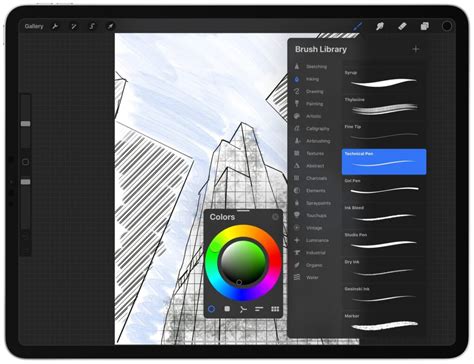
The heart of any digital art software lies in its brush engine, and both Clip Studio Paint and Procreate offer extensive options, albeit with different strengths. Procreate comes equipped with over 200 default brushes, each designed to offer a natural, painterly feel. While creating custom brushes is possible and relatively straightforward, the customization options for these brushes are less advanced compared to Clip Studio Paint. Procreate's brush system encourages experimentation and helps artists achieve expressive, painterly effects with its readily available tools.
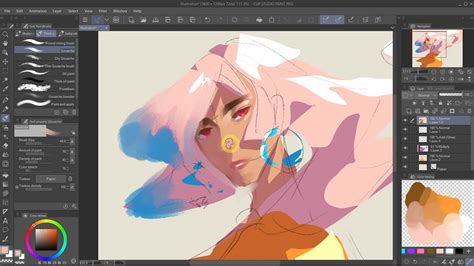
Clip Studio Paint boasts a significantly larger library of brushes, with thousands available, and its brush engine offers unparalleled flexibility and customization. This is particularly beneficial for artists working in specific styles, such as inking for comics or replicating traditional media. Artists can delve deep into brush settings, adjusting parameters like texture, shape dynamics, stabilization, and even creating entirely new brush behaviors from scratch. Furthermore, Clip Studio Paint features an extensive online asset library, often referred to as the "Clip Studio Asset Store," where artists can download or even upload brushes, materials, and 3D models created by the community. This vast ecosystem of user-generated content significantly expands the creative possibilities.
Features and Capabilities
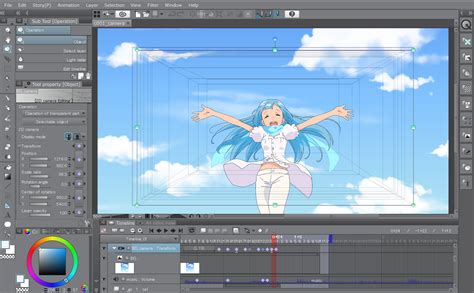
When it comes to specialized features, Clip Studio Paint generally takes the lead, particularly for artists working in sequential art and animation. Its comic creation tools are a standout advantage. Features like perspective rulers, customizable panel layouts, and tools for easily creating and managing speech bubbles and text directly address the needs of comic artists. For those venturing into animation, Clip Studio Paint offers advanced animation support, including a detailed timeline editor, frame-by-frame control, and onion skinning, which are essential for creating complex motion sequences. It also allows for vector creation, a feature that Procreate does not natively offer, providing scalability without loss of quality.
Procreate, while excelling in illustration and painting, has more limited animation capabilities. It offers basic animation tools that allow for the creation of simple GIFs or short frame sequences, which are great for quick animations or storyboarding. However, for professional-grade animation projects, Clip Studio Paint's dedicated tools are far more suitable.
Pricing and Platform Availability
One of the most significant differentiators between Clip Studio Paint and Procreate is their pricing model and platform availability. Procreate is an iOS-exclusive application, meaning it is only available on the iPad and iPhone. Its pricing is a one-time purchase of $12.99, which is remarkably affordable considering the power and versatility it offers. This "buy it once" model has been a major draw for many artists who prefer to avoid subscription fees.
Clip Studio Paint, however, offers a more complex pricing structure and broader platform availability. It is available on macOS, Windows, iOS, and Android. Artists can choose between a subscription model, starting at $8.99 per month (or a discounted annual plan), or a perpetual license for desktop versions. While the subscription might seem like a drawback for some, it's important to consider the value offered. For desktop applications, a one-time purchase often exceeds $20-30, with new major releases requiring additional purchases. The subscription model for Clip Studio Paint ensures artists always have access to the latest features and updates, making it a sustainable business model for the developers. It's also worth noting that the cost of Clip Studio Paint, even with subscriptions, is often comparable to the ongoing costs associated with major desktop art software. The plans are not considered overly expensive, especially given the extensive features provided.
File Management and Collaboration
File management is another area where the two applications diverge. Procreate primarily focuses on single-page creations. While it excels at painting and sketching, it lacks built-in multi-page management. This means that for projects requiring multiple pages, such as comic books or storyboards, artists need to manage these files externally or use workarounds.
Clip Studio Paint, on the other hand, natively supports multi-page projects. This is a significant advantage for comic artists and illustrators working on longer narratives. It also offers excellent PSD compatibility, which is crucial for artists who need to collaborate with others or integrate their work into existing professional pipelines that rely on Adobe Photoshop. This flexibility allows for more efficient management of collaborative projects and seamless integration into various workflows.
Apple Pencil Integration and Pen Dynamics
Both Procreate and Clip Studio Paint offer excellent support for the Apple Pencil, ensuring that every stroke feels fluid and natural, capturing the nuances of pressure sensitivity. However, Clip Studio Paint provides a deeper level of control over pen dynamics. Artists can fine-tune settings such as tilt, rotation, and pressure curves, allowing for highly customized line quality and brush behavior. This advanced control is invaluable for artists who require precise linework and a very specific feel to their digital strokes, especially in fields like inking and technical illustration. Procreate, while offering a fantastic drawing experience, keeps these settings simpler, focusing on an intuitive out-of-the-box experience.
Animation Tools
For artists interested in animation, Clip Studio Paint is the clear winner. It offers a comprehensive suite of animation tools, including a robust timeline editor, frame-by-frame animation capabilities, and onion skinning, which allows artists to see previous frames while drawing the current one. These features are essential for creating professional-quality animations directly within the application. Procreate's animation features are more basic, suitable for creating short animated GIFs or simple frame sequences, but they lack the depth and complexity required for more ambitious animation projects.
Procreat vs Clip Studio Paint - Which Is Best For You #ArtApp
Community and Assets
While Procreate has a growing and active community, it lacks the integrated asset library that Clip Studio Paint offers. Artists using Procreate often rely on third-party websites and downloads for additional brushes, textures, and assets. Clip Studio Paint, however, features an extensive online asset store where users can find a vast array of free and paid brushes, 3D models, patterns, and other materials created by fellow artists. This integrated ecosystem significantly enhances workflow versatility and provides artists with a rich source of creative resources without leaving the application.
Which Software Should You Choose?
The choice between Clip Studio Paint and Procreate ultimately hinges on your individual artistic needs, workflow, and budget.
Procreate is the ideal choice if:
- You are primarily an illustrator or painter who values simplicity and an intuitive, touch-based interface.
- You work exclusively on an iPad and prefer a one-time purchase model.
- You enjoy a fluid, natural drawing and painting experience with minimal setup.
- You are a beginner looking for an easy-to-learn yet powerful digital art application.
- You appreciate a streamlined workflow for single-page creations.
Clip Studio Paint is the better option if:
- You are a comic, manga, or webcomic artist who requires specialized tools for sequential art.
- You are an animator looking for robust animation features within your art software.
- You need advanced customization for brushes and a more technical control over your tools.
- You work across multiple platforms (desktop and mobile).
- You benefit from a vast library of integrated assets and community-created content.
- You are comfortable with a subscription model or a perpetual license for desktop software.
- You require advanced features like vector creation and multi-page project management.
While Procreate offers an effortless and affordable entry into digital art, Clip Studio Paint provides a more comprehensive and versatile toolkit for professionals and those with more specialized creative demands. Both applications are excellent in their own right, and many freelance artists find themselves using and praising both, often depending on the specific project. The "best" software is subjective and deeply personal, dependent on how you create and express your imagination. Ultimately, what you learn and how you apply your skills will define you as a good and professional artist, regardless of the tools you choose.