When embarking on any design project destined for print, a fundamental understanding of the CMYK color model is not just beneficial, it's essential. CMYK, an acronym that stands for Cyan, Magenta, Yellow, and Key (black), forms the bedrock of professional color printing. This four-color process is the standard in the printing industry, enabling the creation of a vast spectrum of hues through a subtractive method. This approach stands in stark contrast to the RGB (Red, Green, Blue) color model, which is prevalent in digital displays and relies on an additive process. The conversion from RGB to CMYK is a critical juncture for anyone involved in professional printing, ensuring that the colors envisioned on screen translate accurately to the physical medium. Whether you are crafting brochures, eye-catching posters, or intricate packaging, a firm grasp of CMYK codes is paramount for maintaining color fidelity from the digital realm to the printed page.
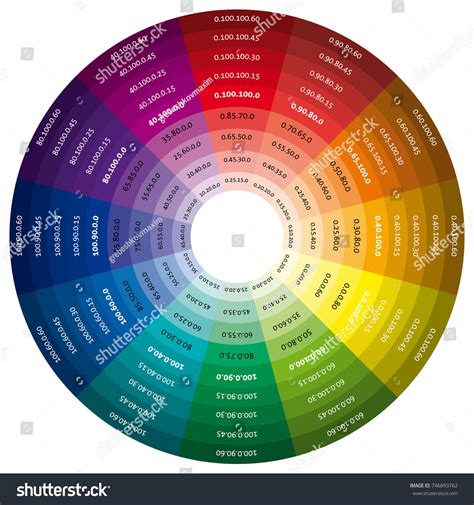
The Building Blocks of CMYK: Cyan, Magenta, Yellow, and the Crucial 'K'
At its core, the CMYK color model is built upon four primary ink colors: Cyan, Magenta, and Yellow. These three inks are the foundation, and by combining them in varying proportions, a wide array of colors can be achieved. However, to achieve true blacks, deep shadows, and nuanced tonal variations, a fourth ink is indispensable: Black, represented by the letter 'K'.
The inclusion of black ink is a practical necessity. While theoretically, mixing equal and sufficient amounts of cyan, magenta, and yellow should produce a pure black, the reality of ink impurities makes this difficult to achieve consistently. The 'K' in CMYK stands for "Key," a term with historical roots in traditional printing. The "key plate" was the printing plate that carried the most detail, often the black ink, and was used to align the other color plates for precise registration. Thus, "Key" became synonymous with black in the printing process. This designation also cleverly avoids ambiguity, as 'B' could easily be mistaken for 'Blue' in a design context.
The role of black is crucial for adding depth and contrast to printed images. While RGB, designed for light-emitting screens, can produce vibrant and luminous colors, CMYK, designed for light-absorbing print media, requires black ink to create rich, dark tones and to ensure that colors appear as intended on paper. For instance, a "true black" is typically achieved with 100% black ink, while a "rich black," offering greater depth for large solid black areas, is created by combining black with percentages of cyan, magenta, and yellow (e.g., C=60%, M=60%, Y=60%, K=100%).
The Subtractive Dance: How CMYK Creates Color
The CMYK color model operates on a subtractive principle. This means that colors are created by absorbing certain wavelengths of light and reflecting others. When inks are applied to a white surface, such as paper, they mask or "subtract" portions of the white light that would otherwise be reflected.
- Cyan ink absorbs red light, reflecting blue and green light, thus appearing bluish-green.
- Magenta ink absorbs green light, reflecting red and blue light, appearing purplish-red.
- Yellow ink absorbs blue light, reflecting red and green light, appearing as a bright yellow.
By layering these inks in precise percentages, printers can control which wavelengths of light are absorbed and which are reflected, thereby creating a vast spectrum of colors. For example, combining cyan and magenta inks, when viewed through a white background, will absorb both red and green light, resulting in the perception of blue. Similarly, cyan and yellow combine to create green, and magenta and yellow create red.
The beauty of the CMYK model lies in its ability to reproduce a wide range of colors with just these four inks. When you see a printed image, what appears as a solid color is often an intricate arrangement of tiny dots of cyan, magenta, yellow, and black ink.
Halftoning: The Illusion of Continuous Tone
The ability of CMYK printing to produce continuous-tone images, where smooth transitions between colors and shades are perceived, relies heavily on a technique called halftoning. This method, which dates back to the 20th century, involves breaking down an image into a series of tiny dots of varying sizes and densities.

Each of the four CMYK inks is applied through a separate printing screen, with the dots for each color often angled differently to prevent moiré patterns (undesirable visual interference). When viewed from a typical reading distance, the human eye blends these closely spaced dots, creating the illusion of solid colors and smooth gradients. Varying the size and density of these dots allows for the simulation of different tones, from the lightest highlights to the deepest shadows. A dense cluster of small dots will appear lighter, while larger, more closely spaced dots will create darker areas. This meticulous arrangement of dots is what allows CMYK printing to achieve a rich and nuanced visual output.
RGB vs. CMYK: A Tale of Two Worlds
It's crucial to understand the fundamental difference between the RGB and CMYK color models, as this is a common source of color discrepancies in design projects.
RGB (Red, Green, Blue) is an additive color model. It's used for digital displays like monitors, televisions, and smartphones. In RGB, colors are created by adding light. Starting with black (no light), adding red, green, and blue light in varying intensities creates a vast spectrum of colors. When all three primary colors are combined at full intensity, they produce white light. The RGB spectrum is broader than CMYK, offering more vibrant and luminous colors that are achievable on screens.
CMYK (Cyan, Magenta, Yellow, Key/Black) is a subtractive color model. It's used for printing. In CMYK, colors are created by subtracting light from a white or light background. The inks absorb certain wavelengths of light, and the remaining wavelengths are reflected back to our eyes. White is the absence of ink (the paper's color), and black is created by combining all four inks.
This difference in how colors are generated explains why a design that looks brilliant on screen might appear dull or different when printed. The RGB spectrum simply has colors that cannot be accurately replicated using CMYK inks. Therefore, for any design intended for print, it is imperative to work within the CMYK color space from the outset or to convert it appropriately before printing.
The Reliability and Consistency of CMYK
One of the significant advantages of the CMYK color model is its reliability and consistency in printing. When organizing a batch of prints, whether it's for business cards, flyers, or large-format posters, CMYK ensures that the color remains consistent across each individual print. This is a crucial factor for brand recognition and maintaining a professional image.
How to Get Brighter Prints for Your Print on Demand Products - RGB vs CMYK
The standardization of CMYK inks and printing processes means that a specific CMYK code will yield a predictable color outcome, regardless of the printing run. This makes it the preferred choice for commercial printing services, where uniformity and accuracy are paramount. While RGB offers a wider gamut of colors on screen, its additive nature is not suitable for physical media that absorb light. CMYK's subtractive approach, coupled with the precision of halftoning, allows for the reproduction of a substantial portion of the visible color spectrum in a predictable and reproducible manner.
File Formats and Conversion for Print
To ensure that your designs are print-ready, it's important to use appropriate file formats that support the CMYK color model. Common file formats that are well-suited for CMYK include:
- PDF (Portable Document Format): A versatile format that preserves layout and is widely accepted by printers.
- TIFF (Tagged Image File Format): Often used for high-resolution images, supporting CMYK color.
- EPS (Encapsulated PostScript): A vector-based format that can contain CMYK color information.
- AI (Adobe Illustrator): Native to Adobe Illustrator, this vector format is ideal for designs intended for print and supports CMYK.
When working with design software, such as Adobe Photoshop, converting an image from RGB to CMYK is a straightforward process. Typically, this involves navigating to an "Image" menu, selecting "Mode," and then choosing "CMYK Color." However, it's important to note that some colors may shift during this conversion due to the inherent limitations of the CMYK gamut compared to RGB. Therefore, it is advisable to preview the colors in CMYK mode and make any necessary adjustments to maintain the integrity of your design.
Beyond the Basics: Expanded Gamuts and Spot Colors
While the standard CMYK model covers a broad range of colors, there are instances where even greater color fidelity or vibrancy is required. In such cases, designers might explore expanded CMYK systems, which incorporate additional ink colors beyond the standard four. Terms like "CMYKOGV" refer to systems that might include orange, green, and violet inks to further broaden the printable color gamut and achieve more vibrant results.
Furthermore, for applications demanding absolute color precision, such as critical brand colors, printers often utilize "spot colors" or "Pantone colors." Pantone is a standardized color matching system that provides a vast library of pre-mixed inks, allowing for exact color replication that might be unattainable with the standard CMYK process alone. While CMYK is excellent for full-color process printing, spot colors offer an alternative when a specific, consistent hue is paramount. Many printing presses are capable of combining both process (CMYK) and spot colors within a single print job.
Designing for Print: Practical Considerations
When preparing designs for printing, several practical considerations come into play. Utilizing CMYK color swatches and digital tools within design software can aid in achieving precise color representation. Tools like Photoshop's CMYK preview mode are invaluable for visualizing how colors will translate from screen to print.
Remember that factors such as paper type and finish can also influence the final appearance of printed colors. Glossy paper, for example, tends to make colors appear more vibrant than matte paper. Understanding these nuances, alongside the core principles of CMYK, empowers designers to create impactful and visually accurate printed materials that effectively communicate their message and brand identity.
Whether you're creating a striking flyer to showcase an event, designing professional business cards to foster connections, or crafting personalized greeting cards, a solid understanding of the CMYK color model is your gateway to achieving professional, high-quality printed results. It's the silent, yet indispensable, partner in bringing your visual concepts to life on paper.