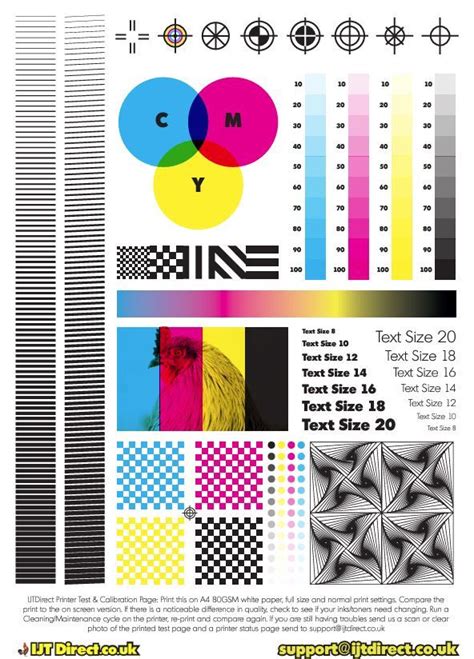
The journey of almost every printer begins with a fundamental test print. Whether it's immediately after assembly on the production line, after being connected at your desk, or within a professional industrial printing facility, a test print serves as the initial validation of functionality. This is precisely where test page templates, often provided as simple PDF files, become incredibly handy. These templates are designed to incorporate a variety of exercises, meticulously crafted to verify that a system or device is functioning up to a standard. Such test page templates are not limited to printers; they can be effectively utilized to test a wide array of systems and devices, encompassing scanners, other hardware, as well as software applications and operating systems.
While the specific testing materials provided by a manufacturer can vary, they typically include test pages, color charts, and other documents specifically designed to help users evaluate the performance of their printer. Employing these manufacturer-provided testing materials is an excellent method to ensure that you are obtaining accurate and reliable results. This is because these materials are usually developed with the specific products of the manufacturer in mind, leading to more precise evaluations.
Beyond Basic Functionality: The Role of CMYK Test Prints
Printing tests offer benefits that extend far beyond merely verifying that a printer is operational. In fact, troubleshooting printing accuracy, calibration, and color deviations using standard text documents and common images is often an exercise in futility. This is where the CMYK test print template distinguishes itself. It is specifically engineered to isolate misbehavior within the printing process, thereby pointing directly to the culprit behind any issues. This targeted approach leads to quicker problem identification and a more straightforward resolution. A key recommendation for effective analysis is to consistently use the same test page for comparison purposes. By retaining these results, you establish a baseline for tracking any changes or degradation in print quality over time.
To ensure the most accurate results from any test print, it is imperative to use a high-quality, high-resolution test file. This file should encompass a diverse range of colors and gradations. Furthermore, the test page itself should be designed to present a challenge to the printer, actively engaging all available colors under a variety of different conditions. Through the systematic printing of these specialized test pages, users can effectively analyze and calibrate their printer’s performance, addressing issues before they impact critical print jobs.
Common Printer Issues Revealed by Test Pages
Several common printer ailments can be effectively diagnosed and understood through the use of CMYK test pages:
Blocked Printheads
Blocked printheads are a frequent cause of poor print quality. These blockages can occur for numerous reasons, but the most prevalent is the drying out of ink within the ink cartridge and the printer head itself. This issue is particularly common if a printer is not used frequently. To mitigate this, a practical recommendation is to cover the printer when it is not in use, thereby protecting it from accumulating dirt and debris that can exacerbate the problem.
Alignment Issues
Regardless of the printer brand, whether it be from HP, Brother, or any other manufacturer, alignment can falter. This often occurs due to cartridges not sitting evenly within their designated slots. Poor alignment directly impacts the precision of ink droplet placement, leading to blurry text, misaligned graphics, and overall diminished print quality.
Inconsistent Ink Flow
If an inkjet printer has remained idle for an extended period, its printheads may become blocked. Additionally, the ink within and surrounding the printer cartridge can dry out, leading to an inconsistent flow of ink. This inconsistency manifests as missing lines, faded areas, or blotchy patches in printed output.
The Significance of CMYK Color Space
The frustration of spending countless hours designing a document or packaging, only to find that your printer has rendered the colors inaccurately, is a common experience. It's crucial to understand that the issue isn't necessarily with your design itself, but rather with how colors are interpreted and reproduced by different devices. The most effective way to define colors is by using numerical values associated with various pigments. These numbers are objective and do not change, unlike our subjective perception of colors.
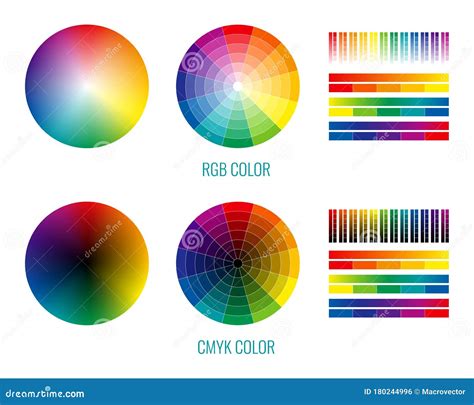
While computer screens typically use the RGB (Red, Green, Blue) color system, which is optimized for light emission, high-end digital printers rely on the CMYK (Cyan, Magenta, Yellow, and Key/Black) color model. This four-color process is subtractive, meaning it works by absorbing light. The variances between RGB and CMYK can be significant, directly impacting the appearance of secondary and tertiary colors. RGB is a three-color process, representing the primary colors of light. CMYK, on the other hand, is a four-color process, using pigments to create a broader range of colors on paper.
In a typical software program like Microsoft® Word, the colors you select are often represented by the RGB system, which is intended for on-screen viewing, not for printed output or physical products. Imagine a scenario where you've designed a product with both plastic and metal components, and both materials need to be a specific shade of bright red. The good news is that you can specify the color of your product with greater precision using the CIE Chromaticity Diagram, also known as the LAB color space. The LAB color space functions as a universal translator for different devices and offers a higher degree of accuracy than both RGB and CMYK. When you utilize LAB colors in software such as Adobe® Photoshop, these colors can be converted to CMYK or RGB for printing.
Production print specialists often work with sophisticated printing presses that can cost hundreds of thousands, or even millions, of dollars. These advanced systems utilize sophisticated Color Management Modules (CMMs), with examples including Adobe Color Engine (ACE), Heidelberg CMM, Kodak CMM, and Agfa CMM. To achieve the desired results, it's essential to consider the color space in which you are designing your document. Typically, designers work in the RGB color space. However, on higher-end printing systems, the Raster Image Processor (RIP) can be configured with a color space profile that matches your input source. This can lead to a noticeable difference in color reproduction between a desktop printer and a high-end production printer. To bridge this gap, you may need to make adjustments, such as calibrating your computer screen to your printer, which might require professional assistance. It is vital to have realistic expectations from the outset and to understand the intricacies of digital printing, particularly concerning color management and the translation of colors between different color spaces. While it is possible to choose either CMYK or RGB for print projects, overcoming the discrepancies between on-screen colors and their printed counterparts is a fundamental challenge faced by production print shops.
Utilizing CMYK Test Pages for Diagnostic Purposes
A CMYK test page serves as a specialized diagnostic tool, meticulously evaluating your printer's capability to accurately reproduce the four fundamental printing colors: Cyan, Magenta, Yellow, and Black (Key). This test is absolutely crucial for identifying color separation issues, color shifts, and ink alignment problems that can significantly degrade print quality. CMYK testing is indispensable in professional printing environments because it clearly reveals how effectively your printer handles four-color separation. It also pinpoints any color bias or tinting issues and ensures the precise registration between different ink colors. By performing these tests, you can effectively avoid costly misprints, minimize ink wastage, and guarantee that your final prints align with your design intentions. Ultimately, this process helps maintain consistent and accurate color reproduction across all your printing projects, saving you valuable time and money while ensuring professional-grade results.
What is the difference between RGB and CMYK?
Step-by-Step Guide to Using a CMYK Test Page
Print the CMYK Test Page: Initiate the process by clicking the designated "Print This Test Page" button. It is highly recommended to print this page on high-quality paper. To ensure the most accurate color reproduction of cyan, magenta, yellow, and black, set your printer to its highest resolution setting.
Check Primary Colors and Solid Blocks: Carefully examine each of the CMYK color blocks. Verify that the colors are pure and vibrant, with no discernible color shifts or tinting. Also, look for consistent solid coverage across these blocks, ensuring there are no streaks or gaps.
Verify CMYK Gradients and Color Scales: Inspect the gradients and color scales for each CMYK color. Confirm that all percentage steps, typically ranging from 10% to 100%, are visible and distinct. Smooth gradients without banding or abrupt color jumps are indicative of proper printer function.
Inspect Registration Marks and Alignment: Pay close attention to the registration marks, usually located in the corners of the test page. These marks are designed to ensure proper alignment between the different color layers. Any misalignment of these marks is a clear indication of registration issues.
Assess Text and Fine Detail: Evaluate the sharpness and clarity of all text elements, including percentage labels. Clear, crisp text signifies that the printer is capable of rendering fine details accurately.
Specific Guidelines for CMYK Color Print Testing
To perform a CMYK color print test effectively, ensure you have a color printer that utilizes the CMYK four-color process. Both inkjet and laserjet printers are suitable for this test, provided they employ 4 CMYK inks or toners. The test page itself should feature a variety of color swatches, gradients, and images specifically designed to challenge the printer's ability to reproduce accurate and consistent colors.
Before you begin printing the test page, it is essential to confirm that your printer is calibrated and that the color settings are correctly configured. Print the test page using the highest quality setting available and on the appropriate type of paper recommended for your printer. Once the print job is successfully completed, meticulously examine the printed test page to verify that the printer is reproducing colors accurately and consistently. If you have access to a colorimeter or spectrophotometer, you can optionally use these tools to measure the color accuracy of the printed test page for a more precise evaluation. After you are satisfied with the appearance of your printed CMYK page, you can proceed to the next diagnostic step or select another color test page from available printing test collections.
Comprehensive Printer Analysis Through Test Pages
Printer test pages are instrumental in evaluating a printer's condition, speed, paper handling, color accuracy, and ink consumption. We offer a range of print test pages, including black-and-white, color, and CMYK styles, each designed to provide valuable insights. A printer test page functions as a fundamental check to ensure your printer is working correctly. It verifies that the printer's internal programs, tools, and connections are functioning as intended. Even with a standard black-and-white printer, a test print can effectively reveal low ink levels.
The quality and color precision of your printer can be initially assessed through color test prints. These prints often feature a series of interconnected images, such as a tree, a car, a cloud, and even a fire hydrant, allowing for a visual assessment of color reproduction. Additionally, printing several pages from a PDF file can also serve as a method to evaluate the alignment of the printer. Many individuals find it beneficial to save a color test printable PDF to analyze the results over time. These color prints also serve a preparatory purpose, ensuring that the printer is in optimal condition for important print jobs.
A printer test page designed for CMYK printing consists of a simple document used to verify the basic color set of Cyan, Magenta, Yellow, and Black. When examining the test print for CMYK, if any colors appear faint, a head cleaning cycle often resolves the issue. In some cases, replacing the ink cartridges may even be necessary. Regularly performing color prints of such documents helps maintain color balance, economizes ink and paper usage, and ultimately ensures that your prints are neat and rich in color. Printable tests are invaluable for verifying whether any color is missing, or if existing colors appear washed out or unclear.
One of the most straightforward methods for confirming whether your printer is functioning correctly is by printing a printer test image. Many users simply print this page, or a home or office test picture, to ensure that everything is operating as it should. A printing test image is both time- and ink-saving, as it highlights potential issues before you undertake actual printing projects.
While various printable documents like lined paper, graph paper, calendars, storyboard templates, and calligraphy paper are incredibly useful for both academic and office tasks, printable coloring pages often bring a unique sense of joy and creativity to users of all ages. Fundamentally, a printer test page offers a direct and uncomplicated method to ascertain if your printer is functioning properly. It also helps determine whether any identified issues originate from the printer itself or from the connected computer. By utilizing a test print page, you can rapidly assess colors, sharpness, and alignment. Furthermore, running a PDF test printer page or a PDF test page printer can confirm that all components are working smoothly. Even a single test color page or a PDF test print page can serve as a valuable sample, ultimately saving you time and ink by providing a clear indication of your printer's current state.
Nicky Bendall, a Product Specialist at Cartridge People, is dedicated to creating helpful content that simplifies printing and everyday office tasks for customers. With a background in developing clear and practical resources, Nicky excels at demystifying complex topics and transforming them into straightforward advice that anyone can follow. Nicky's expertise spans from step-by-step guides on printer maintenance and troubleshooting to providing free downloadable resources such as cards, calendars, and decorations. Nicky is passionate about supporting both home and office users, sharing knowledge and inspiration through the Cartridge People blog, all with the aim of saving customers time, reducing costs, and providing useful tools for their printing needs.