The digital realm of visual design relies heavily on precise color representation, and within software like Adobe Photoshop, understanding and utilizing color codes is fundamental. Whether you're a seasoned professional or a hobbyist following along with a Bob Ross tutorial, knowing how to input and interpret these codes unlocks a world of accurate color replication and creative control. This article delves into the intricacies of Photoshop color codes, exploring their nature, application, and the underlying principles that govern them.
The Role of the Color Picker in Photoshop
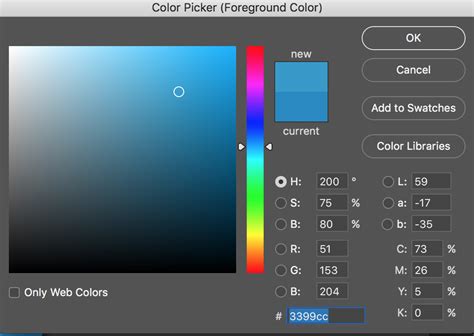
At the heart of color selection in Photoshop lies the Color Picker. This intuitive tool allows users to visually select colors, but it also serves as the primary gateway for inputting specific color values. For those looking to replicate a particular hue, the Color Picker provides fields for various color models, including RGB, HSB, and crucially, hexadecimal (hex) codes.
The user interface of the Color Picker is designed for accessibility. When seeking to input a precise color value, such as a hex code provided in a tutorial or brand guideline, the user can directly type this code into a dedicated field. As one forum user noted, "It's at the bottom of the Color Picker." This simple yet powerful functionality ensures that digital artists can achieve a high degree of color fidelity in their work.
Unpacking the Hexadecimal Color Code
A hexadecimal color code, often referred to as a hex code, is a concise, six-character alphanumeric string used to represent colors in digital design. These codes are built upon the RGB (Red, Green, Blue) color model, which is foundational to how screens display color.
Hex codes are a different expression of RGB values. The six characters in a hex code are divided into three pairs, each representing the intensity of red, green, and blue light, respectively. These values range from "00" (lowest intensity) to "FF" (highest intensity). For instance, white, the combination of all three primary colors at their maximum intensity, is represented as #FFFFFF. Conversely, black, the absence of color, is #000000.
Understanding the basic notation allows for the creation of grayscale colors, which consist of equal intensities of each component. For example, a medium gray might be represented as #808080, where each pair is the same value. When creating specific colors, the intensity of the desired primary color is maximized while others are minimized. A basic purple, for example, requiring equal intensities of red and blue light, is represented by the hex code #800080.
RGB and the Additive Color Model
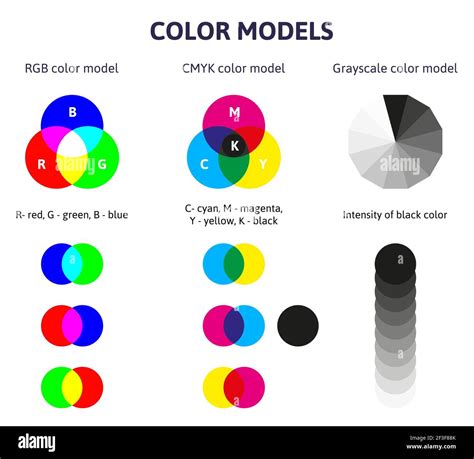
The RGB color model is an additive system where red, green, and blue light are combined in various proportions to produce a spectrum of colors. This is fundamentally different from subtractive color models used in printing. In an additive model, mixing all three primary colors at their full intensity results in white light.
In Photoshop, RGB values are typically expressed as a set of three decimal numbers, each ranging from 0 to 255. For example, a vibrant red might be represented as rgb(255, 0, 0). A hex code is simply a hexadecimal representation of these decimal RGB values. The conversion between hex and RGB is a mathematical process, but for practical purposes within Photoshop, entering the hex code directly achieves the same result as entering the equivalent RGB values.
The RGB color model has its origins in color theory and photography, predating modern electronic systems. Its application in HTML coding and digital displays is a direct extension of this foundational understanding of light and color.
The Concept of Color Space and its Importance
While hex codes and RGB values provide a numerical representation of color, their actual appearance on screen is heavily influenced by the "color space" in which they are interpreted. A color space is a specific organization of colors that defines how colors are represented and displayed. Common color spaces include sRGB, Adobe RGB, and ProPhoto RGB.
The same hex code or RGB values will produce visibly different colors when rendered within different color spaces. For example, the hex code DE7518 will appear as one color in sRGB and a distinctly different color in Adobe RGB. This is a critical point often misunderstood by users who assume a hex code is universally unambiguous.
Color theory explained
Hex codes, in their origin, were primarily used for screen colors and are often safely assumed to refer to the sRGB color space, which is the standard for most web content and displays. However, for professional print work or when precise color matching across different devices is required, relying solely on hex codes can lead to discrepancies. In such scenarios, color management systems and color spaces like Adobe RGB or specific CMYK profiles (for print) become essential for accurate reproduction. Color management uses RGB notation for this very reason, as it's more adaptable within defined color spaces.
Bit Depth: 8-bit vs. 16-bit vs. 32-bit
The bit depth of an image file in Photoshop refers to the amount of information available for each color channel (red, green, blue). This directly impacts the number of possible color variations and the smoothness of color gradients.
- 8-bit Color: An 8-bit image per channel allows for 256 distinct values for each color (0-255). This results in a total of approximately 16.7 million possible colors (256 x 256 x 256). While this provides a vast range of colors, in areas of subtle color transitions, banding (visible steps between colors) can occur.
- 16-bit Color: A 16-bit image per channel offers a significantly larger range of values, with 65,536 distinct values for each color. This dramatically increases the total number of possible colors and provides much smoother gradients, reducing the likelihood of banding.
- 32-bit Floating Point: This mode represents an extended dynamic range. It can represent significantly darker values than 0 and lighter values than 255, allowing for HDR (High Dynamic Range) imaging and greater flexibility in post-processing without data loss.
The user's initial confusion about the disappearance of the hex code input field was related to the bit depth they were working in. In some versions of Photoshop, the hex code input might be more readily available or visible in 8-bit or 16-bit modes. The core functionality of representing colors via hex codes remains, but the context of bit depth influences the overall color data and potential for manipulation.
The Ubiquity and Utility of Hex Codes
Despite discussions about their limitations in representing absolute physical colors without a defined color space, hex codes have endured due to their practicality and widespread adoption. They offer a compact and universally understood method for communicating specific colors, especially in web design and digital graphics.
The ability to express over 16.7 million colors using a simple six-character code makes them incredibly useful. For web developers, designers, and many digital artists, the hex code remains a go-to format for specifying colors. It's a format that has survived because it is incredibly useful in many applications in computing and web design. Saying that its outdated is like saying that the PNG image format is outdated; they were both created in 1996.
While color management systems and more sophisticated color models like LAB (used for technical color description and reproduction in physical media) offer greater precision for print and specialized applications, the hex code continues to be a vital tool in the digital artist's arsenal. Its simplicity, conciseness, and broad understanding ensure its continued relevance in the ever-evolving landscape of digital color.
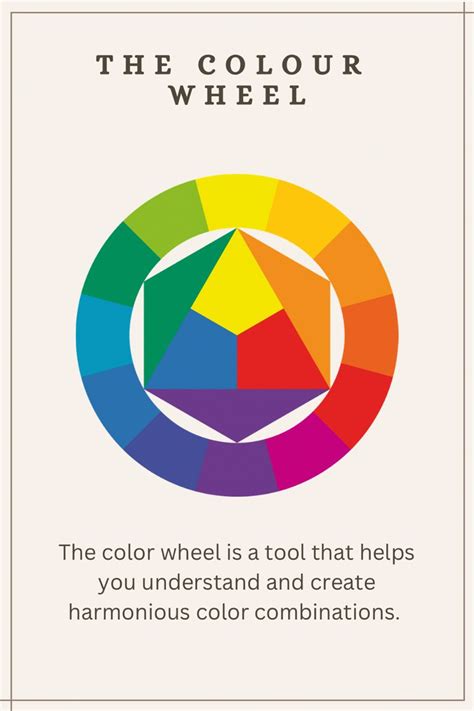
Tools like Adobe Express and Adobe Color further leverage hex codes, allowing users to extract colors from images, generate palettes, and easily apply them to designs. These platforms demonstrate the ongoing utility of hex codes by integrating them into modern design workflows, reinforcing their status as a fundamental element of digital color communication.