Apple's High Efficiency Image File Format (HEIC) offers significant advantages in terms of storage efficiency and image quality. However, its proprietary nature often presents compatibility challenges, particularly for users of Windows PCs and older devices. This is where specialized conversion tools like Coolmuster HEIC Converter come into play, aiming to bridge this gap by transforming HEIC images into more universally accepted formats such as JPG and PNG. This article explores the functionalities, benefits, and limitations of Coolmuster HEIC Converter, providing a comprehensive overview for users seeking to manage their HEIC image libraries.
Understanding the HEIC Format and Its Challenges
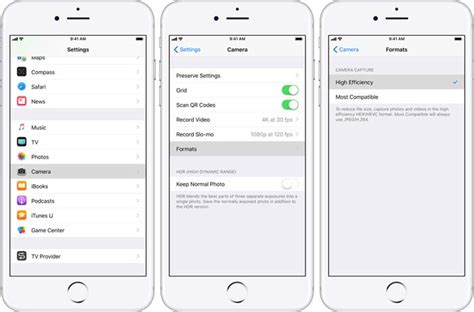
Introduced by Apple with iOS 11 in 2017, HEIC (High Efficiency Image Container) is a modern image format designed to store images more efficiently than traditional JPEG. It utilizes advanced compression techniques, allowing for higher quality images at smaller file sizes. This is particularly beneficial for mobile devices, where storage space can be a constraint. HEIC also supports features like transparency, image sequences (for Live Photos), and depth maps, which are not as readily available or efficiently handled by the JPEG format.
Despite its advantages, the widespread adoption of HEIC has been hindered by its limited native support across different operating systems and applications. Windows PCs, for instance, do not natively support opening and viewing HEIC files without additional software or plugins. This incompatibility forces many iPhone users to convert their HEIC images to more common formats like JPG or PNG when sharing them or transferring them to non-Apple platforms.
Coolmuster HEIC Converter: A Focused Solution
Coolmuster HEIC Converter is a specialized software application designed with a singular purpose: to convert HEIC/HEIF image files into widely compatible formats such as JPG, PNG, and BMP. This focused approach distinguishes it from broader conversion tools that might handle a multitude of file types. The primary goal of this software is to provide a straightforward and efficient solution for users who frequently encounter HEIC files and need to ensure their accessibility across various devices and platforms.
The software aims to simplify the process of managing Apple's proprietary image format, making it easier for users to share, edit, and store their photos without being hindered by format restrictions. It is available for both Windows and Mac operating systems, extending its utility to a broader user base.
Key Features and Functionalities
Coolmuster HEIC Converter boasts several features designed to enhance the user experience and conversion efficiency:
Ease of Use and Straightforward Interface
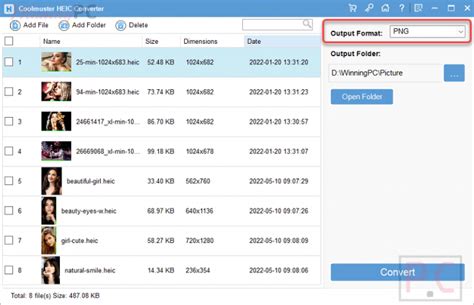
One of the most lauded aspects of Coolmuster HEIC Converter is its user-friendly interface. The software is designed for simplicity, allowing users to convert HEIC images with minimal technical knowledge. The process typically involves a few simple steps: adding the HEIC files, selecting the desired output format (JPG, PNG, or BMP), and initiating the conversion. This intuitive design ensures that even novice computer users can effectively utilize the software without a steep learning curve. The emphasis is on providing a direct path from HEIC to a compatible format, avoiding complex menus or overwhelming configuration options.
Quick Conversion Speed
The software is engineered for speed, promising rapid conversion of HEIC images. This is crucial for users who need to process a large number of files, such as photographers or individuals transferring entire photo libraries from their iPhones. The ability to convert HEIC photos to JPG or PNG quickly and without quality loss is a significant selling point.
Preservation of Image Quality and EXIF Data
A common concern with file conversion is the potential loss of image quality or important metadata. Coolmuster HEIC Converter addresses this by emphasizing its ability to convert images without compromising their original quality. Furthermore, it aims to preserve EXIF (Exchangeable Image File Format) data, which includes crucial information like camera settings, date and time of capture, and location. Maintaining this metadata is important for photographers and archivists who rely on this information.
Batch Conversion Capabilities
For users managing extensive collections of HEIC photos, batch conversion is an indispensable feature. Coolmuster HEIC Converter supports the simultaneous conversion of multiple HEIC files. This capability significantly reduces the time and effort required compared to converting images one by one. Users can process entire folders of HEIC images in a single operation, making it highly efficient for large-scale conversions. The batch functionality ensures that quality settings are consistently applied across all files within a conversion job.
Offline Desktop Operation
Coolmuster HEIC Converter operates as a locally installed desktop application. This means that conversions are performed on the user's computer without the need for an internet connection. This offline functionality offers several advantages:
- Privacy and Security: Files are not uploaded to any cloud servers, which is a significant benefit for users concerned about the privacy of their images, especially if they contain sensitive or confidential information. The conversion process remains entirely within the user's local system.
- Reliability: It eliminates dependence on internet connectivity or the availability of online services. Users can convert their files anytime, regardless of their network status.
- No Upload/Download Time: By avoiding cloud uploads, the process is generally faster and avoids potential issues with large file transfers.
Output Format Flexibility
The software provides flexibility in choosing the desired output format. Users can convert HEIC files to:
- JPG/JPEG: The most widely compatible image format, suitable for general use, sharing, and web display.
- PNG: Ideal for images requiring transparency or lossless compression, often used for graphics and web design elements.
- BMP: A less compressed, lossless format that can result in larger file sizes but offers high fidelity.
This range of options allows users to select the format that best suits their specific needs and intended use of the converted images.
Advantages of Coolmuster HEIC Converter
The specialized nature of Coolmuster HEIC Converter translates into several key advantages:
- Simplicity and Focus: Its dedicated function as an HEIC converter means users don't need to navigate complex menus or features unrelated to their primary goal. This makes it exceptionally easy to learn and use.
- Efficiency for HEIC Tasks: For individuals whose primary need is to convert HEIC files, this tool streamlines the process significantly. The batch conversion and quick processing speeds are particularly valuable.
- Quality Assurance: The emphasis on converting without quality loss and preserving EXIF data addresses critical concerns for many users, especially photographers.
- Enhanced Privacy: The offline, desktop-based operation provides a secure environment for converting potentially sensitive images.
Limitations and Considerations
While Coolmuster HEIC Converter offers a robust solution for HEIC conversion, it's important to acknowledge its limitations:
Extremely Narrow Format Scope
As a single-purpose tool, Coolmuster HEIC Converter handles only HEIC image conversion. Users who require conversion of other file types, such as documents, videos, or different image formats, will need to employ separate software. This can lead to increased software management overhead and potentially higher licensing costs if multiple specialized tools are required. Compared to comprehensive online converters like CloudConvert or Zamzar, which support hundreds of formats, this limitation reduces the overall utility for users with diverse conversion needs.
Platform and Ecosystem Limitations
The software's desktop-only architecture, while beneficial for privacy, lacks the inherent flexibility of web-based or cloud conversion services. These online alternatives can often be accessed from any device with an internet connection and can sometimes be integrated into automated workflows. Coolmuster HEIC Converter does not offer an API or command-line interface, which can be a significant drawback for developers or organizations looking to incorporate conversion capabilities into custom applications, scripts, or automated digital asset management systems. Its standalone nature means it operates in isolation, without direct integration options for content management systems or collaborative platforms.
Limited Advanced Image Controls
While the converter allows for basic selection of output format and quality, it lacks advanced image manipulation features. Users who need to resize images, add watermarks, edit metadata extensively, or manage color profiles will find the feature set insufficient. Such additional image modifications would necessitate the use of separate, more comprehensive image editing software, creating a multi-step workflow. Professional photographers or marketing teams who require these advanced controls might find the tool too basic for their integrated workflows.
Comparison with Alternatives: CopyTrans HEIC
The provided information also mentions CopyTrans HEIC for Windows, another tool designed for HEIC conversion. Understanding its features and how it compares to Coolmuster HEIC Converter can provide further context.
CopyTrans HEIC for Windows is described as a plugin that enables viewing, printing, and converting HEIC images on Windows PCs. It also supports batch conversion, allowing up to 100 HEIC files to be converted simultaneously in one click. Key points about CopyTrans HEIC include:
- Safety and Security: It is presented as a virus-free program that converts photos automatically or manually without requiring users to upload their photos to the cloud.
- Freeware for Personal Use: CopyTrans HEIC is completely freeware for personal use, with a paid business license available for commercial applications.
- Troubleshooting: The information also touches upon potential issues with CopyTrans HEIC not working, attributing them to antivirus software interference, outdated versions, insufficient user privileges, or conflicts with local group policy settings.
While both Coolmuster HEIC Converter and CopyTrans HEIC aim to solve the HEIC compatibility problem, they may differ in their approach to licensing, specific features, and user interface. Coolmuster HEIC Converter is presented as a premium solution that converts unlimited HEIC files on both Windows and Mac, allowing customization of image quality. The mention of converting less than 10 HEIC files for free with one of the alternatives suggests a potential freemium model for some tools, contrasting with Coolmuster's likely paid offering for full functionality.
When is Coolmuster HEIC Converter the Right Choice?
Coolmuster HEIC Converter is an excellent option for users who:
- Primarily work with HEIC files: If your main need is to convert HEIC images from your iPhone or other Apple devices to JPG or PNG for broader compatibility.
- Value simplicity and ease of use: The straightforward interface makes it accessible to users of all technical skill levels.
- Need fast batch conversions: For users managing large photo libraries, the batch processing feature is a significant time-saver.
- Prioritize privacy and offline operation: The desktop-based, offline nature of the software appeals to users concerned about data security.
- Do not require advanced image editing features: If your goal is purely conversion and not extensive image manipulation, this tool is sufficient.
How to Convert HEIC to JPG on Mac
For iPhone users who frequently share photos or transfer them to Windows computers, Coolmuster HEIC Converter offers a quick, reliable, and quality-preserving solution. It effectively addresses the compatibility issues inherent in Apple's HEIC format, ensuring that your images are accessible across a wider range of devices and platforms. While its specialized focus might limit its utility for users with diverse conversion needs, for its core purpose, it stands out as a competent and user-friendly tool.
tags: #coolmuster #heic #converter