AfterShot Pro is a photo editing and management software designed to streamline the process of importing, organizing, editing, and outputting digital images. The software offers RAW photo editing capabilities, batch processing, nondestructive adjustments, and tools for correcting perspective and lens distortion. It supports a range of camera formats and enables users to create customized workflows for image correction and enhancement. AfterShot Pro addresses the business need for efficient handling and editing of large image collections, providing tools for professional photographers and imaging professionals to optimize photo quality and organization at scale in post-production environments.
Evolution and Current Standing
AfterShot Pro 3 represents an evolution of a product that was once a significant player in the RAW photo processing market. While it was a capable product at its inception, concerns have been raised about its trajectory. Over time, the removal of key features, such as the PerfectlyClear functionality, and a perceived stagnation in processing quality have led some users to feel it is falling behind its competitors. However, recent updates and the reinstatement of previously deprecated features, including PerfectlyClear, aim to address these criticisms and restore essential functionality.
User Experience and Interface
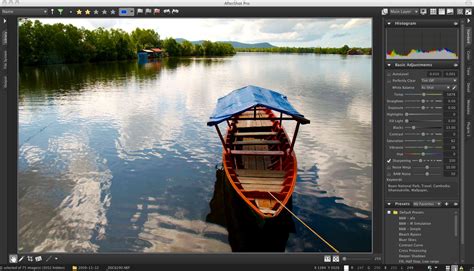
The functional layout of AfterShot Pro has consistently been praised as one of the best-thought-out in the industry. The user-friendly interface, combined with extensive editing tools, allows users to enhance their photos with professional-grade features. The application window is neatly organized, with a focus on the image itself, often surpassing the clarity of more generic Digital Asset Management (DAM) software.
The main window is typically split into three sections. The left panel serves as the navigation tool, offering options for managing files and libraries. Creating a library can enable faster future location of pictures and is similar to tagging, proving extremely useful over time, though the process itself can be perceived as tedious. For users who already maintain a methodical filing system, the File System tab can be sufficient, listing every file path on the computer for easy image location. When a folder containing pictures is selected, they are displayed as thumbnails in the middle section, between the navigation pane and the preview area.
The orientation of these panels can be toggled. The middle section can appear as a row of thumbnails below the main image viewer, or the entire area can be dedicated to thumbnails, which is particularly useful when searching for specific images. Side panels are resizable down to a minimal width and can be entirely hidden, offering a high degree of customization. The division between the image and thumbnail areas is also resizable, as is the scaling of the thumbnails themselves.
Core Editing and Management Features
Image Organization and Management
AfterShot Pro is primarily an image processing program that has acquired basic digital asset management functions, which are entirely optional. This design allows it to cover the entire digital photography workflow, including file organization that can be done before cataloging. It includes specific features to facilitate this process.
The software supports two primary organizational methods: cataloging and direct file system access. Cataloging creates a database of your images, allowing for more sophisticated searching and management. However, the cataloging features are described as subtle rather than front-and-center, especially when compared to dedicated DAM software. If cataloging is optional, AfterShot Pro directly provides a file-system tree-view, which is shown by default. Selecting any folder exclusively shows images directly within it, omitting non-image files.
The File System view supports a minimalist set of filters to limit the thumbnail view to a subset of content directly within the selected folder. Supported filters include Rating, Label, and Flag. Ratings can be filtered for equality, a minimum, or a maximum between zero and five stars. Labels and Flags can be filtered by equality or inequality.
Searching within a catalog works similarly. The principal catalog breakdown mirrors the file-system hierarchy. Selecting the catalog from the Library view allows filtering over all indexed images. Choosing a folder restricts images to those found at any level below. AfterShot Pro 3 searches by refinement. Starting with a selected hierarchy, any number of filters can be applied to refine the shown results.
The Metadata Browser organizes metadata by category: Color Label, Photo Info, IPTC, Keywords, Rating, and Flag. Each category contains specific metadata values organized hierarchically. To refine search results, a value, possibly a keyword, is selected, and the "Refine" button is clicked. This process can be repeated. EXIF information is found under "Photo Info," which provides a limited set of tags. This compound filtering system is powerful, making it efficient to refine large sets of images. All refinements compound with each other, unlike high-level filters that support unions. A notable omission is the lack of a way to exclude images that match any metadata value.
RAW Photo Editing and Adjustments
AfterShot Pro offers robust RAW photo editing capabilities, allowing users to work with the full range of data captured by their camera sensors. The editing tools are non-destructive, meaning the original RAW data remains untouched, and adjustments can be modified or removed at any time.
The editing tools are neatly organized into tabs on the right edge of the right-most panel. The "Standard" tab includes a comprehensive set of common image processing functions, such as controls for Exposure, Highlights, Blacks, Contrast, Saturation, Vibrance, Hue, White Balance, and Sharpness. While the Standard tab provides global controls, the "Color" tab offers adjustments within specific color ranges. Users can select primary or additive/subtractive color models to adjust hue, saturation, and luminance within a certain range of similar colors. This feature is particularly useful for tasks like removing color casts.
Interestingly, the tab below "Color" is named "Tone," but it also incorporates the Tone Curve tool.
Batch Processing and Workflow Efficiency
A key strength of AfterShot Pro is its batch processing capability, which is a significant time-optimization tool. This feature allows users to apply edits and adjustments to multiple images simultaneously, making it effortless to manage large volumes of photos. The ability to perform quick changes in batches is highly valued for its efficiency.
Corel states that AfterShot Pro 3 is up to 4x faster than Adobe Lightroom CC 2015 at converting RAW files. To test this claim, a 10GB set of RAW images was converted through both programs. The conversion process in AfterShot Pro 3 is straightforward: users select the source folder for conversion (e.g., from RAW to JPEG or from camera RAW to TIFF), choose the destination folder for the converted files, and the process begins. Converting 200 various RAW files (totaling 10GB) to full-size JPEG took AfterShot Pro 3 approximately 7 minutes and 5 seconds.
The design of AfterShot Pro, consistent with previous versions, offers a good amount of features within an easy-to-use UI. This approach contrasts with rivals like Lightroom, which often prefer a minimalist approach, hiding features in drop-down menus. Importing images, selecting them, and exporting them is considered easier in AfterShot Pro 3, as it bypasses the need to import an entire folder and catalog it before selecting specific images for export.
How To Run a Batch Process In Photoshop
Specific Features and Tools
Lens Correction
Corel has invested significantly in lens correction development for AfterShot Pro. A built-in preset correction system can compensate for barrel and pincushion distortion. For users requiring more control or finesse, the "Lens Correction Kit" is available. In manual mode, instead of relying solely on EXIF data and pre-selected camera/lens combinations, users can manually adjust radial correction coefficient values. This system likely utilizes Brown's Distortion model to correct radial distortion arising from imperfections in lens alignment.
The Lens Correction feature works easily and includes a good preview system to assess the accuracy of the results.
Perspective Correction
AfterShot Pro includes tools for correcting perspective distortion, allowing users to straighten converging lines in architectural photography or adjust the angle of objects. This is crucial for achieving professional-looking results in architectural and product photography.
Watermarking
The Watermark feature is located in the "Tools" section on the right side of the window. Users have two options: loading an existing image as a watermark or creating a text-based watermark. To avoid repetitive work, created watermarks can be saved for future use and can be adjusted, skewed, and stretched as needed. For watermarks with transparent backgrounds, PNG or SVG file formats are supported. PNG files can be saved using the "Save For Web" options.
Image Preset Library and Plugins
The "Image Preset Library" is accessible next to the Watermark tab in the Tools section. This library contains a mix of free and paid presets. Free options typically include Camera Profiles. Several plugins are also available, such as "Grid" (a composition aid), "Channel Mixer" (enhances black and white images), "Perspector" (Perspective Correction), and "Wavelet Sharpen" (recovers out-of-focus images). Some graduated filters are also available for purchase.
Beyond the plugins, users can select from a variety of image presets under different themes, including cinematic, tonal, landscape, portrait, black & white, wedding, sepia, and color. These presets are generally chargeable, suggesting users should acquire them based on specific needs.
Performance and Compatibility
Speed and Performance
The original Bibble Pro, which AfterShot Pro evolved from, was known for being the fastest DAM program on the market. While AfterShot Pro has retained much of this speed, its substantial lead has diminished with the addition of new features. Importing a catalog of 25GB of images took 20 seconds, plus an additional 6 minutes to generate high-quality previews. This is considered fast, although it's noted that AfterShot Pro 3 may have achieved this speed by ignoring a portion of the available images. Searching for subsets of images is extremely quick, with results updating instantly as filters are applied.
There is an observed lag when selecting an image, with a typical uncached JPEG taking about one second to appear. This reduces to approximately 0.25 seconds for recently displayed images. Once loaded, however, panning and zooming are very fast.
Corel AfterShot Pro 3 is described as exceptionally speedy digital photography workflow software that covers the entire workflow with basic features and significant depth in image processing capabilities.
Compatibility and File Formats
AfterShot Pro supports a wide range of camera formats, ensuring compatibility with various digital cameras. Its performance and compatibility with different file formats are considered appealing for diverse editing needs.
Installation and Stability
Installing Corel AfterShot Pro 3 is generally straightforward on Windows, with a small executable downloading and installing the software without issue. The installation time is dependent on the internet connection speed. On a 500Mbps link, installation took about 2 minutes.
The Linux version installed quickly but encountered issues starting due to dependencies on library versions no longer supported on the latest stable Linux releases, making it a less viable option for some Linux users.
While the software generally performs well, some users have reported issues with software stability, occasional difficulty in learning the interface, and limited features compared to competitors.
Pricing and Value Proposition
AfterShot Pro 3 is often available at a highly discounted price, making it a compelling option for budget-conscious photographers. For instance, it is priced at $79.99, while Adobe Lightroom CC costs $119.8 per year, highlighting a significant price difference. This aggressive pricing strategy by Corel often leads to questions about their profit margins compared to competitors like Adobe.
Despite its competitive pricing and feature set, Corel may face an uphill battle in convincing dedicated Adobe users to switch, largely due to the deep integration between Adobe's ecosystem (Lightroom, Bridge, and Photoshop).
Integration with Other Tools
A highly appreciated feature of AfterShot Pro is its integration with other tools. Users can easily export their edited photos to other applications without encountering issues. This seamless export capability enhances the overall workflow, allowing photographers to leverage their preferred software for different stages of post-production.
Potential Issues and Areas for Improvement
Performance Bottlenecks
While generally fast, some users have noted a significant loading time when previewing created images. Additionally, the noise reduction capabilities have been questioned in terms of their parity with competitor offerings, although the overall results are still considered very good. A significant limitation mentioned is AfterShot Pro 3's inability to index or process very high-resolution images, which is an unfortunate oversight for professionals working with high-megapixel cameras.
Stability Concerns
Some users have encountered stability issues, including instances where launching Corel AfterShot Pro 3 caused video card drivers to crash, leading to computer freezes and requiring manual reboots. In one documented case, a user's AMD Radeon graphics card's "Evolve App" was identified as the cause of these crashes. Corel's technical support was involved in attempting to resolve this issue, indicating that such problems, while not universal, can occur.
Feature Gaps
Despite the reinstatement of features like PerfectlyClear, some users feel that the software has not advanced its processing quality sufficiently over time, causing it to trail behind competitors. The cataloging features, while functional, are considered limited compared to dedicated DAM solutions, with missing refinements and a lack of exclusion options beyond Flags and Labels.
Comparison with Alternatives
AfterShot Pro is often considered as an alternative to more established software like Adobe Lightroom. While it offers a strong feature set, particularly in RAW processing and batch editing, at a lower price point, its limitations in high-resolution image handling and occasional stability issues can be deciding factors for some users. For Linux users, AfterShot Pro is presented as one of the few viable options, provided it functions correctly on their system.
Conclusion
Corel AfterShot Pro 3 presents a compelling package for photographers seeking an efficient and affordable solution for photo editing and management. Its strengths lie in its user-friendly interface, robust batch processing capabilities, and strong RAW editing tools. The software's speed in many operations, coupled with its competitive pricing, makes it an attractive option, especially for those looking to manage large image collections without the subscription costs associated with some competitors.
However, potential users should be aware of the reported limitations, including issues with very high-resolution images, occasional stability problems, and a feature set that, while comprehensive, may not fully match the depth of some industry-leading alternatives in every aspect. The ongoing development and the reinstatement of key features suggest a commitment to improving the product, making it a worthy contender for those whose workflow aligns with its capabilities.