Digital design has become an intrinsic part of our modern world, serving as a primary language for communication and advertising. Our innate attraction to visually appealing and compelling content fuels the convergence of digital design with the needs of businesses seeking to capture the attention of their target audiences. From the packaging of products and the advertisements in magazines to brand logos, billboards, flyers, television commercials, and posters, digital design is ubiquitous. Marketing and advertising, in particular, are deeply intertwined with digital design due to its unique and potent ability to draw people in with aesthetically pleasing visuals and convey messages at a glance. However, the applications of digital design extend far beyond these obvious uses. What unites all these applications is a fundamental requirement for captivating design that grabs attention, communicates a message effectively, and ultimately encourages a desired action. Consider the times you've opted for a product with sleek, professional packaging over a generic alternative, or purchased a graphic tee simply because you admired its design. Even on social media, a well-crafted post can halt your scrolling. This pervasive influence highlights the importance of understanding how digital design functions.
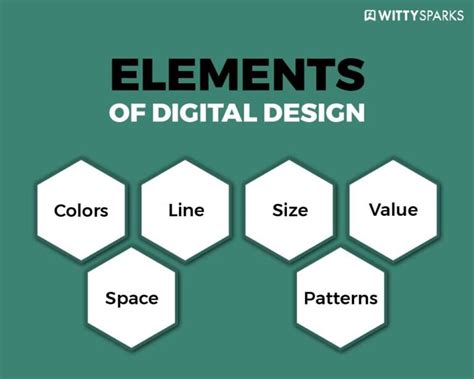
At its heart, digital design relies on a framework of key design principles to arrange elements in the most aesthetically pleasing manner or to subtly influence a viewer's emotional response. Designers meticulously study color theory to grasp how colors evoke feelings, which hues complement or contrast effectively, and which combinations should be avoided. Mastery of elements such as alignment, repetition, proximity, balance, hierarchy, space, and contrast is crucial. The creative talent and skill required for digital design are realized through specialized software on computers or tablets. A diverse array of programs and applications are available to designers for creating illustrations, editing images, designing typography, and much more. Digital design plays a pivotal role in how individuals and businesses communicate and disseminate their messages to a broad audience.
The Core of CorelDRAW: Vector Illustration and Beyond
For illustrators who frequently employ vector drawings to craft intricate artwork, or for those who design and customize logos, posters, and invitations, CorelDRAW stands out as a premier solution. Its utility extends significantly beyond these tasks, offering a comprehensive environment for a wide spectrum of creative endeavors. CorelDRAW is a testament to versatility, having been an industry standard in graphic design software for decades. Developed by Corel Corporation, it presents a robust suite of tools encompassing vector illustration, page layout, photo editing, and general design.
The software is primarily celebrated for its intuitive and powerful vector editing capabilities. Users can meticulously create detailed illustrations, sophisticated logos, and complex designs with a high degree of precision. CorelDRAW’s support for a multitude of file formats ensures seamless integration into various design workflows. A significant advantage of the CorelDRAW suite is the inclusion of Corel PHOTO-PAINT, a powerful raster-based image editor that is seamlessly integrated, allowing for a fluid transition between vector and bitmap editing. The software’s versatility is further evident in its page layout and design features, enabling the creation of multi-page documents, brochures, and comprehensive marketing materials. Throughout its evolution, CorelDRAW has consistently been a preferred choice for graphic designers, illustrators, and marketing professionals, embodying innovation and adaptability within the dynamic field of digital design.
A Brief History of Graphics
Crafting Visuals with CorelDRAW: From Posters to Social Media Graphics
CorelDRAW has firmly established itself as an indispensable tool in the repertoire of designers and creative professionals. The process of creating a poster in CorelDRAW is both straightforward and enjoyable. Its intuitive interface, coupled with a rich array of design elements, empowers users to fully express their creativity and produce visually striking posters. The platform's adaptability in managing fonts, shapes, and colors ensures that poster creation is not merely functional but also a conduit for artistic expression.
The creation of fundamental shapes for diverse applications is significantly streamlined within CorelDRAW. The software's robust shape tools and extensive customization options allow for the rapid generation of graphics precisely tailored to various needs. CorelDRAW empowers designers to craft essential shapes with remarkable precision and efficiency, ranging from basic geometric forms to versatile icons. Similarly, designing invitation cards becomes an effortless task thanks to CorelDRAW's user-friendly design features. The software provides an accessible platform for creating personalized and visually captivating invitations. CorelDRAW's extensive font library and array of design tools enable users to imbue each invitation with a unique touch, transforming it into a true work of art.
Furthermore, CorelDRAW's capability to convert bitmaps into editable vector objects is a standout feature, offering designers unparalleled flexibility in image manipulation. This innovative functionality allows for the refinement and enhancement of bitmap graphics with the precision characteristic of vector editing. The seamless integration of CorelDRAW with external software significantly amplifies its versatility and collaborative potential. The software's compatibility facilitates the synchronization of design workflows with other applications, fostering a cohesive and efficient creative process. Whether exchanging data with image editing tools, collaborating on illustrations with other vector-based software, or integrating with publishing platforms, CorelDRAW's adaptability empowers designers to harness a broader spectrum of creative tools.
The software's sophisticated vector tools are instrumental in enabling designers to produce illustrations with exceptional clarity and scalability. From conceptualizing detailed artwork to executing intricate designs, CorelDRAW offers an intuitive and powerful platform. The creation of logos, a critical element of brand identity, is a process where precision and creativity converge within CorelDRAW. The software's robust vector tools equip designers to fashion distinctive and professional logos. Designers can leverage a rich repository of design elements, fonts, and customization options to ensure that their logos effectively embody and communicate the essence of a brand.

CorelDRAW also excels in combining design prowess with essential document creation tools, enabling users to produce visually appealing and polished documents. From business proposals to comprehensive marketing materials, the software's design-centric approach facilitates the creation of documents that leave a lasting impression. With an extensive selection of fonts, styles, and effects, designers can transform text into a dynamic and engaging visual element. Users can freely experiment with diverse fonts, apply captivating effects, and seamlessly integrate text into intricate designs. CorelDRAW’s text creativity extends beyond simple communication, allowing designers to infuse personality, tone, and significant visual impact into their projects.
Crafting visually appealing graphics is paramount for social media engagement, and CorelDRAW serves as an invaluable ally in this domain. Its intuitive interface and diverse design tools empower users to create visually striking content perfectly tailored for various platforms. From optimizing image sizes for different social media channels to seamlessly incorporating brand elements, CorelDRAW facilitates the effective translation of creative concepts into visually impactful graphics, thereby elevating a brand's digital presence across social media and other digital platforms. The versatility and creative power of CorelDRAW consistently exceed expectations, making it an indispensable asset in numerous design realms. From producing professional documents to designing captivating social media graphics, users discover boundless possibilities within the extensive Uses of CorelDRAW. Its robust features redefine the very scope of what CorelDRAW can achieve in the contemporary design landscape.
A Historical Trajectory: The Evolution of CorelDRAW
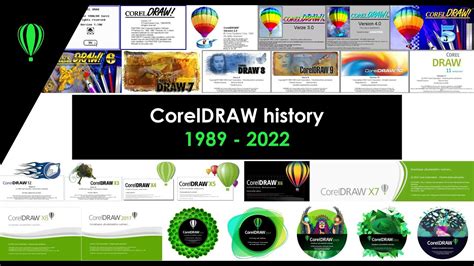
The journey of CorelDRAW began in 1987 when Corel engineers Michel Bouillan and Pat Beirne set out to develop a vector-based illustration program to complement their desktop publishing systems. This ambitious project culminated in the initial release of CorelDRAW in 1989. Early versions, CorelDraw 1.x and 2.x, operated under Windows 2.x and 3.0. A significant leap occurred with CorelDraw 3.0, which truly came into its own with the release of Microsoft's Windows 3.1. This version introduced innovative tools such as the Envelope tool for distorting text or objects using a primary shape, the Blend tool for morphing shapes, the Extrusion tool for simulating perspective and volume, and the Perspective tool for distorting objects along X and Y axes. The suite also expanded to include Corel PHOTO-PAINT for bitmap editing, CorelSHOW for presentations, CorelCHART for graphic charts, Mosaic, and CorelTRACE for vectorizing bitmaps.
The evolution continued with CorelDRAW 3.0, notable for being the last version compatible with Windows 3.x. Subsequently, CorelDRAW 7 marked a significant transition as the first version designed for 32-bit Windows and also introduced a Macintosh version. New features included a customizable interface, and essential tools like the Polygon, Spiral, Knife, and Eraser tools. CorelDRAW 8 brought forth a context-sensitive Property bar, Print Preview with Zoom and Pan options, Scrapbook for drag-and-drop graphic object management, a Publish to HTML option, Draft and Enhanced display options, Interactive Fill and Blend tools, Transparency tools, the Natural Pen tool, a Find & Replace wizard, and the Convert Vector to Bitmap option within Draw. It also incorporated a spell checker, thesaurus, and grammar checker.
CorelDRAW 9 introduced enhanced selection capabilities with Digger selection, Docker windows, and interactive tools for Distortion, 3D effects, Envelope, and realistic Dropshadows. It also featured interactive color mixing, a color palette editor, guidelines as objects, custom-sized pages, and duotone support. The suite bundled with this version included Corel R.A.V.E. for vector animation, Perfect Shapes, Web graphics tools for interactive elements like buttons, a Page sorter, multilingual document support, and a navigator window.
CorelDRAW 10 refined the user experience with a Mesh fill tool for complex color gradients and the Artistic Media tool. It also enhanced Publish to PDF capabilities, introduced embedded ICC color profiles, multiple on-screen color palettes, and support for Microsoft Visual Basic for Applications 6.
CorelDRAW X3 introduced the Double-click Crop tool, a groundbreaking feature allowing simultaneous cropping of vector groups and bitmap images. It also featured the Smart fill tool, Chamfer/Fillet/Scallop/Emboss tools, and the Image Adjustment Lab for image enhancements. A notable addition was the inclusion of OpenType versions of Helvetica, Frutiger, Futura, and Garamond #3 font families from Linotype, replacing previous Bitstream counterparts.
CorelDRAW X4 brought native support for 64-bit and multi-core processors, along with enhanced compatibility for 64-bit Adobe Photoshop plugins. It also offered improved import and export capabilities for Adobe Creative Suite and Publisher. Object properties, styles, and color styling were consolidated into dedicated docking toolbars (Dockers). A new Unicode OpenType-based text engine modernized text handling, providing comprehensive international language support while retaining legacy text modes. Dynamic alignment guides facilitated easier repositioning without static guidelines. The CorelConnect content organizer allowed in-app access to online sources like Flickr for images and clip art. New tools for pushing, pulling, and smearing vector objects were introduced, alongside new default workspaces tailored for illustrators, beginners, and other user roles, as well as new training videos. The introduction of tabbed documents that could break out of the main window enhanced multi-screen work.
CorelDRAW X5 added more retouching and fill tools, along with additional color harmony and QR code generation tools. This version also saw the introduction of 30-day and 365-day rental options (subscriptions) as an alternative to perpetual licenses.
CorelDRAW X6 introduced a new Font List selection filtering system, with Corel Font Manager replacing Bitstream Font Navigator. Enhancements included the ability to hide objects and groups (not just layers), copy and paste portions of curve segments, adjacent node selection, an improved Knife tool, a photo retouching Healing tool, an improved perspective correction tool, enhanced Gaussian feathering on drop shadows, and automated camera effects like bokeh and sepia. Startup and feature tours were enhanced, alongside Border and Grommet and Canvas Prep and Stretch tools specifically for large-format and commercial print applications. High-resolution displays gained official support with new scalable icons and UI elements.
CorelDRAW X7 incorporated a suite of collaboration tools, including Copy editing, a Comments Docker, Annotation tools, and Cloud client sharing. It also featured more non-destructive photo editing capabilities and filters, combined photo editing features with presets, new templates, a new multipage tool, and enhanced multiple-format export options.
CorelDRAW X8 introduced new curve-editing tools, updated Pantone support, and significant stability and security enhancements throughout the program. CorelDRAW Graphics Suite 2018 focused on advanced PDF printing features and improvements to the Paintbrush tool. The 2019 release included enhanced collaboration tools and further refinements. In 2019, CorelDRAW made a significant return to the Mac platform after nearly two decades, with macOS Mojave Dark Mode and Touch Bar support. The 2020 and 2021 versions continued this trajectory of refinement, introducing further improvements to non-destructive editing, templates, multipage functionality, and export options, alongside robust collaboration features and updated Pantone support. Most recently, CorelDRAW Graphics Suite has seen valuable updates aimed at boosting productivity in graphic design, with new features and enhancements continually being added to maintain its position as a leading digital media tool.
Platform Versatility and File Format Considerations
Historically, CorelDRAW demonstrated significant platform adaptability. It was originally developed for Microsoft Windows 2.1, with subsequent versions supporting Windows 3.1x, CTOS, OS/2, and Power Macintosh. Hewlett-Packard notably announced a version for its HP 9000 Series workstations running HP-UX. With the introduction of Corel Linux, CorelDRAW 9 was released with package support for Debian and Red Hat-based Linux distributions. Although Version 11 was released for Mac OS X in 2001, support on both Linux and Mac platforms was later discontinued for a period. As of recent times, CorelDRAW Graphics Suite offers robust support for Windows 10, Windows 11, and macOS, including a dedicated release optimized for Apple silicon. Complementing this, a related web application and iPad app provide online collaboration and markup functionalities, further extending its reach.
The proprietary CDR file format, initially used for vector graphic drawings, was recognizable by the first two bytes of the file being "WL". Starting with CorelDraw 3, the file format evolved to use a Resource Interchange File Format (RIFF) envelope, indicated by the first four bytes being "RIFF," and a specific signature in bytes 9 to 15. Beginning with CorelDraw 4, the file format incorporated the version number of the writing program in hexadecimal. From version X4 (14) onwards, the CDR file structure was compressed using ZIP, containing XML files and a RIFF-structured riffdata.cdr with evolving version signatures.
The challenge of inter-format compatibility has been a long-standing consideration. In December 2006, the sK1 open-source project initiated reverse-engineering efforts for the CDR format, leading to the development of an importer presented at the Libre Graphics Meeting in 2007. The sK1 project also developed the UniConvertor, a command-line open-source tool capable of converting CorelDraw formats (CDR/CDT/CCX/CDRX/CMX) to other formats. In 2012, a joint LibreOffice/re-lab team implemented libcdr, a library for reading CDR files from version 7 to X3 and CMX files, offering support for shapes, color management, and basic text. This library provides converters to SVG and OpenDocument. While Adobe Illustrator and Inkscape offer varying degrees of import support for CDR files, the fidelity and completeness of these conversions can differ. Understanding these file format nuances is crucial for maintaining workflow integrity and ensuring seamless collaboration across different design ecosystems.