Ever wondered about CorelDRAW and why it's an indispensable tool in the creative world? The software, developed by Corel Corporation, is more than just a tool; it's a dynamic force shaping graphic design landscapes since 1989. For people entering the fields of animation and design, learning about this tool is a must. CorelDRAW, the powerful vector graphics editor initially released by Corel Corporation in 1989, has evolved into an essential instrument in graphic design. Its adaptability to diverse projects, regular updates, and accessibility make it indispensable, shaping the visual industry worldwide.
Understanding the CorelDRAW Ecosystem
CorelDRAW offers a variety of software packages catering to different design needs. The CorelDRAW Graphics Suite stands as a comprehensive package for professional designers, offering a full spectrum of tools for vector illustration, layout, photo editing, and typography. For enthusiasts, CorelDRAW Standard provides a more focused set of features. Beginners can find their footing with CorelDRAW Essentials, a simplified version designed for ease of use.
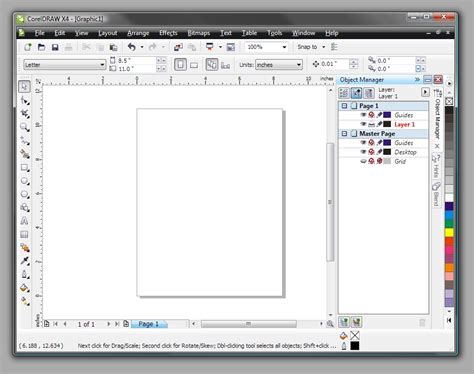
Beyond the core drawing application, the suite integrates several specialized tools that enhance the overall design workflow. Corel Font Manager is a crucial component, designed to streamline and organize fonts. With features like font filtering, searching, and tagging, it simplifies font discovery and selection, ensuring efficient font handling.
For photographers, AfterShot HDR, a feature within Corel's AfterShot Pro, is dedicated to High Dynamic Range (HDR) photography. This tool allows users to merge multiple exposures of a scene, combining highlights and shadows for stunning visual impact.
Complementing the vector capabilities is Corel PHOTO-PAINT, a robust raster graphics editor. Integral to the CorelDRAW Graphics Suite, PHOTO-PAINT's comprehensive toolset includes brushes, filters, and layer-based editing, enabling intricate adjustments and creative transformations. It serves as a powerful Photoshop equivalent within the Corel ecosystem.
Recognizing the need for flexibility and collaboration, CorelDRAW.app offers a web-based version of the renowned vector graphics editor. This application provides unparalleled accessibility, allowing users to create, edit, and collaborate on designs directly from a web browser. It preserves the powerful features of CorelDRAW, ensuring seamless transitions between desktop and online platforms and fostering real-time collaboration. This accessibility extends to a suite of powerful online tools that are easily accessible over the internet, allowing users to harness features like vector drawing, image editing, and layout design directly in their web browser.
Key Features and Tools for Precision Design
CorelDRAW is replete with powerful tools that empower designers to achieve precision and creativity. The Shape tool is a prime example, offering immense flexibility for manipulating vector objects. This tool facilitates effortless customization by allowing users to adjust nodes, curves, and segments, transforming shapes with precision, a concept frequently covered in CorelDraw Interview Questions.

The Crop tool is another handy instrument for refining and framing images or designs. It enables users to trim unwanted portions, focus on specific details, and enhance composition effortlessly. For detailed work, the zoom functionality allows users to magnify or reduce the view, facilitating close examination and intricate editing.
CorelDRAW is pivotal for graphic design, offering a dynamic suite of tools for both professionals and beginners. Alongside alternatives like Inkscape, its robust features, like advanced vector graphics and an intuitive interface, enable precise and scalable designs.
A truly transformative feature is the ability to convert bitmap images into vector images. The result is a resolution-independent image, enabling crisp enlargements without pixelation. This capability is crucial for ensuring that designs remain sharp and clear regardless of their final output size.
CorelDRAW excels in enhancing image perspective and quality. With advanced tools, users can correct distortions, adjust perspective, and refine details, ensuring optimal visual impact. Its layout and design tools empower users to create visually compelling brochures, posters, and more.
Non-Destructive Editing and Creative Control
CorelDRAW Graphics Suite 2026 introduces intelligent tools that accelerate ideation and improve workflows. A significant aspect of these advancements is the emphasis on non-destructive editing. Users can edit bitmaps and vectors knowing they won't harm the original image or object. This includes the ability to create block shadows, symmetrical illustrations, and perspective drawings all non-destructively, offering unparalleled creative freedom and flexibility.
Color Management and Harmony
Effortless color application is another strength of CorelDRAW. Users can easily apply color to fills and outlines using color swatches, or generate colors based on color harmonies, ensuring cohesive and visually appealing palettes. The suite also offers free, integrated Pantone Colors, a vital feature for professional printing and branding, ensuring accurate color reproduction across different media.
Embracing Artificial Intelligence in Design
The latest iterations of CorelDRAW Graphics Suite have integrated Artificial Intelligence (AI) to further enhance creative possibilities. AI Generate is a prompt-based image generation feature available in both CorelDRAW and Corel PHOTO-PAINT, transforming text descriptions into custom visuals in seconds. Users can initiate these creations with a reference image, a sketch, or from scratch.
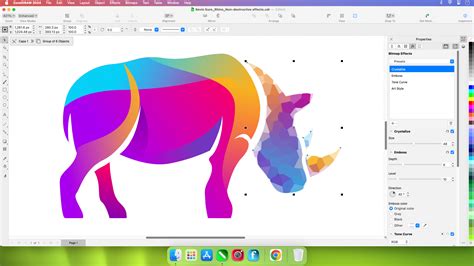
AI credits are the units that power these generative AI features. Each credit allows for prompt-based tasks such as creating images from scratch, generating variations from existing content, or modifying images by changing colors, removing elements, or adjusting specific objects. Subscribers and maintenance customers receive a monthly AI credit allowance, while one-time purchase customers receive a fixed allotment of credits that do not expire but do not renew. Additional AI credits can be purchased through various add-on options, including monthly or annual subscription plans, or one-time credit packs.
Crucially, CorelDRAW assures users that their creative work is never used to train its AI features or third-party AI models, safeguarding intellectual property.
Accessibility, Pricing, and Platform Support
CorelDRAW Graphics Suite is designed with accessibility in mind, offering native support for the latest technology on Windows and Mac, including Windows 11 and macOS. The exceptional performance of Apple silicon is also leveraged.
The suite is available through flexible purchasing options, catering to different budgets and preferences. Users can choose between a subscription model or a one-time perpetual license purchase. While the suite is not free, Corel offers an obligation-free 15-day trial, allowing potential users to experience its capabilities before committing.
A perpetual license offers long-term use of the software but does not include ongoing support for future operating systems, devices, or technologies. A subscription, on the other hand, provides a flexible way to stay up-to-date with access to exclusive new features, apps, and content, along with support for the latest technologies, all at a lower upfront cost. For those who opt for a perpetual license, a maintenance plan is available as a low-cost annual payment that ensures eligibility for the most up-to-date version of the suite, including the latest software, exclusive features, apps, content, and monthly AI credits.
The pricing structure is designed to be competitive. For instance, CorelDRAW Graphics Suite 2025 was priced at $549 for a one-time purchase or a monthly subscription of $22.42, making the perpetual license roughly equivalent to two years of subscription. This pricing is significantly lower than comparable Adobe Creative Cloud subscriptions for equivalent applications like Illustrator and Photoshop.
The suite includes multiple applications, with CorelDRAW (vector illustration and page layout) and Corel PHOTO-PAINT (pixel-based image editing) being the two major components. Corel Font Manager and CorelDRAW.app are also integral parts of the offering. While a screen capture tool, Capture, is included with the Windows version, it is notably absent from the Mac version, despite Mac users paying the same price.
Industry Applications and User Testimonials
CorelDRAW Graphics Suite is a trusted name across various industries. Engineering, manufacturing, and construction firms rely on its precision tools. Companies like Bitsy & Company use CorelDRAW for character creation and layout in their graphic novels, bringing stories to life. An industry leader in custom signage solutions utilizes CorelDRAW Graphics Suite to serve the printing needs of Fortune 100 and 200 companies in North America.
The software's versatility makes it ideal for crafting engaging visuals for social media, from attention-grabbing graphics to shareable content, CorelDRAW's intuitive tools make it easy to design eye-catching posts. Its layout and design tools empower users to create visually compelling brochures, posters, and more.
The ease of learning, coupled with unique features, positions CorelDRAW Graphics Suite as a powerful alternative to other graphic design software. The suite is built to amplify artistry rather than replace it, offering a comprehensive solution for both seasoned professionals and aspiring designers.
CorelDRAW's commitment to user-friendly design, regular updates, and broad accessibility solidify its position as an indispensable tool, continuously shaping the visual industry worldwide. Its seamless blend of versatility, precision, and accessibility defines the standard in graphic design innovation.