CorelDRAW Graphics Suite has consistently positioned itself as a formidable contender in the graphic design software arena, often going head-to-head with industry giants like Adobe's Illustrator and Photoshop. The award-winning suite has long been recognized for its powerful capabilities and brilliantly designed, highly usable, and totally configurable interfaces across its core applications: CorelDRAW for illustration, Corel Photo-Paint for image editing, and Corel RAVE for animation. Version 12.0 of this suite continues this legacy, offering a robust toolkit that caters to a wide range of design needs, from professional illustration and layout to photo manipulation and animation.
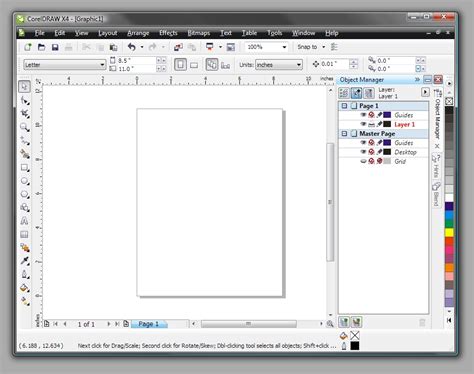
The strength of CorelDRAW Graphics Suite 12.0 lies in its comprehensive nature and its commitment to user-centric design. The suite is thoughtfully packaged on four CDs, with the primary applications-CorelDRAW, Corel Photo-Paint, and Corel RAVE-residing on the first disc. The remaining three CDs are dedicated to enriching the user experience with high-quality clip art, a vast collection of photos, versatile templates, a wide array of fonts, and valuable training materials. This extensive content offering, coupled with the software's powerful features, presents a terrific value, especially when compared to the often significantly higher price points of comparable Adobe applications.
Core Applications and Their Capabilities
At its heart, CorelDRAW Graphics Suite 12.0 comprises three main applications, each designed to excel in its specific domain:
CorelDRAW 12: Mastering Vector Illustration and Page Layout
CorelDRAW has long been a powerhouse for vector illustration, and version 12.0 builds upon this strong foundation. It provides users with the tools to create intricate designs, from simple logos to complex illustrations. The software offers a wide range of drawing tools, and the integration of enhanced font control, including easy Unicode character access, significantly streamlines typography projects. For professionals working with international clients or diverse character sets, this Unicode support is a crucial advantage, enabling better file sharing across different languages and ensuring that characters render correctly.
Furthermore, CorelDRAW 12.0 boasts enhanced import and export capabilities, broadening its compatibility with other design workflows. This includes improved support for exporting to Microsoft and WordPerfect Office suites, and enhanced filters for AutoCAD (DXF/DWG), Visio, and HPGL. This level of compatibility is vital for seamless collaboration and for integrating CorelDRAW designs into various professional environments.
A significant innovation in version 12.0 is the Smart Drawing tool. This intelligent feature aims to simplify the creation of common shapes by intelligently interpreting freehand sketches. For instance, a hand-drawn, slightly irregular circle can be automatically transformed into a perfect geometric circle. While it performs best with basic shapes like circles and rectangles, our tests indicated it also did a commendable job with more complex forms, such as arrows, showcasing its utility in speeding up the initial stages of design.
Another notable addition is the suite of CAD-esque snapping functions, particularly the Dynamic Guides. When activated, these temporary blue lines appear as the mouse cursor hovers over specific points on an object, such as its center or edge. This feature, working in conjunction with the improved Snap to Objects tool, provides precise alignment and positioning assistance. As users draw or place new objects, descriptive text labels pop up, indicating whether the cursor is snapping to a node, intersection, edge, midpoint, or center. This level of granular control significantly enhances accuracy and efficiency, particularly in complex layouts.
Corel Photo-Paint 12: Precision Image Editing
Corel Photo-Paint 12, the suite's image editing component, offers a comprehensive suite of tools for manipulating and enhancing photographs and other raster images. While the core functionality remains robust, version 12.0 saw fewer major enhancements compared to CorelDRAW. One of the additions was a touch-up brush designed for removing defects like dust, scratches, and wrinkles from photographs. However, in initial testing, this tool was found to be less effective, sometimes smudging pixels rather than cleanly removing imperfections, which was a point of disappointment.
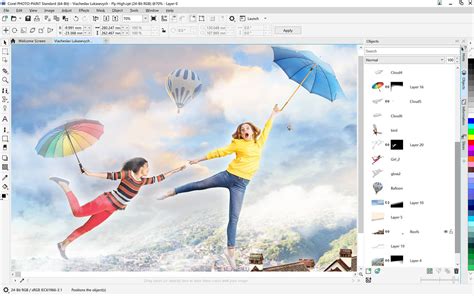
Despite this specific limitation, Corel Photo-Paint 12 retains many of its strengths, including its natural media brushes, which are known for their extensive range and realistic feel, allowing for creative digital painting and detailed retouching. The integration with CorelDRAW also means that users can seamlessly transition from illustration to photo editing. For example, a bitmap image placed in a CorelDRAW document can be double-clicked to open directly in Photo-Paint for edits. Once saved, the updated image appears instantly in CorelDRAW, maintaining a fluid workflow.
The Eyedropper tool in Corel Photo-Paint 12 also offers a convenient feature, allowing users to pick up color from anywhere on their desktop, not just within the application window. This can be incredibly useful for matching colors from external references or other open applications.
Corel RAVE 3: Bringing Graphics to Life with Animation
Corel RAVE (RAVE Animated Vector Effects) 3 is the suite's tool for creating vector-based animations. While it might not possess the full breadth of features found in dedicated animation programs like Macromedia Flash, RAVE 3 offers a capable environment for adding dynamic elements to graphic designs. Version 12.0 of the suite saw RAVE gain a symbol library, which serves as a repository for frequently used objects. This feature can help streamline the animation process by allowing designers to store and quickly access recurring graphical elements, ensuring consistency and saving time.
The most impressive innovations in the new Graphics Suite, as highlighted in user reviews, include the intelligent drawing tools in both CorelDRAW and RAVE 3, which collectively make it easier to create and place objects quickly and precisely. The synergy between these tools, especially with features like Smart Drawing and Dynamic Guides, empowers users to achieve sophisticated results with greater ease.
Suite-Wide Enhancements and Integration
Beyond the individual application improvements, CorelDRAW Graphics Suite 12.0 introduced several suite-wide enhancements that further bolster its value proposition. The integration among the three major applications is exceptionally well-executed. This seamless interoperability is a cornerstone of the suite's design, allowing users to move fluidly between illustration, image editing, and animation tasks without significant disruption. As mentioned, editing a bitmap in CorelDRAW launches Photo-Paint, and the changes are reflected immediately upon return. Similarly, an object or image can be easily dragged into Corel RAVE to incorporate animation effects.
What are Vector and Raster Graphics?
Unicode support is a significant suite-wide enhancement, extending beyond CorelDRAW to improve file compatibility and character rendering across the entire package. This facilitates better collaboration and the creation of multilingual content. The expanded import and export options, particularly the more robust AutoCAD DXF/DWG support, also underscore Corel's commitment to broad compatibility within professional design ecosystems.
The suite's interface is a key selling point. Users can create separate work spaces and toolbars tailored for specific tasks, such as designing brochures or engaging in creative illustration. These custom setups can then be saved and reused, promoting efficiency and personalization. This high degree of configurability ensures that the software adapts to the user's workflow, rather than forcing the user to adapt to the software.
Value Proposition and Target Audience
CorelDRAW Graphics Suite 12.0 is positioned as a cost-effective alternative to Adobe's offerings. While Adobe's Creative Suite, featuring Photoshop and Illustrator, is the industry standard for many professionals, its higher price point can be a barrier. CorelDRAW Graphics Suite 12.0, priced at a fraction of the cost of comparable Adobe applications, offers impressive creative power, a wealth of accessible features, and intelligent workflow enhancements. This makes it an attractive option for a broad audience, including small businesses, home-based designers, students, and even professionals who may not require the absolute bleeding edge of industry-specific features that often come with a premium price tag.
The emphasis on ease of use, particularly with features like Smart Drawing and Dynamic Guides, makes the suite accessible to users who may not have extensive formal graphic design training. The included tutorials and on-screen guidance further support individuals looking to enhance their creative productivity.
While the provided text also mentions recent updates to CorelDRAW Graphics Suite (e.g., AI-assisted tools, generative AI credits, faster app launches, modern interfaces, new brushes and templates), these pertain to much later versions and are not applicable to the specific features of version 12.0. However, they highlight Corel's continuous effort to evolve and enhance its suite over time, maintaining its relevance in the competitive software market.
CorelDRAW Graphics Suite 12.0, therefore, represents a compelling package that balances powerful functionality with user-friendly design and exceptional value, making it a standout choice for a wide spectrum of graphic design needs. The suite's ability to integrate illustration, image editing, and animation, combined with its extensive content and robust import/export options, solidifies its position as a comprehensive and accessible professional design toolkit.