Blackmagic Design has consistently pushed the boundaries of professional video editing software, and with the release of DaVinci Resolve 17, they introduced an exciting new piece of hardware designed to revolutionize the editing experience: the DaVinci Resolve Speed Editor. This compact control unit, though similar in function to its larger and more expensive predecessor, the Editor Keyboard, offers a more accessible and manageable solution for editors seeking to streamline their workflow. Priced at $300, the Speed Editor is positioned to fit within a wider range of budgets, making advanced editing control available to a broader audience. Its smaller footprint also makes it a practical addition to desks already laden with equipment.
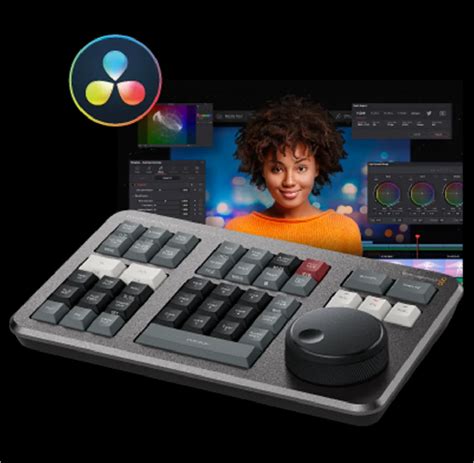
The Speed Editor boasts the same excellent build quality that characterized the Editor Keyboard, featuring a smooth and responsive jog dial that enhances precision during editing tasks. While the initial announcement of Resolve 17 also brought attention to the new Cut Page, many editors, accustomed to the Edit Page, may have initially overlooked its potential. However, with the arrival of the Speed Editor, a renewed commitment to understanding and utilizing the Cut Page becomes a natural progression. This is particularly true for multi-camera editing, where the new Sync Bin offers a fundamentally different approach. Instead of fixating on the edit timeline, the Sync Bin shifts the focus to the action unfolding across all camera angles. This allows editors to effortlessly locate and cut in the most opportune moments from each camera, transforming the multicam editing process.
The Evolution of Editing Control: From Keyboard to Speed Editor
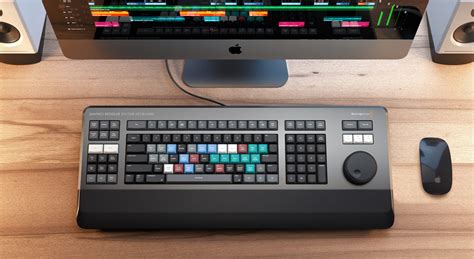
The journey towards the Speed Editor began in 2019 with the launch of the DaVinci Resolve Editing Keyboard. This initial foray into dedicated Resolve peripherals, priced at $995, proved to be a significant investment, limiting its accessibility for hobbyist editors aiming to boost their efficiency. The subsequent introduction of the Resolve Speed Editor during the Resolve 17 live announcement marked a significant step towards democratizing advanced editing tools.
Grant Petty, CEO of Blackmagic Design, highlighted the product's potential, stating, "We think this is an incredibly exciting product as it has such dramatic workflow ramifications." He elaborated on the limitations of traditional mouse-based editing, where "each edit function often takes multiple mouse clicks to do each task." The co-design of the DaVinci Resolve Cut Page and the Speed Editor aims to address this by creating "a whole new generation of editing workflow." This integration promises a more intuitive and rapid editing experience, moving away from the slower, click-intensive methods of the past.
Design and Ergonomics: A Compact Powerhouse
The physical design of the Speed Editor emphasizes portability and ease of use. Measuring 24.49 x 15.6 x 4.39 cm and weighing just 779g, it stands in stark contrast to the bulkier Editor Keyboard, which tips the scales at nearly 2.5KG. This compact form factor makes the Speed Editor an ideal companion for on-the-go editing, allowing users to compile dailies or assemble small edits in environments like coffee shops with a laptop.
While some early impressions suggested the Speed Editor felt "slightly cheaper" than its predecessor, this difference is understandable given its more accessible price point. The hardware, however, retains a high standard of quality. The keys are designed for durability, with each one certified for over a million operations, a feature shared with the Editor Keyboard and reminiscent of high-end eSports keyboards. The tiered key profile further enhances the editing experience by promoting comfort during extended use.
Connectivity is versatile, with the Speed Editor supporting both USB-C and Bluetooth for wireless operation. A notable detail is the absence of a physical on/off button; instead, a battery indicator within DaVinci Resolve monitors power when operating wirelessly. There has been some minor confusion regarding the inclusion of a USB-C to USB-C cable, with Blackmagic Design confirming that the Speed Editor does ship with one, despite some users not receiving it.
Functionality: Bridging the Cut and Edit Pages
The Speed Editor's design intentionally omits the QWERTY keyboard section found on the Editor Keyboard. This means certain dedicated day-to-day operations, like flagging a clip directly from a key, are not present. However, the core functionality is largely transferable. Many of the positive attributes of the Resolve Keyboard can be directly applied to the Speed Editor, as they are, in essence, very similar devices.
A key differentiator is the increased emphasis on the Cut Page. The Speed Editor incorporates several keys not found on the Editor Keyboard, reflecting its designation as a Cut Page-specific device. While these keys are optimized for the Cut Page, many of their functions translate to the Edit Page. For instance, the "TRANS" button, when pressed on the Cut Page, can either apply a default transition or, when held, bring up a transition selection menu via the search dial. On the Edit Page, this specific button might not perform the same immediate action, though Blackmagic has indicated potential for improved Edit Page functionality in future updates.
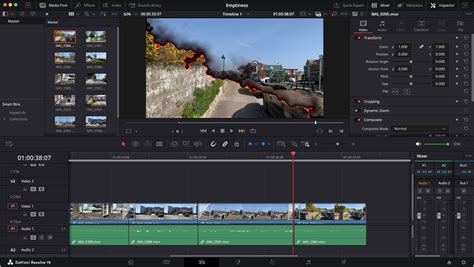
For the most part, the Speed Editor's keys perform their labeled functions efficiently. Setting in and out points in the source viewer, appending clips to the timeline, and applying dissolve transitions are all readily achievable. Some keys offer dual functionality, accessible through double-tapping or holding the key, allowing for a more compact and versatile interface.
A particularly innovative feature on the Cut Page is the "intelligent" operation of edit functions, utilizing the "smart indicator" on the timeline to determine insertion points for selected clips. This sophisticated integration streamlines the editing process, making it more intuitive and less reliant on precise mouse clicks.
The Sync Bin: A New Paradigm for Multicam Editing
The Cut Page introduces the Sync Bin, a groundbreaking tool for multicamera editing. Unlike traditional methods that focus on the timeline, the Sync Bin centers the user's attention on the action across all camera angles simultaneously. This multiview interface allows editors to quickly identify synced shots and select appropriate cutaways, fundamentally altering how multicam sequences are assembled. The Speed Editor directly supports this functionality with a dedicated camera number section, enabling easy selection of cameras within the Sync Bin. This is distinct from the keypad function found on the Resolve Keyboard and is exclusive to the Cut Page.
How to Edit with Multiple Camera Angles in DaVinci Resolve 20 | Multicam Editing
The Search Dial: Precision and Tactile Feedback
The search dial is arguably the most compelling element of the Speed Editor, offering a tactile and highly efficient method for fine-tuning edits. Its operation can be likened to the adaptive triggers of the PlayStation 5's DualSense controller, where the feel of the input changes based on the action. The search dial allows for precise jogging, slipping, and trimming of clips, far surpassing the efficiency of mouse movements or keyboard shortcuts like the comma and period keys.
By holding a trim tool key and manipulating the search dial, editors can dictate the duration of an edit with remarkable accuracy. This precision is also invaluable for adjusting audio levels. While fine-tuning audio levels directly on a clip can be finicky with a mouse, often resulting in overshooting the desired level, the search dial, in conjunction with the audio level button, allows for subtle and exact dB adjustments. This level of control significantly enhances the audio mixing process.
Resolve 17 Compatibility and Beta Considerations
It is crucial to note that the DaVinci Resolve Speed Editor is exclusively compatible with Resolve 17. At the time of its release, Resolve 17 was still in its development beta stages. This necessitates a consideration for users who might be hesitant to upgrade to beta software. Beta versions, while offering early access to new features, are part of the development process and can sometimes be unstable, contain bugs, or have features that are moved or removed. Upgrading to a beta version can potentially impact project stability and editing efficiency. Therefore, users should weigh the benefits of the Speed Editor's advanced functionality against the inherent risks of working with pre-release software.
Despite initial reservations about the Cut Page's prominence, even editors who primarily utilize the Edit Page will find the Speed Editor immensely beneficial. The trim and edit functions it provides are comprehensive enough to facilitate highly efficient navigation and manipulation of edits within the Edit Page. The sheer efficiency of the search dial in speeding up the fine-tuning of edits, compared to traditional mouse and keyboard methods, makes the Speed Editor a highly recommended tool for any editor looking to accelerate their workflow.
The Value Proposition: An Integrated Solution
The Speed Editor represents a significant value proposition, especially when considering current offers. Often, purchasing a DaVinci Resolve Studio license includes the Speed Editor as a complimentary item. This provides users who have been operating with the free version of Resolve and contemplating an upgrade with a dual benefit: acquiring the full Studio license and, effectively, receiving a free Speed Editor. This integrated approach makes the transition to a more powerful and efficient editing ecosystem more attainable than ever before. The Speed Editor is not merely an accessory; it's an integral component designed to unlock the full potential of DaVinci Resolve's editing capabilities, particularly when paired with the innovative features of the Cut Page.