CorelDRAW, a name synonymous with graphic design innovation, has been a cornerstone of the creative industry since its inception by Corel Corporation in 1989. More than just a single piece of software, CorelDRAW represents a dynamic and evolving ecosystem of tools designed to cater to a vast spectrum of design needs, from the nascent enthusiast to the seasoned professional. For individuals embarking on careers in animation and design, understanding the capabilities and nuances of this powerful suite is not merely beneficial; it is a fundamental step towards mastering the craft.
The Genesis and Evolution of CorelDRAW
Initially released as a powerful vector graphics editor, CorelDRAW has steadily transformed into an indispensable tool for graphic designers worldwide. Its enduring presence in the market, spanning over three decades, is a testament to its adaptability and its commitment to providing users with cutting-edge functionalities. The software's journey from its early days to its current sophisticated iterations reflects a deep understanding of the evolving demands of the design landscape.
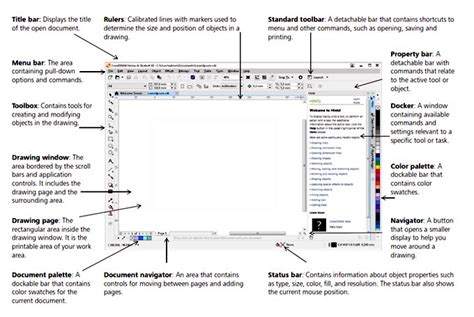
A Suite of Solutions for Diverse Design Needs
CorelDRAW Graphics Suite is not a monolithic entity but rather a comprehensive package that offers a variety of software solutions, each tailored to specific design requirements. This tiered approach ensures that users can find the right tools for their projects and budgets.
CorelDRAW Graphics Suite: The Professional's Choice
For professional designers, the full CorelDRAW Graphics Suite is the flagship offering. It is a robust and all-encompassing toolkit designed to handle complex projects with efficiency and precision. This suite is tailored for businesses of all sizes, from small and medium enterprises to large corporations, across diverse industries such as advertising, marketing, publishing, and multimedia. It encompasses a range of versions, including CorelDRAW Standard, CorelDRAW Graphics Suite, and CorelDRAW Technical Suite, catering to various design needs and budgets.
CorelDRAW Standard: For the Enthusiast
Targeting design enthusiasts and hobbyists, CorelDRAW Standard provides a more focused set of tools. While it may not possess every advanced feature of the full suite, it still offers significant power for creating compelling designs.
CorelDRAW Essentials: The Beginner's Gateway
Recognizing the importance of accessibility for newcomers, CorelDRAW Essentials offers a simplified version of the software. This makes it an ideal starting point for beginners who are looking to learn the fundamentals of graphic design without being overwhelmed by an extensive feature set.
Integral Components of the CorelDRAW Ecosystem
Beyond the core drawing applications, the CorelDRAW suite integrates several specialized tools that enhance the overall design workflow.
Corel Font Manager: Streamlining Typography
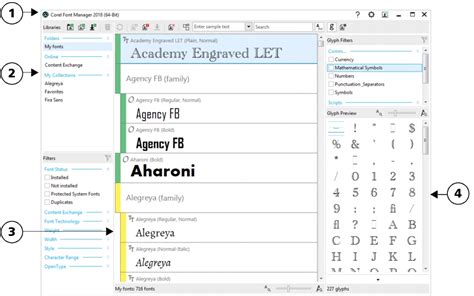
Fonts are the building blocks of visual communication, and managing them effectively is crucial for any designer. Corel Font Manager is an integral component of the CorelDRAW suite, specifically designed to streamline and organize fonts, thereby enhancing design workflows. With features like font filtering, searching, and font tagging, Corel Font Manager simplifies font discovery and selection. This commitment to user-friendly design ensures efficient font handling, allowing designers to spend less time searching for the right typeface and more time creating.
AfterShot HDR: Mastering High Dynamic Range Photography
For photographers and designers working with photographic content, AfterShot HDR, a feature within Corel's AfterShot Pro, is dedicated to High Dynamic Range (HDR) photography. This powerful tool allows users to merge multiple exposures of a scene. By combining the highlights and shadows from different shots, AfterShot HDR enables the creation of images with stunning visual impact, capturing a wider range of detail than a single exposure could achieve.
Corel PHOTO-PAINT: The Raster Graphics Powerhouse
Complementing the vector-based capabilities of CorelDRAW, Corel PHOTO-PAINT is a robust raster graphics editor that is integral to the CorelDRAW Graphics Suite. This application provides a comprehensive toolset for image manipulation, including a wide array of brushes, filters, and advanced layer-based editing. PHOTO-PAINT allows for intricate adjustments and creative transformations, making it a formidable tool for photo retouching, digital painting, and pixel-based design. Its interface is designed to be welcoming, with numerous online tutorials and a 'Learn' sidebar to guide users through its features. While it shares conceptual similarities with other image compositing tools, it offers unique workflows that can provide a learning curve for experienced users, but its basic functionalities are quickly accessible.
Glow Effect | Glow Effect in CorelDraw | CorelDraw Tutorial 1
CorelDRAW.app: Design Without Boundaries
In an era where accessibility and collaboration are paramount, CorelDRAW.app emerges as the web-based version of the renowned vector graphics editor. By offering unparalleled accessibility, this application enables users to create, edit, and collaborate on designs directly from a web browser. It ingeniously preserves the powerful features of CorelDRAW, ensuring seamless transitions between desktop and online platforms. This fosters flexibility and real-time collaboration, allowing teams to work together on projects irrespective of their geographical location or device. Users can harness features like vector drawing, image editing, and layout design directly in their web browser, making it easy to click and drag elements, resize, rotate, and manipulate objects intuitively.
CorelDRAW's Transformative Design Tools
The CorelDRAW suite is replete with specialized tools that empower users to achieve precise and visually stunning results.
The Shape Tool: Precision in Vector Manipulation
A concept frequently covered in CorelDRAW interview questions, the Shape tool is a powerful feature for manipulating vector objects. It facilitates effortless customization by allowing users to adjust nodes, curves, and segments, transforming shapes with remarkable precision. This level of control is fundamental to creating bespoke vector graphics.
The Crop Tool: Refining Your Vision
The Crop tool in CorelDRAW is a handy instrument for refining and framing images or designs. It enables users to trim unwanted portions, focus on specific details, and enhance composition effortlessly. This tool is invaluable for preparing images for print or web, ensuring that the final output is focused and impactful.
Zoom and Pan Capabilities: Detailed Inspection
CorelDRAW offers robust zoom and pan capabilities, allowing users to magnify or reduce the view of their canvas. This facilitates close examination of intricate details and enables precise editing, ensuring that even the smallest elements of a design are perfected.
CorelDRAW's Role in the Modern Creative Landscape
CorelDRAW is pivotal for graphic design, offering a dynamic suite of tools for professionals and beginners alike. Alongside other industry-standard software, its robust features, like vector graphics and an intuitive interface, enable precise and scalable designs.
Vector Graphics and Scalability
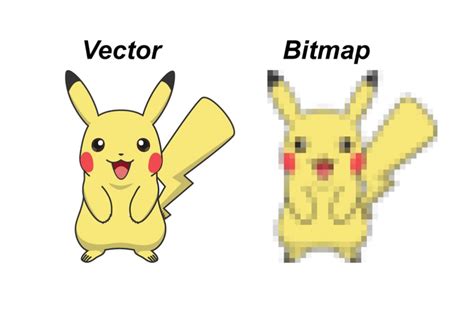
At its core, CorelDRAW is a vector graphics editor. This means designs are created using mathematical equations rather than pixels. The result is a resolution-independent image, enabling crisp enlargements without any loss of quality or pixelation. This is particularly crucial for applications like signage, large-format printing, and branding where designs need to be scaled to various sizes.
Transforming Bitmap Images into Vectors
One of the most transformative capabilities of CorelDRAW is its ability to convert bitmap images (pixel-based images like photographs) into vector images. This process, often facilitated by tools like PowerTRACE, is a massive time saver and opens up new avenues for repurposing existing imagery. The result is a resolution-independent image, enabling crisp enlargements without pixelation.
Crafting Engaging Social Media Visuals
In today's digital-first world, social media presence is vital for businesses and individuals. CorelDRAW excels in crafting engaging visuals for social media platforms. From attention-grabbing graphics to shareable content, its intuitive tools make it easy to design eye-catching posts that resonate with target audiences.
Enhancing Image Perspective and Quality
CorelDRAW is also adept at enhancing image perspective and quality. With advanced tools, users can correct distortions, adjust perspective, and refine details, ensuring optimal visual impact. Its comprehensive layout and design tools empower users to create visually compelling brochures, posters, flyers, and a multitude of other marketing collateral.
CorelDRAW Graphics Suite: Pricing and Purchasing Options
CorelDRAW Graphics Suite offers a flexible pricing model to accommodate the diverse needs of businesses and creative professionals. Understanding these options is key to making an informed decision about acquiring the software.
Subscription vs. One-Time Purchase
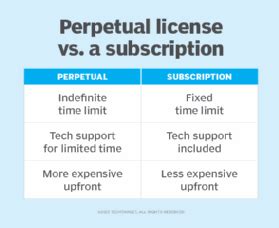
Corel Corporation provides users with a choice between a subscription model and a perpetual licensing model. The perpetual license allows for a one-time purchase, granting long-term use of the software. However, it's important to note that perpetual licenses typically do not include ongoing support for future operating systems, devices, or technologies, nor do they provide access to the latest features and updates.
A subscription, on the other hand, offers a flexible way to stay up-to-date with access to exclusive new features, applications, and content, along with support for the latest technologies. This model often comes with a lower upfront cost compared to a perpetual license. Subscribers and maintenance customers also receive a monthly allowance of AI credits, which are essential for powering the suite's generative AI features.
Maintenance for Perpetual Licenses
For those who prefer a one-time purchase, Corel also offers a maintenance option. This is a low-cost annual payment plan that can be added to a perpetual license. Active maintenance ensures eligibility for the most up-to-date version of CorelDRAW Graphics Suite, guaranteeing access to the latest software, exclusive features, apps, content, and monthly AI credits at no additional cost.
Trial Period and Cost Considerations
CorelDRAW Graphics Suite is not a free product, but the company offers an obligation-free 15-day trial. This allows potential users to explore the software's capabilities and determine if it aligns with their needs before making a purchase. When considering the total cost of ownership (TCO), it's essential to factor in not only the initial software cost but also potential training expenses, hardware requirements, and ongoing support and maintenance costs. The suite is competitively priced, often presenting a more affordable alternative to comparable design software packages, especially when considering the cost of individual applications from other vendors. For instance, subscribing to equivalent Adobe applications can often cost nearly twice as much as a CorelDRAW Graphics Suite subscription.
CorelDRAW Graphics Suite 2025/2026: Enhancements and New Features
The latest iterations of CorelDRAW Graphics Suite, such as version 2025 and 2026, continue to push the boundaries of creative possibility with intelligent tools and performance enhancements.
AI-Powered Features
A significant advancement in recent versions is the integration of AI-powered features. "AI Generate" in CorelDRAW and Corel PHOTO-PAINT allows users to transform text descriptions into custom visuals in seconds, whether starting from a reference image, a sketch, or from scratch. AI credits are the units that power these generative AI features. Each credit allows for tasks such as creating images from scratch, generating variations from a reference image or existing content, and modifying images by changing colors, removing elements, or adjusting specific objects. Subscribers and maintenance customers receive a monthly AI credit allowance, while one-time purchase customers receive a fixed allotment of credits that do not expire but do not renew. Additional AI credits can be purchased through various add-on options. Importantly, user creative work in CorelDRAW is never used to train AI features or third-party AI models.
Refreshed Interface and Performance Improvements
CorelDRAW Graphics Suite 2026, for example, boasts a refreshed interface designed for enhanced usability. Beyond AI, users can expect significantly improved stability and performance, with app launch times reported to be around three times faster or more. This focus on speed and efficiency streamlines the design workflow, allowing creatives to work more productively.
Native OS Experience and Compatibility
The suite offers native support for the latest technology on both Windows and Mac operating systems, including Windows 11 and macOS Tahoe. It also leverages the exceptional performance of Apple silicon. This ensures a seamless and optimized experience for users on their preferred platform.
Enhanced Creative Capabilities
CorelDRAW Graphics Suite provides a comprehensive set of tools for creating stunning visuals. It empowers users to explore their creativity and bring their ideas to life with ease.
- User-friendly Interface: The software boasts an intuitive and customizable interface, making it accessible for both beginners and professionals.
- Advanced Illustration Tools: Renowned for its robust vector illustration tools, CorelDRAW Graphics Suite enables users to create intricate designs with precision and control.
- Seamless Compatibility: With its ability to work seamlessly with various file formats, including AI, PSD, PDF, and SVG, CorelDRAW Graphics Suite ensures compatibility across different platforms and applications.
- Extensive Font Management: The software offers a vast library of high-quality fonts, along with powerful font management tools like Corel Font Manager.
- Non-Destructive Editing: Users can edit bitmaps and vectors knowing they won't harm the original image or object. This includes creating block shadows, symmetrical illustrations, and perspective drawings all non-destructively.
- Color Management: Easily apply color to fills and outlines using color swatches, or generate colors based on color harmonies.
- Asset Management: View, manage, and edit all of your project's digital assets in one view, offering a new playground for creativity.
- Integrated Pantone Colors: Enjoy free integrated Pantone Colors, essential for professional printing and branding.
CorelDRAW's Impact on Industries and Users
CorelDRAW Graphics Suite is a powerful graphic design software that offers a comprehensive set of tools for a wide range of users. Its versatility and robust features have made it a trusted name across various industries.
For Businesses and Professionals
CorelDRAW Graphics Suite is tailored for businesses of all sizes, from small and medium enterprises to large corporations, across diverse industries such as advertising, marketing, publishing, and multimedia. Its ability to drive business growth and profitability is a key advantage. By empowering designers with efficient tools and automation capabilities, the suite helps reduce production time and costs, ultimately improving return on investment (ROI) and lowering total cost of ownership (TCO). Companies like "Bitsy & Company," which creates graphic novels, utilize CorelDRAW for character creation and layout. Similarly, industry leaders in custom signage solutions rely on CorelDRAW Graphics Suite to serve the printing needs of major corporations.
For Engineering, Manufacturing, and Construction
CorelDRAW is also a trusted name for engineering, manufacturing, and construction firms, likely due to its precise vector capabilities and its suitability for technical illustration and documentation.
User Experience and Learning Curve
While the software boasts an intuitive and customizable interface, it's important to acknowledge that CorelDRAW Graphics Suite can present a steep learning curve for beginners, especially those with no prior experience in graphic design software. However, Corel provides ample resources to aid users, including numerous online tutorials and a dedicated 'Learn' section within the applications. The suite is designed to be as welcoming as possible, with welcome pages offering guidance and a 'Learn' sidebar available within the application to assist with creative processes.
Potential Drawbacks to Consider
While CorelDRAW Graphics Suite offers numerous advantages, it's essential to be aware of its potential drawbacks to make an informed decision.
Resource Intensity
CorelDRAW Graphics Suite can be resource-intensive, particularly when working with complex projects or large file sizes. This means that users with older or less powerful hardware might experience performance issues.
Limited Cross-Platform Compatibility (Historically)
Historically, CorelDRAW has been primarily designed for Windows operating systems. While recent versions have improved Mac compatibility, it's important to assess specific needs and requirements carefully, as the software may not be ideal for those working exclusively on non-Windows platforms or with limited hardware resources. For instance, the 'Capture' screen capture tool is noted as being Windows-only, even impacting Mac users who pay the same price for the suite.
Conclusion: A Powerful and Accessible Design Solution
In summary, CorelDRAW Graphics Suite is an impressive vector-based drawing package with powerful tools that seamlessly combine bitmap drawings and photos with resolution-independent vectors. It offers a comprehensive and versatile solution for a wide range of design needs, from illustration and photo editing to page layout and typography. Its adaptability to diverse projects, regular updates, and increasingly accessible pricing models make it an indispensable tool for graphic designers worldwide, continuing to shape the visual industry. Whether opting for a subscription or a perpetual license, CorelDRAW Graphics Suite provides a powerful alternative to comparable graphic design software, empowering users to explore their creativity and bring their ideas to life with ease.