CorelDRAW, a name synonymous with vector graphics editing, has a rich history that stretches back to the late 1980s. Developed and marketed by Corel Corporation, it has evolved from a nascent illustration program into a comprehensive graphics suite, indispensable for a wide array of professional and industrial applications. Its influence is deeply embedded in fields such as signmaking, vinyl and laser cutting, engraving, and print-on-demand services, underscoring its versatility and robust capabilities. This article delves into the technical intricacies of CorelDRAW and its native file format, exploring its historical development, feature set, and the ongoing evolution of its file structure.
Genesis of a Vector Powerhouse
The story of CorelDRAW begins in 1987 when Corel engineers Michel Bouillan and Pat Beirne embarked on a mission to create a vector-based illustration program. Their vision was to bundle this software with their desktop publishing systems, aiming to provide a seamless workflow for graphic design. The fruits of their labor, CorelDRAW, were first released to the public in 1989. Initially, CorelDRAW 1.x and 2.x were designed to operate within the Windows 2.x and 3.0 environments. However, it was with the release of Windows 3.1 that CorelDRAW 3.0 truly came into its own, leveraging the advancements in the operating system to offer a more refined and powerful user experience.
The early iterations of CorelDRAW were instrumental in popularizing vector graphics editing on personal computers. They introduced innovative tools that laid the foundation for future advancements. Among these were the Envelope tool, which allowed for the distortion of text or objects by using a primary shape; the Blend tool, designed for morphing shapes; the Extrusion tool, which simulated perspective and volume in objects; and the Perspective tool, enabling distortion of objects along the X and Y axes. These tools, revolutionary for their time, empowered designers with unprecedented control over their creations.
The Evolving Corel Graphics Suite
Beyond the core illustration capabilities, CorelDRAW quickly expanded into a more encompassing graphics suite. Over the years, this suite has been augmented with a variety of specialized applications, each designed to address different facets of the graphic design and production workflow.
CorelDRAW 3.0, a significant milestone, was bundled with Corel Photo-Paint (for bitmap editing), CorelSHOW (for creating on-screen presentations), CorelCHART (for graphic charts), Mosaic, and CorelTRACE (for vectorizing bitmaps). This comprehensive package offered users a holistic solution for their design needs.
Subsequent versions continued this trend of expansion and refinement. CorelDRAW 4 introduced Photo-Paint, CorelSHOW, CorelCHART, CorelMOVE for animation, Mosaic, and CorelTRACE. This version also marked a significant transition, being the last to be developed for Windows 3.x.
The advent of 32-bit Windows ushered in a new era for CorelDRAW. Version 5 was the first to be engineered for 32-bit Windows and also saw its debut on the Macintosh platform. This version brought forth a host of new features, including a customizable interface, and the introduction of powerful tools like the Polygon, Spiral, Knife, and Eraser tools.
CorelDRAW 6 represented a major leap forward, integrating a proprietary scripting language, Corel SCRIPT, for task automation. This version also introduced a context-sensitive Property bar, Print Preview with Zoom and Pan options, a Scrapbook for managing drag-and-drop graphic objects, and the ability to Publish to HTML. Enhanced display options and interactive tools like Interactive Fill and Blend, along with Transparency tools and the Natural Pen tool, further expanded the creative possibilities.
The evolution continued with features such as the Digger selection, Docker windows for streamlined tool management, Interactive Distortion, 3D, Envelope, and Perspective tools. The Realistic Dropshadow tool, interactive color mixing, a color palette editor, guidelines as objects, custom-sized pages, and duotone support were also integrated, demonstrating a commitment to providing a feature-rich environment.
CorelDRAW 9 was notable for its inclusion of support for VBA (Visual Basic for Applications) macros, eventually leading to the deprecation of Corel SCRIPT. This version also saw the introduction of the Mesh fill tool for complex color filling, the Artistic Media tool, and enhanced Publish to PDF features. Embedded ICC color profiles, multiple on-screen color palettes, and Microsoft Visual Basic for Applications 6 support were also key additions. The suite at this time also included Canto Cumulus LE, a media management software.
The early 2000s saw further innovation. Corel R.A.V.E. (for vector animation), Perfect Shapes, Web graphics tools, a Page sorter, multilingual document support, and a navigator window became part of the suite. CorelDRAW 11, released in 2001, also saw a version for Mac OS X, though support for both Linux and Mac platforms was later discontinued.
CorelDRAW X3 brought the Double-click Crop tool, the first vector software capable of cropping groups of vectors and bitmap images simultaneously. The Smart fill tool, Chamfer/Fillet/Scallop/Emboss tool, and the Image Adjustment Lab were also introduced. A significant enhancement was the inclusion of OpenType versions of popular font families from Linotype, replacing their Bitstream counterparts.
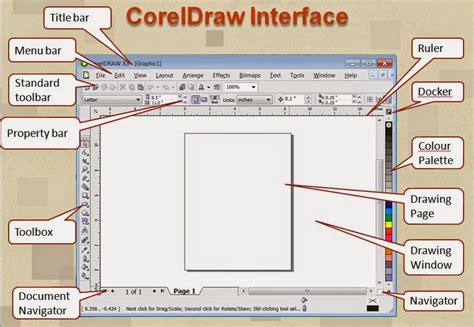
With later versions, Corel embraced modern computing architectures. CorelDRAW X5 offered 64-bit and multi-core processor native support, along with compatibility for 64-bit Adobe Photoshop plugins. It also introduced improved import and export capabilities for Adobe Creative Suite and Publisher. Object properties, styles, and color styling were consolidated into docking toolbars. A new Unicode OpenType-based text engine modernized text handling, offering comprehensive international language support while retaining legacy text modes. Dynamic alignment guides and the CorelConnect content organizer, allowing in-app access to online sources like Flickr, further streamlined workflows.
CorelDRAW X6 continued this trajectory with new tools for manipulating vector objects, such as pushing, pulling, and smearing. Customizable workspaces tailored for different user roles (illustrators, beginners, etc.) and new training videos were introduced. The tabbed documents feature allowed for easier multi-screen work. Additional retouching and fill tools, color harmony features, and QR code generation tools were also added.
A significant shift in licensing occurred with CorelDRAW X7, which introduced 30-day and 365-day rental (subscription) options alongside the traditional perpetual license. This version also introduced a new Font List selection filtering system, with Corel Font Manager replacing Bitstream Font Navigator. Functionality was enhanced with the ability to hide objects and groups, not just layers, and the capability to copy and paste portions of curve segments. Adjacent node selection, an improved Knife tool, a Healing tool for photo retouching, an enhanced perspective correction tool, improved feathering on drop shadows, and automated camera effects like bokeh and sepia further refined the user experience.
CorelDRAW X8 focused on improving user interaction and visual clarity. Startup and feature tours were enhanced, and official support for high-resolution displays was introduced with scalable icons and UI elements. The suite was bolstered with collaboration tools, including Copy editing, a Comments Docker, Annotation tools, and Cloud client sharing. Non-destructive photo editing and filters were expanded, presets were integrated into photo editing features, and new templates, a multipage tool, and more multiple-format export options were added.
Subsequent releases, such as CorelDRAW Graphics Suite 2018, 2019, 2020, and 2021, have continued to refine these features, focusing on performance, collaboration, and integration with modern workflows. The 2018 version, for instance, included new curve-editing tools, updated Pantone support, and bug fixes. The 2019 release brought further improvements to the Paintbrush tool, along with stability and security enhancements. The 2020 version focused on a new multipage tool and enhanced export capabilities, while the 2021 update emphasized non-destructive photo editing and collaboration features. The suite has also seen a return to the Mac platform, with versions supporting macOS Mojave's Dark Mode and Touch Bar.
CorelDRAW: From 1989 to 2025 – You Won’t Believe the Evolution!
The CorelDRAW File Format (CDR)
The native file format for CorelDRAW is the CDR file. Understanding its evolution is crucial for users and developers working with CorelDRAW data.
In its earliest stages, the CDR file format was a proprietary format specifically designed for vector graphic drawings. Files created with these early versions were recognizable by the first two bytes, which were "WL".
A significant change occurred with CorelDRAW 3, when the file format transitioned to a Resource Interchange File Format (RIFF) envelope. Files from this era can be identified by the first four bytes being "RIFF". Additionally, bytes 9 to 15 would contain "CDR*vrsn", where the asterisk was a blank space in earlier versions.
Beginning with CorelDRAW 4, the file format began to incorporate the version number of the writing program in hexadecimal. For instance, "4" indicated version 4, and "D" signified version 13.
A major structural shift took place from version X4 (version 14) onwards. The CDR file evolved into a ZIP-compressed directory containing multiple files. Among these are XML files and a RIFF-structured file named riffdata.cdr, which retains the familiar version signature (e.g., "CDREvrsn" for X4, "CDRFvrsn" for X5). In CorelDRAW X6, a file named root.dat replaced the direct version signature in the RIFF structure, with bytes 9 to 15 appearing as "CDRGfver".
This evolution of the CDR format has implications for interoperability and data recovery. The proprietary nature of its early versions, and the subsequent structural changes, have presented challenges for third-party software attempting to import and edit CDR files.
Interoperability and Open Source Efforts
The proprietary nature of the CDR format has historically posed challenges for users who need to share files with individuals using different software or for long-term archival purposes. However, efforts have been made to improve interoperability.
In December 2006, the sK1 open-source project team began the process of reverse-engineering the CDR format. Their findings and a functional snapshot of a CDR importer were presented at the Libre Graphics Meeting in 2007. The sK1 project also developed the UniConvertor, a command-line tool designed to convert CorelDRAW formats (CDR, CDT, CCX, CDRX, CMX) into other formats. As of 2008, the sK1 project claimed to offer the most comprehensive import support for CorelDraw file formats within the open-source software landscape.
Later, in 2012, a joint LibreOffice/re-lab team implemented libcdr, a library specifically designed for reading CDR files from version 7 to X3, as well as CMX files. This library provides extensive support for shapes and their properties, including color management and spot colors, with basic text support. libcdr includes a built-in converter to SVG and a converter to OpenDocument is available through the writerperfect package.
Despite these advancements, full native support for all versions and features of the CDR format remains a complex undertaking for external applications. Adobe Illustrator, for example, supports importing CDR files, but the compatibility can vary depending on the version of CorelDRAW used and the complexity of the artwork. Adobe's documentation indicates support for specific versions of CDR files, highlighting the ongoing challenges in achieving seamless cross-platform compatibility.
Platform Support and Accessibility
CorelDRAW's journey has seen it adapt to various operating systems throughout its existence. Originally developed for Microsoft Windows 2.1, it later had versions available for Windows 3.1x, CTOS, OS/2, and Power Macintosh. Hewlett-Packard even announced a version for its HP 9000 Series workstations running HP-UX. With the release of Corel Linux, CorelDRAW 9 was made available with package support for Debian and Red Hat-based Linux distributions. However, support for Linux and Mac OS X was eventually discontinued.
As of recent years, CorelDRAW Graphics Suite has re-established strong cross-platform support. It is now available for Windows 10, Windows 11, and macOS, including a new release optimized for Apple silicon. Furthermore, Corel has expanded its ecosystem with a related web app and an iPad app, offering enhanced collaboration and markup capabilities online, making CorelDRAW more accessible and integrated into modern, cloud-centric workflows.
The ability to import and export a wide range of file formats remains a critical aspect of CorelDRAW's utility. While its native CDR format is proprietary, the software supports numerous industry-standard formats, facilitating exchange with other design and production tools. This broad compatibility ensures that CorelDRAW remains a relevant and powerful tool in the diverse landscape of graphic design and digital production.