Blackmagic Design has ushered in a new era of post-production with the release of DaVinci Resolve 19. This comprehensive update introduces a staggering array of over 100 new features and enhancements, with a particular focus on integrating cutting-edge DaVinci Neural Engine AI tools across all aspects of the workflow. From revolutionary editing capabilities to sophisticated color grading, immersive audio mixing, and advanced visual effects, DaVinci Resolve 19 promises to redefine efficiency and creative potential for professionals and enthusiasts alike.
Revolutionizing the Edit Workflow with AI and Enhanced Tools
DaVinci Resolve 19 significantly streamlines the editing process through the integration of artificial intelligence and user-requested functionalities. A standout feature is the ability to edit clips directly from transcribed text. By transcribing clips, users can access a window displaying detected text from multiple speakers, enabling them to remove sections, search through text, and construct timelines based on a script using the AI IntelliScript tool. This approach moves beyond traditional video editing, allowing for a more intuitive and text-driven content assembly.
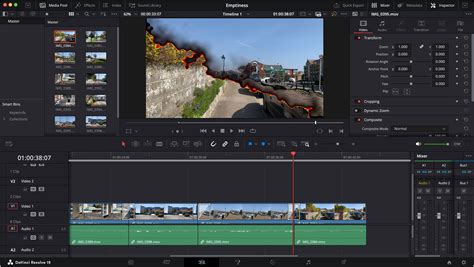
The Cut page has seen substantial improvements, designed to accelerate the creative process. Users now benefit from optimized multiview layouts that better utilize the viewer's width, displaying all sources simultaneously. Furthermore, the transition's duration, type, and alignment can now be adjusted directly from the timeline context menu, facilitating rapid decision-making on the go. For editors working with multiple camera angles, the new Multi-Source feature presents all live cameras or clips with common timecode in a multiview screen, allowing for quick identification and selection of points of interest. The Cut page also introduces broadcast replay tools for live multi-camera broadcast editing, playout, and replay with speed control, making it an indispensable tool for live production environments. A safe trimming mode is also implemented to prevent accidental overwriting of crucial edits, with the ability to drag trim points to quickly fill gaps.
The Edit page now offers the capability to open a timeline in the source viewer, enabling review, comparison, and editing between two timelines. A dedicated keyframe editor is now available on both the Cut and Edit pages, providing finer control over parameter animation through keyframe curves and parameter modes. The voiceover palette on the Cut page allows for direct recording of voiceover tracks during timeline playback, complete with cue, record, and stop controls, along with quick access to voice isolation and dialogue leveling tools. A new dedicated track is automatically added for voiceovers. For those working with vertical video formats, the Cut, Edit, and Color page layouts automatically rearrange to optimize working with a vertical viewer.
Advanced Color Grading and Visual Enhancement
The Color page in DaVinci Resolve 19 is a powerhouse of creative tools, enhanced with new AI capabilities and refined grading palettes. The introduction of the "Color Slice" tool offers a novel approach to color adjustment. This tool allows users to manipulate an image based on six vectors-red, green, blue, yellow, cyan, and magenta-along with a dedicated skin tone slider. This granular control enables precise adjustments to saturation and hue for specific colors, with real-time visual feedback.
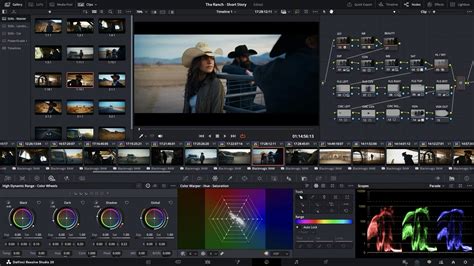
The "IntelliTrack" AI, powered by the DaVinci Neural Engine, revolutionizes object tracking and stabilization. Users can now quickly select points to track, facilitating the creation of sophisticated effects or image stabilization with unprecedented accuracy. For noise reduction, DaVinci Resolve 19 introduces "UltraNR," a new AI-driven spatial noise reduction mode that dramatically reduces digital noise and film grain while preserving image clarity, often without requiring extensive user tweaking.
The "Film Look Creator" module expands color grading possibilities with over 60 cinematic parameters, allowing users to emulate film properties such as halation, bloom, grain, flicker, gate weave, and vignetting. This module offers a starting point with presets like 65mm, cinematic, bleach bypass, and nostalgic, which can then be fine-tuned to achieve desired looks. Another notable addition is the "Defocus Background" effect, which realistically simulates a shallow depth of field through masking, offering a more sophisticated alternative to smartphone-generated effects. The "Face Refinement" tool automatically tracks faces, enabling editors to precisely adjust brightness, colors, and detail for enhanced portrait correction.
New to the Color page is the "Depth Map" effect, which instantly generates a 3D depth matte of a scene. This allows for rapid grading of the foreground separately from the background, or vice versa, enabling creative separation and atmospheric effects. Corrector nodes in the color page's node editor now feature composite modes, allowing for more intricate blending of node values within the color pipeline without the need for a separate layer mixer. The Color page viewer now supports marker overlays and annotations for timeline and clip markers, providing a visual space for notes and feedback.
Fusion: Pushing the Boundaries of Visual Effects
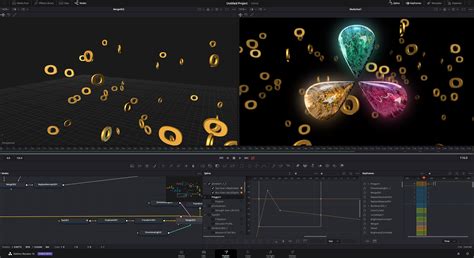
Fusion, DaVinci Resolve's node-based compositing and visual effects environment, receives a significant upgrade in version 19, with an expanded set of USD (Universal Scene Description) tools and advanced compositing capabilities. VFX artists benefit from enhanced multi-layer compositing workflows. Fusion now offers deep image compositing tools, allowing access to depth data found in deep image EXR files. A range of new nodes enables merging, transforming, resizing, cropping, recoloring, and generating holdouts.
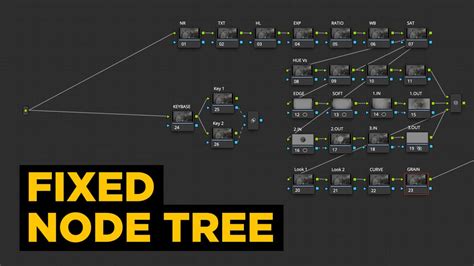
A key new feature is the "MultiPoly" tool, which consolidates all masks into a single list. This eliminates the need to switch between numerous nodes, leading to faster and more accurate rotoscoping. Fusion also introduces new optical flow vector tools: "Vector Warp," "Vector Transform," and "Vector Denoise." These tools leverage motion vectors to enable intricate temporal effects.
For immersive content creation, Fusion's PanoMap, spherical stabilizer, LatLong patcher, 3D VR camera, and 3D viewers have been updated to support a 180-degree angle of view. The enhanced "Dome light" is a 3D tool that simulates natural ambient lighting in 3D scenes by integrating 360 HDRI images for accurate reflections and global illumination. Users can now preview Color page clip grades directly in the Fusion page viewer through the MediaOut node. The "uVolume" tool allows for direct import of volumetric VDB files into Fusion, eliminating time-consuming conversions and offering creative control over effects like smoke, fire, clouds, and explosions.
Fairlight: Intelligent Audio and Immersive Soundscapes
Fairlight, DaVinci Resolve's professional audio post-production suite, sees a significant boost with AI-powered tools and enhanced mixing capabilities. The "IntelliTrack AI" point tracker is a groundbreaking addition, enabling automatic generation of precision audio panning by tracking people or objects moving across 2D and 3D spaces. This intelligently links audio movement to on-screen action, creating more immersive soundscapes.
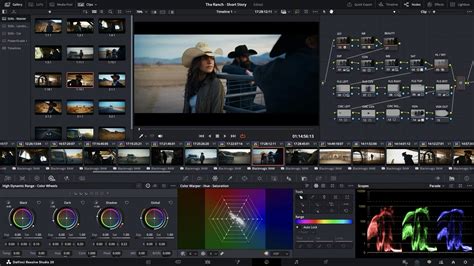
The AI-based "Dialogue Separator FX" allows users to rebalance dialogue against background sound and room ambience. With controls for voice, background, and ambience, users can reduce, remix, or even remove competing sounds, significantly improving dialogue clarity. The "Ducker track FX" automates level adjustments between tracks, eliminating the need for complex sidechain compression or automation curves.
For advanced surround sound mixing, DaVinci Resolve now supports recording, mixing, monitoring, and delivering full-sphere Ambisonic surround soundtracks. Clip EQ has been expanded to offer 6 bands on the Cut, Edit, and Fairlight pages, providing more tonal control at the clip level and matching the track EQ in the mixer. Two new clip processing options allow users to adjust a target clip's audio to match a reference clip's level or tonal spectrum using "EQ Match," which is dynamic and automatically automated across the clip.
Users can now build "Chain FX" to group favorite plugins together, each with customized settings and saved as presets. Fairlight also features per-channel automation mode selection, offering greater flexibility and creative control during mixing. The Fairlight Audio Core, a low-latency, next-generation audio engine, intelligently manages workloads, utilizing all available CPU cores for optimal performance.
DaVinci Neural Engine: The Power of AI Across Resolve
The DaVinci Neural Engine is the driving force behind many of DaVinci Resolve 19's most powerful new features. This advanced machine learning system, fully supported on Apple M-series and Snapdragon X Elite chips, powers tools that enhance efficiency and creative possibilities across editing, color, VFX, and audio.
AI IntelliScript, for example, automates the creation of timelines from text scripts. AI Animated Subtitles bring words to life by animating them as they are spoken. AI Multicam SmartSwitch intelligently assembles multi-cam timelines based on speaker detection, automatically switching camera angles to follow the active speaker.
In the Color page, IntelliTrack AI provides precision object tracking for effects and stabilization. UltraNR leverages AI for advanced noise reduction. For editing, AI Audio Assistant analyzes audio and intelligently creates professional mixes. The AI Set Extender uses AI to generate scene extensions from text prompts, filling in missing regions in frames.
Magic Mask, a tool that requires only a single stroke to locate and track people, features, and objects, is further refined. Smart Reframing repurposes footage to different aspect ratios by recognizing action and panning within the scene. Tools like Object Removal and Patch Replacer allow for the effortless removal of unwanted elements from a scene. Dialogue Matcher uses AI to automatically align the tone, level, and room environment of dialogue from different clips, ensuring audio consistency. The AI Detect Music Beats function analyzes music and automatically places markers for editing to the beat.
Collaboration and Cloud Integration
DaVinci Resolve 19 enhances collaboration through Blackmagic Cloud, offering features designed for seamless teamwork. Projects can be hosted on Blackmagic Cloud, with the option to sync all media. Cloud folders provide an easy way to share extra clips, images, or graphics with collaborators. All cloud content appears as virtual clips and folders until used in a project, at which point it is synced locally.
I Tried a NEW WAY of Video Editing With Blackmagic Cloud — Here's How it Works... | DaVinci Resolve
For clients who do not have a Blackmagic Cloud account, projects can be reviewed through Presentations by generating a URL link. The cloud storage features an icon view with thumbnails for visual media management, and hovering over thumbnails allows for quick media previews. The new Organizations App within Blackmagic Cloud allows larger companies to define a single organization, create groups or teams, and share projects efficiently across entire groups. This app also facilitates the rental and management of DaVinci Resolve Studio licenses for large organizations.
The Blackmagic Proxy Generator App automates the creation and management of proxies from camera originals. By setting up a watch folder, new media is automatically converted into H.264, H.265, or ProRes proxies to accelerate editing workflows. Users can switch between camera originals and proxies with a single click, and DaVinci Resolve automatically links to the camera originals in the media pool. URSA Cine and PYXIS cameras can now upload proxy files, followed by camera originals, to Blackmagic Cloud, enabling quick editing and grading using proxies. SRT streaming ensures high-quality, low-latency video for remote monitoring from Blackmagic Cloud, ideal for live collaboration and feedback.
System Requirements and Version Differences
DaVinci Resolve 19 offers both a free version and a paid Studio version, each with distinct capabilities. The free version provides access to the same high-quality processing and supports unlimited resolution media files. However, it limits project mastering and output to Ultra HD resolutions or lower. It also restricts the use of multiple GPUs (supporting only a single GPU on Windows and Linux, and two on the latest Mac Pro), motion blur effects, advanced temporal and spatial noise reduction, many AI-based tools, HDR tools, camera tracker, voice isolation, numerous Resolve FX, 3D stereoscopic tools, and remote rendering.
For users requiring these advanced features, upgrading to DaVinci Resolve 19 Studio is recommended. Recommended system memory for optimal performance is 16 GB, although 8 GB is the minimum.
New Hardware and Ecosystem Expansion
Alongside the software update, Blackmagic Design has also announced new hardware that complements the DaVinci Resolve ecosystem. The Micro Color Panel for DaVinci Resolve on iPad offers a portable and affordable solution for color grading on the go, featuring trackballs, control dials, and buttons for professional control.
The Pyxis 6K and URSA Cine 12K/17K cameras represent the latest in Blackmagic Design's cinema camera offerings, providing high-resolution sensors, extensive dynamic range, and professional filmmaking features. These cameras are designed to integrate seamlessly with DaVinci Resolve, further enhancing the end-to-end workflow for filmmakers. The URSA Cine models, in particular, offer resolutions up to 12K and 17K, pushing the boundaries of digital cinematography.
DaVinci Resolve 19 continues to solidify its position as a leading post-production solution, offering an unparalleled combination of advanced features, AI-powered tools, and a robust collaborative environment. With its continuous evolution, Blackmagic Design is empowering creators to achieve new levels of visual storytelling and efficiency.