Blackmagic Design has long been a significant player in the film and television industry, recognized for its high-quality post-production tools, digital cinema cameras, and color correctors. Innovations like DeckLink capture cards have historically driven improvements in quality and affordability. The company continues to push boundaries with advancements in SDI technology and Ultra HD workflows. Now, Blackmagic Design is poised to transform video editing and streaming with the introduction of Blackmagic Cloud Sync, an innovative storage and synchronization feature integrated directly into DaVinci Resolve.

Real-Time Media Synchronization: The Core of Blackmagic Cloud Sync
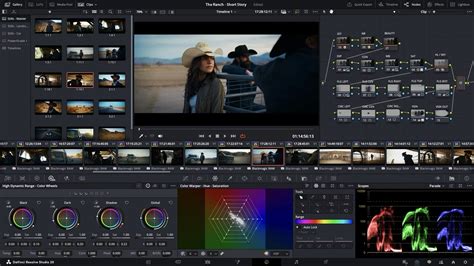
At its heart, Blackmagic Cloud Sync is designed to streamline the post-production process by enabling cameras to synchronize media directly into DaVinci Resolve containers while recording. This means editors can access and work with footage in real time, seeing newly recorded media appear in DaVinci Resolve bins within seconds. This allows editors and colorists to begin their work simultaneously with the recording process, a paradigm shift from traditional linear workflows.
The magic behind this live sync lies in the capability of Blackmagic’s latest cameras, including the Cinema Camera 6K, PYXIS, URSA Cine, and URSA Broadcast G2. These cameras can record full-resolution HD proxies in H.264 format. These proxy files are then synchronized in real-time with Blackmagic Cloud and subsequently with all DaVinci Resolve workstations connected to the same project. This automated process requires users to simply log into Blackmagic Cloud and select a project before commencing recording.
Enhancing Multi-Camera Production and Live Workflows
The utility of Blackmagic Cloud Sync extends significantly to multi-camera shoots. When multiple cameras are recording simultaneously, the multi-sync feature provides editors with a multiview display, allowing them to see and select the best angle from various sources. This functionality resembles live streaming within editing software, where media playback is continuous and updated in real-time. Editors can view and work with clip segments as they are being recorded, offering unprecedented speed and flexibility.
This real-time synchronization capability is particularly invaluable for news workflows, where historical events can be edited and broadcast almost instantaneously. For instance, the URSA Broadcast G2 camera can synchronize with the editing system as recording begins, empowering editors to prepare news segments in real time. This dramatically reduces the turnaround time from capture to broadcast.
Accessibility and Future Development
Blackmagic Cloud Live Sync is available in public beta, initially for the Blackmagic Cinema Camera 6K and Blackmagic URSA Broadcast G2 cameras. This update is provided free of charge to Blackmagic Cloud users, underscoring Blackmagic Design's commitment to innovation and accessibility. Future updates are planned to extend this functionality to other Blackmagic cameras and the Blackmagic Camera iPhone app, further broadening its applicability.
Grant Petty, CEO of Blackmagic Design, emphasizes the revolutionary nature of this technology: "Live syncing media from our cameras directly to DaVinci Resolve containers is a revolution in workflow. This has never been possible before." This sentiment highlights the groundbreaking potential of this feature in transforming how video content is produced and post-produced.
Understanding Blackmagic Cloud Services for Collaboration
Beyond live sync, Blackmagic Cloud offers a robust suite of services designed for seamless remote collaboration on DaVinci Resolve projects. These services are crucial for teams working across different geographical locations.
Project Libraries: The Foundation of Shared Projects
At the core of Blackmagic Cloud collaboration are Project Libraries. These libraries, priced at $5 per month per library, can house multiple projects and are accessible to authorized users. A significant advantage is their compatibility with both the free and Studio versions of DaVinci Resolve, offering flexibility for teams with varied software licenses.
Cloud File Storage: Centralizing Your Assets
Cloud File Storage is another essential component, with pricing starting at $15 per month for 500GB and scaling up to $60 per month for 2TB. This service automatically uploads either proxy files or original media, depending on user configuration, and synchronizes them across team members' computers. This ensures everyone has access to the most current project files. The integration with Blackmagic camera apps further simplifies this by allowing direct uploads from the set.
Collaboration Features: Real-Time Interaction
The true strength of Blackmagic Cloud lies in its collaboration features. It enables real-time project access for multiple users through a system of timeline and bin locking. This prevents conflicts by allowing only one user to edit a specific timeline or bin at a time, while others can view it in read-only mode. The platform also includes built-in chat functionality for seamless communication within the Resolve interface and project status monitoring for an overview of progress.
Why Blackmagic Cloud is AWESOME! | Remote Editing Tutorial with DaVinci Resolve 18
Optimizing Your Blackmagic Cloud Workflow
To maximize the benefits of Blackmagic Cloud, an effective workflow setup is essential. A recommended strategy is to designate a primary computer for importing original files. This main computer should be configured to upload only proxy files to the cloud, thereby conserving bandwidth and storage space.
For other team members' computers, it is advisable to set them to upload both proxies and original files. This ensures that any additional assets, such as graphics or music, that they might add to the project are available to the entire team.
Utilizing project libraries to organize access based on clients or specific projects is another smart organizational tactic. This allows for granular control over who has access to which projects, maintaining confidentiality and clear project separation.
The automatic proxy generation and synchronization offered by Blackmagic Cloud significantly streamline workflows by eliminating the need for manual proxy creation and file transfers.
Collaboration in Practice: How It Works
When working on a collaborative project, Blackmagic Cloud operates on a first-come, first-served basis for accessing timelines and bins. The first user to open a timeline or bin gains edit access, while other users can view it in read-only mode. This system effectively prevents editing conflicts while still allowing team members to reference ongoing work.
Furthermore, automatic project saving and syncing ensure that every change made is saved and synchronized across all team members' computers, guaranteeing that everyone is consistently working with the most up-to-date project version.
Additional Features and Considerations for Enhanced Production
Blackmagic Cloud also incorporates a Presentations feature, akin to review tools like Frame.io or Vimeo. This includes real-time streaming options for review sessions, facilitating client feedback and team reviews. Cloud storage plans typically include 20 presentations.
For teams with both local and remote members, Blackmagic offers cloud-enabled hardware solutions that can integrate with third-party cloud services like Dropbox or Google Drive, providing a flexible hybrid solution.
Organizations: Streamlining Team Management
Blackmagic Cloud Organizations provide advanced management capabilities for larger teams and companies. This service allows for efficient user management, team creation, and control over access to project libraries. It also offers the option to rent DaVinci Resolve Studio licenses for team members at a daily rate, a valuable feature for managing temporary freelancers.
For organizations with existing cloud infrastructure, the Organizations feature supports the integration of their own storage solutions, such as AWS S3 buckets, allowing for seamless integration into existing systems.
Future Enhancements for an Evolving Landscape
While Blackmagic Cloud offers powerful collaboration tools, there is always potential for improvement. Future enhancements could include more granular control over selective uploading of original files, enhanced cloud file management capabilities, and a web interface for more accessible media pool management. These developments would further refine workflows and enhance user experience.
As remote work continues to shape the video production landscape, Blackmagic Cloud emerges as a robust and integrated solution for teams utilizing DaVinci Resolve. By understanding its comprehensive features and implementing strategic workflows, editors can collaborate seamlessly across distances, bringing enhanced efficiency and flexibility to their projects.
DaVinci Resolve: The Complete Post-Production Ecosystem
DaVinci Resolve itself is a comprehensive post-production solution that empowers individuals and teams to work collaboratively on the same project simultaneously. Historically, post-production followed a linear workflow where artists handed off their work sequentially, often leading to errors and extensive change logs. DaVinci Resolve’s collaborative architecture allows each artist to work on their dedicated page within the same project, utilizing the tools they need without such rigid handoffs.
Blackmagic Cloud Integration in DaVinci Resolve
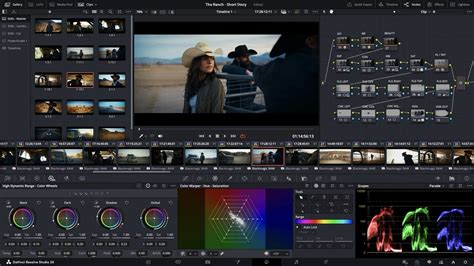
DaVinci Resolve version 20, and subsequent updates, fully embrace the revolutionary Blackmagic Cloud, ushering in a new era of cloud-based workflows. The process begins with creating a Blackmagic Cloud ID, which allows users to log into the DaVinci Resolve Project Server and establish a project library for their endeavors. Any number of collaborators can be assigned to a project, with Blackmagic Cloud facilitating project sharing. The ability for multiple users to work on the same timeline is a core benefit. Changes made by collaborators are visible and can be accepted within the viewer, with updates only applied upon acceptance. A single click can relink files, update timelines, or review changes.
Creating a Blackmagic Cloud ID is a straightforward and free process. Once established, users can log in and set up their project library, either by creating new projects or uploading existing ones to the cloud server. Selecting a server geographically close to the user can optimize performance.
Organizations App for Scalable Team Management
For larger entities, the Organizations app provides a centralized platform for defining a company or organization within Blackmagic Cloud. This enables the creation of groups and teams, allowing for efficient sharing of projects and presentations to entire groups rather than individual members. The Organizations app also supports single sign-on, enabling IT departments to authorize access for staff and freelancers seamlessly. Furthermore, it offers the option to purchase or rent DaVinci Resolve Studio licenses, simplifying license allocation and cost management for projects within large groups. This is particularly beneficial for managing numerous licenses or dongles that can be challenging with traditional methods.
Media Synchronization and Proxy Workflows
Blackmagic Cloud facilitates efficient media sharing among collaborators. Users can opt to sync media between computers, ensuring that everyone has a local copy for fast and responsive work. New files are automatically synced and appear in the project for all collaborators. The growing size of camera original media necessitates efficient proxy workflows. The Blackmagic Proxy Generator, a free tool bundled with DaVinci Resolve, automates the creation of proxies from camera originals. By setting up watch folders, any new media placed within them is automatically converted into proxy files (H.264, H.265, or ProRes). DaVinci Resolve then automatically links these proxies to the original media, accelerating editing workflows.
Multiple Blackmagic cameras, including the URSA Cine and PYXIS, now support uploading proxy files directly to Blackmagic Cloud, followed by the camera originals. This, combined with automatic synchronization to DaVinci Resolve projects, allows editors to commence editing and grading rapidly using proxies, thereby speeding up the entire workflow.
Advanced Collaboration Tools within DaVinci Resolve
DaVinci Resolve is more than just an editing tool; it is a complete post-production solution. The platform supports collaborative editing, visual effects, motion graphics, color correction, and audio post-production across Mac, Windows, and Linux operating systems.
Editor and Control Surfaces: The DaVinci Resolve Speed Editor offers a compact design with essential editing keys and a search dial for rapid navigation. For more extensive editing needs, a full-sized QWERTY keyboard with a metal design and specialized edit, trim, and timecode keys is available. The DaVinci Resolve Color Panel provides comprehensive control for refined color grading, including the ability to add windows. For audio professionals, the Fairlight Studio Console offers extensive control for mixing large projects with numerous channels and tracks, designed for speed and efficiency.
Project Server and Networked Collaboration: For organizations requiring greater control over their network infrastructure, the DaVinci Resolve Project Server application provides robust management for collaborative workgroups on private networks. Major updates in version 18 have significantly enhanced the speed of opening, saving, and sharing projects across private networks. This allows editors, colorists, VFX artists, and audio engineers to collaborate effectively, whether on-site or remotely. Automatic bin and timeline locking prevent collaborators from overwriting each other's work, while built-in chat facilitates communication and idea sharing without leaving the software. The timeline comparison tool visually highlights differences between timeline versions, showing additions, deletions, moves, or trims. Shared markers and annotations allow for clear communication of feedback and notes.
Simultaneous Editing and Grading: In collaborative projects, editors can simultaneously work on different bins, organize footage, and add metadata, while colorists and their assistants can select and grade clips concurrently. DaVinci Resolve features live save, enabling multiple users to constantly save incremental changes to the project database in real time.
Storage Solutions: Blackmagic Cloud Store and Beyond
Blackmagic Cloud offers flexible storage options, moving away from proprietary hardware and expensive IT departments. Users can leverage cloud storage via their Blackmagic Cloud ID or utilize local network storage solutions like the Blackmagic Cloud Store.
Blackmagic Cloud Store: These are high-capacity, high-speed network disks designed for demanding workflows, capable of handling large media files, including 12K Blackmagic RAW. Utilizing advanced flash memory, they support numerous simultaneous users with low latency for fast responsiveness. Blackmagic Cloud Store models are available in 20TB, 80TB, and 320TB capacities. They employ M.2 flash memory cards in parallel RAID 5 groups for speed and data protection, with redundant power supplies for reliability. The four 10G Ethernet ports operate as a switch, allowing for direct connection to multiple computers. An HDMI monitoring output provides a live graphic view of the storage's operation.
Syncing and Global Workflows: The Blackmagic Cloud Store can sync media files globally, eliminating the high costs associated with remote collaboration. It understands proxy workflows, allowing entire timelines and their associated media to be shared rapidly. Multiple Blackmagic Cloud Store units can be synchronized across different geographic locations, providing each user with access to a local copy of the media files, thus eliminating latency.
Ingest and Backup: The USB-C ingest port on the Cloud Store automatically loads files from any connected USB disk or media dock. Similarly, a USB-C backup port allows for local backups to USB disks, offering a cost-effective and private data protection solution.
Connectivity and Control: The Cloud Store features four high-speed 10G Ethernet ports, a built-in Ethernet switch, and two 1G Ethernet connections. It also includes a USB-C to Ethernet adapter for direct connection to modern laptops without Ethernet ports. The HDMI monitoring output provides a visual representation of the storage's activity, including storage capacity, sync status, connected users, and data transfer rates.
Private Storage and Control: Blackmagic Cloud Store offers private storage that users fully control, without subscriptions, monthly fees, or usage tracking. A free utility software for Mac and Windows manages settings, allowing for operation on private networks disconnected from the internet, which is crucial for security-conscious environments.
Multi-Camera Production Integration: The Blackmagic Cloud Store can be integrated into multi-camera production workflows by recording directly from HyperDeck Extremes. Each HyperDeck Extreme can record individual ISO camera feeds into the Cloud Store, creating an ideal DaVinci Resolve multicam editing solution. HyperDeck Extreme supports recording formats like ProRes, H.265, or DNx into the Cloud Store via its high-speed 10G Ethernet connection.
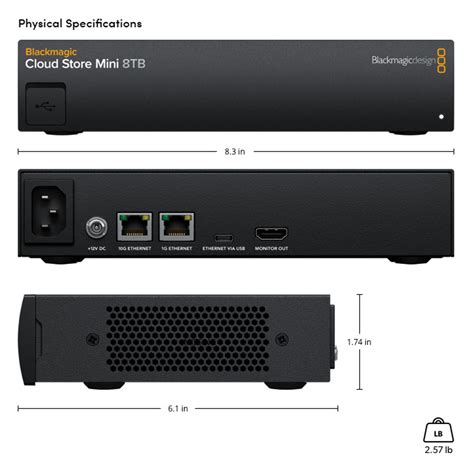
Other Storage Options: Blackmagic Design also offers the Blackmagic Cloud Store Mini, a more affordable and portable rack-mount design with four internal M.2 cards in a RAID 0 configuration for maximum 10G Ethernet port speed. The Blackmagic Cloud Pod allows any USB disk to be shared on a network, providing the lowest cost option for network storage with a 10G Ethernet connection.
Presentations: Client Review and Feedback
The Presentations feature, accessible via Blackmagic Cloud ID, offers a streamlined way to share work-in-progress with clients. Projects can be published directly from DaVinci Resolve or uploaded manually. Clients can review presentations without requiring a Blackmagic Cloud account by using a generated URL link. Shared markers and comments are bidirectionally relinked with DaVinci Resolve, ensuring feedback is integrated efficiently. Cloud storage plans typically include 20 presentations.
DaVinci Resolve Studio: Powering Professional Workflows
While the free version of DaVinci Resolve is remarkably feature-rich, DaVinci Resolve Studio offers advanced capabilities for professional workflows. It supports higher frame rates and resolutions, multiple GPUs for real-time playback of professional 10-bit formats, and accelerated hardware decoding and encoding for H.264 and H.265.
Advanced Color Grading and AI Tools
DaVinci Resolve Studio includes sophisticated noise reduction, lens correction, and advanced HDR scopes. Its color transformation scripts are GPU accelerated, allowing for complex image manipulation. The DaVinci AI Neural Engine powers exclusive features such as facial recognition for populating bins, Super Scale for high-quality image upscaling, and Speed Warp retiming for smooth speed changes. Magic Mask, Object Removal, and Patch Replacer tools offer advanced image manipulation and cleanup capabilities.
Immersive Audio and Advanced Formats
The Studio version supports high-resolution 3D audio for immersive sound mixing, including object-based formats like Dolby Atmos and Ambisonics. It offers advanced support for professional video formats, including 10-bit encoding and "all-I" intraframe encoding. Dolby Vision support, along with the creation of SMPTE ST.2067 compliant IMF files and native support for unencrypted DCP files, caters to broadcast and distribution standards.
Extended Resolve FX and Scripting
DaVinci Resolve Studio includes over 40 additional GPU and CPU accelerated Resolve FX, offering a wide range of creative effects for image enhancement, restoration, and manipulation. It also supports Python and LUA scripting, along with developer APIs, enabling workflow integrations and custom encoding options.
The Future of Collaborative Post-Production
Blackmagic Cloud, with its integrated live sync capabilities, robust collaboration tools, and flexible storage solutions, represents a significant leap forward in post-production workflows. By enabling real-time access to media and projects, it breaks down geographical barriers and accelerates the creative process. As remote work continues to be a dominant force in the industry, Blackmagic Cloud is positioning itself as an indispensable platform for creative teams seeking efficiency, flexibility, and seamless collaboration. The continuous development and free updates underscore Blackmagic Design's commitment to empowering creators with cutting-edge technology.