DaVinci Resolve Studio stands as a singular powerhouse in the realm of post-production, uniquely integrating professional editing, sophisticated color correction, advanced visual effects, and comprehensive audio post-production into a single, cohesive software application. This all-in-one solution empowers users to seamlessly transition between these distinct creative domains with a mere click, streamlining workflows and fostering a more fluid creative process. Designed with the demands of projects possessing tight deadlines in mind, DaVinci Resolve offers specialized tools and pages engineered for maximum speed and efficiency.
The Art of Rapid Editing: The Cut Page and Beyond
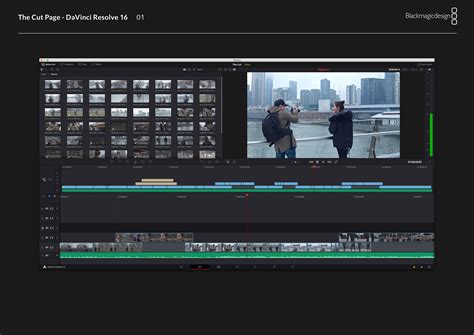
For those who need to turn around projects with remarkable speed, the Cut page is an indispensable asset. It is meticulously designed to accelerate the editing process, enabling users to work faster than ever before. Key features like the sync bin and source overwrite tools provide the swiftest method for editing multi-camera programs, a critical advantage for live events, documentaries, and broadcast news. The inclusion of dual timelines, a source tape, and intelligent editing tools further enhances the editing velocity, making it suitable for both offline editorial tasks and the final online finishing of projects.
The Cut page isn't just about speed; it's about intelligent workflow. Its intuitive layout and streamlined toolset allow editors to focus on the narrative and pacing without getting bogged down in complex technicalities. This means that whether you're assembling a fast-paced documentary or a dynamic music video, the Cut page provides the foundation for efficient and effective storytelling.
Elevating Visuals: Color Correction and Grading
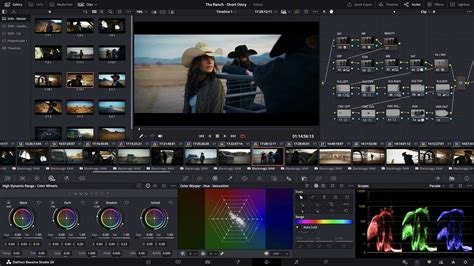
Hollywood's favored tool for color correction continues its evolution, offering unparalleled capabilities for cinematic image enhancement. DaVinci Resolve Studio provides advanced HDR primary color grading tools, complemented by an unlimited array of secondary corrections. The power of power windows and sophisticated tracking ensures that precise adjustments can be applied to specific areas of the frame, allowing for nuanced and artistic control over the look and feel of your footage.
The color page is where raw footage transforms into a visual masterpiece. Beyond basic adjustments, it offers deep control over every aspect of an image's color and luminance. From subtle mood setting to dramatic stylistic choices, the color page empowers creators to achieve their precise vision. The integration of HDR tools means that users can also work with the latest in display technology, pushing the boundaries of visual fidelity and dynamic range.
NEW to DaVinci Resolve? Color Grading - Tutorial
Crafting Immersive Worlds: Visual Effects with Fusion
Fusion, DaVinci Resolve's integrated visual effects and motion graphics powerhouse, presents a true 3D workspace populated with over 250 tools. This robust environment is engineered for creating feature film quality visual effects and stunning motion graphics. DaVinci Resolve 20 introduces a new deep image compositing toolset, alongside a multi-layer pipeline for OpenXR and support for PSD files. These additions significantly expand the possibilities for complex compositing and immersive visual experiences.
The Fusion page is where imagination takes flight. It allows artists to build intricate visual effects, from subtle enhancements to spectacular set extensions and fantastical creatures. The 3D workspace means that elements can be positioned and manipulated in three-dimensional space, leading to more realistic and integrated composites. The advancements in deep image compositing and OpenXR support open doors to more sophisticated workflows, particularly for immersive content creation.
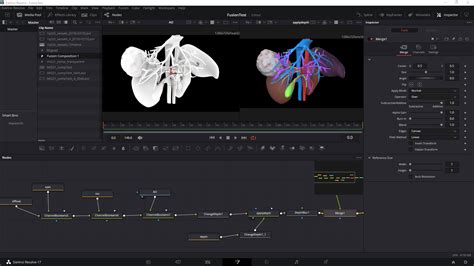
Newer versions of Fusion, such as in Studio v20, have further refined capabilities with major updates to Magic Mask and depth map tools, alongside features like vector warping and support for VR 180. The inclusion of Universal Scene Descriptor (USD) nodes also simplifies the transition between 2D and 3D workflows, making advanced techniques more accessible.
The Sonic Landscape: Audio Post-Production with Fairlight
Fairlight is a fully-fledged digital audio workstation (DAW) offering high-performance, multi-track, sample-level editing and mixing. It is equipped with essential tools for professional audio post-production, including ADR tools, support for sound libraries, and audio/video scrollers for rapid sound synchronization. A scrolling timeline, normalization capabilities, and a suite of Fairlight FX plugins - such as a hum remover and de-esser - provide comprehensive audio sweetening and mixing functionalities.
The Fairlight page is where sound design and audio mixing come to life. It provides the granular control necessary for dialogue editing, sound effects layering, and music scoring. The ability to work at a sample level ensures pristine audio quality, while the integrated plugins help to clean up and enhance recordings. For those working on projects with demanding audio requirements, Fairlight offers a complete solution within the DaVinci Resolve ecosystem.
NEW to DaVinci Resolve? Color Grading - Tutorial
Advanced Features for Enhanced Workflows
For users who upgrade to the paid DaVinci Resolve Studio, a host of advanced features become available, further enhancing productivity and creative potential. IntelliScript allows for the creation of a timeline directly from script text, revolutionizing pre-production planning. The dialogue matcher tool helps to seamlessly blend different audio sources, while the music editor automatically adjusts track lengths to fit the edit. Animated subtitles and beat detection streamline the process of adding and synchronizing text and music. Furthermore, MultiCam SmartSwitch offers automatic camera angle switching, a significant time-saver for multi-camera productions.
These advanced tools underscore DaVinci Resolve Studio's commitment to providing a complete end-to-end solution. From initial script to final mix, every stage of the post-production process is supported with powerful, integrated features.
Blackmagic Design Training: Cultivating Expertise
Blackmagic Design offers comprehensive training programs designed for both new users and established professionals. With a curriculum crafted to impart the skills needed for greater creativity, faster workflows, and successful project completion, these training resources are invaluable. Hands-on lessons are available for mastering editing techniques for various project types, including interviews, dramatic scenes, documentaries, and music videos.
Specific training guides delve into the art of sound editing, sweetening, recording, mixing, and mastering within Fairlight. For colorists, official Blackmagic Design training provides detailed instruction on using DaVinci Resolve's color correction tools. Visual effects artists can benefit from introductory guides to Fusion's compositing tools, enabling them to create effects directly within Resolve without the need for external applications. Advanced training in Fusion explores its true 3D workspace and sophisticated compositing techniques.
The Blackmagic Design certified training program is delivered by passionate trainers who are ambassadors for the software, ensuring a high level of expertise and practical application. The training partner program further extends this reach by collaborating with skilled training organizations, online partners, and academic institutions worldwide.
Hardware Integration: Control Surfaces for Precision
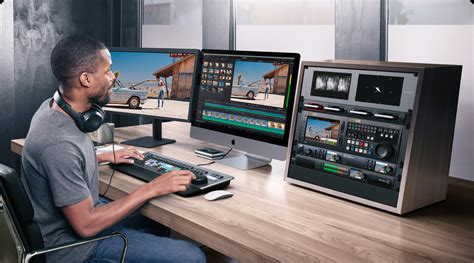
Complementing its software prowess, DaVinci Resolve integrates seamlessly with a range of specialized hardware control surfaces, designed to enhance speed, precision, and tactile control. The DaVinci Resolve Mini Panel, for instance, offers quick access to virtually every Fairlight feature, facilitating incredibly fast audio editing for sound engineers facing tight deadlines. These large consoles, favored by Hollywood and broadcasters, simplify the mixing of complex projects with numerous channels and tracks.
For editors, the DaVinci Resolve Editor Keyboard provides a full-sized QWERTY layout with a premium metal design, featuring a metal search dial with a clutch and dedicated edit, trim, and timecode keys. This design is specifically engineered for multi-cam editing, news cutting, and live sports replay, with buttons optimized for rapid camera selection and editing.
The DaVinci Resolve Color Panel is another crucial component, offering comprehensive control for cinematic image creation. Its controls allow for refined color grading, including the precise addition and manipulation of windows.
Fairlight consoles are available with legs that can be set at either a 0º or 8º angle, providing a flat or slightly angled working surface as preferred by the user. Blank 1/3rd wide bays are also available for custom console configurations, allowing users to tailor their hardware setup to their specific needs. This thoughtful integration of hardware and software ensures that users have the tools at their fingertips to achieve professional results efficiently.
System Requirements and Compatibility
To run DaVinci Resolve Studio, particularly the latest versions, certain system specifications are necessary. For macOS users, a current model Mac with Apple silicon is recommended. The system requires at least 8GB of system memory, with 16GB advised when utilizing the Fusion page due to its intensive processing demands. A minimum of macOS 14 or higher is needed, along with a display resolution of at least 1440 x 900. It is important to note that the Mac App Store version of DaVinci Resolve Studio 20 may have limitations regarding support for certain external control panels and may not be compatible with all third-party OpenFX or VST plugins. Users should always check the latest compatibility information for their specific hardware and software configurations.
The developer, Blackmagic Design Inc., states that this app does not collect any user data. The application size is typically around 3.7 GB, and it falls under the Photo & Video category. Compatibility for macOS requires version 14.5 or later. These requirements ensure that users have a stable and performant environment for their post-production work.
The general performance and stability improvements consistently rolled out by Blackmagic Design ensure that DaVinci Resolve remains a cutting-edge and reliable tool for professionals across the globe. Whether you are a seasoned editor, a colorist pushing the boundaries of visual storytelling, a VFX artist crafting breathtaking imagery, or a sound engineer perfecting the auditory experience, DaVinci Resolve offers a comprehensive and powerful platform to bring your creative visions to life.