DaVinci Resolve has emerged as a powerhouse in the post-production landscape, offering a unified platform for editing, visual effects, motion graphics, color correction, and audio post-production. Whether you are a budding filmmaker or an established professional, a DaVinci Resolve editing course can equip you with the essential skills to elevate your creative output, enhance your workflow efficiency, and successfully complete your projects. This comprehensive guide delves into the multifaceted aspects of learning DaVinci Resolve, from fundamental editing techniques to advanced post-production workflows, drawing upon the rich curriculum designed by Blackmagic Design and its certified training partners.
The Foundation: Understanding the Edit Page
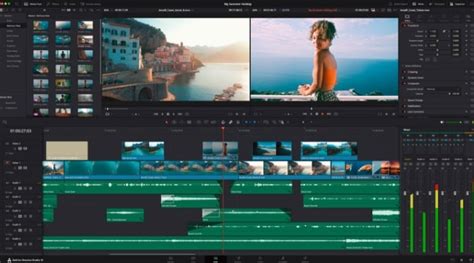
The journey into DaVinci Resolve editing typically begins with a strong understanding of the Edit page. This is where the core of your narrative is assembled, and mastering its features is paramount. A well-structured DaVinci Resolve editing course will expand on the functionalities of this page, teaching you how to effectively cut interviews, dramatic scenes, documentary material, and music videos. These hands-on lessons are designed to provide practical experience, enabling users to translate raw footage into polished content. For new users, the Edit page serves as the entry point into the world of professional editing, while established professionals can discover new efficiencies and creative approaches.
The curriculum emphasizes not just the mechanical aspects of cutting but also the art of storytelling through editing. You'll learn how to select the best takes, create seamless transitions, and build a compelling pace for your projects. The training aims to instill the confidence to tackle diverse content, ensuring that whether you're working with a single camera interview or a multi-shot dramatic sequence, you have the tools and knowledge to craft a professional edit.
Enhancing Your Projects: Visual Effects and Multicam Editing
Beyond basic cutting, DaVinci Resolve offers robust tools for enhancing your projects. A key area of exploration within any comprehensive DaVinci Resolve editing course is multicam editing. This technique is invaluable for projects involving multiple camera angles, such as live events, documentaries, or sports broadcasts. Learning how to manage and synchronize multiple video sources allows for dynamic and engaging storytelling, enabling editors to switch between perspectives with ease. The training will guide you through the process of setting up multicam clips and performing real-time edits, significantly speeding up the workflow for such projects.
Furthermore, the Edit page itself provides avenues to enhance your project with visual effects. While DaVinci Resolve boasts a dedicated Fusion page for advanced VFX, the Edit page offers integrated tools for basic compositing and effects application. This allows for quick adjustments and enhancements directly within your editing timeline, streamlining the process and avoiding the need to constantly switch between applications for minor visual tweaks. Discovering how to apply these effects can add a professional polish to your projects, making them more visually appealing and impactful.
The Art of Color Correction and Grading
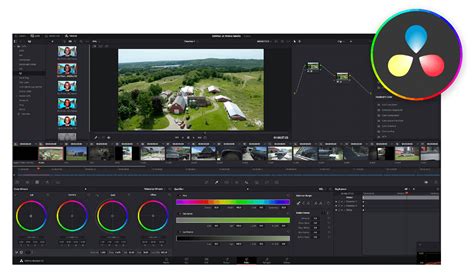
Color is a fundamental element of visual storytelling, and DaVinci Resolve is renowned for its industry-leading color correction and grading tools. Official Blackmagic Design training guides provide a detailed, hands-on approach to mastering the Color page. These practical exercises are meticulously designed to teach you the intricacies of color correction, enabling you to achieve a consistent look across your footage, correct exposure and white balance issues, and develop a distinct visual style for your film.
The training delves into advanced features utilized by Hollywood colorists, offering insights into sophisticated techniques for manipulating color to evoke specific moods and emotions. You'll learn about primary and secondary color correction, power windows for localized adjustments, tracking, and the use of various scopes to ensure accurate and professional results. The goal is to empower you with the creative control needed to craft cinematic images that resonate with your audience.
DaVinci Resolve 17 Color Training - Introduction to Color
Precision Audio Post-Production: From Mixing to Dolby Atmos
Sound is half the picture, and DaVinci Resolve's Fairlight page is a fully equipped digital audio workstation (DAW) designed for professional sound mixing and mastering. A dedicated DaVinci Resolve editing course will guide you through the critical step of mixing audio, ensuring that your sound design is as compelling as your visuals. This includes learning about sound editing, sweetening, recording, mixing, and mastering.
You will discover how to record a simple voiceover track for a scene and, crucially, how to use ADR (Automated Dialogue Replacement) tools to replace dialogue, ensuring clean and professional audio in your final output. The training also covers essential concepts like channel mapping and linked groups, which are vital for managing complex audio projects. For those looking to push the boundaries of immersive audio, DaVinci Resolve offers built-in tools to explore the world of Dolby Atmos. This allows you to create breathtaking spatial audio experiences that transport your audience.
Unleashing Creativity with Fusion: Visual Effects and Motion Graphics
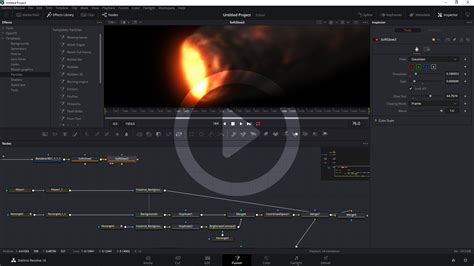
The Fusion page in DaVinci Resolve is where visual effects and motion graphics come to life. This powerful node-based compositing environment allows you to create everything from subtle enhancements to spectacular cinematic visual effects. A DaVinci Resolve editing course focusing on Fusion will introduce you to a core set of compositing tools through a series of easy-to-follow lessons. You'll learn how to create visual effects directly within DaVinci Resolve, eliminating the need for cumbersome import/export processes with other applications.
The training emphasizes practical application, teaching common compositing tasks that are essential for modern filmmaking. You'll explore the true 3D workspace on the Fusion page, opening up new dimensions for your creative work. With DaVinci Resolve Studio, advanced features like 3D camera tracking and Universal Scene Descriptor (USD) nodes significantly simplify the transition from 2D to 3D compositing, making complex visual effects more accessible than ever before. This hands-on training guide provides a practical introduction to these advanced tools and techniques, empowering editors to integrate sophisticated VFX into their projects seamlessly.
Streamlining Your Workflow: Hardware Control Surfaces
To further enhance speed and creative control, Blackmagic Design offers a range of dedicated hardware control surfaces. For editors, the DaVinci Resolve Mini Panel is a popular choice. It features a large search dial in a design that includes only the specific keys needed for editing, allowing for incredibly fast navigation and trimming. For multi-cam editing, particularly for news cutting and live sports replay, the Editor Keyboard is specifically designed with buttons to make camera selection and editing extremely fast.
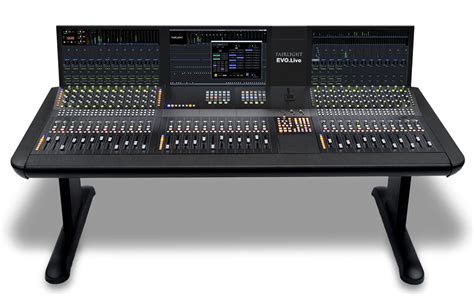
For those seeking a more traditional editing experience, the full-sized traditional QWERTY editor keyboard in a premium metal design offers a metal search dial with clutch, plus extra edit, trim, and timecode keys. In the realm of color grading, the powerful Color Panel provides all the control needed to create cinematic images, including refined controls for color grading and the ability to add windows. Sound engineers working on tight deadlines will appreciate the quick access to virtually every Fairlight feature provided by the large consoles, which are used by Hollywood and broadcasters for mixing large projects with a massive number of channels and tracks. These consoles can be configured with Fairlight studio console legs at either a 0º angle for a flat working surface or an 8º angle for a slightly inclined setup. Blank 1/3rd wide bays are also available for building custom console configurations.
Advancing Your Skills with Bundles and Expert Guidance
For individuals looking to advance their skills in DaVinci Resolve, comprehensive training bundles are available, offering everything needed to reach specific goals in one convenient package. These bundles are popular with learners and provide guidance from real-world experts. Courses are often led by instructors such as Louay Zambarakji and Lucas Roomé from KaiVersity.com, who have received high ratings from thousands of students, indicating the quality and effectiveness of their instruction. These courses are designed to be step-by-step training guides, catering to both new and existing users, ensuring a clear learning path.
The Blackmagic Design certified training ecosystem is designed to attract the most skilled training organizations and educational institutions. Blackmagic Design collaborates with strategically chosen onsite training companies, online partners, and academic institutions. This network ensures that trainers are passionate ambassadors for DaVinci Resolve, possessing direct contact with a wide range of customers and a deep understanding of the software's capabilities. This collaborative approach guarantees that the training provided is current, practical, and aligned with industry demands, making DaVinci Resolve an accessible yet powerful tool for professionals across the globe working on Mac, Windows, and Linux platforms.