DaVinci Resolve stands as a revolutionary, all-in-one solution for post-production, seamlessly integrating editing, color correction, visual effects, motion graphics, and audio post-production into a single, cohesive application. Its elegant and modern interface is designed to be intuitive for new users while offering the depth and power required by seasoned professionals. This unified approach eliminates the need to learn and switch between multiple software applications, allowing users to maintain camera original quality throughout the entire workflow and significantly boosting efficiency. It's akin to having a complete post-production studio contained within a single app, a testament to its sophisticated design and expansive capabilities. High-end professionals working on feature films and television shows increasingly favor DaVinci Resolve, recognizing its unparalleled quality and creative tools that consistently surpass the competition. Furthermore, the legendary quality of Fairlight audio processing ensures industry-leading sound design and mixing.
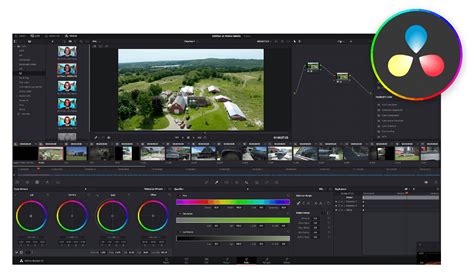
DaVinci Resolve 20 represents a significant leap forward, introducing over 100 new features, with a particular emphasis on powerful AI tools engineered to assist users across all stages of their workflow. These intelligent assistants include AI IntelliScript, which enables the creation of timelines directly from a text script; AI Animated Subtitles, which automatically animates words as they are spoken; and AI Multicam SmartSwitch, designed to intelligently assemble a multicam timeline based on speaker detection. The Cut and Edit pages have been enhanced with a dedicated keyframe editor and intuitive voiceover palettes. The AI Audio Assistant is a standout feature, capable of analyzing audio and intelligently generating a professional audio mix. In the realm of visual effects and motion graphics, the Fusion page now supports advanced multi-layer compositing workflows. The Color page has seen significant updates, with the Color Warper now featuring Chroma Warp, and the Magic Mask and Depth Map tools receiving substantial enhancements.
The Unified Workflow: Pages for Every Task
DaVinci Resolve is meticulously structured into distinct "pages," each providing a dedicated workspace tailored for specific post-production tasks. This modular yet integrated design ensures that every aspect of the creative process is accessible and optimized within the same software environment.
Media and Deliver Pages: Organization and Output
The Media page serves as a dedicated, full-screen workspace for preparing footage, synchronizing clips, organizing media into bins, and adding essential metadata before embarking on the editing process. It includes a robust clone palette to ensure the secure copying of data from camera media cards during backup procedures. The Deliver page offers comprehensive control over all encoding options and formats, complemented by a render queue for efficiently exporting multiple jobs.
Media & Project Management Media & Deliver Page In Davinci Resolve
Cut and Edit Pages: The Art of Assembly
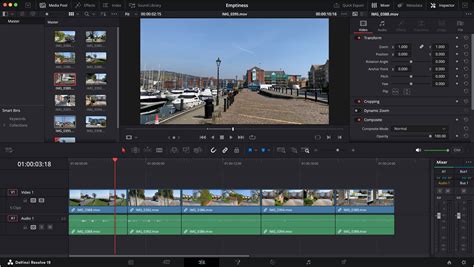
Editing is primarily handled on the Cut and Edit pages. The Edit page is recognized as the world's most advanced professional non-linear editor, offering a familiar track layout, dual-monitor design, and a traditional workflow that is easy for new users to grasp while providing ample power for professional editors. It is ideally suited for large-scale projects such as feature films, television shows, streaming content, commercials, and documentaries. The Edit page boasts drag-and-drop editing, context-sensitive automatic trimming tools, fully customizable keyboard shortcuts for accelerated workflows, and a vast library of hundreds of titles, transitions, and effects that can be easily added and animated. Comprehensive media management, organization, and timeline management tools are also integral to this page.
Designed for editors who need to turn around work rapidly, the Cut page is perfect for projects with tight deadlines. It features a streamlined interface that is quick to learn and optimized for speed. Tools like Source Tape, dual timelines, fast review, and smart editing tools significantly enhance editing velocity. The Sync Bin and Source Overwrite tools are particularly useful for quickly editing multicam programs, and the page is also excellent for documentary work, live broadcast editing, and instant replays. The Multi Source feature allows for the fastest possible viewing of camera feeds and editing to the timeline, even while cameras are still recording. Every action on the Cut page is designed to be intuitive, ensuring users spend more time editing and less time searching for commands.
Fusion Page: Visual Effects and Motion Graphics
The Fusion page empowers users to create cinematic visual effects and broadcast-quality motion graphics directly within DaVinci Resolve. Fusion employs a node-based workflow, which is generally faster and more intuitive for creating complex effects and animations compared to traditional layer-based approaches. It provides hundreds of 2D and 3D tools for visual effects and motion graphics, alongside advanced animation curve and keyframe editors for crafting incredibly organic and realistic animations. Fusion offers a comprehensive suite of tools, including point, planar, and 3D camera tracking, as well as rotoscoping and keying tools essential for creating photorealistic composites, stunning animated titles, and intricate 3D particle systems.
Color Page: Hollywood's Advanced Color Corrector
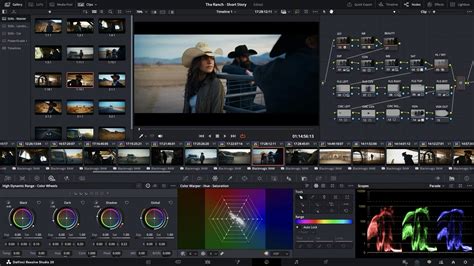
The DaVinci Resolve Color page is renowned as Hollywood's most advanced color corrector, having been instrumental in the color grading and finishing of more high-end feature films and television shows than any other system. Despite its professional pedigree, it remains approachable for new users, offering features designed to make achieving great results easier while they learn the more advanced tools. For instance, primary control sliders are familiar to anyone who has used image editing software, simplifying adjustments to contrast, temperature, midtone detail, saturation, and more.
Fairlight Page: Professional Audio Post-Production
The Fairlight page is equipped with hundreds of professional tools for audio post-production, essentially integrating a full-fledged digital audio workstation (DAW) into the editing and color system. The Fairlight Audio Core supports working with up to 2,000 tracks simultaneously, complete with real-time effects, EQ, and dynamics processing. Users benefit from sample-accurate editing tools, advanced ADR and Foley capabilities, and a suite of Fairlight FX, including reverb, de-esser, and hum removers. AI-powered effects like Voice Isolation and Music Remixer further enhance the audio post-production experience. IntelliTrack AI tracking allows for the use of video to drive the Fairlight audio panner, and the system supports mixing and mastering in stereo, 5.1, 7.1, and even immersive 3D audio formats, including 5th-order ambisonics.
Cutting-Edge Features and AI Integration
DaVinci Resolve is at the forefront of technological advancement, continually integrating new features and artificial intelligence to streamline workflows and unlock creative potential.
AI-Powered Enhancements
DaVinci Resolve 20 significantly bolsters its AI capabilities. The AI IntelliScript allows for the generation of timelines from text scripts, a groundbreaking feature for rapid content assembly. AI Animated Subtitles automatically bring spoken words to life visually, enhancing viewer engagement. AI Multicam SmartSwitch intelligently analyzes speaker detection to automatically assemble multicam sequences, saving considerable time in post-production. The AI Audio Assistant is a powerful tool that analyzes audio and intelligently creates a professional mix, ensuring clarity and balance.
Media & Project Management Media & Deliver Page In Davinci Resolve
Advanced Compositing and Color Tools
The Fusion page in Resolve 20 introduces advanced multi-layer compositing workflows. The Color page has been expanded with Chroma Warp within the Color Warper, offering precise control over color adjustments. Furthermore, the Magic Mask and Depth Map tools have undergone significant updates, providing even more sophisticated tools for object selection and depth-based effects.
Innovative Editing and Audio Tools
The Cut and Edit pages now feature a dedicated keyframe editor, offering finer control over animation and effects. Voiceover palettes have been added to these pages, facilitating the recording of narration directly within the editing environment.
Resolve FX and the Neural Engine
DaVinci Resolve Studio 20 includes over 100 GPU and CPU accelerated Resolve FX, encompassing a wide range of effects such as blurs, light effects, noise reduction, image restoration, lens flares, and stylization tools. Version 20 introduces new plugins like Background Defocus, ideal for portrait shots, and the Film Look Creator, which allows users to easily apply various film looks by adjusting color shading, vibrance, hue, and luminance, even enabling the addition of film grain. Enhancements have also been made to the face refinement box and profile handling, with additional controls for skin refinements, smoother sub-pixel animation, and finer control for directional blur.
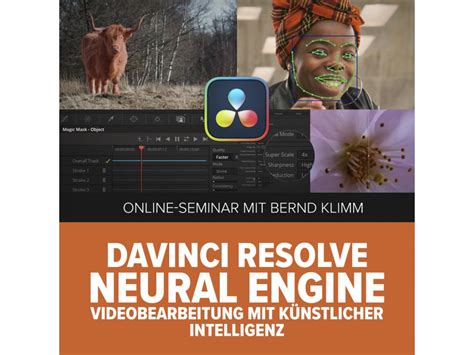
The DaVinci AI Neural Engine leverages state-of-the-art deep neural networks and machine learning to power features like facial recognition, object detection, smart reframing, speed warp retiming, super scale, auto color, and color matching. This engine is entirely cross-platform, utilizing the latest GPU innovations for AI and deep learning to deliver exceptional performance and quality. The DaVinci AI Neural Engine simplifies complex, repetitive, and time-consuming tasks through intuitive tools.
Collaboration and Expandability
DaVinci Resolve is uniquely positioned to support collaborative workflows, enabling teams to work together seamlessly on the same project.
Multi-User Collaboration
DaVinci Resolve is the only solution that allows users to build and grow their own multi-user post-production studios. Project libraries are built for real-time local and remote collaboration, enabling editors, colorists, visual effects artists, and sound engineers to work together concurrently. This eliminates the need for importing and exporting files, translating projects, losing work, or conforming and managing changes. DaVinci Resolve uniquely allows everyone to work together in parallel on the same project simultaneously.
Open Platform and Hardware Integration
The software is designed to be compatible with a wide range of storage systems, from direct-attached hard drives to NAS and SAN systems. DaVinci Resolve can be extended with third-party Open FX and audio plugins, as well as third-party title and motion graphics templates. New workflow integration and encoding APIs allow developers to integrate workflow and asset management systems directly with DaVinci Resolve.
Blackmagic Design also offers a suite of hardware control surfaces designed to enhance the DaVinci Resolve experience. These include the DaVinci Speed Editor, featuring dedicated edit function keys and a high-quality search dial for faster editing; the DaVinci Resolve Replay Editor for live broadcast operations; and the DaVinci Resolve Editor Keyboard for QWERTY-based editing. For colorists, the DaVinci Resolve Micro, Mini, and Advanced Color Panels provide tactile control over grading parameters. Fairlight hardware consoles act as a natural extension of the software, streamlining audio workflows with intuitive, task-based designs.
Accessibility: Free and Studio Versions
Recognizing that professional creative tools should not be limited to elite studios, Blackmagic Design offers a free version of DaVinci Resolve. This allows aspiring professionals and enthusiasts to learn and utilize the same powerful tools employed by Hollywood artists. The free version is robust, working with virtually all 8-bit video formats at up to 60fps in resolutions as high as Ultra HD 3840 x 2160.
For users requiring more advanced features, DaVinci Resolve Studio provides access to a wealth of additional effects, 3D capabilities, and the DaVinci AI Neural Engine. The Studio version supports resolutions greater than Ultra HD (up to 32K) and frame rates over 60 FPS (up to 120 FPS). Key features exclusive to the Studio version include the DaVinci AI Neural Engine, dozens of additional Resolve FX, temporal and AI spatial noise reduction, text-based editing, Magic Mask, film grain, and optical blur.
A Deeper Dive into Specific Features
Beyond the core pages, several specialized tools and features within DaVinci Resolve deserve particular attention for their impact on workflow and creative output.
Film Look Creator
One of the most lauded new features, the Film Look Creator, found in the Open FX sub-menu of the Edit window, allows users to impart a classic film-like aesthetic to their clips within a single, centralized location. It offers a selection of presets such as 65mm, 35mm, Cinematic, Bleach Bypass, and Nostalgic, alongside a "Custom" option for bespoke looks. Beyond presets, users can fine-tune parameters like Color Blend, Effects Blend, Color Space Overrides, Skin Bias, Exposure, Contrast, Highlights, Fade, White Balance, Noise, and Halation. This tool significantly simplifies the process of achieving a cinematic film look without the laborious manual tweaking previously required, delivering impressive results with ease.
Built-in Dialogue Leveler
Addressing a common issue in projects with multiple actors or disparate recording conditions, the built-in Dialogue Leveler ensures consistent audio levels. Instead of navigating the complexities of the Fairlight engine for tedious level adjustments, this new feature allows for precise dialogue leveling. When combined with noise reduction effects, it dramatically improves the overall quality of audio tracks, ensuring that dialogue remains clear and intelligible.
ColorSlice Six Vector Grading
Achieving accurate and pleasing skin tones is a perennial challenge in color grading. The ColorSlice Six Vector Grading tool offers a sophisticated solution, enabling the production of rich, film-like tones and precise correction of skin color. This tool allows for the adjustment of six distinct colors, along with specific controls for skin tones. Users have granular control over density, density depth, saturation, saturation depth, and hue. For those struggling with challenging skin tones, this tool provides an intuitive way to achieve natural and cinematic looks.
Face Refinement
Similar to the challenges of skin tone correction, the desire for flawless-looking faces on screen is paramount. DaVinci Resolve 19 introduces a new Face Refinement tool, a filter that automatically detects and tracks facial features to address imperfections. Parameters such as skin smoothing help correct unflattering color casts and retouch eyes, lips, and cheeks, contributing to a polished on-screen appearance that rivals professional makeup artistry.
Patch Replacer
For situations where an unwanted object or blemish appears in a shot, and re-filming is not an option, the Patch Replacer tool in DaVinci Resolve offers a powerful solution. This feature allows for the removal of elements like boom microphones or minor distractions, seamlessly blending the corrected area with the surrounding image. The Patch Replacer functions effectively even in scenes with motion or changing lighting conditions, acting as an intelligent clone brush that replaces a selected area with another part of the image. While its application may require some learning, its effectiveness in resolving common visual issues is impressive.
Workflow Integration and Hardware Solutions
DaVinci Resolve is designed to integrate smoothly into various production environments and workflows, supported by specialized hardware that enhances its usability.
Editing Keyboards and Control Panels
DaVinci Resolve keyboards are engineered to facilitate significantly faster editing than mouse-based workflows, enabling simultaneous use of both hands. The DaVinci Speed Editor features dedicated edit function keys and a high-quality search dial with transport controls, allowing users to locate shots, mark in/out points, and perform edits and live trimming concurrently. The DaVinci Resolve Replay Editor builds upon this by adding live camera selection and slow-motion replay with stingers, ideal for broadcast applications. The DaVinci Resolve Editor Keyboard offers a full QWERTY layout with color-coded shortcut keycaps, designed for editors who spend extensive hours at their workstations.
For color grading, DaVinci Resolve color panels allow for simultaneous adjustment of multiple parameters, enabling the creation of unique looks that are difficult to achieve with a mouse and keyboard alone. The compact DaVinci Resolve Micro Color Panel is suitable for beginners or portable setups, featuring three high-quality trackballs, knobs for primary grading controls, and buttons for accessing additional tools. The DaVinci Resolve Mini Panel offers more extensive controls and screens for accessing nearly all palettes and tools, while the DaVinci Resolve Advanced Panel provides high-end professional colorists with direct access to every feature and command.
Fairlight Audio Hardware
Fairlight hardware consoles, developed in collaboration with professional sound engineers, act as a natural extension of the software, streamlining audio workflows. Their intuitive, task-based design automatically adapts to present the most relevant controls. The Fairlight Desktop Console is a complete mixing console suitable for home studios, small suites, or on-location work. For dedicated audio suites and scoring stages, multi-bay Fairlight consoles are available, and components can be integrated into custom desk setups.
Conclusion
DaVinci Resolve has firmly established itself as a dominant force in the post-production landscape, offering an unparalleled combination of editing, color correction, visual effects, motion graphics, and audio post-production within a single, powerful application. Its continuous evolution, marked by the introduction of advanced AI tools, sophisticated editing and grading features, and robust collaboration capabilities, ensures it remains at the cutting edge of creative technology. Whether for feature films, television, or independent content creation, DaVinci Resolve provides a professional, efficient, and inspiring environment for bringing creative visions to life. The availability of a powerful free version further democratizes access to these industry-standard tools, making it an essential software for a wide spectrum of users.