The landscape of post-production, particularly in the realm of color grading, has been significantly reshaped by the introduction of dedicated hardware control surfaces. For years, professionals and aspiring colorists alike have sought more intuitive and efficient ways to interact with sophisticated grading software. Blackmagic Design's foray into this market with their DaVinci Resolve control panels, specifically the Micro, Mini, and Advanced models, represents a pivotal shift, offering a range of solutions designed to enhance speed, precision, and creative freedom. These panels aim to bridge the gap between software-based manipulation and the tactile experience desired for nuanced color adjustments, catering to a diverse spectrum of users from home studios to high-end professional facilities.
The Evolution of Color Control: From Mouse to Tactile Surfaces
Historically, color grading relied heavily on mouse and keyboard input within software like DaVinci Resolve. While powerful, this method can be cumbersome for the intricate and simultaneous adjustments required for professional color work. The introduction of dedicated panels, such as Blackmagic Design's offerings, addresses this by providing physical controls that mirror and enhance the software's capabilities.
The DaVinci Resolve Micro Color Panel, for instance, is a compact hardware panel built specifically for DaVinci Resolve. It occupies a unique position in the market, sitting between the entry-level software interface and the more extensive professional panels like the Mini and Advanced. Its primary purpose is to provide editors and colorists with tactile control over Resolve’s color grading tools, making adjustments faster, more precise, and more natural. This philosophy extends across the entire range of Blackmagic panels, each designed to offer a more fluid, hands-on control over multiple parameters simultaneously, thereby unlocking more creative options and accelerating the workflow beyond what a mouse and keyboard alone can achieve.
Addressing the Market Gap: Affordability and Accessibility
For many years, there was a significant dearth of options at the lower end of the control panel market. While high-end panels existed, their prohibitive cost, exemplified by Blackmagic's own full-size panel at £21k, placed them out of reach for the new breed of home studio colorists and smaller post-production houses. For a time, the Avid Artist Color panel, though woefully supported, and more recently, Tangent's 'Element' control surface, were the primary choices for freelancers and smaller operations.
The announcement of Blackmagic's Micro and Mini panels marked a considerable shift. The DaVinci Resolve Micro Panel, retailing for a fraction of the cost of even a single component of the Tangent Element (the Tk balls and wheels), offers a compelling alternative. It is priced at approximately $995, making it one of the most accessible professional grading panels available. This affordability, coupled with its robust build quality and thoughtful design, positions it as a direct competitor to existing solutions. The fact that the Micro Panel retails for the same cost as just one part of the Element, or nearly a third of the full Element setup, highlights Blackmagic's strategy to democratize professional color grading tools.
Tangent vs. Blackmagic: A New Paradigm
The arrival of Blackmagic's panels has undoubtedly presented a challenge to established manufacturers like Tangent. While Tangent's products were functional, the DaVinci Resolve Micro Panel and Mini Panel offer distinct advantages. The Micro Panel feels much more solidly built, boasts a more thoughtfully laid out design, and, crucially, works seamlessly with Resolve right out of the box. In contrast, Tangent's panels require users to install their TangentHub software. Blackmagic's panel, however, simply plugs in using an included USB-C to USB-A cable, eliminating the need for additional software installation, which is a significant benefit, especially in environments with strict security protocols that may limit internet access on workstations.
While some might argue that Tangent's Mapper utility software, allowing soft keys to be re-mapped to various functions, offers an advantage, Blackmagic's approach fosters a different kind of standardization. The consistency across Micro and Mini panels means that muscle memory built on one panel will directly translate to another, regardless of the specific studio or location. This predictability is invaluable in professional workflows, ensuring that a colorist can step into any environment with a DaVinci Resolve panel and begin working immediately without a steep learning curve or re-configuration.
DaVinci Resolve Micro Panel: Compact Powerhouse
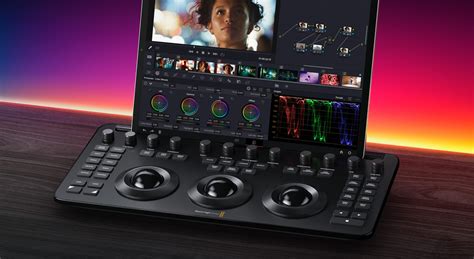
The DaVinci Resolve Micro Color Panel is designed for maximum portability and immediate impact. Its compact size is a significant advantage, making it an ideal companion for on-the-go grading sessions, fitting perfectly alongside a laptop. The panel is exactly the same width as a full-size Apple keyboard, allowing it to nestle snugly between a keyboard and a Mac, facilitating a seamless transition between editing and grading tasks.
First Impressions and Tactile Experience
In use, the Micro Panel delivers a reassuringly solid and well-built feel. Despite its small footprint, it possesses a reassuring weight that prevents it from sliding around during intensive use. The knobs offer a lovely fluidity, while the buttons provide a satisfyingly firm resistance, minimizing the chance of accidental activation of functions. The easy-to-read, backlit buttons with their simple layout contribute to an intuitive user experience. Within minutes of first use, operators can often gain confidence in locating key functions, enabling them to grade faster than with a mouse and keyboard alone. This immediate usability is a testament to its thoughtful design.
Essential Controls for Efficient Grading
The Micro Panel provides essential controls for efficient color grading. It features 12 primary color correction control knobs that facilitate quick adjustments to image contrast, saturation, hue, temperature, tint, midtone detail, color boost, shadows, highlights, and more. Specifically, it includes dedicated knobs for Lift, Gamma, and Gain (often referred to as shadows, midtones, and highlights), allowing precise adjustments to the luminance of specific tonal ranges. The Contrast knob alters the tonal difference between light and dark areas, while Pivot adjusts the contrast "balance." Midtone Detail manipulation affects edge details, influencing the perception of sharpness and definition. Color Boost intelligently enhances areas of low saturation without impacting already vibrant colors, leading to more natural color enhancement. Shadow and Highlight knobs enable the lightening or darkening of shadow details and the retrieval of blown-out highlights in HDR images. The Saturation knob controls the intensity of colors, and the Hue knob allows for the rotation of hues around the color wheel. A Luminance Mix control balances color adjustments with luminance-only adjustments.
How to setup the NEW Blackmagic Micro Color Panel for Davinci Resolve
Portability and Workflow Integration
The Micro Panel's key strength lies in its portability. Fully powered via USB, it can be simply plugged into a laptop, allowing users to get up and running at home, in a studio, or on set. This makes it ideal for grading with portable systems, even on a shooting cart. The ability to carry it around and plug it into a client's system for immediate work is a significant advantage, especially when internet access is restricted.
DaVinci Resolve Mini Panel: Enhanced Functionality for Freelancers
The DaVinci Resolve Mini Panel represents a step up in functionality, offering a more comprehensive set of controls for freelance artists and those who require a fully featured portable panel. While it is a significant step up in price from the Micro Panel, at £2500, it provides a more robust solution for users who split their time between editing and grading, or who work in mixed-purpose rooms.
Design and Build Quality
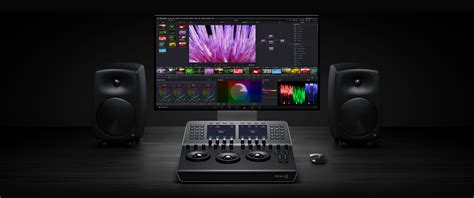
The Mini Panel shares Blackmagic's signature minimal and clean design aesthetic, with sparse packaging containing only the panel, a USB-A to USB-C cable, and a welcome note. A notable feature is its ability to be powered over Ethernet (PoE), allowing a single cable to transmit both data and power, offering flexibility in placement and reducing cable clutter. The build is described as tight, modern, and undeniably solid, feeling like a single piece of machined hardware with a subtle retro aesthetic.
Expanded Control Surface
Compared to the Micro Panel, the Mini Panel offers dedicated knobs for Midtone Detail, Color Boost, Contrast, Pivot, Highlights, and Shadows. These are invaluable functions that have been added to Resolve software since the introduction of the larger panels. Like its smaller counterpart, it features toggles above the trackballs for quick switching between Primary (LGG) controls and Log (Shadow, Mid, High) controls. The Offset control transforms the far-right ball and wheel into an offset balance and master control, while the center and left wheels become dedicated temperature and tint controls. This offers a mathematically accurate and rapid way to balance and correct shots, especially when proper colorspace flagging is in place.
The upper deck of the Mini Panel features quick jump buttons for accessing specific controls such as Raw, Primary, Motion, Curves, Qualifier, Window, Tracker, Blur, Keyer, and Sizing. The Raw button is particularly useful when working with raw codec source material. The Primary button is handy for jumping back to primary adjustments or navigating from the edit page to the color page. The Motion control accesses noise reduction functions.
Precision and Tactile Feedback
A standout feature of the Mini Panel, and indeed the larger Advanced Panel, is the exceptional feel of its trackballs and wheels. They are described as being as precise and smooth as those on larger panels. However, the rotary digitizers for the soft controls and dedicated knobs are considered the smoothest and most precise ever encountered by some users. This level of finesse makes adjustments, particularly to custom curves, an absolute delight. Unlike some larger panels where adjusting curves can modify both X and Y positions simultaneously, the Mini Panel's digitizers are locked on the Y-axis, allowing for a greater degree of exactitude.
The Mini Panel also includes a pair of page-shifting buttons on the top left, enabling users to view and modify various functions using the digitizers. This includes an "append node" button, which is perfect for adding a node after the last one in the chain for last-minute tweaks during review sessions.
Custom Curves and Navigation
The ability to create custom curves for precise adjustments to image luminance and chrominance is a significant advantage. The Mini Panel allows users to isolate color channels using buttons above the displays and rotate knobs to adjust channel luminance in 20% increments. The Advanced and Mini Panels also facilitate the creation of Power Windows - shape-based objects used to target corrections to specific areas of an image. Different window shapes, such as squares, circles, polygons, or gradients, can be created.
Navigation is also streamlined. The area to the right of the trackballs contains keys for navigating between clips, stepping through frames, and jumping between nodes in the node editor. These navigation keys keep hands on the panel, reducing the need to reach for the mouse. Transport controls for play forward, reverse, and stop are also included.
Limitations and Potential Enhancements
Despite its strengths, the Mini Panel has a few limitations. The storage and application of stills from memory are missing, and there's no way to adjust the position of a still/reference wipe. The transport controls are also limited, lacking dedicated fast forward and rewind buttons. Users often find themselves reaching for the keyboard for certain functions, especially if also performing editing tasks. The software currently only allows assignment of the first 8 memories to the panel, not the full 26 available on the Advanced Panels. This has led to speculation that Blackmagic might release a companion side-panel for the Mini, offering dedicated memory functions, extended soft menus, and a T-bar for wipe controls, effectively maximizing the Mini's potential.
DaVinci Resolve Advanced Panel: The Professional's Choice
The DaVinci Resolve Advanced Panel is designed for professional color suites working on feature film, television, and commercial projects. It offers the most comprehensive control, providing access to virtually every feature on the color page, thereby minimizing the need for a mouse or keyboard.
Comprehensive Control and Workflow Integration
The Advanced Panel is built to provide ultimate control over refined color grading, including the creation and manipulation of Power Windows. Its trackballs allow for simultaneous adjustment of colors across lift, gamma, and gain, enabling the creation of unique effects. Smooth gliding rings around the trackballs facilitate master level adjustments and dynamic contrast setting. Keys above each trackball offer quick resets for color adjustment, level adjustment, or both.
Dedicated Feature Buttons and Displays
The Mini and Advanced Panels include dedicated feature buttons that grant rapid access to the color page palettes, eliminating the need to switch between mouse and panel. Color displays on these panels provide precise control over the tools within the color page. When a palette is selected, the screens display its unique interface and settings, with arrow keys for navigating modes or pages. Soft keys above the displays allow for channel isolation, preset selection, or other feature-specific functions, while soft knobs below the displays enable parameter adjustments.
Functionality in Low Light and Organization
Grading sessions are often performed in low light conditions to ensure accurate color representation on the grading monitor. The keys and soft knobs on Blackmagic's color panels illuminate when selected, aiding visibility. On the Mini and Advanced Panels, keys are also backlit for easier button location and pressing. The Advanced Panel even allows for customizable backlight colors.
A vital component of the post-production workflow is organization and labeling. The Advanced Panel features a slide-out keyboard for entering clip metadata, naming files, labeling nodes in the node editor, and adding notes to clip flags and markers. This keyboard can be further optimized with custom shortcuts or by using preset preferences.
The Ultimate Grading Experience
The Advanced Panel offers quick access to virtually every Fairlight feature, making it a powerful tool for audio engineers as well. It includes a jog/shuttle knob for faster and more precise scrubbing on the timeline. The combination of tactile controls, dedicated buttons, illuminated interfaces, and integrated keyboard makes the Advanced Panel the pinnacle of DaVinci Resolve control, designed to maximize efficiency and creative output in the most demanding professional environments.
Beyond Color: Panels for Editing and Audio
While the focus is often on color grading, Blackmagic Design also offers specialized panels for other aspects of post-production, reflecting Hollywood's adoption of their solutions.
Editing Panels
The DaVinci Resolve Editor Keyboard is tailored for editing, featuring a search dial in a design that includes only the specific keys needed for editing. There's also an Editor Keyboard specifically designed for multi-cam editing, ideal for news cutting and live sports replay, with buttons to expedite camera selection and editing. For a more traditional approach, a full-sized QWERTY Editor Keyboard is available in a premium metal design, featuring a metal search dial with a clutch, plus extra edit, trim, and timecode keys.
Audio Post-Production Consoles
For audio engineers working on tight deadlines, Blackmagic offers powerful Fairlight studio consoles. These large consoles simplify mixing large projects with a massive number of channels and tracks. They are available with legs that can be set at 0º for a flat working surface or 8º for a slightly angled surface. The consoles provide quick access to virtually every Fairlight feature and can be customized with blank bays for building unique console configurations.
Conclusion: A Panel for Every Workflow
Blackmagic Design's range of DaVinci Resolve control panels-Micro, Mini, and Advanced-effectively caters to a wide spectrum of users. The Micro Panel offers an affordable and portable entry point, ideal for aspiring colorists and small studios. The Mini Panel strikes a balance for freelance artists needing enhanced functionality and portability, while the Advanced Panel provides the ultimate professional-grade experience for high-end productions. Each panel is designed to enhance speed, precision, and creativity by providing tactile control over DaVinci Resolve's powerful tools, fundamentally transforming the color grading workflow and making professional-level adjustments more accessible than ever before. The decision of which panel to choose ultimately depends on the user's specific needs, budget, and the demands of their projects.