DaVinci Resolve stands as a singular, comprehensive post-production solution, seamlessly integrating editing, color correction, visual effects, motion graphics, and audio post-production into a single application. Its intuitive, modern interface is designed for rapid learning by new users while retaining the power required by seasoned professionals. This unified approach allows for accelerated workflows and enhanced quality, as users can maintain camera original image quality throughout the entire process without the need to switch between multiple software applications. It effectively functions as a personal post-production studio within one app.
The platform is widely adopted by high-end professionals working on feature films and television shows, largely due to its reputation for exceptional quality and advanced creative tools that significantly outpace competitors. Furthermore, it incorporates the renowned Fairlight audio processing for industry-leading sound design. DaVinci Resolve 20, for instance, introduced over 100 new features, including powerful AI tools aimed at assisting users across all stages of their workflow. These AI capabilities encompass IntelliScript for generating timelines from text scripts, Animated Subtitles for dynamically animating words as they are spoken, and Multicam SmartSwitch for assembling multicam timelines based on speaker detection.
The Cut and Edit pages have been enhanced with dedicated keyframe editors and voiceover palettes. The AI Audio Assistant intelligently analyzes audio to create professional mixes, while the Fusion page supports advanced multi-layer compositing. Updates to the Color page include Chroma Warp in the Color Warper, alongside significant improvements to Magic Mask and Depth Map. A key differentiator of DaVinci Resolve is its capability to facilitate the creation and expansion of multi-user post-production studios. Project libraries are engineered for real-time local and remote collaboration, enabling editors, colorists, visual effects artists, and sound engineers to work concurrently on the same project. This eliminates the need for cumbersome file importing and exporting, project translation, or managing changes, allowing for true parallel collaboration.
DaVinci Resolve is structured into distinct "pages," each offering a specialized workspace and tools for specific tasks. Editing is primarily conducted on the Cut and Edit pages, visual effects and motion graphics on the Fusion page, color correction on the Color page, audio post-production on the Fairlight page, and media organization and final output on the Media and Deliver pages.
The Edit page is recognized as the most advanced professional non-linear editor available. Its familiar track layout, dual-monitor design, and traditional workflow make it accessible for new users while providing the depth required by professional editors. It is particularly well-suited for large-scale projects such as feature films, television shows, streaming content, commercials, and documentaries. The Edit page offers drag-and-drop functionality, context-sensitive automatic trimming tools, fully customizable keyboard shortcuts for enhanced speed, and a comprehensive library of titles, transitions, and effects that can be easily added and animated. It also includes robust media management, organization, and timeline management tools, designed to expedite editorial turnaround.
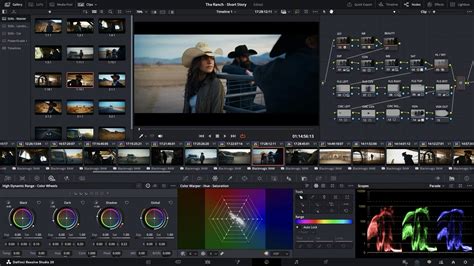
For projects with extremely tight deadlines, the Cut page offers a streamlined interface optimized for speed. Features like Source Tape, dual timelines, fast review, and intelligent editing tools contribute to an accelerated workflow. The Sync Bin and Source Overwrite tools are invaluable for quickly editing multicam programs, and it is also highly effective for documentaries, live broadcast editing, and replay applications. The Multi Source feature allows for the fastest method of viewing cameras and editing to the timeline while recording is still in progress. Every action on the Cut page is designed to be immediate, ensuring users spend more time editing and less time searching for commands.
The DaVinci Resolve Color page is considered Hollywood's most sophisticated color corrector, having been instrumental in the color grading and finishing of more high-end films and television shows than any other system. It balances advanced capabilities with user-friendly features to assist newcomers in achieving professional results as they learn. For instance, primary control sliders, familiar to users of other image editing software, allow for straightforward adjustments to contrast, temperature, midtone detail, saturation, and more.
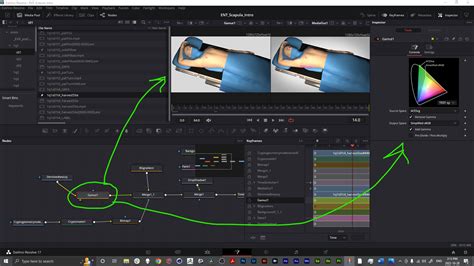
The Fusion page enables the creation of cinematic visual effects and broadcast-quality motion graphics directly within DaVinci Resolve. Fusion employs a node-based workflow, which facilitates the creation of complex effects and animations more efficiently than traditional layer-based approaches. It provides hundreds of 2D and 3D tools for visual effects and motion graphics, complemented by advanced animation curve and keyframe editors for crafting highly organic and realistic animations. Fusion's toolkit includes 2D and 3D compositing, planar and 3D camera tracking, rotoscoping, keying tools for photorealistic composites, animated titles, and sophisticated 3D particle systems.
For audio post-production, the Fairlight page offers a comprehensive suite of professional tools, essentially integrating a professional Digital Audio Workstation (DAW) into the editing and color system. The Fairlight Audio Core supports up to 2,000 tracks simultaneously with real-time effects, EQ, and dynamics processing. It features sample-accurate editing tools, advanced ADR and Foley capabilities, and a range of Fairlight FX, including reverb, de-esser, and hum remover, alongside AI-powered effects such as Voice Isolation and Music Remixer. IntelliTrack AI tracking allows for video-driven tracking of the Fairlight audio panner, and the system supports mixing and mastering in stereo, 5.1, 7.1, and immersive 3D audio formats, including 5th-order ambisonics.
The Media and Deliver pages are equipped with all necessary tools for importing, managing, and exporting final projects. The Media page provides a dedicated, full-screen workspace for preparing footage, syncing clips, organizing media into bins, and adding metadata prior to editing. The Clone palette ensures complete data integrity when backing up camera media cards. During editing or grading, video outputs can be streamed to remote client monitors via DeckLink. The Deliver page offers granular control over all encoding options and formats, along with a render queue for managing multiple export jobs.
DaVinci Resolve Studio 20 boasts over 100 GPU and CPU accelerated Resolve FX, encompassing blurs, lighting effects, noise reduction, image restoration, lens flare, stylization, and more. Version 20 further expands this with plugins like background defocus for portrait shots and a film look creator, which allows for easy application of various film aesthetics by altering color shading, vibrance, hue, and luminance, even enabling the addition of film grain. Enhancements have also been made to the face refinement box and profile handling, with additional controls for skin refinements, smoother sub-pixel animation, and finer control for directional blur.
The DaVinci AI Neural Engine leverages state-of-the-art deep neural networks and machine learning to power features such as facial recognition, object detection, smart reframing, speed warp retiming, super scale, auto color, and color matching. This engine is cross-platform and utilizes the latest GPU innovations for AI and deep learning to deliver exceptional performance and quality. It provides simplified tools for tackling complex, repetitive, and time-consuming tasks.
How to Use DaVinci Resolve 19 Neural Engine for AI-Powered Editing (2025 Guide)
Ensuring compatibility and openness is crucial in the diverse landscape of post-production workflows. DaVinci Resolve supports a wide range of storage solutions, from direct-attached hard drives to NAS and SAN systems. Its extensibility includes support for third-party Open FX and audio plugins, as well as third-party title and motion graphics templates. New workflow integration and encoding APIs allow developers to integrate asset management and workflow systems with DaVinci Resolve.
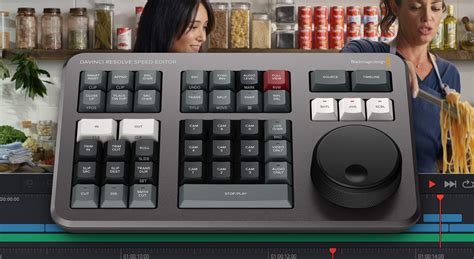
Hardware accelerators are also a significant component of the DaVinci Resolve ecosystem, designed to enhance speed and efficiency. DaVinci Resolve keyboards, for example, are engineered for faster editing than mouse-based workflows, enabling simultaneous use of both hands. The DaVinci Speed Editor features dedicated edit function keys and a high-quality search dial with transport controls. This allows users to locate shots, mark in/out points, perform edits, and live trim using the search dial and Source Tape buttons with one hand, while the other hand can operate other controls. The DaVinci Resolve Replay Editor builds upon these capabilities by adding live camera selection and slow-motion replay with stingers. The DaVinci Resolve Editor Keyboard offers a full QWERTY layout with color-coded shortcut keycaps, specifically designed for editors who spend extensive hours at their workstations.
For colorists, DaVinci Resolve color panels offer precise control, allowing for simultaneous adjustment of multiple parameters to create unique looks that are difficult to achieve with a mouse and keyboard alone. The compact DaVinci Resolve Micro Color Panel is ideal for new colorists or those requiring a portable solution, featuring three high-quality trackballs and knobs for primary grading controls, along with buttons for accessing additional tools. The DaVinci Resolve Mini Panel provides more extensive controls and screens for accessing nearly all palettes and tools. For ultimate control, the DaVinci Resolve Advanced Panel maps every feature and command to a dedicated button, catering to high-end professional colorists.
Fairlight hardware consoles, developed in collaboration with professional sound engineers, streamline audio workflows by acting as a natural extension of the software. Their intuitive, task-based designs adapt automatically, placing necessary controls at the user's fingertips. This leads to increased creativity and faster work compared to using only a mouse and keyboard. The Fairlight Desktop Console is a versatile mixing console suitable for home studios, small suites, or on-the-go use. Components of the Fairlight Studio Console can be integrated into custom desk setups or purchased as pre-configured multi-bay units for dedicated audio suites and scoring stages.
Accessing Older Versions of DaVinci Resolve
While the latest versions of DaVinci Resolve offer cutting-edge features and AI capabilities, there are several reasons why users might seek to download older versions. These can include compatibility issues with specific hardware or operating systems, the need to maintain a consistent workflow for an ongoing project that was initiated with an older version, or simply a preference for the interface or feature set of a previous release.
Blackmagic Design, the developer of DaVinci Resolve, provides a support page on their official website where users can download software updates and older versions. This is the most reliable and recommended method for obtaining previous releases.
To download an older version:
- Navigate to the Blackmagic Design Support Page: Open your web browser and go to the official Blackmagic Design website. Locate the "Support" or "Downloads" section.
- Select DaVinci Resolve: Within the support area, find and select "DaVinci Resolve" from the list of products.
- Browse for Older Versions: The download page will typically list the latest version first. Scroll down or look for an option to view "Previous Software Versions" or an archive.
- Choose the Desired Version: You will usually find a list of past DaVinci Resolve versions, often categorized by major releases (e.g., v18, v17, v16). Select the specific version number you are looking for.
- Download the Installer: Once you have identified the correct older version, click on the download link. Ensure you select the installer appropriate for your operating system (macOS, Windows, or Linux).
It is important to note that older versions may not be actively supported with updates or bug fixes. Additionally, some features, particularly those relying on newer AI technologies or hardware optimizations, may not be present or fully functional in older releases. Users should also be aware that project files created in newer versions may not be backward-compatible with older versions of DaVinci Resolve. If you intend to use an older version, it's advisable to create a backup of your project before opening it in the older software.
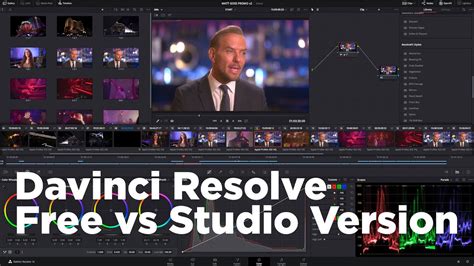
The free version of DaVinci Resolve offers a powerful introduction to professional post-production tools, allowing users to learn the same software used by Hollywood professionals. It supports virtually all 8-bit video formats at up to 60fps in resolutions as high as Ultra HD (3840 x 2160). This free version includes a vast array of features found in the paid Studio version.
However, DaVinci Resolve Studio, the paid version, unlocks a significant number of advanced capabilities. These include the DaVinci AI Neural Engine, dozens of additional Resolve FX, temporal and AI spatial noise reduction, text-based editing, Magic Mask, film grain, and optical blur, among other enhancements. For those seeking the absolute latest in features and performance, upgrading to DaVinci Resolve Studio is the path forward.
The core of DaVinci Resolveâs appeal lies in its ability to provide professional-grade tools across the entire post-production pipeline. Whether you are a beginner exploring the free version or a seasoned professional utilizing the Studio edition, the software is designed to foster creativity and enable users to concentrate on producing their best work.
For users who require specific legacy features or are working within established project parameters, accessing older versions through the official Blackmagic Design support channels remains a viable and recommended option. This ensures that users can continue to work with the tools they are accustomed to, without compromising on the integrity of their projects.
The platform's commitment to innovation is evident in its continuous development, with each new version introducing enhancements and new functionalities. However, the availability of older versions ensures that the software remains accessible and adaptable to a wide range of user needs and project requirements.