DaVinci Resolve has evolved from an incredibly expensive, hardware-bound professional color grading system to an accessible, all-in-one post-production solution. While the core functionality is available for free, understanding the cost of DaVinci Resolve Studio and its specific advantages is crucial for users looking to unlock the full potential of this powerful software. This overview delves into the historical context, current pricing structure, and the feature set that differentiates the free and Studio versions, helping you decide if the investment is right for your workflow.
The Evolution of DaVinci Resolve Pricing
The journey of DaVinci Resolve's pricing is a fascinating testament to industry evolution. In its earlier iterations, DaVinci Resolve was not merely software but a comprehensive hardware and software application. This bundled approach led to astronomical costs, with the highest-end systems once commanding a staggering $800,000. This made the tool exclusively accessible to the most elite post-production houses.
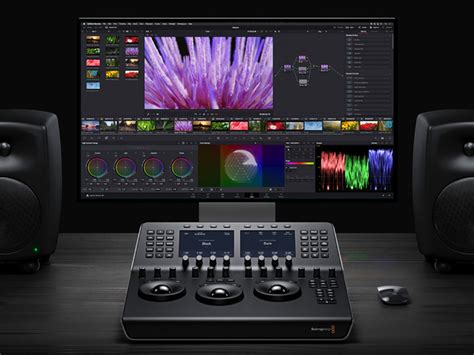
When Blackmagic Design acquired DaVinci Resolve in 2009, CEO Grant Petty recognized the need for a business model transformation. The goal was to democratize access to this powerful technology. Petty stated, "When we bought that company the cheapest low-end system with hardware was $350,000 and the high-end system was $800,000. We went and changed the business model and made a Mac version and a Linux version. The software we sold for $1,000 and we sold more in the first month than had previously sold in the whole history of the business, which had been running since the early 80s.” This shift from a prohibitively expensive hardware bundle to a more affordable software-centric model was revolutionary, dramatically expanding the user base.
Since then, the cost has been further refined. The industry has seen various pricing strategies, from one-time purchases with incremental upgrade costs to the prevalent subscription models. DaVinci Resolve, however, has carved out a unique niche by offering a robust free version alongside a one-time purchase for its Studio version.
Understanding the DaVinci Resolve Free Version
It is important to clarify that the free version of DaVinci Resolve is not a fundamentally different product from its Studio counterpart. Instead, it functions as a fully capable, yet feature-restricted, version. This means that users are not dealing with a trial or a watermarked experience; rather, they are accessing a powerful suite of tools that can handle a vast majority of post-production tasks. The sheer depth of functionality available in the free version is a significant reason why many creators have transitioned from other editing platforms.
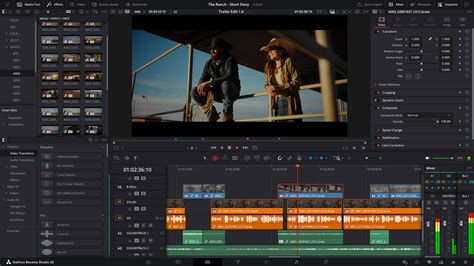
For instance, both the free and Studio versions support multi-user collaboration, a feature often absent in free tiers of other professional software. This includes an integrated chat function for seamless team communication. However, the Studio version enhances collaboration with features like remote grading, monitoring, and synchronized markers and comments via Dropbox. The fact that multi-user collaboration is even present in the free version speaks volumes about Blackmagic Design's commitment to providing substantial value without an initial financial commitment.
DaVinci Resolve Free vs. DaVinci Resolve Studio: A Feature Comparison
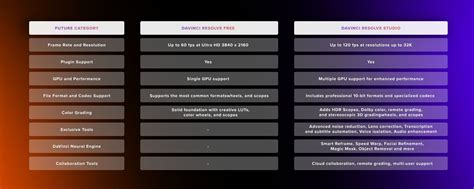
The core differences between the free and Studio versions of DaVinci Resolve lie in performance enhancements, advanced creative tools, and professional-grade features. While the free version is incredibly powerful, the Studio version unlocks capabilities that are essential for high-end productions and demanding workflows.
| Feature | DaVinci Resolve (Free) | DaVinci Resolve Studio |
|---|---|---|
| Resolution | Up to 4K UHD | Up to 32K |
| Frame Rate (FPS) | Up to 60fps | Up to 120fps |
| GPU Rendering | Single GPU support | Multiple GPU support |
| HDR Support | Basic support | Full support (Dolby Vision, HDR10+) |
| Noise Reduction | No | Temporal and Spatial Noise Reduction |
| Stereoscopic 3D Tools | No | Yes |
| Fairlight Audio | Basic tools | Advanced tools (Dolby Atmos, Auro-3D) |
| Neural Engine Features | No | Yes (Magic Mask, Face Detection, etc.) |
| Remote Grading | No | Yes |
It's important to note that while the free version limits export resolution to 4K UHD, users can still import, edit, and grade footage at higher resolutions. The restriction is solely on the final output.
DaVinci Resolve Studio Exclusive Features
The list of features exclusive to the DaVinci Resolve Studio version is extensive, covering enhancements across editing, performance, visual effects, color grading, and audio post-production.
General Edit and Performance Features:
- Supports clean feed viewer mode on an additional display.
- Frame.io integration and Dropbox Replay integration.
- Create timeline using an IMF or DCP Composition Playlist (CPL).
- Camera LUT in a node.
- Supports AVCHD and Encoding AVC Intra 50, 100, and 200.
- Supports External Scripting (Javascript, LUA, and Python).
- Timeline and render resolution higher than UHD.
- Timeline Frame Rates greater than 60fps.
- Network, remote, and headless rendering.
- Multiple Image-Processing GPUs and Multiple Red Rockets.
- CDL export.
- HEVC decoding and High 10 profile H.264 decoding.
- IMF based renders and Sony XAVC renders.
FusionFX:
- CCTV, Drone overlay, Camera tracker, Lens distortion correction, Match Move.
- Stereoscopic 3D tools and VR tools.
Color:
- Full HDR support, including Dolby Vision and HDR10+ support.
- HDR metadata and mastering.
- HDR Scopes for ST.2084 and HLG.
- HDMI 2.0a metadata.
- Node in HDR and Gamut mapping (Improved).
Neural Engine (Resolve’s AI Engine):
- Deinterlacing, Face detection, Magic mask, Object removal, Scene cut detection, Smart reframe, Retime - Speed Warp - Optical Flow.
ResolveFX (A selection of many):
- Abstraction, Alpha Matte Shrink and Grow, Analog Damage, Aperture Diffraction, Automatic Dirt Removal, Beauty, Camera Shake, Chromatic Aberration Removal, Chromatic Adaptation, Color Compressor, Color Palette, Color Stabilizer, Contrast Pop, DCTL, Dead Pixel Fixer (Improved), Deband, Deflicker, Dehaze, Detail Recovery, Dust Buster, Face Refinement, False Color, Film Grain, Halation, Lens Blur, Lens Distortion, Lens Flares, Lens Reflections, Motion Trails, Patch Replacer, Pencil Sketch in DaVinci, Sharpen, Sharpen Edges, Smear, Soften and Sharpen, Stylize, Texture Pop, Tilt-Shift Blur, Warper, Watercolor.
Fairlight:
- Fairlight B-Chain Support for Audio Monitoring.
- Fairlight Format Support for Auro-3D and Dolby Atmos, MPEG-H, and SMPTE ST.2098.
- Supports 96 KHz and 192 KHz Sample Rates at a project level.
- Power Mastering.
Delivery:
- AMD-accelerated Decoding of H.264 and H.265.
- Hardware Accelerated Decoding of H.264 and H.265.
- HEIF Decoding on Windows 10 and Linux OS.
- IMF Based Renders and Kakadu JPEG 2000 Renders over 2Kx2K.
- Noise Reduction (Temporal and Spatial).
- Remote Grading and Rendering.
- Export of a wide range of Gallery Still Formats.
Emerging Features (DaVinci Resolve 19 Beta)
It's worth noting that DaVinci Resolve 19, currently in beta, introduces further advancements exclusively for the Studio version. These include:
- Cut & Edit: Text-Based Editing and Audio Transcription, IntelliTrack.
- Color: UltraNR Noise Reduction, Film Look Creator, IntelliTrack, Face Refinement (Improved).
- Fusion: Speed Warp (Faster in 19).
- Audio / Fairlight FX: Immersive 3D Audio with Ambisonic Surround Sound, Auto Panning (IntelliTrack-powered), Music Remixer FX, Dialog Separator (Improved in 19), Voice Isolation (Improved in 19).
These additions underscore the continuous development and the increasing value proposition of the Studio version.
Which Version of DaVinci Resolve is Right for You?
The decision between the free and Studio versions of DaVinci Resolve hinges on your specific needs and project requirements. Blackmagic Design's approach is customer-centric, ensuring that users don't need to purchase the Studio version for basic tasks.
For individuals creating content for YouTube, social media, short films, or music videos shot on consumer-grade cameras, the free version is often more than sufficient. Its ability to handle up to 4K resolution at 60fps, coupled with its comprehensive editing, color, VFX, and audio tools, makes it a professional-grade solution without a price tag.
DaVinci Resolve Colour Grading Tutorial (Start to Finish for Beginners)
However, if you find yourself consistently encountering limitations, such as the "Ready to Upgrade?" pop-up, or if your projects demand higher resolutions (beyond 4K export), higher frame rates, advanced noise reduction, true HDR grading (Dolby Vision), or AI-powered tools like Magic Mask and Speed Warp, then upgrading to DaVinci Resolve Studio becomes a logical step.
The principle of upgrading applies here as it does to camera equipment: upgrade when you genuinely need the additional capabilities, not merely because they exist. If your current camera struggles in low light, that's a reason to upgrade your camera. Similarly, if you need slow-motion capabilities beyond what your current software allows, that's a reason to consider DaVinci Resolve Studio.
The Value of the One-Time Purchase
One of the most compelling aspects of DaVinci Resolve Studio is its pricing model. It is a one-time purchase of $295 (often listed as $299 in some materials, with $295 being a more prevalent direct purchase price), with no recurring subscription fees. This makes it a highly cost-effective solution for professionals and hobbyists alike, especially when compared to subscription-based software. Furthermore, the Studio version is frequently bundled with Blackmagic Design hardware, such as their cinema cameras, meaning you might already have access to it without an additional purchase.
DaVinci Resolve Studio vs. Competitors
DaVinci Resolve Studio stands out in the post-production software landscape due to its all-in-one nature and its pricing. Unlike software that requires separate applications for editing, color grading, visual effects, and audio, Resolve integrates all these disciplines into a single, cohesive interface. This not only streamlines the workflow but also eliminates the need to learn multiple distinct applications.
The free version alone offers more functionality than many paid competitors. When you consider the Studio version's extensive feature set, including advanced AI tools, multi-GPU support, and professional HDR capabilities, it presents an unparalleled value proposition.
Work Faster with Customizable Templates and Hardware
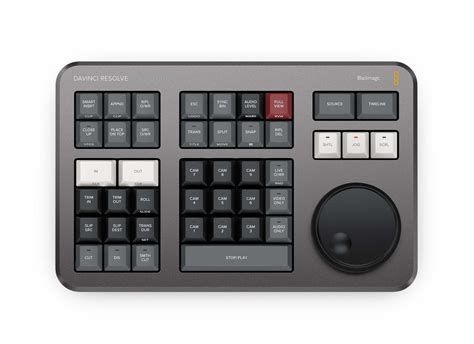
Blackmagic Design also offers hardware solutions designed to enhance the DaVinci Resolve experience. The DaVinci Resolve Editor Keyboard and Speed Editor are designed to significantly speed up editing tasks through dedicated keys and intuitive controls. Similarly, the DaVinci Resolve Micro, Mini, and Advanced Color Panels provide tactile control for color grading, allowing for more nuanced and efficient adjustments. For audio professionals, the Fairlight range of hardware consoles offers an integrated and powerful mixing experience.
Furthermore, the availability of third-party templates, such as those offered by Storyblocks, can further enhance the creative possibilities within DaVinci Resolve, even for users of the free version. These templates can provide access to sophisticated transitions and effects without requiring the Studio license.
Conclusion: Making the Informed Decision
DaVinci Resolve offers a remarkable entry point into professional post-production with its free version. It is a testament to Blackmagic Design's commitment to empowering creators of all levels. However, for those who require the absolute cutting edge in performance, resolution, frame rates, AI-driven tools, and advanced color and audio features, DaVinci Resolve Studio is an investment that pays dividends. The one-time purchase model, combined with the sheer breadth of professional tools, makes it a compelling option for aspiring and established filmmakers, editors, and colorists alike. The best approach is to utilize the free version to its fullest, and only upgrade to Studio when your workflow and creative ambitions unequivocally demand it.