Adobe Lightroom, far from being a singular application, presents itself as a comprehensive ecosystem designed for both organizing and editing your photographic endeavors. This multifaceted approach, however, can lead to confusion when it comes to understanding its associated costs. To truly grasp the Adobe Lightroom cost, one must first delineate the different components of this ecosystem and then examine the subscription models that grant access to them.
The Lightroom Ecosystem: More Than Just One Program
At its core, Adobe Lightroom is a powerful suite of tools for managing and refining your images. However, Adobe has expanded this offering into a cohesive system, often referred to as an ecosystem, comprising several distinct but interconnected applications. Understanding these components is crucial for making informed decisions about which plan best suits your needs and budget.
Adobe Lightroom: The Cloud-Centric Hub
The primary application, simply named Adobe Lightroom, is Adobe’s “web first” version. While it functions as a desktop program, its defining characteristic is that all your images are stored in the cloud, on Adobe’s own web servers. This cloud-based storage is not merely a convenience; it’s the gateway to the broader Lightroom ecosystem. By housing your library in the cloud, this version of Lightroom enables seamless integration with other Adobe services and devices, offering a unified workflow irrespective of where you are or what device you are using.
Adobe Lightroom Mobile: Your Pocket-Sized Editing Studio
Complementing the desktop experience is Adobe Lightroom mobile, an application available for both Android and iOS devices. This mobile app mirrors much of the functionality and user interface of its desktop counterpart, allowing photographers to carry on viewing, editing, and sharing their photos from a mobile device. Crucially, Lightroom mobile can access your photos and albums stored in the cloud, ensuring that your edits and library are synchronized across all your devices. Furthermore, the mobile app includes its own Camera mode, providing the convenience of capturing photos directly into your Lightroom library, ready for immediate editing and organization.

Lightroom Web: Access Anywhere, Anytime
Adding another layer of accessibility, Lightroom web provides a way to view, organize, and edit your photos directly within a standard web browser. This platform offers a convenient option for users who may not have access to their desktop or mobile devices, or for those who prefer a browser-based interface for quick edits or organization tasks. Like the other components, Lightroom web is integrated with the cloud storage, allowing for consistent access to your entire photo library.
Adobe Lightroom Classic: The Legacy Powerhouse
Distinct from the cloud-centric Lightroom is Adobe Lightroom Classic. This is the application that many long-time Lightroom users will be familiar with, representing the “old” Lightroom. Lightroom Classic stores your images locally on your computer, offering a different workflow and storage approach compared to the cloud-based Lightroom. While it operates differently in terms of storage, it remains a powerful tool for professional photographers who prefer a local workflow or require advanced features traditionally associated with desktop-based editing.
Navigating Lightroom Subscription Costs: Plans and Pricing
Adobe Lightroom, in all its forms, is exclusively available through a subscription model. This means that access to the software and its features is contingent upon a recurring payment. Adobe offers several plans tailored to different user needs, with pricing that can vary. As of recent information, the most cost-effective plans for photographers often revolve around the 1TB Photography Plan and the 1TB Lightroom Plan.
The Photography Plans: Bundling Power
Adobe’s Photography Plans are designed to offer a comprehensive package for photographers, typically including both Lightroom and Photoshop, alongside cloud storage.
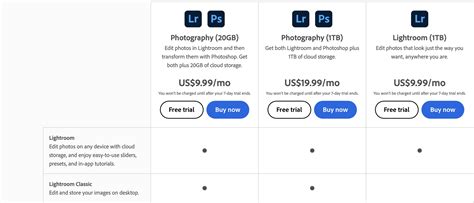
- 20GB Photography Plan: This plan, while no longer available to new users, was historically priced at $9.99/£9.98 per month and offered exceptional value. It included Adobe Lightroom, Adobe Lightroom Classic, and Adobe Photoshop, along with 20GB of cloud storage. It's important to note that for Adobe Lightroom's cloud-based storage, 20GB of storage is often insufficient for anything beyond a brief trial, highlighting the necessity for larger storage tiers for active cloud users.
- 1TB Photography Plan: This is now the standard offering for new users subscribing to a Photography Plan. Priced at $19.99/month, it essentially provides the same bundle as the older 20GB plan but significantly increases the included cloud storage to 1TB. This plan is ideal for photographers who require both Lightroom and Photoshop and need substantial cloud storage for their expanding libraries.
The Lightroom Plan: Focused Simplicity
For users who are primarily interested in Lightroom’s organizational and editing capabilities and do not necessarily need Photoshop, Adobe offers a more streamlined option.
- 1TB Lightroom Plan: This plan is specifically designed for those who want access to Adobe Lightroom and its associated cloud features. It comes with 1TB of cloud storage and is priced at $11.99/month. This plan is often considered the best deal for individuals who solely require the Lightroom ecosystem and find the inclusion of Photoshop in the Photography Plan unnecessary for their workflow. The 1TB of storage should be ample for a considerable period for many users.
It is crucial to understand that these prices reflect annual plans paid on a monthly basis. This means that while you are paying month by month, you are committing to a full year's subscription. Early termination of these annual plans can incur penalties, so it is essential to be certain of your commitment before signing up.
Trial Versions and Mobile App Availability
Adobe does offer a trial version of its software, typically lasting a few days. However, it is important to note that these trials usually require credit card details upfront and must be actively cancelled before the trial period expires to avoid automatic subscription charges.
The Lightroom mobile app can be downloaded for free from the Apple App Store or Google Play. While the app itself is free to download, its full functionality and access to cloud features are often tied to an active subscription to one of the paid Lightroom or Photography Plans.
Photoshop vs Lightroom What is the Difference?
Understanding the Commitment: Annual Contracts
A critical aspect of Adobe Lightroom cost that users must be aware of is the nature of the subscription agreements. The Adobe Photography and Lightroom Plans are annual plans paid monthly. This structure implies a commitment to a full 12-month period, even though payments are spread out over these months. Users cannot simply opt out of the subscription at any time without potential consequences.
There might be a grace period or specific conditions under which a user can exit the contract without penalty. For instance, if a user is only a few months away from the end of their annual subscription term, they might be able to leave without incurring additional charges. However, outside of such specific circumstances, breaking the annual contract prematurely can lead to penalties. This contractual obligation is a significant factor in the overall "cost" of Lightroom, as it represents a long-term financial commitment that needs careful consideration.
Is Lightroom Free? Clarifying the Cost
The question of whether Lightroom is free is a common one. While the Lightroom mobile app can be downloaded without charge, the full suite of Lightroom features, including cloud synchronization, advanced editing tools, and access to Lightroom Classic, requires a paid subscription. Therefore, in its complete and functional form for professional or serious amateur use, Adobe Lightroom is not free. The cost is embedded within the subscription plans, which offer varying levels of service and storage to cater to different user requirements.
The information presented here, drawing from the insights of seasoned photography journalist Rod Lawton, underscores the importance of understanding the Adobe Lightroom cost not just in terms of monthly fees, but also in the context of the ecosystem's structure and the commitment involved in its subscription models. By dissecting the different applications and the nuances of the pricing plans, photographers can make a more informed decision about which Lightroom offering aligns best with their workflow, budget, and long-term photographic goals.