The landscape of digital art and design is undergoing a profound transformation, driven by the rapid advancements in generative artificial intelligence (AI). Corel, a long-standing innovator in creative software, is at the forefront of this evolution, with its latest updates to CorelDRAW Graphics Suite 2024 and CorelDRAW Technical Suite ushering in a new era of AI-powered creativity and efficiency. These updates introduce a suite of powerful AI features, designed not to replace human ingenuity, but to augment and accelerate the creative process for designers, illustrators, and technical artists alike.
Vector FX: Revolutionizing Vector Graphics with Text Prompts
A particularly noteworthy advancement is the introduction of Vector FX, a standalone generative AI application that significantly simplifies the creation of vector graphics. This innovative tool allows users to generate unique, scalable vector graphics simply by inputting text-based prompts. Once generated, these graphics can be seamlessly imported into CorelDRAW for further refinement and editing, offering a powerful new avenue for rapid ideation and asset creation. This capability is a game-changer, enabling users to translate textual concepts into visual elements with unprecedented speed and ease.

Enhancing Creativity and Efficiency with New Tools
Beyond the groundbreaking Vector FX, CorelDRAW Graphics Suite 2024 boasts a range of enhancements aimed at boosting flexibility, efficiency, and creativity. The Painterly Brush tool has been significantly upgraded with the addition of new pixel-based brushes, exclusively available to subscribers. These brushes offer extensive customization, allowing users to fine-tune parameters such as texture, density, smoothing, and glow. The Painterly Brush now features a dedicated tab within the Properties docker/inspector, providing a streamlined interface for easy access and adjustment of brush properties.
Further enriching the creative toolkit, the 2024 suite integrates Pantone's latest color palettes at no additional cost, introducing 175 new shades from the Pantone Dualities palette. This ensures precise and vibrant color matching, empowering designers with an expanded and up-to-date color library.
CorelDRAW also introduces Brush Favorites, a feature that allows users to save their most-used brushes for quick access, and Focus Mode, designed to provide a distraction-free workspace. The new Print Merge feature now supports QR codes, images, and Excel spreadsheet data, streamlining the creation of personalized print materials such as marketing brochures, invitations, and labels.
CorelDRAW Technical Suite: Specialized Tools for Technical Illustration
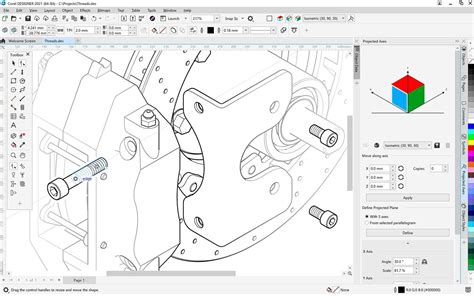
The CorelDRAW Technical Suite has also seen a significant upgrade, with specialized tools tailored for professionals in technical illustration and documentation. The addition of an S1000D palette and enhanced CAD integration caters to the specific needs of technical drawing, ensuring precision and compliance with industry standards.
The Power of AI in CorelDRAW and PHOTO-PAINT
CorelDRAW Graphics Suite 2026 marks a pivotal moment with the deep integration of powerful new AI tools, including leading-edge models like Stable Diffusion 3.5, Flux Schnell, and Nano Banana. These AI capabilities are accessible through a dedicated AI docker within CorelDRAW and Corel PHOTO-PAINT. Users can now generate images from text prompts, create variations of existing artwork, and experiment with different styles without leaving the application.
The AI docker offers nuanced control over generations, including aspect ratio selection, the creation of multiple variations, and the application of optional styles and color palettes. Crucially, reference image strength controls allow designers to shape the output, moving beyond the perception of AI as a mere "slot machine." As Prakash Channagiri, Senior Director of Product Management for CorelDRAW, emphasizes, the goal is to keep designers "fully in control of every creative decision." Corel also assures users that uploaded art and images will not be used to train the AI models, addressing a common concern surrounding generative AI.
In Corel PHOTO-PAINT, the AI enhancements are particularly competitive, bringing features such as background removal, one-click cutouts, and image clean-ups directly into the application. These additions significantly narrow the gap with industry leaders in rapid photo manipulation powered by AI.
Navigating the Purchasing Options: Subscription vs. One-Time Purchase
CorelDRAW Graphics Suite 2024 is available through two distinct purchasing models: a subscription and a one-time purchase. Both options provide access to the core applications, including Corel PHOTO-PAINT, Corel Font Manager, CAPTURE, and AfterShot HDR, but with key differences.
The subscription model offers immediate access to all new updates and enhancements as they become available. This includes exclusive tools like Vector FX and the new Painterly Brushes. Subscribers also benefit from a cloud-based template library with over 500 templates and a cloud-based asset management system for enhanced organization and accessibility. Furthermore, the subscription version provides enhanced support for AutoCAD DWG/DXF files and an improved Hints docker for personalized learning resources.
The one-time purchase model allows users to own the software indefinitely without recurring fees. However, this version does not include the ongoing updates and new features available to subscribers. It comes with over 200 templates and more than 100 brushes, which is a more limited offering compared to the subscription.
Vision FX: Transforming Images with Generative AI
The Vision FX plugin represents another significant integration of generative AI, designed to transform photos and images into a wide array of artistic styles. From cartoon characters to futuristic fantasy, classic art, science fiction, and anime, Vision FX enables users to bring their ideas to life through text prompts and simple settings. This plugin is compatible with CorelDRAW, Corel PHOTO-PAINT, PaintShop Pro, and Painter, as well as other applications like Adobe Photoshop and Affinity.
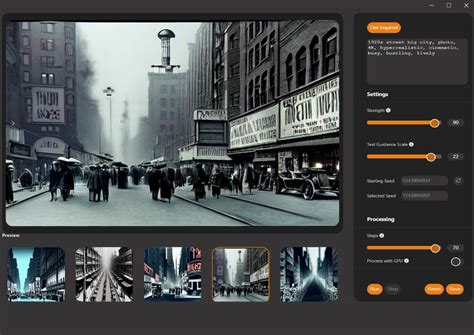
Vision FX operates using an image-to-image AI algorithm, requiring a raster image as a starting point. Users can adjust settings such as Strength to control how much the AI deviates from the original image, and Seed to generate variations. The Steps slider influences quality and speed. The plugin supports customizable resolutions, with the ability to generate at 512x512 pixels by default and up to 1024 pixels for higher quality. Negative prompts can be used to exclude unwanted elements, providing even greater control.
Vision FX utilizes a Stable Diffusion 1.5 model and operates locally on the user's device, ensuring data privacy. Artwork created with Vision FX is permitted for commercial use, though ethical considerations and acknowledgment of the AI's contribution are encouraged. The AI algorithms are sophisticated enough that distinguishing AI-generated content from traditionally created content can be challenging.
Pricing and Availability
CorelDRAW Graphics Suite 2024 is available on Windows, macOS, and via web access for subscribers and maintenance customers. The subscription model is priced at $269 USD per year (or equivalent in Euros and Pounds, including VAT). A one-time purchase option is available for $549 USD (or equivalent in Euros and Pounds).
CorelDRAW Go, the beginner-friendly online design tool, now also includes AI-powered image generation and remixing features, along with new text presets for logos, badges, and sticker creation. A subscription for CorelDRAW Go costs $9.99 USD per month or $99 USD per year.
AI Credits: Managing Generative Tool Access
AI credits are integral to accessing the generative AI tools within CorelDRAW Graphics Suite. Subscribers and maintenance customers receive 2,000 credits each month, which reset at the beginning of each month. One-time purchase customers receive a one-time allocation of 2,000 credits. Trial credits do not recur.
Additional credits can be purchased as one-time add-on packs or through a 30-day or 365-day AI credit subscription. These purchased credits are recurring and reset monthly, with the exception of non-recurring credits tied to perpetual license purchases. Purchased credit packs can be redeemed online. For volume licenses, recurring credits are allotted based on seat count. Currently, credit packs are for individual use and are not shared among team members from an admin account.
Technical Optimization and User Experience
Beyond AI features, CorelDRAW 2026 emphasizes technical optimization, with claims of up to three times faster application startup. This reduction in waiting times and system load is particularly beneficial in production-intensive environments. The user interface has been modernized while maintaining a familiar workflow, and a new multi-page view allows for side-by-side project display and layout variant comparison.
Bitmap vectorization via PowerTRACE also leverages AI algorithms. Subscribers gain access to CorelDRAW Web, a browser-based version for vector illustration and layout tasks. Corel continues to expand its support for non-destructive workflows, and the integrated access to Pantone color palettes remains a strategic advantage.
CorelDRAW Graphics Suite 2026 is positioned as a productivity-focused release, with its AI functions being practice-oriented and meaningfully integrated. For professional users with ongoing update needs, the subscription model is strategically the more sensible choice.
User Control and Ethical Considerations
CorelDRAW's AI features are designed to empower creativity, not replace it, with a commitment to supporting artists' workflows and keeping human art at the center. Users must accept the GenAI policy and confirm they are 18 or older to access these features.
Images generated with CorelDRAW AI tools can be used commercially, but users are cautioned that AI-generated content may not be unique and could potentially infringe on third-party rights. Disclosure requirements for AI-generated content vary by jurisdiction, with the EU, for example, mandating disclosure.
CorelDRAW's AI tools utilize third-party models that may generate trademarked content or likenesses of real people if prompted. While the company aims to provide control over AI outputs, users are responsible for ensuring their use of generated content complies with legal and ethical standards. The company explicitly states that user data and images are not used to train AI models.
Addressing Common Issues and Error Messages
CorelDRAW provides guidance on common issues users might encounter with its AI features:
- AI Server Unavailable: This message appears when the AI server is too busy or undergoing maintenance.
- AI Server Unable to Generate All Requested Images: This can occur when generating multiple images simultaneously, and not all are successfully produced due to server load.
- Out of Credits: Generation is halted when the user's credit balance is insufficient for the selected AI model.
- Generation Cancelled: This indicates that the prompt contained content violating model policies (e.g., violence, racism, explicit content).
- Data Privacy: CorelDRAW assures users that their data and images are not used for AI model training. Usage of AI Features may be logged for debugging, safety, compliance, and analytics.
Evaluating AI Model Performance
Corel integrates various AI models, each with distinct strengths:
- Flux Schnell: Supports 2K image generation, advanced text rendering, high prompt accuracy, and strong reference image fidelity. It is focused on guided editing and transformations, keeping key elements of reference images intact, and is good for short, concise prompts.
- Stable Diffusion 3.5: Offers high-fidelity generation with strong prompt accuracy, excellent reference image interpretation, and advanced editing capabilities.
- Nano Banana: Faster and less resource-intensive than Stable Diffusion 3.5, it produces large images with lower fidelity and fewer fine details in complex scenes but is still capable of versatile, good-quality images.
- Vision FX (Stable Diffusion 1.5 based): Excels in high-quality text-to-image generation with strong detail, rich textures, and reliable handling of complex scenes, lighting, and compositions. It is extremely fast, optimized for producing many variations and exploring ideas quickly.
Corel is continuously evaluating new AI models to integrate into its products, aiming to deliver the best results for diverse customer use cases. The integration of these models within familiar applications like CorelDRAW and Corel PHOTO-PAINT, coupled with flexible purchasing options and a focus on user control, signifies a significant step forward in making advanced AI tools accessible and practical for creative professionals.