Filmora, a popular video editing software, offers a variety of subscription plans designed to cater to different user needs, from casual hobbyists to professional creators. Understanding these options is crucial for making an informed decision that aligns with your editing workflow and budget. This article delves into the intricacies of Filmora's subscription models, examining their features, limitations, and value propositions, to help you choose the best fit for your video production endeavors.
The Core of Filmora: Free vs. Paid Access
When you first download and install Filmora, you're greeted with the opportunity to explore its capabilities without immediate financial commitment. Filmora can be accessed with the payment of a single fee for perpetual ownership of a specific version, or through ongoing subscription plans. You can access all of Filmora's basic editing features for free, and easily export your videos. However, this free access comes with a significant caveat: watermarks will be added to the exported files. These watermarks are essentially branding elements imposed by the software, indicating that the video was created using the free version. For those looking to produce professional-quality videos without these visual interruptions, a paid plan is a necessity.
The free version serves as an excellent introduction to Filmora's interface and core editing functionalities. It allows users to experiment with timelines, import media, apply basic transitions and effects, and get a feel for the overall editing process. This accessibility is a key factor in Filmora's widespread appeal, enabling a broad audience to engage with video creation. However, the presence of watermarks severely limits the practical application of these exports for any serious project, be it for personal branding, business promotion, or content creation on platforms that prohibit watermarked videos.
Subscription Models: Monthly, Yearly, and Perpetual
Filmora offers a tiered approach to paid access, primarily revolving around subscription models. You pay a monthly or yearly fee to use Filmora, which constitutes an ongoing subscription during the specified period. This model ensures that users always have access to the latest version of the software, including new features, updates, and bug fixes. Software development is a continuous process, involving ongoing development, tweaks, and is often used to repair the product. By opting for a subscription, you benefit from this continuous improvement cycle, ensuring your editing tools remain current and robust.
Monthly Subscription: This plan offers the most flexibility. It's ideal for users who might only need Filmora for a short-term project, or those who prefer to pay on a month-to-month basis without a long-term commitment. The monthly fee provides full access to the software's features for the duration of the subscription.
Yearly Subscription: For users who anticipate needing Filmora for an extended period, the yearly subscription typically offers a cost-saving compared to paying monthly for twelve months. This plan provides uninterrupted access to the software for a full year, often at a discounted rate.
Perpetual Plan: Filmora also offers a Perpetual Plan. This plan allows you to own a specific version of Filmora indefinitely. Unlike subscription plans, it is a one-time payment for a license to use that particular version. However, it's important to note that the Perpetual Plan license is device-specific. This means if you purchase a Windows Perpetual License, it will only work on Windows devices. Similarly, a macOS license would be restricted to Apple devices. This is a crucial distinction from subscription plans, which often offer cross-platform compatibility or are tied to your account rather than a specific device. The Perpetual Plan is a good option for users who prefer to avoid recurring payments and are comfortable using a specific version of the software without necessarily having access to future major updates unless they purchase a new license.
Understanding License Types: Individual vs. Business
Filmora's licensing structure differentiates between individual and business use, impacting how the software can be deployed.
Individual Licenses: The Basic and Advanced plans are typically single-user licenses, meaning they are intended for use by one individual only. These licenses are not transferable or shareable among multiple people. This ensures that each user has their own legitimate access to the software and its features. This is common for software aimed at individual creators, students, or small-scale content producers.
Windows License Specifics: As mentioned earlier, the Windows License for the Perpetual Plan can only be used on Windows PCs. This is a hardware and operating system specific restriction.
Business Plans: For teams, organizations, or individuals requiring multiple simultaneous users or a more comprehensive solution, Filmora offers Business Plans. If you need multiple users to access Filmora simultaneously, consider purchasing additional licenses or opting for our Business Plan to accommodate more users. Business plans often come with features tailored for collaborative work, centralized management, and potentially dedicated support, making them suitable for professional studios and marketing agencies. These plans are designed to scale with the needs of a growing business, providing flexibility in user allocation.
The Evolving Landscape of AI Features in Filmora
Filmora is increasingly integrating Artificial Intelligence (AI) features to streamline the editing process and unlock new creative possibilities. Understanding how these AI features are licensed and accessed is becoming as important as understanding the core editing software plans.
Normal AI Features and High-Speed Mode: Filmora's AI functionalities operate in different modes, impacting processing speed and priority. You can access all of Filmora's basic editing features for free, and easily export your videos. However, the advanced AI features often come with specific usage rights and credit systems. In the normal mode, your AI tasks are processed conventionally. You can receive a certain amount of high-speed mode credits each month. When you opt for the high-speed mode, your AI tasks will be processed with faster speed and given priority. This means that when a task is processed through the high-speed channel, it is faster than normal AI features. This tiered access to AI processing power allows users to manage their usage and choose the speed that best suits their needs and budget. The availability and cost of these high-speed credits can vary depending on the specific Filmora plan you are subscribed to.
What are Normal AI Feature Rights? The term "normal AI features rights" likely refers to the baseline access and usage allowances for AI tools within a given plan. This includes the types of AI tasks you can perform and the volume of usage permitted under standard processing conditions. More intensive or advanced AI operations might require higher subscription tiers or the purchase of additional credits.
The integration of AI is a significant trend in video editing software, and Filmora's approach reflects this. Features like AI-powered background removal, automatic transcription, smart object tracking, and AI-generated music are becoming increasingly common. The way these features are bundled and priced within Filmora's subscription plans can significantly influence the overall value proposition of each tier. For instance, a plan that offers a generous allocation of high-speed AI credits might be more attractive to users who frequently utilize these advanced tools.
Activating Your Filmora License
Regardless of the plan you choose, activating your Filmora license is a straightforward process. If you run Filmora for the first time, you will be prompted to activate it. This typically involves logging into your Filmora account or entering a license key provided upon purchase. This activation step links the software to your account or device, ensuring legitimate use according to the terms of your chosen plan. The activation process is generally straightforward and can be completed within a few minutes.
Platform Compatibility: Windows and Apple Devices
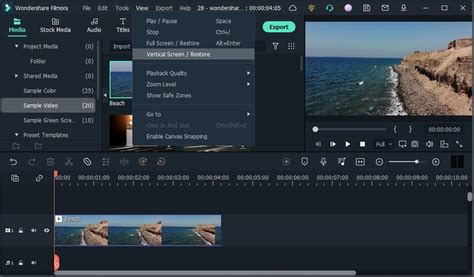
Filmora is designed to be accessible across major operating systems, though specific license types can impose limitations. Filmora is available on different platforms. The Windows License, as previously noted, can only be used on Windows PCs. This means if you purchase this specific license and run Filmora on a Mac, it will not function. Conversely, if you are anApple device user, you would need a license compatible with macOS. This cross-platform availability, coupled with the specific license restrictions, means users must ensure they purchase the correct version for their operating system. For users who work across both Windows and Apple devices, subscription plans might offer a more flexible solution, often allowing installation on multiple devices regardless of the operating system, tied to the user account.
Choosing the Right Plan for You
The ideal Filmora subscription plan hinges on your individual requirements and usage patterns.
- For casual users and beginners: The free version is a great starting point to learn the ropes. If you need to export without watermarks for occasional personal projects, a monthly subscription might be the most economical choice.
- For content creators and YouTubers: A yearly subscription often provides the best value, offering consistent access to the latest features and updates at a reduced cost over twelve months. This is especially true if you are consistently producing video content.
- For professionals and businesses: The Perpetual Plan can be appealing if you are satisfied with a specific version and prefer a one-time purchase, provided you understand its device-specific limitations. For teams requiring collaboration and simultaneous access, the Business Plan is the clear choice, offering scalability and potentially enhanced support.
When evaluating AI features, consider how often you anticipate using them and whether the high-speed mode credits offered in your potential plan will be sufficient for your workflow.
7 Filmora Video Editing Tips EVERY Editor Should Know!
Ultimately, Filmora's tiered subscription model aims to provide a solution for a wide spectrum of users. By carefully considering your budget, technical needs, operating system, and the importance of advanced features like AI processing, you can select the Filmora plan that best empowers your video editing journey. The ability to access basic features for free, coupled with flexible paid options, makes Filmora a compelling choice in the competitive landscape of video editing software.
tags: #filmora #subscription #plans