In today's visually driven digital landscape, the ability to quickly and effectively remove backgrounds from images is a crucial skill for professionals and hobbyists alike. Whether you're an e-commerce seller aiming to make your products pop, a social media influencer crafting engaging content, or a designer building stunning presentations, mastering online background removal can save you time, money, and creative energy. This guide explores the various methods and tools available, from sophisticated AI-powered solutions to user-friendly online editors, ensuring you can achieve professional-looking results with minimal effort.
The Power of AI in Background Removal
Gone are the days when removing a background from an image required hours of meticulous work with complex software like Photoshop. The advent of Artificial Intelligence (AI) has revolutionized this process, offering automated solutions that can detect subjects and remove backgrounds in mere seconds. Professional studios, with their associated costs, are no longer the only option for achieving jaw-dropping visuals. AI-powered tools can generate realistic backgrounds and apply them seamlessly, often with just a single click. This capability is invaluable for last-minute client projects, allowing users to achieve professional-quality results without needing specialized gear or extensive design skills.

AI background removers excel at instantly detecting the subject of any photo, providing a smooth and clear cutout. This means no more struggling with blurry selfies or dull colors; these tools often include features to sharpen, brighten, and even upscale images to stunning, print-ready HD quality. The result? Images that look as if they were professionally shot, with realistic shadows that make products "pop" off the screen. This is particularly important for e-commerce, as a floating toaster, for instance, lacks credibility and can deter potential buyers.
Enhancing Product Photography and E-commerce
For online sellers, high-quality product photography is paramount. Blurry images, inconsistent backgrounds, or poorly lit products can significantly impact sales. AI background removers offer a cost-effective and time-efficient solution. They enable sellers to remove distracting backgrounds from product photos, creating clean, consistent visuals that highlight the product itself. This not only enhances brand identity but also builds customer trust, leading to increased click-through and conversion rates across all sales channels.
The ability to scale background removal is a significant advantage for businesses. Manually editing hundreds or thousands of product images can be a bottleneck, slowing down product launches and straining teams. AI solutions, particularly those offering batch processing or API integration, can speed up these workflows dramatically. This allows businesses to handle large volumes of photo edits in minutes, ensuring that product catalogs remain up-to-date and visually appealing. Companies are reporting significant boosts in sales and substantial reductions in photo editing costs after adopting these technologies.

User-Friendly Online Tools for Everyone
Beyond the advanced AI capabilities, numerous online tools cater to a wider audience, prioritizing ease of use and accessibility. These platforms are designed for individuals who may not have extensive design experience but still need to create impactful visuals.
Canva: A Creative Powerhouse
Canva is a prime example of a platform that democratizes design. Its "Background Remover" tool is intuitive and fast, instinctively detecting the foreground in a photo. This allows users to focus on their creative vision rather than getting bogged down in technical editing. Canva's background remover works on a range of images, including people, animals, and objects, and supports various upload formats like JPG, PNG, HEIC, or HEIF.
How to Remove Background in Canva Without Canva Pro | Easy & Free Background Removal Tutorial
With Canva, you can transform images for any purpose. Whether it's creating gorgeous product shots for an e-commerce site, assembling a collage of images, or simply making a personal photo more appealing, the tool makes it effortless. The platform offers a free trial for its background remover, with options to upgrade to Canva Pro for unlimited usage and access to advanced features like a Video Background Remover. After removing the background, the canvas turns transparent, allowing you to save the image as a high-resolution PNG. You can then easily replace the background with new content from Canva's extensive media library or upload your own.
Adobe Express: Versatile and Impactful Designs
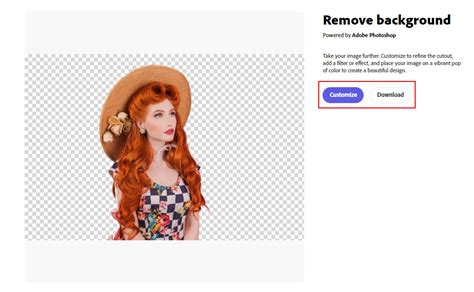
Adobe Express offers a powerful and easy-to-use online background remover that allows users to create standout content. Similar to other AI-driven tools, it quickly removes unwanted backgrounds, making the subject of the photo stand out. The process is as simple as uploading an image, letting the tool work its magic, and downloading the new image.
Adobe Express supports both JPG and PNG images, and its free plan provides access to numerous Quick Action tools, templates, and editing features. Once the background is removed, users can further enhance their images within the Adobe Express editor. This includes adding shape crops, applying filters, or incorporating GIFs and animations for dynamic designs. The tool is ideal for transforming edited images into stunning flyers, social posts, album covers, profile photos, and much more. The platform encourages creativity by offering unlimited templates, fonts, icons, and GIFs to personalize designs.
Photoroom: Professional Product Photography Simplified
Photoroom is another AI-powered background remover specifically designed to simplify professional product photography. It automates the process of removing backgrounds, eliminating the need for expensive tools or design expertise. This is particularly beneficial for e-commerce businesses that require consistent, high-quality product images for online stores and marketplaces.
Photoroom's AI can remove backgrounds in seconds, allowing users to create marketplace and e-commerce platform-compliant backgrounds. It also offers features for batch editing, enabling teams to process hundreds of images efficiently. By creating clean, professional images, businesses can improve their visual branding, increase click-through rates, and ultimately boost sales. The platform supports various product types, from clothing to furniture, ensuring visual consistency across different sales channels.
Advanced Features and Customization
While automated background removal is incredibly convenient, many tools offer advanced features for users who need more control and customization.
Fine-Tuning and Editing
Even the most sophisticated AI can sometimes produce imperfect results, especially with complex images like those with fine hair, translucent objects, or busy backgrounds. Tools like Cutout.pro and Clipping Magic provide an "Edit" button or manual refinement options. These allow users to manually erase any unwanted parts or restore areas that were incorrectly removed. This combination of AI automation and manual control ensures precise results.
Changing Backgrounds and Adding Effects
Once the background is removed, many platforms allow users to replace it with a new image, solid color, or even a gradient. Canva, Adobe Express, and Fotor all offer extensive libraries of backgrounds or the ability to upload custom ones. Furthermore, tools like Photoroom offer "Instant Shadows" to create natural-looking drop shadows or reflections, a crucial element for making products appear grounded and professional. Fotor, for instance, provides options to change background color, add pre-designed backgrounds, or even generate custom AI backgrounds using text prompts.
Bulk Processing and API Integration
For businesses dealing with large volumes of images, bulk processing and API integration are essential. Platforms like Cutout.pro offer a desktop application for drag-and-drop batch processing of thousands of images at once. For enterprise-level needs, API integration allows developers to embed background removal capabilities directly into their projects with just a few lines of code. This scalability is key for businesses that need to process millions of images, ensuring consistent quality and efficiency across their entire visual content.

Understanding Image Compatibility and Limitations
While most online background removers are highly effective, understanding their limitations and compatibility can prevent frustration.
Image Formats and Quality
Most tools support common image formats like JPG and PNG. However, it's always advisable to check the specific requirements of the platform you are using. For best results, uploading clear, well-lit images with distinct subjects is recommended. Images where the subject has blurry edges, such as lightning, flames, or waterfalls, or where the subject's color is too similar to the background, may not yield optimal results with fully automated tools.
Resolution and File Size
Some free tools may offer limited resolution for downloads, requiring users to purchase credits or upgrade to a premium plan for high-definition (HD) or larger-sized image downloads. Tools often have maximum dimensions they can process, sometimes around 4000x4000 pixels. For images exceeding these limits, custom solutions or direct contact with technical support might be necessary. It's also important to ensure a stable internet connection during uploads and downloads, as interruptions can affect the process.
Transparency and File Formats
When you remove a background, the goal is often a transparent background, typically saved as a PNG file. However, some image editors, like certain versions of Canva or older software, may not display transparency correctly, showing a black or white background instead. It's important to use image editors that support transparency to view and utilize your edited images correctly.
Choosing the Right Tool for Your Needs
The best online background remover for you will depend on your specific requirements:
- For casual users and quick edits: Canva or Adobe Express offer user-friendly interfaces and free trial options, perfect for social media posts, presentations, or personal projects.
- For e-commerce sellers and small businesses: Photoroom, Fotor, or Cutout.pro provide robust features for product photography, including batch processing and professional-looking enhancements.
- For developers and large enterprises: API integration from providers like Cutout.pro or Adobe Express offers scalable solutions for bulk image processing and integration into existing workflows.
By leveraging the power of these online tools, you can significantly streamline your photo editing process, enhance your visual content, and achieve professional-quality results without the traditional time and cost investments. The ability to remove backgrounds online has become an indispensable asset, empowering creators and businesses to tell their visual stories more effectively and captivate their audiences.
tags: #google #remove #background