In the dynamic world of branding and digital content creation, a clean, professional logo is paramount. Often, logos are provided with a white background, which can clash with various design elements and hinder their seamless integration across different platforms. Fortunately, the process of removing these white backgrounds and achieving a transparent, versatile logo has become remarkably accessible, even for those without advanced design skills. This article explores the various methods and tools available, from sophisticated AI-powered solutions to user-friendly online editors, empowering individuals and businesses to achieve polished, print-ready visuals in seconds.
The Challenge of White Backgrounds
Logos are the visual cornerstone of a brand's identity. Whether used on websites, social media, marketing materials, or merchandise, their impact is often diminished by an undesirable white background. This solid color can disrupt the aesthetic flow of a design, making the logo appear out of place or unprofessional. For instance, when creating a video with sponsors for a conference, as described by one user, logos imported with white backgrounds can be problematic. The goal of making these logos fade in and out on top of a moving, color-changing background is significantly complicated by an opaque white layer. This necessitates a method to isolate the logo itself, rendering its background transparent.
Historically, achieving this transparency required specialized software like Adobe Photoshop and a certain level of expertise. Techniques such as using the "magic wand tool" to select the white color and then deleting it were common. However, this method often had limitations, particularly if the logo itself contained white elements or if the white background was not a uniform color, requiring the layer to be unlocked or converted from a background layer. Drawing a clipping path using the Photoshop pen tool was another recognized technique, offering precise control but demanding significant skill and time. For users with less advanced Photoshop skills, manually erasing the white background with an erasure tool was an option, albeit a tedious one.
The Rise of AI and Automated Solutions
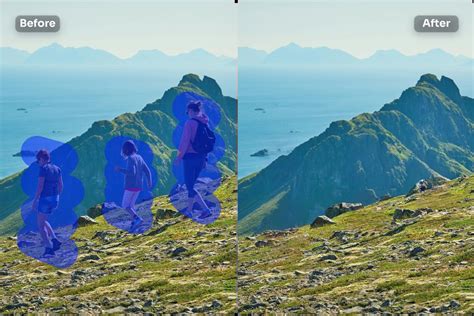
The advent of Artificial Intelligence (AI) has revolutionized image editing, offering powerful and rapid solutions for tasks that were once time-consuming and complex. For logo background removal, AI-powered tools can instantly detect the subject of an image, whether it's a person, animal, or object, and generate a smooth, clear cutout. This means that instead of spending hours staging photos or painstakingly editing in Photoshop, users can achieve professional-looking results in mere seconds.
These AI solutions are designed for efficiency. For example, one platform boasts that its AI generates realistic backgrounds in 5 seconds flat, eliminating the need for fancy gear or advanced skills. This has been a game-changer for many, with users reporting significant time savings, such as one Amazon Seller who "Saved me 6 hours on a last-minute client project!" The ability to fix blurry selfies, dull colors, and create realistic shadows that make products "POP off the screen" further highlights the transformative power of these tools. The AI can apply natural-looking shadows, ensuring products appear expensive and trustworthy, as the common sentiment is that "nobody trusts a floating toaster."
Streamlining Workflows with Bulk Processing and APIs
Beyond individual image editing, many professional workflows require processing a large volume of images. This is where AI-driven solutions truly shine, offering robust bulk processing capabilities and seamless API integration. For businesses needing to produce on-brand visuals at scale, or requiring scalable image editing for enterprise-level needs, these features are indispensable.
Desktop applications are available that allow users to drag and drop thousands of images at once. With a simple click of "Start," each image is automatically processed, removing backgrounds and preparing them for further use. For even larger-scale operations, particularly those involving millions of images, APIs can be integrated into existing projects with just a few lines of code. This enables background removal "at scale," a critical requirement for enterprise catalogs, e-commerce platforms, and large-scale marketing campaigns. These solutions aim to boost efficiency, reduce costs, and provide a competitive edge in business-to-business (B2B) environments. The ability to "bulk process thousands of photos-upscale, refine, and integrate via OnPremise, API or Custom Solution" underscores the flexibility and power of these advanced tools.
7 ChatGPT image editing tips you NEED TO KNOW | AI image generation
User-Friendly Online Editors and Free Trials
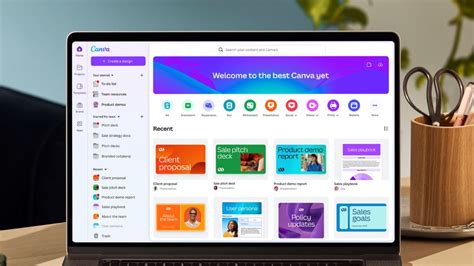
For individuals and small businesses, the accessibility of online background removal tools is a significant advantage. Platforms like Canva and Adobe Express have made sophisticated image editing features available through intuitive, user-friendly interfaces. These tools often offer a free trial or a limited number of free uses, allowing users to experience the benefits firsthand.
Canva's "Background Remover" tool, for instance, instinctively detects the foreground subject in a photo, speeding up the editing process. This allows users to focus on other design aspects, such as creating collages or producing gorgeous product shots for e-commerce sites, even without prior design experience. The process is straightforward: upload an image, click "BG Remover," and the background becomes transparent. Users can then save the image as a high-resolution PNG file. For unlimited usage and access to more advanced features like a Video Background Remover, a subscription to Canva Pro is available.
Similarly, Adobe Express offers a powerful "Remove Background" tool that works effortlessly on both JPG and PNG images. The process involves uploading the image, letting the AI remove the background, and then downloading the new, transparent image. Adobe Express goes further by providing a comprehensive suite of design tools, allowing users to transform their newly edited image into flyers, social posts, album covers, profile photos, and much more. With a vast library of templates, fonts, icons, and GIFs, users can personalize their creations to create standout content. The platform emphasizes its ease of use, stating that there’s "no need to learn complicated tools or software." It also offers a free plan that includes dozens of Quick Action tools, thousands of templates, and photo editing capabilities.
The "How-To" of Background Removal
The core process across most modern background removal tools is remarkably consistent and designed for simplicity. Users typically follow these steps:
- Upload Your Image: Select the logo or image you wish to edit. Most tools accept common formats like JPG, PNG, HEIC, or HEIF. Some platforms also offer stock photo libraries if you don't have your own image.
- Initiate Background Removal: Locate the "Background Remover" or a similar function within the editor. This is often a prominent button or tool.
- Automatic Processing: The AI or algorithm will then automatically detect the subject and remove the background. This process usually takes only a few seconds.
- Review and Refine (Optional): In some cases, you might have the option to fine-tune the cutout, though for many simple logos, the automatic result is sufficient.
- Download Your Transparent Image: Save the resulting image, typically as a PNG file, which preserves the transparency.
For those needing to change the background entirely, once the original background is removed and the canvas becomes transparent, users can then add a new backdrop. This can be a solid color, a pattern, a texture, or even another image from an extensive media library or one uploaded by the user. This flexibility allows for complete customization, transforming a simple logo into a versatile design asset.
Addressing Common Concerns and Misconceptions
A key benefit of these modern tools is their ability to address common misconceptions about image editing. The idea that one needs advanced "Photoshop skills" or expensive software is rapidly becoming outdated. The "FOMO" (Fear Of Missing Out) mentioned in some marketing materials highlights that competitors are likely already leveraging these efficient tools.
Furthermore, the concern about creating "meh" photos versus "wow" visuals is directly tackled by AI's ability to refine details, upscale images to stunning print-ready HD, and add realistic shadows. This elevates the perceived value and professionalism of any visual content. The tools also empower users to "wipe out distractions instantly," a crucial step for creating clean headshots for CVs, custom photos for presentations, or professional product imagery for e-commerce.
The question of whether these tools can handle complex images or if they are limited to simple logos is also addressed. Background removers generally work on a range of images, including those with people, animals, and various objects. Even logos with non-layered, white boundaries that might have previously required specific Photoshop techniques can now be handled automatically. The ability to select a color with a magic wand and delete it, while still a valid Photoshop technique, is now often surpassed by AI's more robust and less error-prone methods. The need to avoid erasing or complex selections is minimized, making the process accessible to a much wider audience.
The Future of Logo and Image Editing
The trend towards automated, AI-driven image editing is undeniable. As technology advances, we can expect even more sophisticated tools that offer greater precision, faster processing, and more intuitive user experiences. The ability to scale image editing, integrate it seamlessly into workflows, and achieve professional-quality results without extensive training or investment, is no longer a futuristic ideal but a present-day reality. Whether for a quick headshot, a complex e-commerce catalog, or a dynamic video presentation, removing white backgrounds from logos and other images has become an effortless task, empowering creativity and business growth alike. The accessibility of these tools, often with free trials, means that anyone can experiment and discover the power of a transparent background.