Instagram Stories have become an indispensable tool for sharing moments, updates, and creative expressions. Among the myriad of ways to enhance these ephemeral narratives, the Instagram Story collage stands out as a particularly engaging format. It allows users to present multiple images within a single, cohesive frame, offering a richer and more dynamic visual experience than a single photo. This guide will delve into the art and science of creating these eye-catching collages, ensuring your Stories capture attention and tell a compelling visual story.
The Allure of the Instagram Story Collage
Why opt for a collage when you can post individual photos? The answer lies in visual storytelling and impact. A collage allows you to:
- Showcase Multiple Moments: Instead of choosing just one photo from an event or a series of related experiences, a collage lets you present a curated selection, giving your audience a more comprehensive glimpse.
- Create a Narrative Flow: By arranging images strategically, you can guide the viewer's eye through a sequence of events or a progression of ideas.
- Enhance Aesthetic Appeal: A well-designed collage can be visually striking, combining different colors, textures, and compositions to create a harmonious and appealing whole.
- Maximize Limited Space: For platforms where brevity is key, a collage efficiently conveys more information and visual interest in a single Story frame.
- Boost Engagement: The complexity and visual density of a collage can often pique curiosity and encourage viewers to spend more time interacting with your content.
Choosing Your Canvas: Tools for Collage Creation
The process of making an Instagram Story collage can range from simple to sophisticated, depending on your desired outcome and available resources. Fortunately, there are numerous tools designed to make this process accessible to everyone, from beginners to seasoned designers.
One such powerful yet user-friendly option is Adobe Express. This platform is designed to be simple and easy to use, welcoming all skill levels to create an Instagram Story collage. The core functionality is remarkably straightforward: all you have to do is upload your favorite photos and watch as the collage maker combines them into one stunning collage. This intuitive approach democratizes the creative process, allowing anyone with a story to tell to do so visually.
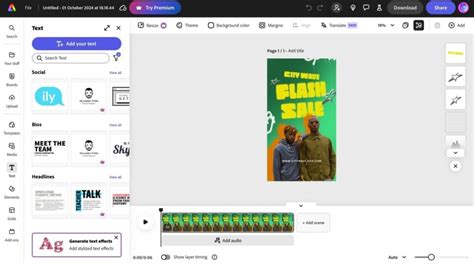
Adobe Express is particularly appealing because it acknowledges that creativity isn't a one-off event. Yes, you can make as many Instagram collages as you’d like with Adobe Express, so have fun with all the customization options at your fingertips. This freedom encourages experimentation and allows for the development of a consistent visual style across your Stories.
The Building Blocks: Essential Elements of a Good Collage
Regardless of the tool you choose, certain principles underpin the creation of an effective Instagram Story collage. Understanding these elements will elevate your creations from a mere collection of images to a visually compelling narrative.
1. Theme and Purpose: What's Your Story?
Before you even select your photos, consider the overarching theme or purpose of your collage. Are you documenting a trip, showcasing a product, sharing a recipe, or highlighting a special event? Having a clear theme will guide your photo selection and arrangement. For instance, a travel collage might feature landscapes, local food, and memorable moments, all tied together by the destination.
2. Photo Selection: Quality Over Quantity
The quality of your individual photographs is paramount. Choose images that are:
- High Resolution: Blurry or pixelated images detract from the overall appeal.
- Well-Composed: Even if they are part of a larger collage, each photo should stand on its own.
- Relevant to the Theme: Ensure each image contributes to the story you're trying to tell.
- Varied: Mix close-ups with wider shots, action shots with static ones, and portraits with scenic views to add visual interest.

3. Layout and Arrangement: The Art of Placement
The way you arrange your photos is crucial. Consider:
- Grid Layouts: These are classic and offer a sense of order and balance. Many apps provide pre-set grid templates.
- Freeform Layouts: This allows for more creative expression, enabling you to overlap images, vary their sizes, and position them dynamically.
- Focal Point: Decide if you want one dominant image to draw the viewer's eye, or if you prefer a more balanced composition.
- Flow and Direction: Arrange images so that the viewer's eye naturally moves across the collage, telling a story sequentially.
4. Color Harmony and Contrast: Visual Cohesion
The colors within your collage should complement each other.
- Color Palette: Try to select photos that share a similar color scheme or have complementary colors. This creates a sense of unity.
- Contrast: Use contrast strategically to make certain elements pop. This could be through the colors of the photos themselves or through background elements.
5. Text and Graphics: Adding Context and Flair
While the focus is on images, text and graphic elements can significantly enhance your collage.
- Overlay Text: Use text to add captions, dates, locations, or a brief narrative. Choose fonts that match your overall aesthetic.
- Stickers and Emojis: These can add personality and visual interest, but use them judiciously to avoid clutter.
- Backgrounds: A solid color, gradient, or subtle pattern can tie the collage together and provide a clean backdrop for your photos.
Harnessing the Power of Editing: Enhancing Your Images
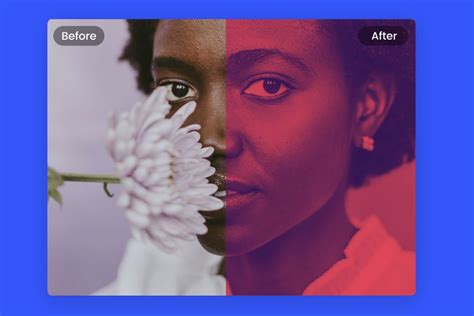
Once your photos are in the collage, the editing capabilities of your chosen tool come into play. Adobe Express, for instance, allows you to edit your photos directly in your project. Just select the photo of your choice, then play around with different photo effects such as Duotone filters, contrast, brightness, cropping images, and so much more.
- Cropping: Adjust the aspect ratio of individual photos to fit seamlessly into the collage layout.
- Filters: Apply filters to unify the look and feel of all images or to create a specific mood.
- Adjustments: Tweak brightness, contrast, saturation, and sharpness to ensure each photo looks its best and contributes to the overall visual harmony.
- Duotone Filters: These can be particularly effective for creating a stylized, artistic look by applying two colors to an image.
Getting Started with Adobe Express: A Practical Approach
For those new to digital design, Adobe Express offers a gentle learning curve with powerful results.
Step 1: Access Adobe ExpressYou can use Adobe Express through your web browser or download the mobile app.
Step 2: Choose a Template or Start from ScratchAdobe Express offers a vast library of templates specifically designed for Instagram Stories. You can also choose to start with a blank canvas.
Step 3: Upload Your PhotosDrag and drop or select the photos you want to include in your collage.
Step 4: Select a LayoutAdobe Express provides various collage layouts. Choose one that suits your needs, or drag and resize elements to create a custom arrangement.
Step 5: Customize and Edit
- Replace Photos: Click on a placeholder image and select a photo from your uploaded assets.
- Adjust Photo Settings: Select an individual photo to access editing options like cropping, flipping, adjusting brightness, contrast, saturation, and applying effects.
- Add Text: Use the text tool to add captions or titles. Customize font, color, size, and alignment.
- Add Graphics/Stickers: Browse the library of graphics and stickers to enhance your collage.
- Change Background: Select the background to change its color or apply a pattern.
Step 6: Refine and FinalizeReview your collage for balance, color harmony, and overall aesthetic appeal. Make any final adjustments to text, images, or graphic elements.
Step 7: Download and ShareOnce you're satisfied, download your collage as an image file (typically JPG or PNG) and upload it to your Instagram Story.
Frequently Asked Questions About Instagram Story Collages
Can I make Instagram collages for free?Yes, you can make Instagram collages for free. Many applications and online tools offer free plans with substantial features. For instance, Adobe Express's free plan offers many core features including thousands of templates, photo editing and effects, animation, and 2GB of storage. This allows you to experiment and create without financial commitment.
What are the best apps for making Instagram Story collages?Besides Adobe Express, other popular and user-friendly options include:
- Canva: Offers a wide range of templates and design tools.
- Layout from Instagram: A simple, dedicated app from Instagram itself for creating basic collages.
- PicCollage: Known for its ease of use and fun stickers.
- InShot: A versatile video and photo editor that also handles collages well.
How do I ensure my collage looks professional?
- Consistency is Key: Maintain a consistent style in terms of colors, fonts, and editing.
- Don't Overcrowd: Leave some white space or negative space to give your eyes a rest and make the collage easier to digest.
- High-Quality Images: Always start with the best possible photos.
- Purposeful Arrangement: Think about the story you want to tell with the placement of each image.
- Subtle Editing: While editing is important, avoid over-editing that makes images look unnatural.
What if I don't have many photos to choose from?Even with just two or three photos, you can create an effective collage. Focus on the layout and how these few images can be arranged to tell a story or create a strong visual impact. You can also incorporate text and graphic elements to fill the space and add context.
Exploring Advanced Techniques and Creative Ideas
Once you've mastered the basics, consider these advanced techniques to make your collages truly stand out.
Thematic Storytelling Series
Instead of a single collage, think about creating a series of collages that tell a story over multiple Stories. Each collage could represent a different chapter or aspect of your narrative. For example, a "Day in the Life" story could have one collage for morning activities, another for lunch, and a third for evening events.
How to Make a Collage on Instagram Stories
Incorporating Video Clips
Some platforms allow you to embed short video clips within your collages. This adds a dynamic element that can capture attention more effectively. Imagine a collage of photos from a concert, with a short video clip of the performance seamlessly integrated.
Using Overlays and Textures
Beyond basic filters, experiment with adding subtle textures or graphic overlays to your collage. This could be a vintage paper texture for a nostalgic feel, or a subtle bokeh effect for a dreamy atmosphere. Many editing tools offer these options.
Color Blocking and Gradients
Strategic use of color blocking or gradients as backgrounds can unify disparate images and create a modern, graphic aesthetic. This is particularly effective when your photos have a wide range of colors.
Interactive Elements
While not directly part of the collage itself, consider how you can use Instagram's built-in features to make your collage more interactive. For instance, you could create a poll or quiz related to the content of your collage, encouraging viewer participation.
The Second and Third-Order Implications of Collage Use
The impact of using Instagram Story collages extends beyond immediate visual appeal. On a second-order level, consistent and well-executed collages can contribute to building a stronger personal brand or a more recognizable business presence. A unique collage style can become a signature element that followers associate with your account, fostering brand recall and loyalty. For businesses, this translates to increased brand recognition and a more professional online image.
On a third-order level, the increased engagement generated by compelling collages can influence an account's visibility within the Instagram algorithm. Higher engagement rates-more likes, shares, and time spent viewing-signal to Instagram that your content is valuable, potentially leading to greater reach and exposure for future posts. This can create a positive feedback loop, where good content leads to more visibility, which in turn encourages the creation of even better content.
Furthermore, the act of carefully curating and arranging photos for a collage encourages a more mindful approach to content creation. It pushes users to think critically about the narrative they are presenting, the quality of their visuals, and the overall message they want to convey. This process can lead to a deeper understanding of visual communication and storytelling, benefiting not just their Instagram presence but their ability to communicate effectively in other contexts as well.
Avoiding Common Pitfalls in Collage Design
To ensure your collages are effective rather than overwhelming, be mindful of common mistakes:
- Overcrowding: Too many images or too much text can make a collage look messy and difficult to understand.
- Low-Quality Images: Using blurry or pixelated photos will detract from the overall professionalism.
- Inconsistent Editing: When photos have vastly different color tones or levels of sharpness, the collage can appear disjointed.
- Clashing Fonts: Using too many different fonts or fonts that are hard to read can hinder readability.
- Ignoring the Theme: A collage without a clear theme or purpose can feel random and uninspired.
By understanding these potential pitfalls and applying the principles of good design, you can consistently create Instagram Story collages that are not only visually appealing but also effectively communicate your message and engage your audience. The accessibility of tools like Adobe Express means that creating stunning visual narratives is now within reach for everyone, transforming the way we share our stories, one collage at a time.