Krita, a powerful and free open-source digital painting application, offers a vast array of customization options, among which brush presets play a pivotal role in shaping an artist's workflow and final output. For those looking to expand their creative toolkit beyond the default offerings, the world of Krita brush packs provides an exciting avenue for exploration. This article delves into the intricacies of finding, downloading, and utilizing these invaluable resources, with a particular focus on the renowned contributions of artist David Revoy and other notable creators within the Krita community.
The Appeal of Custom Krita Brushes
The default brush presets that come preinstalled with Krita are a solid foundation for many artistic endeavors. However, as artists evolve and their creative needs diversify, the desire for specialized tools becomes more pronounced. Custom brush packs offer a solution by providing a curated selection of presets designed for specific purposes, styles, or effects. These packs can range from realistic emulations of traditional media to highly stylized digital tools, each offering unique characteristics that can elevate the artistic process.
One of the primary motivations for seeking out new brush packs is the desire for a more refined or specific artistic output. For instance, an artist might be looking for a brush that perfectly mimics the subtle grain of a charcoal pencil for sketching, or a textured brush that adds expressive strokes with hard, dirty edges for dynamic highlights. The information provided highlights a specific pencil preset used for sketching, noted for its pressure curve and slow line buildup, with a subtle grain and soft rendering. This digital tool is described as having a "very digital and plastic feeling," akin to drawing with a perfect pencil on smooth bristol paper, useful for reducing noise in crosshatching.
Furthermore, the need for efficiency in digital painting often drives the search for specialized brushes. Artists may seek out tools that simplify complex tasks, such as quickly blocking in large shapes with a textured feel, or brushes designed for smoothing and adding details with ease. The "Hardpainting" family of brushes, for example, was developed to achieve a rendering far removed from soft shading, offering a more challenging yet rewarding painting experience. These brushes are noted for their ability to reveal canvas texture while painting details, particularly effective when painting bright on dark strokes.
David Revoy's Brush Packs: A Cornerstone of the Krita Community
Artist David Revoy is a prominent figure within the Krita community, known for his significant contributions to the project and his commitment to FOSS (Free and Open-Source Software). His brush packs are highly regarded for their quality, versatility, and frequent updates, ensuring compatibility with the latest Krita versions. Revoy's approach to brush creation often involves meticulous research and a deep understanding of digital painting techniques.
One of his notable contributions is a bundle of 25 new presets, an upgrade to his previous work, incorporating research for his recent speedpaintings. These brushes are designed to blend seamlessly with Krita's default set. He meticulously crafted a collection that includes a preset for sketching, lauded for its pressure sensitivity and gradual line building, featuring a subtle grain and soft rendering. This drawing tool is described as offering a "very digital and plastic feeling," perfect for achieving a smooth, pencil-on-bristol paper effect.
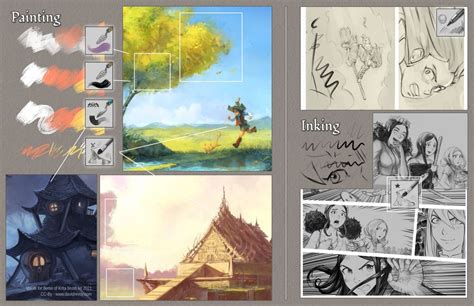
Revoy also developed brushes for specific artistic needs. For instance, a large, heavily textured pencil was used during the storyboard for episode 30 to avoid diving into details, proving wonderfully effective with bright gray colors. Another brush was designed for easier painting over, smoothing, and adding details, also producing very soft line-arts. This brush is highlighted as a frequently used tool, capable of subtle glazing with low opacity and expressive strokes at full pressure. For episode 30, a different preset was built to achieve a less smooth rendering, with the artist painting almost the entire episode using it.
The "Hardpainting" family is another significant creation by Revoy. Codenamed as such because painting with them is harder and they produce a rendering far from his usual "soft" shading, these brushes are ideal for blocking large shapes with a distinct texture. The first preset in this family is specifically for details, sharing similarities with an inking preset but designed to reveal canvas texture. It works best on a bright-on-dark stroke. A "knife" brush adds expressive strokes with hard, dirty edges, simulating a loaded knife hitting the canvas or flattening an area without a digital, flat result. Another brush eases volume modeling and smoothing softer edges, reacting similarly to a soft brush but with a slightly flat and angular tip, though its overuse can lead to weak results on hard surfaces.
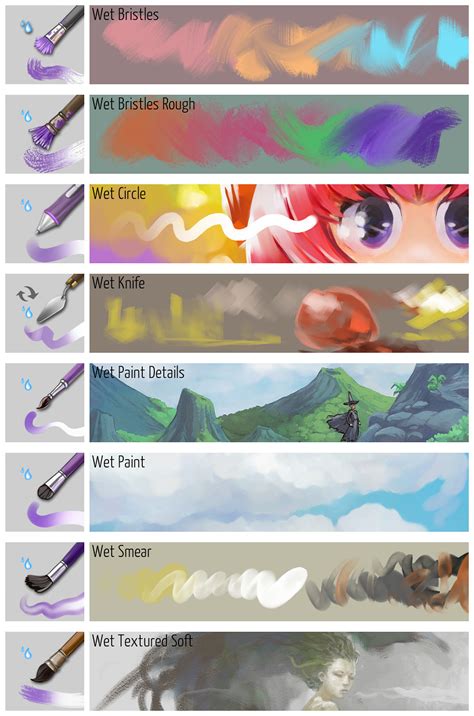
Revoy also addresses the challenges of using textured brushes, noting the difficulty in adjusting colors without relying on opacity when working with transparent textures. He designed a brush that shows "half threw the texture," not ideal for blocking main volumes but excellent for post-fix adjustments. For breaking hard edges, a brush with a bit of mixing ease the process. A preset that adds grain to a piece, simulating the rub of a small brush on canvas, is also mentioned, along with a larger version because Krita lacks a setting to scale texture size with brush diameter. His favorite preset at the moment is a rake with tilt dynamic, requiring a tilt-supporting device, used for cutting shapes and depicting initial painting layers, adding noise and scratching the canvas effectively. Another brush adds a large texture, mimicking paint applied and then excess removed, leaving paint in the canvas fibers, useful for base layers or hiding flat areas.
The need for a specific brush to create thin, aliased marker lines for colorize masks led Revoy to develop a preset that fills at 100% with a slight "friction" at the start of pressure. He also designed a dashed line preset that works well with Krita's shape tools, offering more texture than vector lines. A unique brush produces numerous stars for night scenes, with a caution to reduce their number to avoid an overly dense star-field. This brush can also be used for snow when blurred and at a large diameter.
Revoy's philosophy extends to the distribution of his brush packs. He opts for a libre and open-source model, believing in an internet that shares and donates rather than prohibits and sells. His brush packs are licensed under Creative Commons Attribution 4.0, requiring attribution for redistribution, commercialization, or modification, but not for personal usage or screenshots/screen recordings.
Exploring Other Notable Krita Brush Pack Creators
While David Revoy's contributions are significant, the Krita community boasts a diverse range of talented artists who have developed and shared their own brush packs. These creators offer a wide variety of styles and functionalities, catering to different artistic preferences and needs.
The "Nylnook" brush pack is frequently cited as an "awesome" collection, with some brushes mimicking traditional pen and paper, while others are geared towards digital work. This pack was released for free on GitLab and has been updated to v2, fixing bugs and adding new brushes. The Framagit page and original blog post offer detailed information on the brushes, techniques, and installation instructions. This pack is considered great for beginners, though it may require some time to master.
The "Hushcoil Brushes" are described as "pretty unique and very detailed," hosted on Gumroad, a popular marketplace for digital art assets. The GDquest team offers a freemium alternative to their paid game art brush pack, with their current bundle in v7.0 available for free download. These brushes are designed to mimic traditional cartooning tools like pens and brushes, suitable for classic comics or graphic novels, and they all work at 300 DPI for high-definition print quality or digital screen design.
User "radian1" released a brush set on DeviantArt, geared towards painting and requiring Krita v3.2 or later. While direct download from DeviantArt isn't always straightforward, the pack contains a variety of "goodies." Another set from David Revoy, easily installable and user-friendly, offers painterly brushes modeled after real bristle brushes. Designed for Krita 2.9, they are compatible with later versions and include brushes used by Revoy for his webcomic series Pepper&Carrot, featuring blending styles for opaque colors that emulate real color mixing techniques.
From DeviantArt creator "GrindGod," a massive download (over 34 MB) includes a full pack with demos. A newer v5 set, compatible with Krita 2.9+, is noted to contain all v4 brushes with updates and new additions. This pack offers a decent collection of brush styles, including dabbed/splatter brushes and more refined, controlled options. While not the same as using a tablet, it allows for a feel of how the brushes work, with a size range of 30px-100px.
Illustrator Raghavendra Kamath published a brush pack dating back to Krita 2.0, released as open-source on GitHub. Despite their age, these brushes are surprisingly versatile and work well on older versions, though testing on v2.8 or below is recommended. Designed with pixel-perfect strokes, they can be resized as needed. Another free download from Gumroad offers a set of brushes that mimic traditional media or are geared towards digital work.
A small and simple set by DA user "Aliciane (Elésiane Huve)" is derived from David Revoy's pack but includes a few changes. These brushes work with Krita 2.8 or higher and feature unique smudge brushes and a custom move tool. The "Aldys Brush Pack," available since Krita 2.3.1, contains many basic brushes worth trying if other packs feel too complex, though they are quite outdated.
Specialized Brush Packs for Diverse Needs
Beyond general-purpose brush packs, numerous specialized collections cater to specific artistic requirements, from character design to environmental art.
The "Speedpaintings" brush pack by David Revoy features flat brushes with multiple uses, including the "flat paint brush creamy" for excellent color mixing even at low pressure, the "flat paint brush dry" for softer edges, and the "flat small brush" for clean, solid edges with texture. This pack is similar to Krita's default brushes, as Revoy designed the official default brush.
A pack of three charcoal pencil-styled brushes allows for digital sketches with subtle grainy, smooth grain, or pressure curve options. The "Zedig Brushes for Krita" pack, originally for Photoshop, has been converted for Krita and includes grungy, smeary, spongy, and pencil-like brushes. Lilly Mist's special brushes offer a variety of effects and decor brushes for unique elements.
TheFlow offers a diverse pack with basic drawing and painting brushes, smudge brushes, mixer brushes, abstract brushes, and a stamp brush. While not a full pack, a single G-Pen brush, based on a Clip Studio brush, is available, known for its speed and pressure sensitivity, ideal for comics and manga.
A pack featuring various high-res and low-res styled brushes includes a chaotic glitch blend brush, designed for stylized art but adaptable to other styles. Many brushes with a rotate icon are created for styluses supporting tilt, focusing on hard but organic edges, with block and round brushes for blocking large areas and rougher textures.
For hair painting, a specialized brush pack requires a specific technique, involving duplicating strokes and using a "soak ink brush." A brush designed for leafy foliage in a watercolor style produces a pencil-like effect, best used with other watercolor and pencil brushes. Sixteen free brushes for watercolor-styled paintings and drawings utilize a default blending mode of Geometric Mean.
A free brush set contains various smudge brushes, and another pack focuses on vegetation and material brushes for foliage and character materials. This latter pack is designed for Krita version 4 but may be useful for older and newer versions. Several brush packs are suited for specific styles, not general use, including one specifically for game artists, featuring chalk, rock texture, and vegetation flower brushes.
Other packs include various brush tips like sponge, eraser, and fine tips. A few watercolor brushes were created to address limitations in Krita's default watercolor brushes, offering four options with different hardness levels. Additionally, five sketch brushes include a fine G-pen, a rough G-pen, a transparent rough pen, a marker tip, and a pencil-like tip.
Installation and Usage of Krita Brush Packs
Installing Krita brush packs is generally a straightforward process. Most packs are distributed as zip files or Krita bundle files (.bundle).
Installation Steps:
- Download the Brush Pack: Locate and download the desired brush pack. Ensure it's compatible with your Krita version.
- Extract Files (if necessary): If the pack is a zip archive, extract its contents to a temporary location.
- Import into Krita:
- Open Krita.
- Go to
Settings>Manage Resources.... - In the
Manage Resourcesdialog, clickImport Bundle/Resource. - Navigate to the extracted brush pack file (often a
.bundlefile) and select it. - Krita will import the brushes, and they should appear in your brush presets.
Bundle Management:
- When importing bundle files, Krita manages them in the
Active Bundlescolumn. - It's generally recommended to choose one bundle if there are overlapping brushes to avoid confusion in the Krita tagging system.
Usage Considerations:
- Canvas Size: Some presets may appear large on smaller canvases, as they were often designed for larger resolutions (e.g., 2K and above).
- Stylus Support: Brushes with rotation icons are optimized for styluses that support rotation (like Wacom Art Pen), allowing for thick and thin strokes essential for inking. Brushes with a "G" icon indicate "Generic rotation," emulating rotation using Krita features like Drawing Angle Lock and Fuzzy Stroke, and can work with any stylus.
- Mixing Brushes: Brushes with a drop icon or those designed for mixing can blend colors with what's already on the canvas, creating a "wet" feel. These, especially when combined with textures and rotation, can be more computationally intensive.
- Naming Conventions: Many brush packs use prefixes (e.g., "Nylnook") to facilitate quick searching within Krita's tagging system, followed by a categorization of the brush type.
Understanding Licensing and Support
The licensing of Krita brush packs varies among creators. David Revoy's packs, for instance, are licensed under Creative Commons Attribution 4.0, requiring attribution for redistribution or commercial use, but not for personal painting. Other packs may be released under CC0 (Public Domain), allowing for unrestricted use.
Supporting the creators of these valuable resources is encouraged. Many artists offer their brush packs for free but welcome donations or support through platforms like Patreon. This support helps sustain their work and encourages the continued development of free and open-source creative tools for the Krita community.
The availability of free Krita brush packs significantly enhances the software's already robust capabilities. By exploring and incorporating these custom brushes into your workflow, you can unlock new artistic possibilities, refine your techniques, and ultimately, achieve more compelling digital art.