In today's visually driven world, where images are paramount, the ability to skillfully edit and enhance photographs is an invaluable asset. It's a rare occurrence to encounter a truly unedited photograph, as most images we see have undergone a transformation through various editing tools. Whether you aspire to achieve the polished aesthetic seen in magazines or simply want to elevate your personal photos for social media, understanding photo editing basics is key. Fortunately, achieving professional-looking results no longer requires expensive and complex software like Adobe Photoshop or Lightroom. Accessible tools and a guided approach can equip you with the skills to manipulate images effectively.

The Evolution of Picsart Tutorials: A Community-Centric Approach
Picsart, a leading platform in photo and video editing, has embraced the creative drive within its vast community. Recognizing the need for accessible and engaging learning resources, Picsart has undergone a significant revamp of its tutorial offerings. These redesigned tutorials aim to revolutionize how users create and learn within the app. Moving away from its former location in the Daily Journal, tutorials now have their dedicated space, reflecting their importance. The PicsArt community is a vibrant tapestry of artists, encompassing a wide spectrum of styles and skill levels. This diversity fuels a collaborative environment where creativity flourishes. To ensure every user can readily find relevant guidance, Picsart has strategically categorized its tutorials into three distinct levels: Easy, Medium, and Advanced. This tiered approach guarantees that users of all abilities can discover tutorials that resonate with their current skill set and learning objectives, making the journey of mastering Picsart both intuitive and inspiring.
Navigating the Picsart Interface: Your First Steps to Editing
For newcomers to the Picsart app, the sheer volume of photo effects and the myriad ways they can influence an image can initially seem overwhelming. However, Picsart champions user autonomy in the creative process, refraining from dictating specific editing techniques. Instead, it empowers users to explore and experiment, allowing for the discovery of unique and novel applications of its features. Each photo effect within Picsart is equipped with a range of adjustable settings and parameters, providing the latitude to imbue every image with a distinct and original character. It's entirely possible to employ an effect in a manner that has never been conceived before, pushing the boundaries of conventional usage.
To begin manipulating an effect, users can engage with the sliders presented on the toolbar, meticulously adjusting various parameters. Once a satisfactory configuration has been achieved through experimentation with different settings, the next step involves navigating to the "Shape" option, typically located at the top of the screen. This allows for the introduction of shapes into the image, independent of any applied effect. The user can then freely resize and reshape these areas to their desired dimensions and formulations. Furthermore, the "Invert" option provides an additional layer of control, enabling the effect to be applied exclusively within the boundaries of the selected shape, or conversely, to everything outside of it.
Following this, users can delve into the "Artistic Effects" menu, where a wealth of distinct features and settings await exploration. This section is designed to foster experimentation, encouraging users to play with different styles and transformations. Upon concluding their creative endeavors within the "Artistic Effects" menu, the next logical step is to explore the "Paper Effects" gallery. This collection offers the ability to alter the textural qualities of the entire image, adding a new dimension to the visual composition. When the user is satisfied with the overall appearance of their image and the chosen photo effects, they can finalize their edits by clicking the Checkmark. This action saves the modifications, and the edited photo can then be uploaded to the user's personal gallery. To facilitate community engagement and learning, users are encouraged to tag their images with the names of the effects they have utilized. This practice allows others to discover their methods and provides an opportunity to compare techniques with fellow Picsart users who have employed the same effects, fostering a collaborative learning environment.
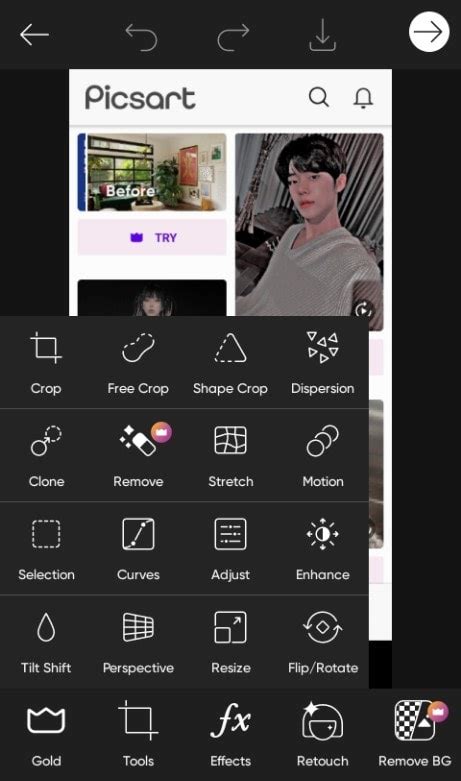
Essential Photo Editing Tools in Picsart: Building a Strong Foundation
In the contemporary digital landscape, mastering basic photo editing tools is crucial for anyone looking to refine their images. Picsart offers a suite of fundamental tools that are both powerful and accessible, allowing users to transform their photos without the steep learning curve associated with professional-grade software.
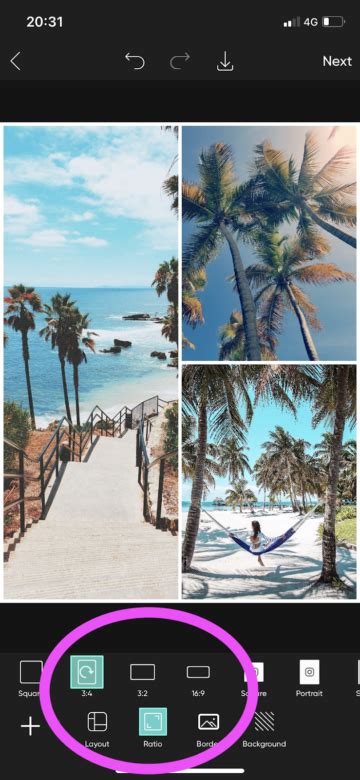
The Crop Tool: Perhaps the most fundamental editing tool, the Crop tool is indispensable for refining the composition of your photographs. It allows you to adjust the framing, which is particularly useful when preparing images for social media platforms that often have specific aspect ratio requirements. For instance, if you're posting to Instagram and need your image to adhere to the popular 1:1 square ratio, the Crop tool is your go-to solution. Beyond social media, this tool is excellent for emphasizing the most compelling elements of your picture and improving its overall visual balance.
The Straighten Tool: Akin to the Crop tool in its simplicity, the Straighten tool is endlessly beneficial. When capturing photos, especially with a smartphone, achieving perfect angles can be challenging. A slight tilt to the left or right, or an image taken from an unflattering low angle, can detract from an otherwise excellent photograph. The Straighten tool allows you to correct these imperfections, ensuring your horizons are level and your subjects are presented from their best perspective.
Light and Contrast Adjustments: Light plays a pivotal role in photography, dictating the mood of an image and the level of detail captured. While controlling light during the shooting phase can be difficult, especially with phone cameras, editing tools offer powerful post-capture adjustments.
- The Contrast Tool: This tool is designed to make your images bolder and brighter. By increasing contrast, you heighten the intensity of both the shadows and highlights, resulting in a more dynamic and eye-catching aesthetic. Conversely, reducing contrast can yield a softer, more muted look.
- The Saturation Tool: Often used in conjunction with Contrast, the Saturation tool directly influences the vibrancy of colors within your image. Boosting saturation enhances the intensity and richness of colors, making them more vivid and impactful. Reducing saturation can create a more subdued or desaturated effect.
Clarity and Detail Enhancement: When working with phone cameras that may have less advanced lenses, achieving sharp, detailed images can be a challenge. The Clarity tool addresses this by increasing the overall sharpness of your photograph. This feature is crucial for bringing out fine details and giving your images a crisp, polished appearance.
Shadows and Highlights: Effective photo editing involves understanding how different tonal ranges interact within an image.
- The Shadows Tool: This tool allows you to selectively adjust the darker areas of your photograph. You can lighten shadows to reveal hidden details or deepen them to create more dramatic contrast.
- The Highlights Tool: Complementary to the Shadows tool, the Highlights tool focuses on the lighter areas of an image. It's particularly useful for correcting overexposed images by reducing harsh glare and bringing back detail in bright areas.
Temperature Adjustment: The perceived warmth or coolness of an image, known as its temperature, significantly impacts its mood and style. The Temperature tool allows you to adjust the white balance and color cast. Warmer tones, reminiscent of natural sunlight, are often favored on social media for their inviting and pleasant feel. Colder tones, on the other hand, are frequently associated with editorial photography or vintage styles, such as that of Polaroid pictures. Experimenting with both warm and cool tones can lead to striking visual outcomes.
How To Use PicsArt! (Complete Beginners Guide) (2024)
Exploring Picsart's Creative Effects: Beyond Basic Adjustments
Once you've mastered the fundamental editing tools, Picsart offers a vast array of creative effects and filters to truly make your content stand out. These effects allow for artistic expression and the ability to achieve unique visual styles.
Overlays and Adjustments: Picsart provides a wide range of photo overlays and adjustments that can be applied to images before posting them directly from your phone. You can even achieve a transparent background for your images, opening up possibilities for creative compositing.
The Effects Gallery: Within the Picsart app, the Effects gallery is a treasure trove of creative possibilities. You can search for a variety of overlays to further enhance your photos.
- Blur, Artistic, and Distort Collections: These collections offer effects that are more unconventional and visually striking than typical Instagram-friendly filters. The Blur effects can manipulate the focus of your photos, while the Artistic and Distort collections introduce interesting graphic changes and truly unique visual rearrangements, taking your images on a wild ride of transformation.
- Paper Effects: In contrast to the more experimental "Artistic" and "Distort" collections, the effects found in the Picsart "Paper" gallery are remarkably nuanced and gentle. They offer subtle textural changes that can add a sophisticated layer to your images.
Pop Art and Color Effects: For those who admire the vibrant and iconic style of artists like Andy Warhol, the Pop Art and Colors effects within Picsart are ideal. These effects can make your photos burst with character and style, allowing for easy color adjustments in just a few taps.
Canvas and Sketch Effects: If you're aiming for a more artistic and illustrative look, the Canvas and Sketch effects are worth exploring. These collections feature fun effects that blend your photos with painterly styles and add interesting pencil strokes across your compositions, transforming your images into artistic creations.
Putting Your Knowledge to Work: Experimentation is Key
Having familiarized yourself with the array of photo editing tools and effects available in Picsart, the next crucial step is to apply this knowledge. The secret to creating engaging and professional-looking photos, not just for Instagram but for any platform, lies in consistent experimentation. Dedicate time to exploring the intricacies of these user-friendly photo editing tools. Once youâve gained a solid understanding of the basics, the process of creative editing becomes significantly more intuitive and enjoyable. Picsart's commitment to fostering a creative community means that the platform is constantly evolving, offering new tools and features to inspire and empower creators of all levels. By embracing experimentation and utilizing the comprehensive resources available, you can unlock your full creative potential and produce stunning visual content.
Picsart: A Global Creative Ecosystem
Picsart stands as a prominent photo and video editing platform, intricately woven with a thriving creative community. Its global reach is underscored by its status as a top 20 most downloaded app worldwide, boasting an impressive user base of over 150 million monthly active users. The platform's innovative AI-powered tools are designed to empower creators across the entire spectrum of skill levels, enabling them to design, edit, draw, and share their work seamlessly from any location.
A cornerstone of Picsart's appeal is its expansive and diverse collection of user-generated and curated content. It has amassed one of the largest open-source content libraries globally, encompassing a vast array of photos, stickers, backgrounds, templates, and much more. This rich repository serves as an invaluable resource for individuals and businesses alike. Whether you are a consumer looking to enhance personal photos, a marketer aiming to create compelling advertising materials, a content creator developing engaging social media posts, or a business seeking professional design solutions, Picsart's tools are adept at fulfilling both personal and professional design needs.
The platform's influence and reach are further amplified by its strategic collaborations with major artists and globally recognized brands. Partnerships with entities such as BLACKPINK, Taylor Swift, Lizzo, Ariana Grande, Warner Bros. Entertainment, iHeartMedia, and Condé Nast highlight Picsart's significant role in the contemporary creative landscape. These collaborations not only introduce Picsart to new audiences but also underscore its capability to support high-profile creative endeavors, solidifying its position as a go-to platform for visual content creation and innovation.