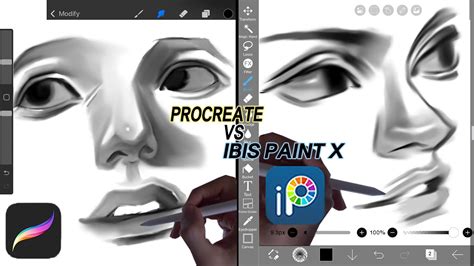
The digital art landscape is populated by a multitude of tools, each promising to unlock a creator's potential. Among the most frequently discussed are Procreate and Ibis Paint X, often pitted against each other in discussions about which platform reigns supreme. While some users claim the differences are negligible, asserting that skill and art style are the sole determinants of a drawing's quality, a closer examination reveals distinct characteristics that cater to different artistic needs and preferences. Understanding these nuances is crucial for any digital artist, from the novice exploring their first digital canvas to the seasoned professional seeking the optimal tool for their workflow.
The Core Functionality: What Both Apps Offer
At their heart, both Procreate and Ibis Paint X are powerful digital art applications designed to facilitate the creation of illustrations, paintings, and various forms of visual art on digital devices, primarily iPads and iPhones for Procreate, and a wider range of mobile devices for Ibis Paint X. They both provide users with a digital canvas, a palette of colors, a selection of brushes, and layering capabilities - the fundamental building blocks of digital art. The ability to undo mistakes, zoom and pan for detailed work, and utilize various blending modes are standard features present in both.
Procreate: The Artist's Playground
Procreate, exclusively available on Apple's iOS devices, has garnered a reputation for its intuitive interface and a robust set of features that appeal to a broad spectrum of artists. A significant draw for Procreate is its extensive library of brushes. While some brushes are pre-installed, the app also allows for the import and creation of custom brushes, offering a nearly limitless possibility for unique textures and effects. This vast selection of brushes can significantly influence the final look of a drawing, enabling artists to achieve a wide range of styles, from realistic oil paintings to crisp vector-like illustrations.
The animation capabilities within Procreate, while not its primary focus, are also noteworthy. Users can create frame-by-frame animations, and the fill bucket tool generally works reliably within this context, facilitating the coloring of animated sequences. However, the user feedback suggests that while animation is possible, creating longer, more complex animations can be more challenging and time-consuming compared to dedicated animation software.
Procreate's interface is often lauded for its clean design and ease of use, allowing artists to focus on their creative process without being overwhelmed by complex menus. The app's performance is also a strong point, with many users reporting a smooth and responsive experience, even when working with large, high-resolution files or complex brush strokes. The one-time purchase model for Procreate also makes it an attractive option for many, as it avoids recurring subscription fees.
Ibis Paint X: Accessibility and Feature-Rich Options
Ibis Paint X, available on both iOS and Android devices, presents a different approach, prioritizing accessibility and offering a vast array of features, many of which are unlocked through an in-app purchase model or by watching advertisements. This makes it a highly appealing option for users who are on a budget or are just starting their digital art journey and may not want to invest heavily in software.
One of the most talked-about aspects of Ibis Paint X is its brush system. While the free version offers a limited selection of brushes, many of which are described as not being of the highest quality, the app provides a substantial number of additional brushes that can be unlocked by watching short advertisements. This ad-supported model allows users to access a much larger variety of brushes without upfront cost, although it can interrupt the creative flow. For users willing to pay, there are also monthly subscription options that unlock all features and remove ads.
The fill tool in Ibis Paint X is generally functional, aiding in the efficient coloring of illustrations. However, when it comes to animation, Ibis Paint X's capabilities are more limited. Feedback suggests that while animations can be created, the process can be slower, especially when it comes to loading animations for tasks like lip-syncing. Furthermore, some users have reported experiencing glitches that could potentially lead to the loss of unsaved work, a significant concern for any digital artist. The color management and layer switching in Ibis Paint X have also been noted as areas where the user experience could be improved, with some users finding it less streamlined than in other applications.
Framecast: A Niche for Animation Enthusiasts
While not directly a competitor in the same vein as Ibis Paint X and Procreate for general illustration, Framecast emerges in discussions as a platform specifically geared towards animation. Its primary appeal lies in its ability to facilitate the creation of longer animations. However, this comes with significant trade-offs. The fill tool in Framecast is reported to be problematic, and users have encountered glitches that pose a risk to their saved work. The loading times for animations can be considerable, impacting workflow efficiency. Additionally, Framecast lacks robust tools for color management and layer manipulation, which are essential for many artistic processes. Despite these drawbacks, for individuals whose primary goal is to produce lengthy animations and who can work around its limitations, Framecast offers a unique, albeit flawed, solution.
The Skill vs. Tool Debate: Finding the Balance
The assertion that "there isn't a difference really" or that "it all really just depends on your art style and skill level" holds a kernel of truth, but it oversimplifies the impact of software tools. While a highly skilled artist can produce remarkable work with almost any tool, the capabilities and limitations of a software application can significantly influence the ease with which certain effects are achieved, the speed of the workflow, and the overall creative experience.
For instance, Procreate's superior brush engine and performance can allow artists to achieve more nuanced textures and effects with greater ease, potentially leading to a richer visual output for those who leverage these features. The intuitive interface can reduce the learning curve, allowing artists to focus on their craft.
On the other hand, Ibis Paint X's accessibility, particularly its ad-supported brush unlocking system, democratizes access to a wider range of tools for users who might otherwise be priced out. While the quality of some free brushes may be lower, the sheer volume available through ads offers a compelling proposition. The potential for glitches and the less streamlined interface are valid concerns that may hinder some artists, but for others, the cost-effectiveness and feature set outweigh these drawbacks.
Top 7 Best Drawing & Digital Art Software
Deconstructing the Differences: Brushwork, Animation, and User Experience
When we move beyond general statements, the differences become more pronounced. Procreate's strength lies in its sophisticated brush engine. The ability to import and create custom brushes allows for unparalleled control over texture, flow, and responsiveness. This is particularly evident in achieving painterly effects or highly detailed linework. The animation features, while not as comprehensive as dedicated software, are integrated smoothly, allowing for quick animation sequences.
Ibis Paint X, conversely, offers a trade-off. While its free brushes might not match Procreate's finesse, the ability to unlock a vast library through ads is a significant advantage for budget-conscious users. The fill bucket in Ibis Paint X generally functions well for coloring static images, but its performance in animation contexts, coupled with potential stability issues, becomes a point of concern. The user experience in Ibis Paint X, with its more complex menus and the necessity of navigating ads or subscriptions for full functionality, can be less fluid than Procreate's streamlined approach.
Framecast occupies a different space, prioritizing animation length over polish and stability. Its utility is limited to a specific use case, and its inherent flaws make it a less attractive option for general digital art creation.
The Impact on Art Styles
The choice of software can subtly, or even significantly, influence an artist's style. An artist who relies heavily on textured brushes might find Procreate's engine more conducive to their desired aesthetic. The ease with which Procreate allows for brush customization can lead to the development of unique artistic signatures.
Conversely, an artist using Ibis Paint X might develop a style that works well within the limitations of its available brushes, or they might invest time in unlocking and experimenting with the wider array of tools offered through advertisements or subscriptions. The learning curve associated with Ibis Paint X's feature set might also shape how an artist approaches their work, potentially leading them to discover creative workarounds or utilize features that are less prominent in other applications.
Conclusion: A Tool for Every Artist
Ultimately, the debate between Ibis Paint X and Procreate is not about which app is definitively "better," but rather which app is "better for you." Procreate excels in providing a polished, intuitive, and powerful environment for artists who prioritize brush control, performance, and a seamless user experience, especially on iOS devices. Its one-time purchase model offers long-term value.
Ibis Paint X, with its broad device compatibility and its accessible, albeit ad-supported, feature set, serves as an excellent entry point into digital art or a viable option for artists who are budget-conscious or prefer a wider variety of brushes unlocked through non-monetary means. While it may have limitations in animation and user experience compared to Procreate, its extensive offerings make it a formidable contender. Framecast, with its focus on animation length, caters to a specific niche, but its inherent instability and feature gaps make it a less universally recommended tool.
The "digital gibberish" that some find confusing is, in reality, the nuanced vocabulary of digital art creation. Understanding the specific strengths and weaknesses of each tool allows artists to make informed decisions, select the software that best aligns with their artistic goals, and ultimately, to create the art they envision, regardless of the platform. The most significant difference often lies not in the pixels on the screen, but in the vision and skill of the artist wielding the stylus.