In the competitive landscape of design and business, the ability to present ideas compellingly is paramount. Pitching your design services or trying to sell an idea to a client requires gorgeous, polished idea boards. While the creative process itself is often the heart of a project, the way it's communicated can make or break its success. This is where Adobe InDesign, a powerful tool for graphic design, truly shines, especially when leveraged through its versatile presentation templates. Unfortunately, creating polished presentations from scratch in InDesign can be quite labor-intensive. The solution lies in utilizing pre-designed templates, a secret weapon for getting a swift sign-off on your designs by making your presentation stand out and avoiding the cliché look of PowerPoint.
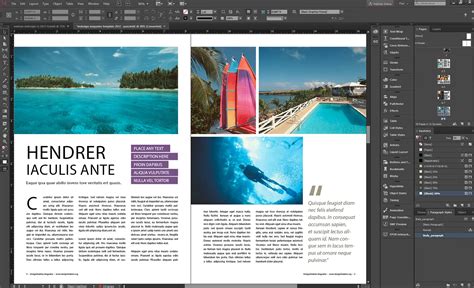
Adobe InDesign is perfect for branding due to its extensive customization options. There are plenty of settings that make Adobe InDesign highly flexible, allowing designers to tailor every element to their specific needs and brand identity. And finally, since InDesign is such a popular tool, there is a bunch of tutorials, plugins, and software that offer integration with it, further streamlining the workflow and enhancing the capabilities of presentation design. The Fohlio plugin, for instance, is one you’ll find tremendously helpful for managing product information and generating presentations.
The Foundation of a Polished Presentation: Core InDesign Techniques
Creating professional-looking presentations in InDesign involves more than just dropping in text and images. It requires a systematic approach to ensure consistency, visual appeal, and efficient workflow. Here are quick and easy guidelines for creating polished, professional presentations that will elevate your proposals and pitches.
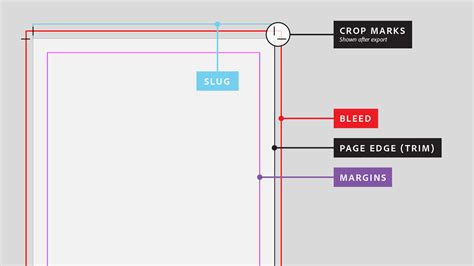
The first thing you want to do when creating a design proposal in InDesign is to set bleeds and margins. Pay close attention to the 'Margins' and 'Bleed and Slug' sections when creating a document. These settings are crucial for ensuring that your printed or exported designs have the correct dimensions and that no essential content is cut off.
Frames are a great way to keep your presentations consistent from page to page. By utilizing frames for text, images, and other content, you create a structured framework that can be easily replicated and modified. Another surefire way to create consistency is by duplicating elements. Instead of recreating the same layout or object multiple times, duplicate it and then simply modify the elements that need to be changed. This not only saves time but also ensures a uniform look across your entire presentation. The shortcut for duplicating is simple: select your element, press Option (Mac) or Alt (PC), drag it, and then release the mouse. Are you noticing a theme here? When it comes to professional-looking presentations, consistency is the name of the game.
To apply a transformation to multiple objects simultaneously, you can use InDesign's powerful transformation tools. First, resize an object that you want to use as a specimen for your transformation. After that, select other objects you wish to transform, then navigate to 'Object' > 'Transform Again' > 'Transform Sequence Again Individually'. This allows you to apply the same sequence of transformations to multiple items, ensuring precise and consistent adjustments across your design.
Want to take your InDesign presentation templates to the next level? Use grids. Grids provide an underlying structure that helps align elements and create a visually pleasing layout. InDesign offers intuitive ways to create custom grids. You can start by drawing any frame, then hold the mouse button and press the up/down arrow keys to add or remove rows, and the left/right arrow keys to add or remove columns. This quick method allows you to define custom grid structures for your layouts, ensuring balance and order.
A master page is a template that holds all the elements, such as headers, logos, page numbers, and footers, that you want to appear on every page in a document. By defining these elements on a master page, you ensure they are consistently applied throughout your presentation, saving you from manually adding them to each individual page. This is an indispensable feature for maintaining brand consistency and a professional appearance.
Leveraging Specialized Tools for Enhanced Presentations
While InDesign offers robust built-in features, specialized plugins and web applications can further enhance your presentation creation process, particularly for fields like interior design. These tools automate tasks, streamline data management, and integrate seamlessly with InDesign.
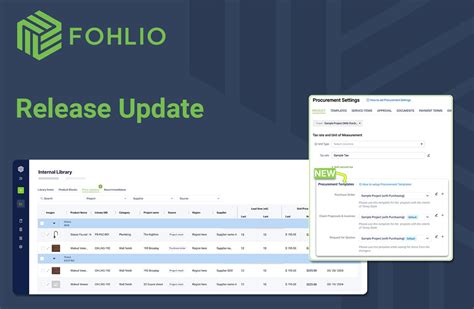
And finally, your design proposal will definitely contain some actual products, a mood board, or even cut sheets. Fohlio is a web application that can auto-generate interior design presentations in many formats, including InDesign Mockup Files. Its smart browser plugin lets you quickly add product information from any webpage with simple clicks, and then organize products by schedule and location layers. One can generate stylish mood boards via a thumbnail gallery view and professional presentation documents. Simply select the products you will need and then export a well-designed grid to InDesign or PDF. It’ll instantly look good and have all the data you need organized in a unified way. This integration bridges the gap between product sourcing and presentation design, making the process remarkably efficient.
Moodboard tutorial InDesign
A World of InDesign Presentation Templates: Styles and Categories
The real power of InDesign for presentations lies in the vast array of templates available. These templates act as starting points, offering pre-designed layouts, color palettes, and typographic styles that can be customized to fit any project. Whether you're a seasoned designer or a beginner, these templates can significantly speed up your workflow and inspire your creative process.
Who said you can't put together a stunning slide deck in minutes? You've got all the big ideas, and we've got 50 amazing presentation InDesign templates you can start customizing now. These templates are meticulously crafted to cater to a wide range of aesthetic preferences and project requirements.
In this comprehensive list, you'll find both free and paid InDesign Templates that have been carefully handpicked and organized by category. Feel free to jump to the section that interests you most:
Free InDesign Presentation Templates
These templates offer an excellent starting point for those looking to create professional presentations without immediate investment. They provide a solid foundation for various project types.
- Quirky Artisan: Give your presentation a touch of quirk to show off your work! Go ahead and customize this template with your images and text. And feel free to adjust the fonts and object styles to fit your pitch!
- Modern Smart Casual: Go for a modern look without overdoing it with a simple and straightforward presentation. This template uses soft tones of orange and grey, along with smart font styles to ensure you deliver your concepts loud and clear.
- Muted Modern Look: Place your images against muted tones, and edit the texts in this free template to make it your own. Move around the paragraphs and objects, then choose from a variety of character styles to achieve a modern presentation.
- Throwback To Retro: Tune up your sharp proposal using a boldly retro presentation. With this free template, you get to customize the characters and objects to highlight your ideas on beige, black, and white pages.
- The Memphis Flow: Throw in some fun appeal to your presentation using this Memphis-inspired layout. With fun lines, shapes, and colors, this free template is ready to hold your texts and images under the best light.
Modern InDesign Presentation Templates
For those aiming for a contemporary and sophisticated aesthetic, these modern templates offer sleek designs with clean lines and up-to-date typography.
- Formal Flair: Project your flair onto your presentation using this formal and easy-to-follow landscape template. Place your images and text on white pages with green undertone accents to make each slide engaging.
- The Attractive Modernist: Attract your readers with a modern presentation that sharply lays down your ideas. This template has warm tones of beige, grey, and red that fittingly complements every image.
- The Modern Loop: Loop in everyone's interest by presenting your proposal using a modern template with circular elements. Accentuated with blues and grey, this template is sure to level up your layout. Download and edit it with your own texts and images today!
- Edgy Modern Blues: Open more doors for opportunities with a presentation that magnifies your edge. Use this template to showcase your designs on clean pages, texturized by blue, grey, and black objects that will boost the appeal of your ideas.
- Simplicity Above All: A total of 28 pages with a simple yet unique layout with strong, and contemporary typography. Perfect for when you want to showcase your design in a simple yet bold way.
- The Yellow Project: Bring your concepts to life by displaying them in a warm modern presentation with sharp fonts and a touch of bright yellow. Just customize this template with your images and texts, then it's ready for show!
- Plain And Straight: Be on point with your concepts and ideas in a simply straightforward proposal. Set your thoughts on this template stylized with yellow boards and blue accents. And get to edit the characters and objects to suit your theme.
- Dark Blue Decorum: Volume up your modernist vibes by presenting your ideas using a dark blue portfolio with grey accents. This template features smartly laid out images and text spaces that will make a great fit for any presentation.
- The Pale Appeal: Make your presentation easy on the eyes using a template with a pale blue and grey base. And lay out your ideas by choosing from a variety of character styles and use objects to present data that clearly deliver your topic.
- Striking Vision: Strike your audience with strong visuals to embolden your discussion. Use this template to highlight your key points with red and grey objects and backgrounds that make each slide a gaze holder.
- Less Hues, More Use: Propose your ideas using a formal but modernly attractive layout. With minimal hues of grey and yellow accents, this template will surely dapper up your presentation. And it is readily editable to hold your images and texts.
- The Blue Emphasis: Put emphasis on your key points using blue accents. In this template, you get to personalize your presentation using the built-in fonts and fully editable design objects that give off that modern look.
- Classy Catalog Block: Drive a classy ride with a catalog-style presentation. This template will pose your discussion in black-highlighted pages with red accents. Play with the font and block styles to best engage your audience.
- The Modern Elite: Set your presentation apart from the rest with this modern template. With blue and grey highlights that will give your discussion an elite feel, this multipurpose ensemble is a sure boost of visual appeal.
- Warm Professional: Achieve that professional yet engaging feel by using this template. Its white base is lifted by accents of grey and warm yellow, making the presentation appear pleasing and not distracting.
Colourful InDesign Presentation Templates
Inject energy and personality into your presentations with these vibrant and colorful templates, perfect for creative industries or projects that require a lively visual approach.
- Tricolor Rendezvous: Liven up your presentation with undertones of yellow, red, and black. Customize each page of this landscape layout by playing with the font and object styles to best deliver your discussion.
- Pastel Plunge: Put on a visually pleasing presentation with pastel tones of blue and pink as accents. Along with soft patterns and designs, each stylized slide will surely catch your audience's eyes.
- Filled In Focus: Ace your presentation with this cool-toned template that enhances text and image focus with red, peach, and blue fills. Simply add your visuals and edit the characters, then you're ready to go!
- Refreshing Rapport: Grab your audience's interest with a refreshing presentation. This template uses the light rapport between pink and green accents, making each slide aesthetic. All it needs is your texts and images!
- The Nat Geo: Impress anyone with a straight-to-the-point presentation, accentuated with nature colors of brown, green, and yellow. This template is fully editable, so you're free to move the images, characters, and paragraphs to your preference.
- Simply Navy: Clarify your ideas using a simple and well-structured presentation. With a navy blue base and light blue accents, this template makes for a neat and easy-to-read business plan, proposal, and more.
- The Eye Candy: Prepare to have all eyes on your candy-colored presentation. This template will back your ideas with fun elements and bold, legible characters. Add in your visuals and play with the designs and fonts!
- Yellow Linings: Illuminate your concepts with yellow highlights using this professional template. Each page is organized with figures, characters, and linings that will help clarify your presentation of any purpose.
- Vivid Corner: Speak your mind vividly through a professionally laid out presentation with blue and orange accents. This template has careful placements of texts, images, and icons so that you can convey your concepts effectively.
- The Extra Mile: Step out of conventions with a modern and neatly designed blue presentation. Use this template and customize the smart icons, characters, and figures. Then adjust the texts and images to suit your concepts professionally.
Minimalist InDesign Presentation Templates
Minimalism emphasizes simplicity and clarity, making these templates ideal for conveying information directly and elegantly, ensuring the focus remains on your content.
- The Minimal Millennial: Fill your presentation with accents of beige and grey using this minimalist template. Its professionally organized slides, highlighting the key points, will surely help draw your audience's attention.
- Toned Down: Level up your presentation with toned-down colors. Every page features a plain background with aesthetic accents of beige to achieve that minimalist look. All you have to do is insert your texts and images!
- White Turner: Turn every eye to your presentation with this pleasingly white template. On each slide, you get to put the focus on important information, thanks to the minimalist font styles and smart image placements.
- Aesthetic Mint: Exhibit your best ideas through an aesthetic presentation. This template has mint accents and a touch of pale orange, resulting in a pleasing and organized display of data. Use it and wow your audience throughout!
- On Point Gradient: Shoot every detail of your presentation with on-point visuals. The slides in this template feature gradient elements, from fills to icons. Personalize it with your own texts and images, and it's set to project your concepts.
- Vintage Bloom: Impress everyone with a vintage-themed presentation. Use this template, adorned by classic serif characters and beige accents to take your discussion into full bloom. Edit the file with your texts and images in just a few clicks!
- More Than Minimum: Achieve more with minimal colors using this presentation template. Limited to blue, orange, and yellow accents, the slides in this file make a fine display of data that's easy to visualize.
- The Monochrome: Maximize the potential of your proposal using a monochromatic template. Every flip features black and white elements which are organized in a deliberate manner. Plus, the file is fully editable!
- Prudent Plains: Show prudence in your presentation with this minimal template. The pages are strategically plain with grey and orange accents. Go ahead and add your own texts and images, then move around the elements to best convey your concepts.
- Pale Pages: Capture your audience through an aesthetic presentation composed of pale colors. This template uses undertones of pink and blue, along with bold fonts to help you put together a clear proposal.
Simple InDesign Presentation Templates
For straightforward and effective communication, these simple templates offer clean layouts that prioritize readability and ease of use.
- Easy Classic: Ease up on colors and take the classic black and white layout. With this simple vertical template, you get easily editable characters, paragraphs, and images to go along with any topic.
- Simply Organic: Leave no room for distraction with a minimal presentation. Use this template to exhibit your organic visuals by inserting your texts and images on white slides.
- Wide Range: Showcase your range through a simple but striking presentation with dark blue and orange accents. You can use this template for a wide variety of topics/purposes. Add in your work and you're good to go!
- Multipurpose Mono: Meet your desired impression by putting together a smart presentation. Using this black and white template with beige accents, you can simply insert your images, type in your texts, and move around the elements to convey your ideas.
- Route Blue: Take the straightforward route to a successful presentation with this simple template. Each page has concise spaces for characters and paragraphs, along with blue and grey accents that enhance the appeal of the layout.
- Snappy Simple: Create a snappy presentation using this simple vertical template. White pages with yellow-green accents are all you need to highlight your best ideas into one deliberate proposal.
- Still Teal: Aim for your goal with a foursquare presentation. This template has a simple and smart layout with a pale teal accent. In addition, you can personalize the characters by choosing from a set of free fonts.
- The Breakthrough: Prepare for your breakthrough with a neat and professional presentation. Use this template to visualize your ideas, and feel free to edit the colors, paragraph styles, fonts, and objects to best match your theme.
- The Blueprint: Collate your concepts into one dapper presentation. With strong blue accents, this template is fully editable from background to design elements. Edit it with your images and texts to make your print!
- Gray Guarantee: Demonstrate your concepts and ideas through an elegantly simple presentation. This template has 40 organized pages with grey accents and editable paragraph styles that guarantee a fit for any topic.
Customization and Usage: Key Considerations
When using InDesign presentation templates, it's important to understand the terms of use and customization possibilities. Many templates are designed for individual use and cannot be resold or redistributed.
IMPORTANT INFORMATION:You are NOT allowed to RESELL, SHARE or DISTRIBUTE the template. PURCHASE DOES NOT INCLUDE COPYRIGHT.
Due to the instant nature of this transaction, I cannot offer refunds or exchanges on your purchase. However, if you have any problems with the download or file, please contact me here on Etsy and I’ll help to resolve it as quickly as possible! You will receive an INSTANT DOWNLOAD, no physical copy will be shipped. Due to variations in monitors, web viewing devices, and printers, the colors shown on your screen may vary slightly from the actual printed file. If you have any questions, please message me! Any attempt to resell or copy our products is a violation of our terms and policies. We take intellectual property rights seriously. We are committed to protecting the integrity of our creations and will take necessary actions to enforce our rights.
It is crucial to remember that while templates provide a framework, the inclusion of your own unique content, such as photos and specific project details, is essential. "You must add your own photos." This personalization is what transforms a generic template into a powerful and authentic presentation.
InDesign templates let designers skip the tedious setup and dive straight into the creative process. Templates are just the beginning. Designers can customize every aspect of their presentation, from colors and fonts to graphics and animations. So, whether it's a client pitch or a conference keynote, leave a lasting impression that's hard to forget. Next time you see a jaw-dropping presentation, you'll know the magic starts with these templates, saving you oodles of time and hassle. With ready-made layouts and snazzy styles, they let you focus on the fun stuff: creativity!
Ever wonder why designers are all jazzed up about InDesign presentation templates? Imagine having to whip up a pitch deck from scratch every time you want to wow your audience. Yikes! But with InDesign and its slick presentation templates, it's like having a design genie by your side. These babies are your go-to for crafting eye-catching pitch decks in a flash. We’ve set up this comprehensive list of InDesign templates so you don’t have to go hunting.
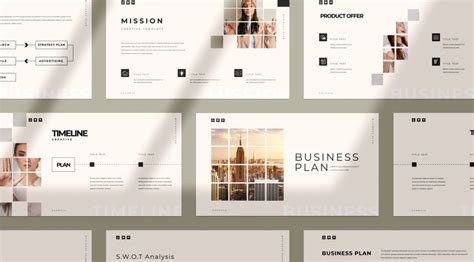
Achieve a seamless and cohesive presentation package by combining our Business Presentation with the Business Proposal template available in our shop. This synergy between different template types can create a unified and professional brand experience for your clients.
tags: #indesign #templates #for #presentations