Inkscape stands as a prominent free and open-source software for vector graphics editing, operating under the GNU General Public License (GPL). Its versatility makes it an indispensable tool for a wide array of artistic and technical illustrations, encompassing everything from vibrant cartoons and clip art to intricate logos, sophisticated typography, detailed diagrams, and clear flowcharts. At its core, Inkscape leverages the power of vector graphics, a methodology that enables sharp, scalable printouts and renderings at resolutions limited only by imagination, thus freeing users from the pixel-bound constraints inherent in raster graphics. The program's primary file format is the widely adopted Scalable Vector Graphics (SVG).
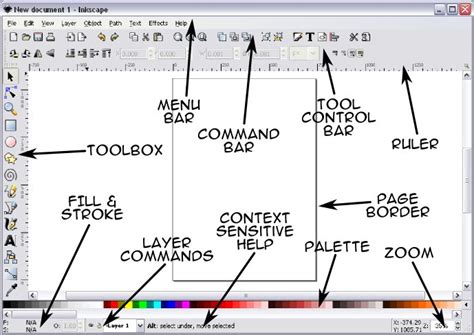
Core Functionality and Evolution
Inkscape's foundation lies in its ability to render primitive vector shapes, including rectangles, ellipses, polygons, arcs, spirals, stars, and even 3D boxes. These fundamental elements can be extensively customized with solid colors, intricate patterns, and smooth radial or linear color gradients. Furthermore, the borders of these objects can be stroked with adjustable transparency, allowing for nuanced visual effects. The software also embraces the integration of raster graphics, offering embedding and optional tracing capabilities. This feature empowers users to transform photographs and other raster-based sources into editable vector graphics, bridging the gap between pixel-based and vector-based imagery.
The journey of Inkscape began as a fork of the Sodipodi project in late 2003. This pivotal moment was spearheaded by four former Sodipodi developers: Ted Gould, Bryce Harrington, Nathan Hurst, and MenTaLguY. Their decision to diverge was driven by fundamental differences in project objectives, a desire for greater openness to third-party contributions, and technical disagreements within the Sodipodi community. Following this fork, Inkscape's development team undertook significant architectural changes. They transitioned the primary programming language from C to C++ and adopted the GTK toolkit's C++ bindings, known as gtkmm. This foundational shift paved the way for a redesigned user interface and the subsequent addition of a multitude of innovative features.
A significant milestone in Inkscape's development was the full implementation of the SVG 1.1 standard, achieved with version 0.91. This commitment to standards compliance continues with ongoing efforts to incorporate features from the still-evolving SVG 1.2 and SVG 2.0 standards, such as the advanced Mesh Gradients. Since 2005, Inkscape has been an active participant in the Google Summer of Code program, fostering collaboration and innovation through its engagement with the open-source community.
Advanced Manipulation and Design Tools
Inkscape's workflow is intrinsically linked to its manipulation of vector objects. A comprehensive suite of tools allows for precise control over primitive vector shapes. Beyond the basic rectangles and ellipses, users can create more complex forms like 3D boxes with adjustable perspectives, stars, polygons, and spirals. The software also boasts a rendering feature capable of generating objects such as barcodes, calendars, grids, gears, and intricate roulette curves, notably through its spirograph tool. As mentioned, these objects can be filled with a spectrum of colors, patterns, and gradients, with adjustable transparency for borders, offering extensive visual customization.
Text manipulation is another area where Inkscape shines. Users can write and edit text with a robust set of tools that facilitate changes to font, spacing, kerning, rotation, and even flowing text along paths or into shapes. For ultimate creative freedom, text can be converted into paths, unlocking a new realm of editing possibilities. The program's layer system provides an organized approach to managing objects, allowing for preferred stacking orders on the canvas.
Symbol libraries offer a convenient way to incorporate existing symbolic elements, such as logic-gate symbols or DOT pictograms, into designs. Clones, acting as child objects of an original parent object, offer powerful duplication capabilities. These clones can be subjected to a variety of transformations, including changes in size, position, rotation, blur, opacity, color, and symmetry. Every object within a drawing can undergo arbitrary affine transformations - moving, rotating, scaling, skewing, and matrix transformations - with parameters that can be precisely specified numerically.
Objects can be grouped together, and these groups behave much like individual objects, simplifying complex compositions. The Z-order, which dictates the drawing sequence of objects on the canvas, is a critical aspect of managing visual hierarchy. Objects with a higher Z-order are drawn on top of those with a lower order. This order can be managed through layers or by manually adjusting the object's position within the Z-order. Alternatively, objects can be moved by directly entering their location coordinates in the top toolbar.
The Power of Path Editing
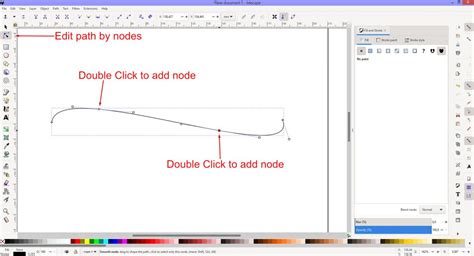
The Edit Path by Node tool is central to Inkscape's precise vector manipulation. This tool allows for the detailed editing of single or multiple paths and their associated nodes. Inkscape recognizes four primary types of path nodes: Cusp (corner), Smooth, Symmetric, and Auto-Smooth. Users have granular control over the positioning of nodes and their associated handles, including angle and length adjustments for Linear and Bézier paths, as well as Spiro curves. Path segments themselves can also be modified. When multiple nodes are selected, they can be collectively moved, scaled, and rotated using keyboard shortcuts or mouse controls. The ability to insert additional nodes at arbitrary or specific placements further enhances the flexibility of path creation. An effect can even be employed to automatically insert nodes at predefined intervals.
Sculpting with the Tweak Tool and Live Path Effects
The Tweak tool offers a more organic, sculpting-like approach to object and node editing. It provides the ability to manipulate entire objects or specific regions (parts) of an object. This tool can push, repel/attract, randomize positioning, shrink/enlarge, rotate, and copy/delete selected whole objects. For parts of a path, the Tweak tool can push, shrink/enlarge, repel/attract, roughen edges, blur, and alter color.
Path-Offsets, including Outset, Inset, Linked, and Dynamic variations, are another powerful feature. These can generate linked or dynamic (unlinked) insets and outsets of existing paths, which can then be fine-tuned using the Shape or Node tool. Crucially, creating a linked offset ensures that any modifications to the original path are automatically reflected in the offset, maintaining a dynamic relationship.
Inkscape also incorporates a robust feature called Live Path Effects (LPEs). These effects apply various modifiers to a path non-destructively, allowing for experimentation and iteration. Envelope Deformation, accessible through the Path Effects, provides a perspective effect, enabling users to warp paths into specific shapes. The LPE system encompasses more than a dozen distinct effects, significantly expanding the creative possibilities for path manipulation.
Bend. Inkscape Tutorial: Live Path Effects
File Format Support and Interoperability
Inkscape's primary file format is SVG 1.1, meaning that its creation and editing capabilities are designed to align with the standards and constraints of this format. While Inkscape can import and export a variety of other formats, these operations typically involve a conversion process to and from the SVG format. The SVG format internally utilizes the CSS standard, and Inkscape's implementation of both SVG and CSS standards is continually being refined. It is important to note that Inkscape does not natively support animation.
The software boasts multilingual support, with particular attention paid to complex scripts. Historically, formats that relied on the UniConvertor library were supported up to a certain release, but this has since evolved. The computational geometry library, lib2Geom, originally developed for Inkscape, is now available for use in external applications. This library provides support for fundamental geometric algebra, path operations, distortions, Boolean operations, plotting implicit functions, and Non-Uniform Rational B-Splines (NURBS), among other advanced mathematical and geometrical functions.
An addon known as Ink/Stitch is specifically designed to integrate stitching tools for machine embroidery directly into Inkscape. This empowers designers to create intricate embroidery patterns within the familiar vector environment.
User Interface and Accessibility
Inkscape's development has seen a continuous focus on improving its user experience. As of recent developments, Wacom tablet support for GTK 3 is undergoing a revival project. Earlier issues that affected GTK3-based applications on macOS Ventura (macOS 13), leading to unresponsiveness with certain mouse events, are being addressed. GTK is a widely used toolkit across many programs, so these improvements have broader implications.
Reviews have highlighted various aspects of Inkscape's interface and functionality. A PC Magazine review in February 2019, while awarding the application three out of five stars, noted criticisms regarding interface graphics, the lack of optimized stylus support, and perceived poor interoperability with other graphics editors. The text formatting controls were described as unwieldy, and the macOS version's quality was also a point of critique. However, the review positively acknowledged the ability to add custom filters and extensions, praising the Inkscape community's dedication to creating and sharing them. The precision offered by both path and placement tools was also a significant positive. The review concluded that despite its free nature, Inkscape "boasts outstanding features and a passionate user base."
More recently, in January 2020, TechRadar provided Inkscape with a favorable rating of four stars out of five. This review lauded the extensive range of editing tools and comprehensive support for numerous file formats. However, it did point out that the application's processing speed could sometimes be slow.
Recent updates have focused on refining the user experience and addressing common usability issues. For instance, the default selection tool setting has been adjusted to prevent confusing behavior related to the current layer. New installations or preference resets will now have the setting configured to avoid situations where the current layer differs from the active layer, thus resolving issues with pasting into incorrect layers. The LPE tool, also known as the geometric construction tool, is now hidden from the toolbar by default, streamlining the interface. The on-canvas right-click menu no longer uses popover dialogs, which had caused problems with Gtk3. This change aims to improve stability and responsiveness.
Furthermore, users can now override styles within their selected theme without needing to directly modify the theme files. Inkscape can be launched from the Welcome dialog when using Wayland as a display server, enhancing compatibility with modern display technologies. For Windows users, the underlying dependencies have been updated. The po (translation file) directory has been transitioned to a git submodule, requiring specific commands for building if any residual files remain. On Wayland, depending on the Gtk version, users might encounter crashes when moving docked tabs or closing floating dialogs, indicating ongoing development in this area. Weblate is now the platform for managing interface translations, with numerous language updates occurring.
Recent Version Highlights and Future Directions
Inkscape's development is marked by a consistent release cycle, with significant updates introducing new features and improvements. Version 1.0, a major release, brought a modernized user interface and numerous enhancements. Subsequent versions, such as 1.1, 1.2, 1.3, and the latest iterations like 1.4, have continued to build upon this foundation.
A notable development in version 1.2 was the introduction of multi-page support. This feature, implemented using the standardized svg:view element, allows for the creation and management of multiple pages within a single SVG document, enhancing document organization and workflow. This new format is designed to be compatible with other SVG viewers, promoting broader interoperability. It's important to note that versions prior to Inkscape 1.4.3 may not be able to interpret pages created in versions 1.5 and upwards. Opening and saving a document in Inkscape 1.4.3 can convert it to the pre-1.5 multipage format.
Inkscape 1.3 introduced tools for more efficient organization and workflow management. Beta versions of 1.3 provided early access to these features. The release of Inkscape 1.4 brought powerful new features with a focus on accessibility and customization. This version also included important fixes and refinements. Subsequent point releases, such as 1.4.1, 1.4.2, and 1.4.3, have focused on addressing bugs and ensuring stability. For example, Inkscape 1.4.3 specifically addressed bugs and ensured compatibility with future multipage formats.
The development roadmap indicates a continued focus on SVG and CSS standard compliance, performance optimization, and user experience enhancements. The ongoing transition to GTK 3 and integration with modern display servers like Wayland are also key areas of development. The community's active participation through programs like Google Summer of Code and the regular release of updates underscore Inkscape's dynamic and evolving nature as a leading free and open-source vector graphics editor.