In today's business landscape, the ability to create professional-looking marketing materials is more accessible than ever. Gone are the days when Adobe's Photoshop and InDesign were the sole arbiters of professional design. A simple search online will reveal a plethora of free or low-cost graphic design programs capable of helping businesses craft everything from a compelling logo to a polished brochure. While the prospect of designing your own promotional materials might seem straightforward - download a program, spend a night putting something together, and send it to the printer the next day - the reality is far more nuanced. The challenge lies not in the availability of tools, but in selecting the right applications for your specific needs. Often, a combination of programs will be necessary to achieve the desired outcome.
Understanding Your Design Needs: The Foundation of Software Selection
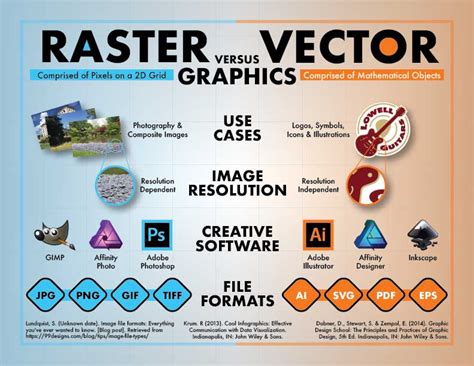
Before diving into software options, it's crucial to identify the types of promotional materials you intend to create. This foundational step will guide your selection of software, much like understanding the specific task at hand dictates the tool chosen from a toolbox. If your plan involves creating original images rather than solely relying on stock photography, then additional tools for image creation become essential. For instance, if you'll be generating your own visuals, exploring vector graphics creators and editors like Inkscape is a wise move. Inkscape stands as a powerful, free alternative to professional software such as Adobe Illustrator, offering robust capabilities for designing scalable graphics that remain crisp at any size.
Beyond image creation, your toolkit might require other specialized applications. If you frequently work with images, a color management tool like Adobe Color CC can be invaluable for ensuring color consistency across your materials. Furthermore, consider the possibility of incorporating interactive elements into your print materials, such as Quick Response (QR) codes. The ubiquity of smartphones and tablets makes QR codes a practical way to bridge the gap between print and digital. While primarily used for social media sharing, applications like Word Swag (available for both iOS and Android) can transform your images by adding text overlays, which can also be adapted for certain print promotional materials.
Navigating Software Types: Desktop vs. Web-Based Applications
Graphic design software generally falls into two main categories: desktop applications and web-based platforms. Desktop programs are installed directly onto your computer, while web-based applications are accessed through your internet browser. A significant advantage of web-based applications is their platform independence. This means you can seamlessly transition between different operating systems, such as working on a Mac at the office and a Windows PC at home, without compatibility issues.
Desktop programs, on the other hand, often boast a more comprehensive feature set and may offer greater performance, especially for complex projects. While industry giants like Adobe Photoshop and InDesign are prime examples of feature-rich desktop software, numerous free and low-cost alternatives exist that provide an in-depth array of functionalities. Your choice between these two types will also depend on your working environment and preferences.
Platform Considerations: Mac vs. Windows and Beyond
When selecting software, it's important to consider your operating system. While many graphic design programs are cross-platform, meaning they are available for both macOS and Windows, some are exclusively designed for a single platform. Therefore, whether you primarily use a Mac or a Windows computer can influence the range of available options. This is where web-based solutions offer a distinct advantage, circumventing platform limitations entirely.
Evaluating Software Features and Usability
Once you've considered the types of materials you'll create and the software categories, you'll be better equipped to filter through the vast number of options available. The primary driver for many individuals and small businesses opting for DIY design is a constrained marketing budget. However, it's essential to factor in the value of your time. A program that can handle a wide range of tasks, such as the feature-rich GIMP (a free Photoshop alternative), might also come with a steep learning curve.
Even with user-friendly applications, you may encounter situations where you need to acquire new skills to achieve a specific design effect. In such instances, a graphic design program with readily available tutorials can be an invaluable resource. Before committing to a particular software, take the time to investigate the availability and quality of its tutorial offerings. This proactive approach can save significant time and frustration down the line.
The Role of Inkscape in Print Design
Inkscape, as a free and open-source vector graphics editor, is particularly well-suited for creating graphics that need to be scaled without losing quality. This is crucial for print materials that will be reproduced at various sizes, from business cards to large banners. Vector graphics are defined by mathematical equations, allowing them to be resized infinitely without pixelation, unlike raster (bitmap) images which are composed of pixels and degrade in quality when enlarged.
When preparing documents for printing, understanding the rendering options available in your software is key. In Inkscape, when sending a document to a printer, you might encounter options related to rendering, such as "Vector" and "Bitmap."
Vector Rendering: This option is generally appropriate for projects composed solely of text and vector-based graphics. It ensures that all elements maintain their mathematical definitions, allowing the printer to render them at the highest possible resolution. This is ideal for logos, illustrations created within Inkscape, and typography.
Bitmap Rendering: This option becomes relevant when your project incorporates imported raster images (like photographs) alongside vector elements and text. In this scenario, Inkscape needs to convert its vector elements into a pixel-based format to be combined with the imported bitmap images. The resolution at which this conversion occurs is critical for print quality. If you are importing high-resolution images, ensuring that Inkscape's bitmap rendering is set to a sufficiently high DPI (dots per inch) will prevent the final output from appearing pixelated.
The appropriate use of these rendering options depends on the composition of your artwork. For purely vector-based designs, utilizing the vector rendering path ensures the sharpest possible output. When raster elements are involved, careful consideration of the bitmap rendering settings is necessary to maintain image clarity and detail. It's often beneficial to consult the documentation for your specific printer and the software you are using to understand the optimal settings for achieving the best print results. For instance, if you are printing on a Canon Image Runner 3220, understanding how its driver interacts with Inkscape's rendering options is paramount.
Premium Options and Templates: Balancing Cost and Efficiency
While many excellent free graphic design applications are available, a significant number also offer "premium" features or low-cost templates. These paid options can significantly reduce the time invested in designing your projects. If your marketing budget allows for such investments, exploring what these premium features or customizable templates offer can be a worthwhile consideration. A template can provide a solid starting point, allowing you to focus on customization and content rather than fundamental layout.
The Evolving Landscape of Design Software
It's important to acknowledge that the world of graphic design software is dynamic. Good, free, and low-cost applications emerge, gain popularity, and sometimes fade from prominence over time. While established software like Adobe Photoshop is unlikely to disappear soon, newer, innovative tools are constantly being developed. Therefore, staying informed about current offerings and regularly re-evaluating your software toolkit is a prudent strategy.
Making Informed Choices for Your Printing Needs
When faced with the task of creating your own print marketing materials, especially under budget constraints, a careful evaluation of your specific needs and the features offered by available free and low-cost tools is essential. Inkscape, with its powerful vector editing capabilities, stands out as a strong contender for businesses looking to produce professional, scalable graphics for a variety of print applications. By understanding the different types of software, their functionalities, and how they integrate with printing processes, you can make informed decisions that align with your budget and design objectives, ultimately guiding you to the right tools for your unique purposes.
A company like Inkscape Print LLC, for example, can be a valuable partner in this process. Their mention of "minimal setup of our high quality digital printing presses lets us produce jobs with minimal lead times and very competitive pricing on small to medium-sized jobs" suggests an understanding of the needs of businesses that are actively involved in their own design processes. Their ability to handle custom catalogs, business cards, brochures, flyers, and other materials indicates a versatile printing service that can accommodate designs created with tools like Inkscape. The fact that they can handle "custom shaped prints" and have designers available to "recreate the design" if a high-resolution print file is unavailable further underscores the collaborative potential between DIY designers and professional print services. Their preference for "high res pdf files" but ability to "work with most file types as long as the resolution is good" also highlights the importance of preparing your files correctly for professional printing, a skill that can be honed when using vector-based software like Inkscape.
The testimonials provided by Inkscape Print LLC, such as those from Robert Ringler, Frederick Davison, and Patrick Krownapple, emphasize the importance of customer service and product quality, which are crucial when outsourcing your printing needs. Their stated "0 Years of Experience" and "0 % Customer Satisfaction" is likely a typo and should be interpreted as a testament to their extensive experience and high customer satisfaction rates. Their operational hours (Mon-Fri: 7AM - 4:30PM) and shipping methods (UPS, USPS, local delivery) provide practical information for potential clients. The FAQ section, addressing topics like production time, rush services, paper types, finishing options, and file preparation, demonstrates a commitment to transparency and client education. This level of detail is precisely what a business creating its own print materials would need to consider when partnering with a printer. For example, understanding that "normal production time can vary depending on the product but is normally about a week for print items" and that "if we are doing design for the project that will add about a week to the production time" helps in project planning. Their advice against scanning old cards or brochures and their preference for high-resolution files directly relates to the quality achievable with vector design software like Inkscape.