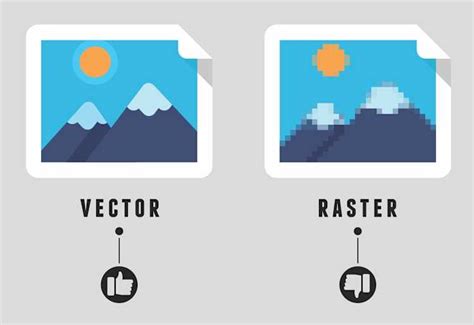
In the realm of digital art and graphic design, understanding the fundamental differences between raster and vector graphics is paramount. Programs dictate how creations are displayed, operating either on pixel data (raster graphics) or mathematical formulas (vector graphics). Raster graphic programs, such as Adobe Photoshop, assign color values to individual pixels to construct an image. This method becomes apparent when zooming in, as raster images tend to become pixelated and jagged. In contrast, vector graphics, generated by programs like Adobe Illustrator and Inkscape, remain smooth and sharp at any scale due to their reliance on mathematical equations to define shapes and lines. This inherent scalability makes vector files exceptionally well-suited for designs that require frequent resizing, such as logos, branding elements, and illustrations intended for diverse applications.
Both Adobe Illustrator CC and Inkscape are robust vector graphics applications that are compatible with Windows and Mac operating systems. Mirroring the functionality of raster programs like Photoshop, both Illustrator and Inkscape offer support for layer stacking, a crucial feature for organizing complex designs. A significant point of compatibility between these two powerhouses is their shared support for SVG (Scalable Vector Graphic), an open-standard vector file format. This open standard ensures a degree of interoperability, allowing designs created in one program to be opened and edited in the other, albeit with potential nuances. Beyond SVG, each program boasts an extensive list of supported file types for saving vector projects, including widely used formats such as PDF, PNG, DXF, and EPS.
Understanding the Core Differences: Features and Functionality
When comparing Inkscape and Adobe Illustrator, several key distinctions emerge, primarily revolving around cost, licensing, proprietary formats, and feature sets.
Adobe Illustrator: The Industry Standard
Adobe Illustrator is part of the subscription-based Adobe Creative Cloud suite and is widely considered the industry leader for professional vector-based graphic design. Its long-standing presence and pervasive adoption have cemented its status as the de facto standard in many professional design environments.
Key Advantages of Adobe Illustrator:
- Employment Opportunities: As the industry standard for vector design, learning Illustrator offers significant upside for career advancement. Most employers and educational institutions utilize Illustrator, making proficiency in this software a highly sought-after skill. This translates directly into more job prospects and a smoother integration into professional workflows.
- Extensive Features: While other vector tools can perform similar functions, Illustrator is equipped with a wide array of advanced tools and features that can automate certain tasks and significantly save time. These include sophisticated effects like 3D effects, Live Trace for converting raster images to vector, Live Paint for intuitive color application, and seamless integration with Adobe Fonts, providing access to a vast library of typography.
- Proprietary Formats and Ecosystem Integration: Adobe's proprietary formats, such as .ai (Illustrator's native format) and .psd (Photoshop's native format), are the most commonly used by designers and frequently requested by clients. While there are workarounds for opening and creating Illustrator files with Inkscape, it's far from perfect, and elements can sometimes be lost in translation. A major strength of the Adobe suite is the exceptional inter-application communication. Vector graphics created in Illustrator can be effortlessly imported and integrated into other Adobe applications like After Effects, Premiere Pro, and Photoshop, enabling a fluid and efficient cross-program workflow. This real-time updating when embedding or linking files between Creative Cloud applications is a significant productivity booster.
- Customizable Workspace: Illustrator offers a highly customizable workspace, allowing users to modify or remove various panes and toolbars to suit their individual preferences and working style. This adaptability can lead to a more efficient and comfortable design process.
Considerations for Adobe Illustrator:
- Price: Adobe software is typically sold as a service, meaning it operates on a subscription model with an ongoing monthly expense. This can be a significant barrier for individuals or small businesses with limited budgets, especially when compared to free alternatives.
- Hardware Requirements: To run smoothly and efficiently, Adobe Illustrator, like other high-end professional software, requires high-performance hardware. Using Adobe software on a low-end machine can be a frustrating experience, often leading to performance issues and slowdowns.
Adobe Illustrator Crash Course (for complete beginners)
Inkscape: The Powerful Open-Source Alternative
Inkscape is an open-source vector graphics application that is freely available for all major operating systems, including Windows, macOS, and Linux. It has been a preferred vector graphics tool for many users since its inception, demonstrating that powerful professional-grade software doesn't always come with a hefty price tag.
Key Advantages of Inkscape:
- Cost: The most compelling advantage of Inkscape is its cost - it is completely free. This makes it an incredibly accessible option for students, hobbyists, freelancers, and organizations looking to minimize software expenses without compromising on functionality. It's hard to beat free when it comes to powerful design software.
- Intuitiveness: Many users find Inkscape's user interface (UI) and overall functionality to be slightly more intuitive than Illustrator's. A good example often cited is the ease of editing gradients directly on the canvas, which some users find more straightforward in Inkscape. This subjective ease of use can significantly impact the learning curve and daily workflow.
- Versatility and Cross-Platform Compatibility: Inkscape's ability to run on all major operating systems, including Linux, makes it a highly versatile choice for users who work across different platforms or in environments where Windows or macOS are not the primary operating systems.
- Community-Driven Development: Inkscape is developed by a passionate community of volunteers who prioritize the principles and values of open-source software over profit. This collaborative development model often leads to rapid innovation and a strong focus on user needs. The community also provides extensive support through forums and documentation.
Considerations for Inkscape:
- Proprietary Format Compatibility: While Inkscape supports the SVG standard, it cannot directly open Adobe Illustrator's proprietary .ai files. These files must be converted to SVG or another compatible format, and this conversion process can sometimes lead to a loss of fidelity or unexpected changes in the design. This is a significant consideration for designers who frequently collaborate with others using Illustrator or work with .ai files.
- Fewer "Industry Standard" Integrations: While Inkscape is a capable tool, it lacks the seamless integration with a suite of proprietary professional applications that Adobe Creative Cloud offers. This means that workflows involving video editing or advanced photo manipulation might require more manual steps to transfer assets created in Inkscape compared to those created in Illustrator.
File Format Compatibility and Interoperability
The ability to save and import various file formats is crucial for any design software, especially when collaborating or preparing work for different applications. Both Inkscape and Adobe Illustrator are compatible with the open standard SVG format, which is a cornerstone of web-based vector graphics. This compatibility ensures that basic vector information can be exchanged between the two programs.
However, the native file formats present a key differentiator. Adobe Illustrator uses the proprietary .ai format, which encapsulates a wide range of design data and features specific to Illustrator. Inkscape cannot directly open .ai files. To work with an .ai file in Inkscape, it must first be converted to a format like SVG, PDF, or EPS. This conversion process, while often successful, can sometimes result in subtle alterations to the design, such as changes in gradients, stroke appearances, or the loss of certain complex effects.
Conversely, Illustrator can import SVG files, but its handling of complex SVGs exported from Inkscape might also occasionally present minor rendering differences. The remark that "things sometimes get lost in translation" when converting between proprietary and open formats is a valid concern, particularly when dealing with intricate designs or specific color profiles.
The discussion around comparing rendered images using JPGs highlights a fundamental misunderstanding of vector editors. JPG is a raster format, and using it to compare vector editors is inherently flawed because it flattens the vector data into pixels. Differences observed in JPG comparisons are more likely due to the conversion process or inherent differences in how the software interprets color and rendering, rather than a difference in the vector editing capabilities themselves. For instance, the observation that "Inkscape has some color features which Inkscape doesn't have yet (CMYK color, for example)" points to a critical difference. Illustrator's robust support for CMYK color profiles is essential for professional print design, where color accuracy is paramount. Inkscape's primary focus has traditionally been RGB, making it more suited for web and screen-based design, though support for CMYK is evolving.
Workflow and Ecosystem Integration
The broader software ecosystem in which a design tool operates can significantly impact a designer's workflow. Adobe Illustrator is part of the extensive Adobe Creative Cloud, a suite of applications designed to work seamlessly together. This integration allows for efficient workflows where assets can be easily shared and updated across programs like Photoshop, After Effects, and Premiere Pro. For example, embedding or linking a vector graphic from Illustrator into a video project in Premiere Pro or an animation in After Effects means that any updates made to the original Illustrator file can be automatically reflected in the linked project, saving considerable time and effort. This interconnectedness is a powerful advantage for professionals working on multimedia projects.
Inkscape, while a standalone application, can also be integrated into broader workflows, but it often requires more manual steps for asset transfer and synchronization compared to the Adobe ecosystem. Its open-source nature means it can be combined with other open-source tools, creating a powerful, albeit different, workflow.
Target Audience and Learning Curve
The choice between Inkscape and Illustrator often depends on the user's background, goals, and budget.
- For Beginners and Hobbyists: Inkscape's free nature and often more intuitive interface can make it an excellent starting point. The lack of financial commitment reduces the barrier to entry, allowing new users to explore vector design without pressure. The active community also provides ample resources for learning.
- For Students: Educational institutions often provide access to Adobe Creative Cloud, making Illustrator the default choice for students aiming for careers in design. Learning Illustrator in an academic setting prepares them for industry expectations. For students without institutional access or those on a tight budget, Inkscape offers a powerful alternative to develop fundamental vector design skills.
- For Professionals: Professionals often choose Illustrator due to its industry-standard status, extensive feature set, and seamless integration with other Adobe products. The demand for Illustrator skills in the job market is undeniable. However, professionals working in environments that prioritize open-source solutions or have budget constraints might find Inkscape a perfectly capable and cost-effective alternative, especially for tasks not requiring deep integration with other Adobe apps or specific print-focused features like robust CMYK management.
- For Linux Users: Inkscape stands out as a primary, fully-featured vector graphics editor for Linux users, offering a professional-grade experience on an operating system that sometimes has fewer commercial software options.
The statement that "Adobe software on a low-end machine is very frustrating" is a crucial practical consideration. While Illustrator is powerful, its demands on hardware can be substantial. Inkscape, generally being less resource-intensive, can often perform more smoothly on older or less powerful computers, making it a more accessible option for a wider range of users.
Core Concepts in Vector Design: A Foundation for Both Programs
At their core, both Inkscape and Adobe Illustrator manipulate vector paths. These paths are defined by mathematical equations that describe lines, curves, and shapes. Key elements of vector design include:
- Anchor Points and Handles: Paths are constructed using anchor points, which are nodes that define the beginning and end of a straight segment or the cusp of a curve. Bezier curves are commonly used, where handles extend from anchor points to control the curvature and direction of the path. Precise manipulation of these points and handles is fundamental to creating smooth and accurate vector artwork.
- Fill and Stroke: Vector objects have two primary visual attributes: fill and stroke. The fill is the color or pattern applied to the interior of a shape, while the stroke is the color, weight, and style of the line that defines the object's outline. Both Inkscape and Illustrator offer extensive control over these attributes, including gradients, patterns, and textured fills.
- Transformations: Vector objects can be freely transformed using operations like scaling, rotating, skewing, and reflecting. Because these operations are based on mathematical formulas, they can be applied repeatedly without any loss of quality, unlike raster transformations.
- Boolean Operations (Pathfinder): Both programs offer tools that allow users to combine, subtract, intersect, or exclude overlapping vector shapes. These "Boolean operations" or "pathfinder" tools are essential for creating complex shapes from simpler ones, a common technique in logo design and illustration.
- Gradients and Meshes: Advanced gradient tools, including linear and radial gradients, allow for smooth color transitions. Illustrator also offers the Gradient Mesh tool, which enables the creation of highly complex, multi-directional color blends within a single object, offering unparalleled control over shading and form. Inkscape provides robust gradient editing capabilities as well, though the mesh tool is a specific feature that differentiates Illustrator.
Considerations for Print vs. Web Design
For designers primarily focused on web and screen-based graphics, both Inkscape and Illustrator are highly capable. Their support for RGB color modes and export to formats like PNG and SVG are well-suited for digital applications.
However, for professional print design, Adobe Illustrator's built-in support for CMYK color profiles is a significant advantage. CMYK (Cyan, Magenta, Yellow, Key/Black) is the standard color model for printing, and working directly in CMYK ensures that colors will translate accurately from the screen to the printed page. While Inkscape can be used for print by working in RGB and converting to CMYK during the export process or by using external tools, this indirect approach can sometimes lead to color shifts and requires careful management. The observation that "Illustrator has some color features which Inkscape doesn't have yet (CMYK color, for example)" is a critical point for print-focused workflows.
Conclusion: Choosing the Right Tool for Your Needs
The "big three" applications for vector graphics - Inkscape, Illustrator, and CorelDraw - are all excellent options, completely capable of handling raw design needs. The choice of which to use ultimately depends on individual and specific personal needs, workflow requirements, and budget constraints.
- Adobe Illustrator remains the industry benchmark, offering unparalleled feature depth, seamless integration within the Adobe ecosystem, and strong employment prospects. Its subscription cost and hardware demands are the primary considerations.
- Inkscape provides a powerful, professional-grade vector design experience completely free of charge. Its cross-platform compatibility, intuitive interface for many users, and strong community make it an exceptional choice for a wide range of users, particularly those prioritizing open-source solutions or working within budget limitations. Its main limitation lies in its handling of proprietary Adobe formats and the absence of certain advanced print-centric features found in Illustrator.
- CorelDraw, while mentioned, is a significant player in specific niches, particularly in sign-making and large-format printing industries. Its employment opportunities are more specialized compared to Illustrator's broad industry adoption.
Ultimately, both Inkscape and Adobe Illustrator are powerful tools. Understanding their respective strengths and weaknesses allows designers to make an informed decision about which software best aligns with their creative process, project requirements, and career aspirations. For those new to vector design, experimenting with Inkscape is a risk-free way to learn the fundamentals, while those aiming for careers in established design studios will likely find proficiency in Adobe Illustrator essential.
tags: #inkscape #vs #adobe #illustrator