The world of digital art has been revolutionized by the advent of powerful and portable drawing applications, with Procreate standing at the forefront of this movement. For aspiring and seasoned artists alike, understanding which iPad models are compatible with Procreate, and its related applications like Procreate Dreams, is crucial for a seamless creative experience. This article delves into the specifics of Procreate compatibility, dissecting the requirements and offering guidance for users with various iPad generations, from the venerable iPad Mini 4 to the latest Pro models.
Understanding Procreate's Core Requirements
At its heart, Procreate is an application designed to leverage the capabilities of Apple's iPad hardware and software. The current version of Procreate, version 5.4.8, necessitates iPadOS 16.3 or newer to function optimally. This operating system requirement is a significant factor in determining compatibility, as older iPad models may not be able to upgrade to this specific version of iPadOS.
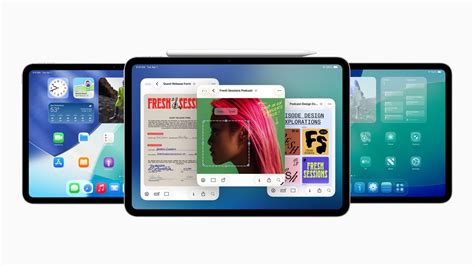
The makers of Procreate, Savage Interactive, have strived to make their applications accessible across a broad spectrum of iPad models. However, as newer hardware and software features are introduced, the compatibility list evolves. It's essential to verify your iPad's operating system version and model against the latest specifications provided by Procreate.
Procreate Compatibility with Older iPads: The iPad Mini 4 Case
A common point of inquiry revolves around the compatibility of Procreate with older, yet still functional, iPad models such as the iPad Mini 4th generation. For those who own an iPad Mini 4 upgraded to iPadOS 15, the good news is that Procreate IS compatible with an iPad Mini 4. Period. While this specific model is NOT compatible with ANY Apple Pencils, Procreate can still be effectively utilized. Users can opt to draw directly with their finger or employ a "non-Bluetooth," "dumb," "purchase anywhere," third-party capacitive stylus. These styli simulate a finger touch and are widely available, with some even offering powered functionality. The key takeaway is that the core Procreate application itself will run on this device, albeit without the precision and advanced features offered by an Apple Pencil.
Procreate Dreams: Enhanced Animation Capabilities and iPadOS 16.3
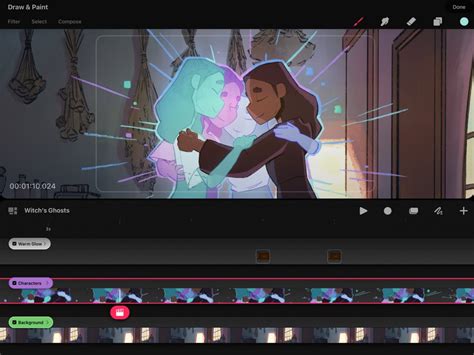
Procreate Dreams represents a significant expansion of Procreate's capabilities, focusing on animation. This application is designed to work on as many different models of iPad as possible, but its advanced features come with more stringent hardware requirements. Procreate Dreams supports all iPads able to run iPadOS 16.3. Due to hardware differences between iPad models, Procreate Dreams implements varying content and video track limits.
Video tracks are instrumental in housing high-resolution video content on your timeline, allowing for the seamless integration of video with images, drawn animations, and audio. The number of these tracks, along with general content tracks, is determined by the iPad model.
iPad Model Specific Track Limits in Procreate Dreams
To illustrate the differences in capabilities, here's a breakdown of track limits for various iPad models compatible with iPadOS 16.3 and Procreate Dreams:
- iPad Pro (M4) & iPad Pro (M5): 200 content tracks‡ and 4 video tracks up to 4K.
- iPad Air (M3) & iPad Air (M2): 200 content tracks‡ and 4 video tracks up to 4K.
- iPad Pro 11-inch (4th generation): 200 content tracks‡ and 4 video tracks up to 4K.
- iPad Pro 12.9-inch (6th generation): 200 content tracks‡ and 4 video tracks up to 4K.
- iPad Air (5th generation): 200 content tracks‡ and 2 video tracks up to 4K.
- iPad Mini (7th generation): 200 content tracks and 2 video tracks up to 4K.
- iPad Pro 11-inch (3rd generation): 200 content tracks‡ and 2 video tracks up to 4K.
- iPad Pro 12.9-inch (5th generation): 200 content tracks‡ and 2 video tracks up to 4K.
- iPad Mini (6th generation): 200 content tracks‡ and 1 video track up to 4K.
- iPad (11th generation): 200 content tracks‡ and 1 video track up to 4K.
- iPad Pro 12.9-inch (4th generation): 200 content tracks‡ and 1 video track up to 4K.
- iPad Pro 11-inch (2nd generation): 200 content tracks‡ and 1 video track up to 4K.
- iPad Pro 12.9-inch (3rd generation): 200 content tracks‡ and 1 video track up to 4K.
- iPad Pro 11-inch (1st generation): 200 content tracks‡ and 1 video track up to 4K.
The symbol "‡" indicates that the exact content track limit may vary based on canvas resolution and other factors.
Identifying Your iPad Model
With the proliferation of iPad models, it can be challenging to discern which specific device you own. Apple typically labels models with generation numbers (e.g., "iPad Air 5th generation") or specific identifiers like "iPad Pro 11-inch (4th generation)". You can find this information in your iPad's Settings app, under General > About. The "Model Name" will clearly state your iPad's designation.
Key Hardware Specifications for Procreate Performance
Beyond the operating system, several hardware components significantly influence how well Procreate and Procreate Dreams perform on your iPad.
Chip (Processor)
The processor, or "Chip," is the engine of your iPad. It dictates the speed and responsiveness of the device. An older iPad or iPhone might exhibit delays when tapping, typing, or launching applications. Newer iPads, particularly those featuring Apple's M-series chips (M1, M2, M3, M4, M5), offer substantial performance gains, crucial for handling complex art projects with numerous layers and high-resolution canvases. The "M" designation signifies a significant leap in processing power, often comparable to chips found in MacBooks.
RAM (Random Access Memory)
RAM is a critical factor, especially for Procreate, as it determines the maximum layer count for a given canvas size. While Apple doesn't always publicly list RAM for older models, it's a key differentiator for performance. More RAM means your iPad can handle more simultaneous tasks and support larger, more complex projects within Procreate without slowdowns. For instance, a device with 8GB of RAM might support fewer layers on a large canvas compared to a 16GB device. The introduction of iPads with 16GB of RAM was a significant boost for creative professionals, though it's important to note that historically, iPadOS did not always make the full amount of RAM available to applications. However, with the release of iPadOS 15 and subsequent updates, Apple has increased the amount of RAM available to developers, a substantial improvement for demanding applications like Procreate.
Capacity (Storage)
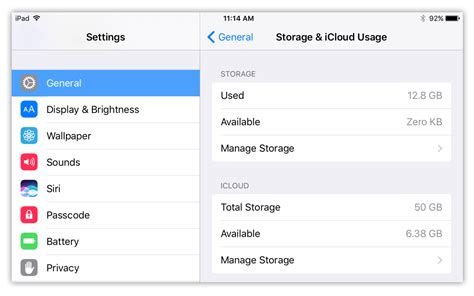
Storage capacity determines how many apps, photos, videos, Procreate drawings, and other files you can store on your device. While not directly impacting the performance of Procreate in terms of speed or layer count, sufficient storage is essential for a practical workflow. If you plan to store a large library of Procreate projects, reference images, or other media, opting for higher storage capacities is recommended. A capacity of 128GB, 256GB, or 512GB is often considered the sweet spot for many users, balancing cost and usability. For those who frequently work with large files or store extensive media libraries, 1TB or even 2TB options provide ample space.
Procreate and iPad Storage Tiers
To help visualize storage needs, consider this: each block represents 32 GB of memory capacity. If you use your iPad for business and require access to a vast amount of data without space constraints, the 128GB, 256GB, or 512GB options are excellent choices. The "bottom line here is more is better" when it comes to storage, especially for digital artists.
The Role of RAM in Layer Count
The relationship between RAM and the number of layers available in Procreate is direct. For a given canvas resolution, more RAM translates to a higher potential layer count. For example, if an 8GB device allows for 100 layers on a specific canvas, a 16GB device could potentially support double that amount, around 200 layers. This is a crucial consideration for artists who work with intricate illustrations or detailed digital paintings.
Canvas Resolution and Megapixels
The maximum canvas size varies by device, and this is directly linked to the processing power and RAM available. To understand the scale of canvases, multiplying the width and height of each canvas and converting it to megapixels (MP) provides a clearer picture. For instance, a canvas might be represented as 100 MP, indicating its overall resolution and complexity.
Procreate vs. Procreate Pocket vs. Procreate Dreams
It's important to distinguish between Procreate's different offerings:
- Procreate: The flagship application for iPad.
- Procreate Pocket: A version optimized for iPhone.
- Procreate Dreams: The dedicated animation application for iPad.
While Procreate and Procreate Dreams share a common lineage and are designed for iPad, Procreate Dreams has specific hardware requirements tied to iPadOS 16.3 and offers advanced animation features with varying track limits based on the iPad model.
Updating Procreate
Keeping your Procreate app updated is essential to benefit from the latest features, performance enhancements, and bug fixes. To update Procreate, open the App Store, tap on your profile picture in the top right corner to access your Account menu, and then tap the "Update" button next to Procreate if an update is available. Many of the recent additions to Procreate are built upon the latest iPadOS technologies, making updates even more impactful.
iPad How to UPDATE Apps! (iPadOS 18)
Understanding Licensing and Usage Rights
Savage Interactive has clear guidelines regarding the use of content created with their applications:
- Default Tools: Any art created with the default brushes and color swatches that come with Procreate and Procreate Pocket, including Time-lapse videos, is considered your content. You are free to use it however you like, though crediting Procreate is appreciated.
- Model Packs: The 3D objects included in the downloadable Procreate Model pack are not available for commercial use. You can paint on them and share your artwork on social media, but you cannot use these objects for your own licensing or sale.
- Fonts: Procreate, Procreate Pocket, and Procreate Dreams come bundled with fonts like Eina 01, Impact, and Jack Armstrong BB. These fonts are licensed for personal use only. Other fonts within the apps may be system fonts or fonts you have downloaded to your device, which may have different licensing terms.
Navigating the iPad Air vs. iPad Pro Decision
For those considering a new iPad for Procreate, the choice often comes down to the iPad Air and iPad Pro lines. While these devices are becoming increasingly similar, especially with the integration of M-series chips, there are still key differences. The Pro models generally offer superior screen technology (like ProMotion for smoother scrolling and drawing), potentially better speakers, and sometimes more advanced camera systems. However, for the core Procreate experience, the primary difference at this price point often boils down to storage capacity and specific processor variants.
When comparing the latest iPad Air and Pro models, it's crucial to examine their specifications closely. For instance, the minimum storage capacity for newer 11-inch iPad Air and 13-inch iPad Air models has increased to 128GB, up from 64GB in previous generations. While the Pro models may offer higher maximum RAM configurations and more advanced features, a well-specced iPad Air can provide an exceptional Procreate experience. The decision may also hinge on other features important to you that are not directly related to Procreate, such as portability, display quality, or accessory compatibility.
Ultimately, the "sweet spot" for capacity often lies in the 128GB to 512GB range, depending on your workflow and how much media you store. The decision process for selecting an iPad for digital art can be complex, but understanding these key specifications-processor, RAM, and storage-will empower you to make an informed choice that best suits your creative needs and budget.
tags: #ipad #compatible #with #procreate