The Apple App Store is a vibrant ecosystem teeming with numerous animation applications, leaving many creators to ponder which one best suits their needs. For those looking to bring their artistic visions to life on an iPad, Procreate Dreams has emerged as a significant contender. This article delves into whether Procreate Dreams is a worthwhile endeavor for aspiring animators, examining its benefits, drawbacks, and overall value proposition, drawing from both personal experience and comparative insights with other animation software.
The Investment: Understanding Procreate Dreams' Cost
The financial aspect of any creative tool is a primary consideration. Procreate Dreams is currently available for a one-time purchase of $19.99. This fee grants access to all current and future updates, a business model that stands in stark contrast to the prevalent subscription-based services in the software industry. This upfront, perpetual access is a significant draw for many users, offering predictable budgeting and long-term value.
However, the cost discussion isn't entirely straightforward. Some users have expressed that the drawing experience within Procreate Dreams doesn't quite match the fluidity and intuitiveness they've come to expect from its sibling app, Procreate. While the drawing tools in Procreate Dreams are anticipated to improve over time, the current reality for some is a slight disconnect. For those who prioritize the drawing experience, a potential workaround involves purchasing Procreate as well. This would bring the combined cost to $29.99, which, considering the absence of subscriptions and the inclusion of all future updates, remains a competitive price point, especially when juxtaposed with the often substantial costs of desktop animation programs.
For many, the $19.99 for Procreate Dreams alone is sufficient. The author, for instance, finds that the app fulfills their animation needs, which primarily involve simple linework and colors without extensive shading or complex paint effects, even without the full Procreate app. This highlights that the necessity of purchasing both apps is contingent on individual workflow and artistic requirements.
When comparing Procreate Dreams to other iPad animation applications, its pricing positions it in the middle of the road. Toon Squid offers a one-time purchase option for $10, while Callipeg provides a perpetual license for $59.99, also with a subscription option available. The $19.99 price point for Procreate Dreams, offering a comprehensive animation suite with the promise of ongoing development, presents a compelling value proposition.
The Artistic Foundation: Exploring the Drawing Experience
The drawing experience is the bedrock of any animation application, and Procreate Dreams aims to deliver a robust environment for artists. The app boasts an extensive library of brushes, far exceeding what most users might need. Furthermore, the flexibility to load custom brushes or seamlessly import brushes directly from Procreate enhances the already rich toolset.
Having utilized a variety of animation programs, including industry-standard software like Toon Boom Harmony, Blender Grease Pencil, Krita, Clip Studio Paint, and the more direct competitor Toon Squid, the author finds the drawing experience in Procreate Dreams to be surprisingly on par with these established applications, a notable achievement for a relatively new program.
For those whose work involves intricate drawings or detailed paintings, particularly for backgrounds, Procreate Dreams might necessitate a complementary workflow. Creating such assets in Procreate and then importing them into Dreams is a viable and effective strategy, leveraging the strengths of both applications. This symbiotic relationship offers significant flexibility in how artists approach their visual creation process.
A minor point of contention for some is the implementation of brush stroke smoothing in Dreams. While functional, it's perceived by some as less intuitive and more "clunky" compared to its counterpart in Procreate. However, this minor drawback is often overshadowed by the extensive functionality that Procreate Dreams offers for animation itself.
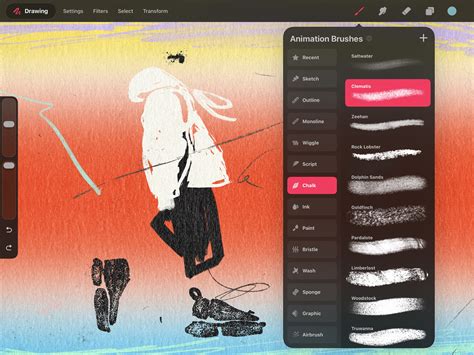
The ability to draw outside the designated borders of the canvas is another excellent feature, providing animators with expanded creative freedom. Clipping masks, layer masks, and blending modes, functionalities familiar to Procreate users, are also present and well-implemented, adding layers of depth to the visual creation process.
Bridging the Gap: Accessibility and the Learning Curve
The perceived difficulty of learning a new software can be a significant barrier for potential users. Procreate Dreams, however, generally presents a fairly accessible learning curve. While any program can be intimidating for newcomers, especially those without a prior background in graphic design or similar applications, Procreate Dreams aims to ease this transition.
The author, a graphic designer by profession, acknowledges that their familiarity with complex software might influence their perception of ease. However, they emphasize that individuals with prior experience in animation or image editing programs should find themselves up to speed with Procreate Dreams relatively quickly. The app's design philosophy, which echoes the minimalistic yet powerful approach of the original Procreate, means that many features are accessible through intuitive gestures and thoughtful UI placement.
Upon its release, the author spent a few hours exploring Procreate Dreams, supplemented by reading its comprehensive manual, which is lauded as a valuable resource. Even in the early days, with limited training videos available, a solid grasp of the program's core functionalities was achievable. Today, the landscape is even more favorable, with a growing wealth of free online tutorials, including those on the author's own YouTube channel, dedicated to teaching users how to effectively utilize the program. This robust availability of learning resources significantly enhances the app's accessibility.
The app's commitment to a user-friendly experience is further evidenced by its well-implemented onion skinning feature, which is easily adjustable and intuitive, making it a breeze to animate motion that remains believable while allowing for stylistic expression. The "performing" feature, which allows users to record their actions live as they manipulate elements, is another groundbreaking aspect that makes animation more approachable for novices and lends a natural, hand-made feel to motion.
Everything about Procreate Dreams in 9 MINUTES!
Evolving with the Times: Development and Future Potential
The pace of development for Procreate Dreams has been notably swift. Since its launch on October 27, 2023, the app has seen approximately ten updates, averaging about one update every two weeks. These updates have consistently addressed various aspects of the application, including stability improvements, enhancements to audio processing, refinements to the timeline functionality, and expanded layer capabilities. The update released on February 25, 2024, specifically mentioned preparations for upcoming features, hinting at a promising future roadmap.
The development team's responsiveness to user feedback and their proactive approach to releasing updates suggest a strong commitment to the app's long-term growth and improvement. This mirrors the trajectory of the original Procreate app, which has continuously evolved and expanded its feature set over the years, building a loyal and trusting user base. The emphasis on user suggestions in their development priorities bodes well for the continued maturation of Procreate Dreams.
Mastering the Word: Text Implementation
One area where Procreate Dreams truly shines and deserves commendation is its implementation of text options. While not a primary focus for all animators, the text tools within Dreams are surprisingly robust. A comprehensive tutorial dedicated to this aspect of the app reveals a deep offering of settings and controls, making it a powerful tool for projects that incorporate text elements. For a program that is still in its early stages of development, the sophistication of its text handling capabilities is particularly impressive.
Navigating the Shortcomings: Areas for Improvement
Despite its many strengths, Procreate Dreams is not without its limitations, especially when compared to more established and feature-rich desktop animation programs like Toon Boom Harmony or Adobe Animate. It's crucial to contextualize these limitations, considering that those programs have had years of development and are not iPad-centric, often commanding higher price points.
Drawing Manipulation and Selection Tools
A significant area where Procreate Dreams currently falls short is in its drawing manipulation and selection tools. The absence of essential tools like a lasso tool, which is crucial for selecting and manipulating specific parts of a drawing, is a notable drawback for many users. This deficiency makes making even slight adjustments to artwork a more cumbersome process. While the developers are likely aware of this and may implement such features in future updates, their current absence is a point of concern.
Rigging Capabilities
For animators who rely on rigging tools, such as bone systems, Procreate Dreams may not be the ideal solution. While the app offers some basic rigging-type functionalities, they are far from the comprehensive and robust systems found in professional animation software. The app appears to be more geared towards frame-by-frame animation techniques, and if character rigging is central to your workflow, you may need to explore alternative solutions or integrate Dreams into a more complex pipeline.
Advanced Color Management
The lack of a fully adjustable color palette, similar to those found in Toon Boom Harmony or Blender Grease Pencil, is another area for improvement. In those programs, changing a color swatch can dynamically update that color across all instances in a project, a feature that offers immense flexibility and saves considerable manual recoloring effort. The absence of this dynamic color updating in Procreate Dreams means that manual adjustments are often required, which can be time-consuming for projects with extensive color variations.
Keyframe and Layer Management
Specific aspects of keyframe and layer management also present opportunities for enhancement. The absence of a speed graph, a crucial tool for fine-tuning animation timing and easing, is a significant omission for many experienced animators. The inability to reorder layers within a frame group, or to easily merge layers, can also lead to a more convoluted workflow. Furthermore, the lack of features like "tween frames" (creating in-betweens between selected frames) and the necessity to keyframe every single change, even for simple opacity adjustments on groups, adds to the manual effort required. The current process for moving multiple frames often involves grouping, moving, and then ungrouping, which can be cumbersome.
User Interface and Workflow Quirks
While the UI is generally praised for its cleanliness, some aspects can feel convoluted, requiring users to consult external resources for clarification. The absence of keyboard shortcuts, as far as is known, also limits efficiency for users accustomed to desktop workflows. The fill-in tool's limitation to working only within the active layer, rather than allowing fills above a line layer to preserve linework, is another functional constraint. The "cycle" animation feature, which would allow for repeated animation loops, is also missing, requiring users to duplicate frames manually.
Export Options and Performance Limits
The export options are perceived as lacking by some users, particularly when compared to the advanced export capabilities of applications like Callipeg, which offers export to After Effects. The current options are primarily limited to PNG sequences or basic video exports. Additionally, some users have reported buggy behavior and occasional crashing, especially on older iPad models, indicating that further optimization is needed. The lack of a bloom or glow feature, and the inability to apply distort or deform effects to groups, further highlight areas where the app could be enhanced.
The Verdict: Is Procreate Dreams Worth It?
Procreate Dreams represents a significant and promising entry into the iPad animation software market. Its strengths lie in its accessible price point, intuitive interface that builds upon the familiar Procreate experience, powerful drawing tools, robust text implementation, and innovative features like "performing" mode. The continuous development and responsiveness of the Procreate team suggest a bright future for the application.
However, it's essential to approach Procreate Dreams with realistic expectations. While it offers a compelling animation experience, it currently lacks some of the advanced features found in more mature desktop applications, particularly in areas of drawing manipulation, rigging, and advanced color management. For users whose workflows heavily rely on these specific features, Procreate Dreams might require supplementary software or a more intricate integration into their existing pipeline.
For existing Procreate users who are looking to expand into animation, Procreate Dreams offers a natural and cost-effective progression. The synergy between the two apps is undeniable, allowing for a seamless transfer of assets and a familiar creative environment. For those new to animation on the iPad, Procreate Dreams provides a highly capable and enjoyable entry point, especially with the abundance of learning resources now available.
Ultimately, whether Procreate Dreams is "worth it" depends on individual needs, budget, and artistic goals. For many, it offers an exceptional value proposition, providing a powerful and enjoyable animation experience on a portable device without the burden of recurring subscription fees. It is a tool with immense potential, and its ongoing evolution is something to watch with keen interest.