Adobe InDesign, a powerful page layout design software released in 1999, stands as an industry standard, integral to the Adobe Creative Cloud suite. Alongside Photoshop and Illustrator, it forms a trifecta of essential creative tools used across numerous sectors, from publishing to graphic design. Initially conceived to streamline the creation of page layouts for books and magazines, InDesign has evolved into a remarkably versatile tool for a wide array of creative projects. Its ability to create compelling and vibrant page layouts is significantly enhanced by its deep integration with other Adobe Creative Cloud applications, allowing for seamless workflows between Photoshop, Illustrator, and XD.
The Core Functionality of InDesign
While Illustrator excels in vector graphics and Photoshop in image manipulation, InDesign occupies a distinct yet crucial niche: building page layouts. Creatives leverage InDesign to construct prototype layouts for diverse applications, encompassing everything from marketing brochures to intricate web page mock-ups. The software is equipped with robust tools for populating these layouts with text, graphics, and even interactive elements. Although historically dominant in traditional print media, InDesign's utility is increasingly recognized in the digital realm, including ePublishing and Web Design.
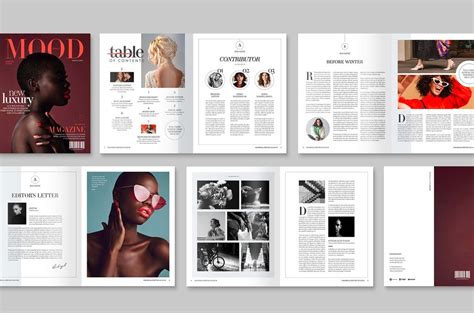
The fundamental strength of InDesign lies in its capacity to enable users to create vibrant and memorable design layouts suitable for a broad spectrum of uses. These can range from print advertisements and promotional brochures to newsletters and full-fledged magazines. Essentially, almost any print layout can be masterfully constructed using InDesign. Furthermore, the tool is frequently employed by Web Designers to produce mock-ups of web pages, allowing for a visual representation of the final digital product before development. Users can meticulously add text, color, and images to their layouts, ensuring that the intended message is communicated effectively and engagingly. A significant advantage of InDesign is its ability to facilitate the creation of templates or the replication of pages, thereby streamlining the complex process of multi-page design. This feature is particularly invaluable for projects requiring consistency and efficiency across numerous pages.
Beyond professional applications, InDesign offers numerous non-professional uses for individuals aiming to create eye-catching posters, informative infographics, or compelling flyers for their own organizations or communities. The development of strong visual design skills through InDesign can empower users to share information in memorable and impactful ways, making it an invaluable tool for anyone looking to communicate effectively with a wider audience. Moreover, many small businesses or private commercial organizations, such as Etsy shops or local bands, can significantly benefit from having staff members trained in InDesign. The software empowers these entities to produce professional-grade graphic page layouts without necessarily requiring a dedicated design department.
The inherent integration of InDesign with the broader Adobe Creative Cloud ecosystem is a significant asset. Users already familiar with other Adobe programs can seamlessly incorporate their existing work into their InDesign layout designs. Photos edited or illustrations created in Photoshop and Illustrator can be effortlessly imported into InDesign to populate layouts, creating a cohesive and polished final product. Similarly, work can be transferred between InDesign and Adobe XD, facilitating the construction of interactive prototype web layouts. These interconnected functionalities amplify the capabilities of all Adobe Creative Cloud applications, offering a comprehensive and integrated design workflow.
Careers Leveraging InDesign Expertise
The versatility of InDesign translates into a diverse range of career opportunities across multiple industries. Proficiency in this software can unlock doors to roles that require meticulous attention to detail, a strong sense of aesthetics, and the ability to manage complex information effectively.
Graphic Designer
Graphic Designers are at the forefront of visual communication, employing a blend of creative flair and technical acumen to craft images that convey messages to their intended audience. While many graphic designers are employed by agencies, the freelance route is also popular, offering flexibility in setting rates and working hours. Adobe InDesign is instrumental in making documents visually appealing, even those laden with substantial amounts of text. This capability ensures that information is not only communicated but also presented in an accessible and engaging manner. Graphic designers typically utilize a suite of software, including Adobe Illustrator for vector graphics and Adobe Photoshop for image manipulation, to bring their visions to life.
Digital Designer
Often conflated with graphic design, the role of a Digital Designer encompasses a broader scope, focusing on dynamic and interactive design elements. This can include crafting interactive web pages, 3D models, and animations. As a vector-based program, Adobe InDesign allows digital designers to create projects that can be scaled to any size without compromising the quality of the work, a crucial feature for digital applications where adaptability is key. This scalability ensures that designs remain crisp and professional across various devices and platforms.
Marketing Coordinator
Marketing Coordinators are tasked with leveraging a variety of digital channels to enhance brand awareness, increase revenue, and expand a client's customer base. Adobe InDesign plays a vital role by enabling the creation of interactive PDF documents. These engaging marketing materials help clients stand out from their competitors by offering a more captivating user experience. The ability to embed interactive elements within PDFs transforms static content into dynamic tools for engagement and lead generation.
Social Media Manager
Social Media Managers are responsible for overseeing and managing an organization's presence across various social media platforms. A significant aspect of their role involves creating content that captures audience attention and encourages interaction. InDesign offers specialized tools designed for social media content creation. For instance, its features allow for the optimization of designs for platforms like Instagram Stories, which are predominantly viewed on mobile devices, ensuring that content is visually effective and engaging on these specific formats.
Technical Illustrator
For individuals with a keen eye for design coupled with an aptitude for data and statistics, Technical Illustration presents an attractive career path. These professionals excel at translating complex information into easily understandable diagrams and drawings, often found in textbooks, instructional manuals, and technical documentation. InDesign's capability to produce scalable drawings makes it an ideal tool for technical illustrators, as their work can be seamlessly displayed in both print and digital formats, maintaining clarity and precision regardless of the medium.
Design Editor
Typically employed within the marketing industry, Design Editors are responsible for laying out advertisements intended for both digital and print distribution. They may also contribute to other marketing tasks, such as creating product illustrations and designing logos. Adobe InDesign empowers them to develop visually appealing layouts for campaigns and other marketing collateral, ensuring a consistent and professional brand presentation across all touchpoints. The software's precision tools allow for intricate adjustments to typography and image placement, crucial for high-impact advertising.
Copywriter
Distinct from legal "copywriting," a Copywriter in the creative field crafts compelling content for digital platforms. They often utilize InDesign to ensure their content appears professional and stands out across various online mediums. By integrating well-designed layouts with their written content, copywriters can enhance readability and impact, making their messages more persuasive and memorable. This synergy between text and design is crucial for effective digital communication.
Production Artist
Production Artists are integral members of creative teams, combining artistic and technical skills to realize the vision of an Art Director. They frequently collaborate with Graphic Designers. InDesign is a key tool for creating a variety of deliverables, including press releases and professional PDF documents. Their role focuses on the precise execution of designs, ensuring that all elements are correctly formatted and prepared for their intended output, whether for print or digital platforms.
Desktop Publishing Specialist
Desktop Publishing (DTP) professionals utilize InDesign to design page layouts destined for both print and digital publication. Beyond technical layout skills, DTP specialists often assist with editing materials for grammar, spelling, and punctuation. These are essential skills for anyone aspiring to a career in publishing, ensuring that the final product is not only visually appealing but also free from errors. The role demands a meticulous approach to detail and a strong command of language.
Layout Artist
For those drawn to the art and design industry, a career as a Layout Artist is a compelling option. These professionals skillfully integrate text, photographs, and illustrations to create visually appealing layouts, primarily for print purposes such as brochures, magazines, posters, and books. InDesign is an indispensable tool for layout artists, as creating aesthetically pleasing and functional layouts is one of the program's core strengths. Their work bridges the gap between content and presentation, ensuring that information is delivered in an organized and attractive manner.
The Publishing and Design Industries: A Landscape Shaped by InDesign
The prevalence of InDesign is deeply intertwined with the health and evolution of several key industries, each with its own unique demands and outlook. Understanding these industry trends is crucial for anyone considering a career path that involves InDesign skills.
Marketing and Advertising
The Marketing and Advertising sector is a significant consumer of InDesign expertise. This industry thrives on promoting businesses and campaigns to attract target audiences. While job responsibilities are diverse, ranging from strategy development to data analysis and content creation, InDesign is a common thread. Marketing Coordinators, Marketing Analysts, and Content Developers all utilize InDesign to craft compelling marketing materials such as brochures, advertisements, infographics, and social media content. The industry is projected to experience substantial growth, driven by the increasing demand for digital advertising and competitive market pressures. However, there's an anticipated decline in print-focused roles within this sector, particularly in newspaper publishing. Success in this competitive field hinges on strong communication, creativity, and proficiency in relevant software like InDesign.
Art and Design
The Art and Design industry is a vast domain encompassing graphic design, illustration, animation, and more. Careers in this field often involve creating content for marketing, branding, packaging, and sales, or pursuing educational roles teaching artistic expression. Many artists also become entrepreneurs. While the outlook for traditional fine arts is less robust, occupations that integrate digital technology, including Digital Designers, Product Designers, and Video Game Designers, are experiencing significant growth. Animators and Art Directors also see a positive outlook. High job competition is characteristic of this industry, and strong creative skills coupled with digital software proficiency, including InDesign, are paramount.
Publishing
Publishing, the industry focused on making information available to the public in digital or printed formats, relies heavily on InDesign. Roles range from authors and agents to production, design, sales, and distribution specialists within publishing houses. Printing houses also depend on skilled individuals to prepare designs for physical reproduction. While print publishing, particularly newspapers, faces challenges, the digital publishing sector is experiencing robust growth as online information consumption rises. The digital aspect of publishing is projected for significant expansion, while print publishing is expected to remain relatively steady. Job competition can be steep, especially for writers and editors, but positions in advertising and sales within publishing are more accessible. Strong computer skills, including web design and InDesign proficiency, are essential for success in this evolving landscape.
Computer Systems Design and Related Services
This industry, focused on software and hardware integration and system design, is experiencing steady growth. While not always directly using InDesign for core programming, professionals in this sector such as Web Developers and Digital Designers (including UX/UI specialists) often leverage InDesign for prototyping and design conceptualization. The job outlook for these roles is particularly strong, with projected growth rates indicating a high demand for skilled individuals. These professionals can work in various environments and may also find opportunities in the marketing, art, and publishing sectors. Innovation and software expertise, including familiarity with design tools like InDesign, are critical for success in this competitive field.
Word Processing Vs Page Layout Modes In Mac Pages
Elevating Your InDesign Skills: Training and Career Advancement
For those looking to harness the power of Adobe InDesign for career advancement, specialized training programs are readily available. Noble Desktop, a partner program of Career Centers, offers a comprehensive range of courses designed to cater to various learning needs and career aspirations.
In-Demand Training Options
Noble Desktop provides introductory courses like "InDesign in a Day," a six-hour session focused on fundamental skills such as layouts, text customization, and image effects, ideal for beginners. For a more in-depth understanding, the 18-hour "Adobe InDesign Bootcamp" delves into advanced features and professional contexts, preparing students for real-world applications. This bootcamp emphasizes hands-on experience, mirroring projects undertaken by professional graphic designers. Students learn to effectively utilize InDesign's text, color, and graphic tools, import various formats and styles, and master parent pages for efficient creation of complex, multi-page designs like brochures and magazines.
For a holistic approach to a design career, the "Graphic Design Certificate" program at Noble Desktop integrates InDesign training with essential skills in Photoshop and Illustrator. This comprehensive program covers the foundational principles of graphic design, including composition, color theory, and typography. Students learn to create digital illustrations and assets in Illustrator and Photoshop, which are then seamlessly incorporated into InDesign for final layout design. This integrated approach aims to transform novice users into proficient designers, equipping them with the skills necessary to pursue new career opportunities.
A key benefit of Noble Desktop's programs is the option to retake courses for free within a year of enrollment. This policy allows students to reinforce their learning, gain additional hands-on experience, and address any areas they found challenging during their initial training. The courses are taught by professional instructors with extensive experience in both teaching and graphic design, ensuring high-quality instruction and practical insights.
Acquiring proficiency in InDesign can significantly broaden career prospects, opening doors to industries such as Marketing, Art and Design, Publishing, and Computer Systems Design. InDesign serves as a powerful productivity tool for crafting layouts across print, digital, graphic, and web design applications. Understanding the specific requirements and expectations of different industries is crucial when embarking on InDesign training, whether one has a clear career goal or is still exploring potential paths. The investment in professional InDesign training is an investment in a versatile skill set that remains highly relevant in today's dynamic creative and professional landscape.