Slideshows have long been a beloved method for weaving narratives from a collection of still images. The ideal slideshow maker transcends mere photo arrangement, offering the ability to seamlessly blend visuals with audio and text, thereby transforming static moments into dynamic stories. For those seeking to create engaging slideshows without the burden of downloading hefty software or purchasing expensive editing features, free online editors like Kapwing present a powerful and accessible solution. This guide will explore the multifaceted features of Kapwing's slideshow maker and provide a comprehensive tutorial on leveraging its capabilities.
The Foundation: Uploading and Arranging Your Visuals
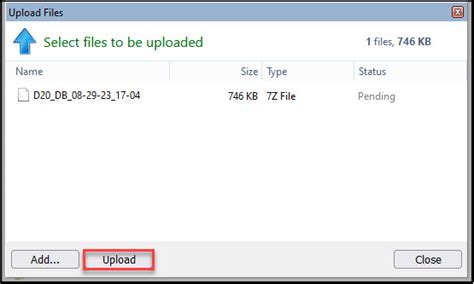
The journey to a captivating slideshow begins with your chosen images. Kapwing streamlines this initial step, allowing users to upload pictures directly from their device by simply dragging and dropping files onto the canvas. Alternatively, the "Add Media" option in the left sidebar provides a conventional upload method, or you can paste a link to an image hosted online. This flexibility ensures that your creative process is not hindered by file location.
Once your images are within the Kapwing environment, the next crucial step is to define their presence within the slideshow. This is achieved by adjusting the "Duration" of each image layer. By clicking on an image on the canvas, you can access the "Duration" dropdown menu in the right sidebar. Selecting the desired display time for each photo will automatically open a timeline at the bottom of the editor. This timeline is the central hub for orchestrating your slideshow, enabling the precise placement and timing of transitions, text, and other elements.
The arrangement of these image layers on the timeline is paramount. By clicking and dragging each layer, you can dictate the sequence in which they appear, effectively creating a visual flow. It is essential to align these image layers in the same row on your timeline to facilitate the seamless insertion of transitions between them. This meticulous arrangement forms the backbone of a well-paced and coherent slideshow.
Elevating the Experience: Transitions, Music, and Text
A slideshow is more than just a sequence of pictures; it's an opportunity to imbue it with personality and emotion. Kapwing excels in this regard by offering an extensive library of over 60 different picture transition effects. These transitions act as the connective tissue between your images, smoothing out the visual narrative and preventing abrupt shifts. Whether you opt for subtle fades, dynamic wipes, or energetic zooms, Kapwing provides the tools to stitch your slideshow together with professional flair.
Beyond transitions, the ability to incorporate text and music transforms a simple photo display into a richer storytelling experience. Kapwing's intuitive interface allows for the drag-and-drop addition of text elements, which can be customized in terms of font, color, size, and animation. This enables you to add titles, captions, or any other textual information to enhance the viewer's understanding and engagement.
The impact of music on a slideshow cannot be overstated. A well-chosen soundtrack can evoke specific emotions, set a particular mood, and significantly amplify the overall impact of your visuals. Kapwing provides access to a stock audio library, allowing you to search for music by keyword or explore various categories. You can also upload your own music tracks, provided you have the necessary rights. Adjusting the volume of the music is crucial to ensure it complements, rather than overpowers, your visual content.
For those looking to go the extra mile in creating a high-quality slideshow, the integration of animated elements and additional images can further enhance the visual appeal. Kapwing's "Visuals" tab opens up a stock media library where you can browse or search for images and videos to overlay onto your slideshow, adding another layer of depth and interest.
The Power of AI and Advanced Editing in Kapwing
Kapwing's commitment to simplifying video creation extends beyond basic slideshow functionality. The platform is increasingly integrating Artificial Intelligence to streamline complex editing tasks and unlock new creative possibilities. For instance, Kapwing's AI-powered tools can assist in generating video content from text prompts, repurposing existing videos for different platforms, and even creating automated rough cuts.
The "Auto-Edit" tool, accessible through the "Smart Tools" menu, is a prime example of AI in action. After uploading your footage and arranging clips on the timeline, this feature can automatically remove silences, filler words, and repeated takes, significantly speeding up the initial editing phase. This allows creators to focus on the more creative aspects of their project rather than getting bogged down in tedious manual trimming.
Furthermore, Kapwing's AI capabilities extend to generating subtitles and voiceovers. The "Auto Subtitles" feature can transcribe spoken content in your video, making it more accessible to a wider audience and easier to follow. The "Text-to-Speech" tool allows you to generate realistic AI voiceovers from a typed script, offering a convenient alternative to recording your own narration. For advanced users, Kapwing even offers a voice cloning tool to create AI versions of your own voice.
The platform also empowers users to generate entire videos from text prompts using tools like "Kai." By providing a clear description of the desired video, including topic, tone, and audience context, Kai can generate multi-scene videos complete with stock clips, music, and subtitles. This generative AI capability opens up a world of possibilities for rapid content creation, allowing users to transform ideas into video narratives with unprecedented speed.
Beyond Slideshows: Kapwing's Comprehensive Video Editing Suite
While this article focuses on slideshow creation, it's important to recognize that Kapwing's capabilities extend far beyond this specific application. The platform is a robust online video editor designed to cater to a wide range of video production needs, from simple social media clips to more complex instructional videos.
Kapwing's editor provides a comprehensive suite of tools for every stage of video production. This includes:
- Content Upload: Supporting nearly every file type, Kapwing allows for easy import of videos, photos, and GIFs from your device or via URLs.
- Audio Editing: Beyond adding music, Kapwing offers features like "Clean Audio" to remove background noise and precise volume adjustments.
- Text and Overlays: Adding stylized text, shapes, and images as overlays allows for visual emphasis and branding.
- Transformations: Cropping, resizing, and rotating layers provide granular control over the visual composition of your video.
- Trimming and Speed Adjustment: Precisely trim video clips and adjust playback speed to achieve desired pacing and effects.
- Filters and Adjustments: Apply pre-made filters or fine-tune brightness, contrast, and saturation for a polished look.
- Subtitles and Translations: Generate automatic subtitles, edit them for accuracy, and even translate videos into over 75 languages, making content globally accessible.
- Generative AI Tools: Beyond Kai, Kapwing's AI continues to evolve, offering tools for generating images from text and other creative applications.
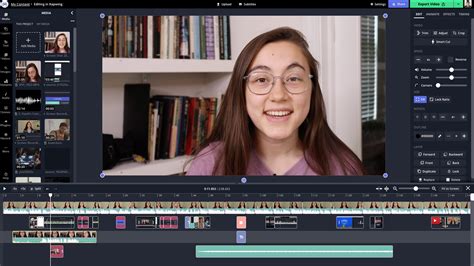
The platform's emphasis on a user-friendly, drag-and-drop interface ensures that even beginners can navigate its features with ease. This accessibility is a key differentiator, making professional-level video editing attainable without a steep learning curve. Kapwing's commitment to cloud-based editing also means that projects are accessible from any device, fostering a flexible and collaborative workflow.
Practical Application: Creating a Slideshow with Kapwing
To illustrate the practical application of Kapwing's features, let's outline a step-by-step process for creating a slideshow:
- Initiate a New Project: Navigate to Kapwing.com and select "Start Editing." Choose "Start with a blank canvas" or an upload option.
- Upload Your Photos: Drag and drop your desired photos onto the canvas or use the "Add Media" button. For the free version, be mindful of the 250MB file size limit.
- Set Image Durations: Click on each image on the canvas and adjust its "Duration" in the right sidebar to control how long it appears on screen.
- Arrange on Timeline: Once durations are set, a timeline will appear. Click and drag each image layer to arrange them in the desired sequence. Ensure they are aligned on the same row for smooth transitions.
- Add Transitions: Select the space between two image layers on the timeline. The "Transitions" tab will appear on the right, offering a selection of over 60 effects. Choose a transition and adjust its duration.
- Incorporate Text (Optional): Click the "Text" option in the left toolbar, add a text box, and customize its content, font, color, and timing.
- Add Music (Optional): Go to the "Audio" tab, select "Music," and browse Kapwing's stock library or upload your own track. Adjust the volume to balance it with any existing audio.
- Review and Export: Once you are satisfied with your slideshow, click "Export Video." Choose your desired file format (MP4 is recommended for video slideshows). Kapwing will process your project, and you can then download or share your creation.
Kapwing's Educational Resources and Community
Kapwing understands that learning new tools can be a journey. To support its users, the platform offers a wealth of educational resources. Their YouTube channel, Kapwing App, is a treasure trove of in-depth tutorials covering a wide range of editing techniques, from basic slideshow creation to advanced AI-powered video generation. The Kapwing blog and resource pages also provide valuable tips, templates, and guides for creators of all levels.
This commitment to user education, coupled with a powerful yet accessible online editor, makes Kapwing an invaluable tool for anyone looking to create engaging visual content. Whether you're a seasoned professional or a complete beginner, Kapwing provides the features and support to bring your creative visions to life, transforming simple photos into compelling slideshows and beyond. The platform's continuous evolution, with the integration of cutting-edge AI, ensures that it remains at the forefront of accessible and innovative video creation technology.