In the dynamic world of digital content, video has emerged as a dominant force. However, to truly maximize reach and engagement, simply creating compelling video content is no longer sufficient. The necessity of making this content accessible and understandable to a wider audience has brought the importance of subtitles and captions to the forefront. Kapwing's Subtitle Generator stands out as a powerful, AI-driven solution designed to streamline this crucial aspect of video production. This article delves into how Kapwing's tool functions, its benefits, and its significance in modern content creation.
The Power of Automation: Generating Captions in One Click
Manually typing captions for videos is a laborious and repetitive task that significantly detracts from creative workflows. Kapwing's AI-powered Caption Generator automates this process, freeing up valuable time for creators to concentrate on more critical aspects such as research, scriptwriting, and editing. By leveraging automatic dialogue and narration detection, the Caption Generator converts audio into text captions with industry-leading accuracy. This makes it an ideal solution for everything from individual social media videos to comprehensive content libraries.
The tool generates word-by-word captions with a fully editable transcript in mere seconds. This efficiency is further enhanced by flexible export options, including the widely used SRT format, ensuring seamless integration across various platforms. The core of its functionality lies in sophisticated speech recognition algorithms that analyze the audio track of a video. These algorithms break down spoken words into text, associating each word or phrase with precise start and end timestamps.
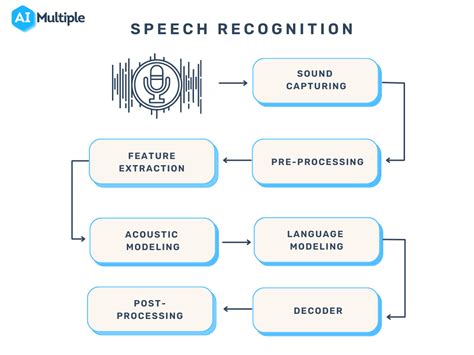
The process begins with the upload of a video file. Kapwing's system then processes the audio, employing advanced machine learning models trained on vast datasets of spoken language. These models are designed to identify phonemes, words, and even sentence structures, taking into account various accents and speaking styles. For instance, when a video is uploaded, Kapwing automatically detects the spoken language and initiates the transcription process. The AI then segments the transcribed text into coherent captions, aligning them with the corresponding audio segments. This automated transcription is the foundation upon which all subsequent caption customization and export options are built.
Enhancing Accessibility and Engagement
The impact of captions extends far beyond mere convenience; they are instrumental in broadening a video's reach and improving viewer engagement. Statistics indicate that a significant majority of viewers are more likely to finish a video when captions are available. This is attributed to several factors: captions enhance clarity, boost retention, and help maintain audience focus, ultimately leading to longer watch times and better information absorption.
By providing an additional layer of context, captions improve comprehension, especially for complex or information-dense content. Furthermore, captions are crucial for accessibility, catering to viewers who are hard of hearing, those who absorb written information more effectively, or individuals who find themselves in noisy environments where audio playback is impractical. Consequently, content creators can reach a wider audience, including those who prefer or need to watch videos on mute, whether the content is for training materials, product demonstrations, social media, or educational purposes.
The European Accessibility Act (EAA) further underscores the importance of closed captions, mandating their inclusion for public-facing audiovisual content. Kapwing simplifies the process of creating compliant closed captions, ensuring that videos meet these essential accessibility standards. To achieve this, users can click on "Subtitles" in the left-hand toolbar, select "Auto subtitles," and then customize font, color, design, and position. The final video with hardcoded captions can be exported, or the transcript can be downloaded in formats like SRT, VTT, and TXT.
Connecting Globally: Captions in Over 100 Languages
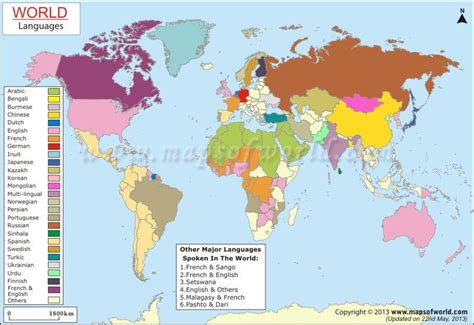
In an increasingly interconnected world, the ability to communicate across linguistic barriers is paramount. Kapwing's AI-powered captioning tool excels in this regard, recognizing over 100 languages and accents. This capability makes it effortless to translate captions, transcripts, and even audio into a multitude of languages, including Spanish, Chinese, French, and Hindi. This empowers content creators, marketers, and educators to tap into international markets, connect with global audiences, and foster the growth of their online communities.
As an integral part of Kapwing’s Translation Studio, the auto-caption tool seamlessly integrates with dubbing and lip-syncing features. This offers a comprehensive solution for video localization, allowing users to generate AI-powered voiceovers, synchronize translated audio naturally with on-screen speech, and amplify their content's global impact-all within a single online platform. This integrated approach to localization means that the effort invested in creating accurate captions in one language can be leveraged to produce localized versions of the content efficiently.
The process for translation is straightforward. After generating auto-captions in the original language, users can select their desired target language. Kapwing's AI then translates the captions automatically, updating the video accordingly. This feature is invaluable for businesses expanding into new markets, educators reaching international students, or content creators aiming for a global following. The ability to translate captions into over 100 languages means that a single piece of content can be adapted for a vast array of cultural contexts, breaking down communication barriers and fostering greater understanding.
Customization and Brand Consistency
Beyond automatic generation and translation, Kapwing provides extensive customization options for captions. Users can edit captions in real-time and personalize them with a wide array of colors, fonts, backgrounds, and animations. With over 100 preset styles to choose from, or the ability to create unique styles using custom fonts, drop shadows, borders, and effects, creators can ensure their captions align perfectly with their brand's aesthetic. This includes applying unique styles for different speakers, adding animated highlights, or optimizing readability through precise adjustments to line height and padding.
Customizable captions are particularly vital for content creators, marketers, and advertising teams who depend on strong branding and visual consistency to stand out. To facilitate seamless team collaboration and maintain a cohesive look across projects, Kapwing allows users to store preferred colors and fonts in a Brand Kit. This ensures that teams and freelancers alike can easily adhere to brand guidelines, even when working remotely.
The Brand Kit feature is a significant asset for maintaining brand consistency. It allows teams to upload their own fonts and define specific color palettes that align with their brand identity. When generating captions, these brand assets are readily available, ensuring that every piece of content, regardless of who creates it, maintains a unified visual language. This is especially beneficial for larger organizations with multiple content creators or external collaborators.
Boosting Discoverability with Automatic Transcriptions
Kapwing's auto-captioning tool also generates fully editable transcripts. These transcripts are invaluable for enhancing video discoverability and improving Search Engine Optimization (SEO). By making video content searchable, transcripts allow for easier indexing by search engines. Creators can incorporate these transcripts into video descriptions, blog posts, or use them as standalone subtitles. They can also be downloaded for seamless integration across various platforms, repurposing video content into written articles or documentation.
The generation of a transcript is a direct byproduct of the speech-to-text process used for captioning. Once the audio is converted into text, this text forms the basis of the transcript. The transcript is not just a raw output; it is designed to be fully editable, allowing users to correct any inaccuracies, add speaker labels, or include any necessary non-spoken audio cues. This editable transcript serves as a powerful SEO tool, making the information contained within videos accessible to search engines and, by extension, to a wider audience actively searching for related content.
HOW Video Transcriptions Can BOOST Your SEO And Engagement
The ability to download transcripts in various formats, such as TXT, SRT, and VTT, further enhances their utility. This flexibility allows content creators to leverage the transcribed content in numerous ways, from creating detailed show notes for podcasts to generating blog posts summarizing video content. This repurposing of content not only extends its lifespan but also increases its potential reach across different channels and platforms.
Meeting EAA Requirements with Closed Captions
Kapwing simplifies the creation of Closed Captions that comply with the European Accessibility Act (EAA). For a video to meet EAA requirements, it must include sound, and the captions should be synchronized with this audio. The platform guides users through a clear process: clicking "Subtitles" in the left-hand toolbar, selecting "Auto subtitles," and then customizing the appearance and placement of the captions.
Once the captions are generated and customized, users have two primary options for export. They can select "Export Project" from the top-right of the screen to hardcode the captions directly into the video file, creating a single, universally viewable video. Alternatively, they can click the download icon above the subtitle editor to obtain the transcript and caption data in formats like SRT, VTT, and TXT. This distinction between hardcoded (open) captions and downloadable (closed) caption files offers flexibility depending on the intended use and platform.
The EAA compliance is a critical aspect for many organizations, particularly those operating within or targeting the European market. By providing a straightforward method to generate EAA-compliant closed captions, Kapwing removes a significant technical and administrative hurdle. This ensures that content is not only engaging but also legally compliant and accessible to a broader audience, including those with hearing impairments. The platform's ability to accommodate custom edits, speaker labels, and non-spoken audio cues further enhances the quality and utility of these closed captions, making them suitable for a wide range of professional and educational applications.
The Kapwing Ecosystem: Beyond Subtitles
Kapwing is more than just a subtitle generator; it's a comprehensive online video editing suite. Users can start creating immediately with thousands of templates and a library of copyright-free videos, images, and music. The platform also allows for repurposing content from the internet simply by pasting a link. Kapwing is free to start, offering powerful online tools to supercharge editing workflows.
The collaborative features are another strong suit. Real-time comments and shared workspaces allow teams to quickly review and provide feedback, streamlining the production process. Kapwing’s cloud-based nature means videos and projects are accessible from anywhere, and the company emphasizes user privacy, stating they will not spam users or sell their information.
The platform is continuously evolving, integrating the latest advanced AI models to power generative AI and one-click editing tools. This commitment to innovation ensures that Kapwing remains at the cutting edge of video creation technology. From intuitive editing interfaces to advanced AI-driven features, Kapwing aims to democratize video production, making professional-quality content creation accessible to everyone, regardless of their technical expertise.
Frequently Asked Questions About Kapwing's Subtitle Generator
Is the AI Caption Generator Free to Try?
Yes, Kapwing offers a free trial of its AI Caption Generator. This trial typically includes a limited number of minutes for caption generation. For extended usage, including more minutes for subtitles, translated subtitles, auto-dubbing, and lip-sync features, along with access to advanced tools like Voice Cloning, users can upgrade to a Pro Account.
How Can I Translate Captions into Another Language?
Kapwing's video caption generator supports translation to and from over 100 languages, including major languages like Chinese, Spanish, Hindi, and French. To translate captions, users first upload their video and generate captions in the original language using the "Auto subtitles" feature. Then, they select the desired target language for translation. Kapwing automatically translates the captions and updates the video accordingly.
How Do I Convert Dialogue or Narration into Captions?
Kapwing's AI-powered video caption generator utilizes speech recognition to automatically detect spoken words within an audio or video file. It then generates an editable transcript of the spoken dialogue, which can be directly modified and used as video captions. Users have the option to either "hardcode" these subtitles, permanently burning them into the video, or download them as separate caption files in formats such as SRT, VTT, or TXT.
Is There a Watermark on Exports?
For users on a Free account, all exports from Kapwing, including those generated by the AI Caption Generator, will include a watermark. Upgrading to a Pro account removes this watermark from all exported videos and also provides additional benefits, such as monthly minutes for video translation.
What to Do if My Captions Are Out of Sync?
While Kapwing's AI aims for perfect synchronization, minor timing adjustments can sometimes be necessary. Users can manually alter the timing of each caption line by editing the transcript on the left-hand side of the screen. This interface displays start and end time columns, allowing for precise adjustments to the duration of each caption line. Additionally, the timeline view offers visual cues for fine-tuning caption timing.
Can Captions Be Applied to Multiple Speakers?
Yes, Kapwing's AI Caption Generator is capable of automatically detecting multiple speakers. It separates their dialogue into distinct subtitle sections, enabling individual edits for each speaker. This feature allows for customization of color, speed, fonts, and other visual elements for each speaker's captions, enhancing clarity and organization within the video.
Can I Edit and Customize Captions After They Are Generated?
Absolutely. Once captions are generated, users can edit the text directly through the transcript interface on the left side of the screen. Clicking on the transcript allows for manual editing of subtitle text and adjustment of durations. This capability is ideal for incorporating non-spoken audio, adding speaker labels, and implementing other accessibility features necessary for meeting legal requirements like the European Accessibility Act.
Conclusion
Kapwing's Subtitle Generator represents a significant advancement in video accessibility and efficiency. By harnessing the power of AI, it automates the time-consuming process of captioning, enhances video discoverability through transcriptions, and facilitates global reach with multi-language support. Its user-friendly interface, extensive customization options, and seamless integration into a broader video editing suite make it an indispensable tool for content creators, marketers, educators, and businesses looking to maximize the impact and accessibility of their video content in today's digital landscape. The ability to produce professional-quality captions and subtitles quickly and efficiently empowers creators to connect with a wider audience, improve viewer engagement, and ensure their message resonates across diverse linguistic and cultural boundaries.